Hello! Welcome to the first lesson of our module on the Network Layer.
In our last lesson, we captured our first network packets with Wireshark. We saw how Ethernet frames use Layer 2 MAC addresses for local delivery to devices like your router. But inside those frames, we also saw Layer 3 packets containing IP addresses, which are used for end-to-end communication across the entire internet.
Today, we'll zoom in on the most fundamental aspect of those IP addresses. This lesson focuses on the learning outcome: Convert between binary and decimal representations of IPv4 addresses. Understanding this is crucial because while we humans read IP addresses in a familiar decimal format, computers and routers process them as binary numbers. Mastering this conversion is the first step toward understanding how routing, subnetting, and nearly all IP networking functions work.
Given your background in computer science and mathematics, you're already familiar with binary, but we'll focus specifically on how it's applied in the context of networking.
Understanding the IPv4 Address Structure
An IPv4 address is a 32-bit number. To make it easier for humans to read, it's divided into four groups of 8 bits each. Each 8-bit group is called an octet. These octets are then converted to their decimal equivalent and separated by dots. This format is called dotted-decimal notation.
For example, the IP address 172.16.254.1 is the human-readable version of a long 32-bit binary number.
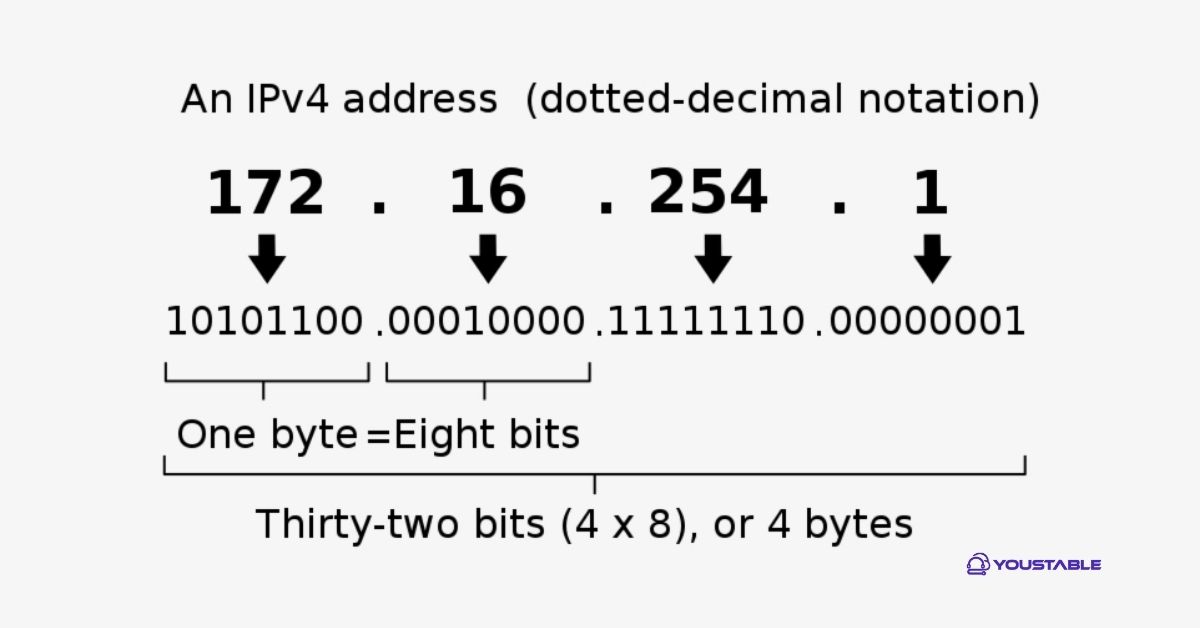
Our main task is to learn how to convert any octet (a decimal number from 0 to 255) into its 8-bit binary equivalent, and vice-versa.
The Key: Powers of Two
The tool we'll use for these conversions is a simple chart representing the positional value of each of the 8 bits in an octet. Since binary is a base-2 system, each position corresponds to a power of 2, starting from on the right.
| Position | 8 | 7 | 6 | 5 | 4 | 3 | 2 | 1 |
|---|---|---|---|---|---|---|---|---|
| Power of 2 | ||||||||
| Decimal Value | 128 | 64 | 32 | 16 | 8 | 4 | 2 | 1 |
This sequence—128, 64, 32, 16, 8, 4, 2, 1—is all you need to memorize.
To get a great foundation in this, let's watch a video from Professor Messer. While it's general binary math, it perfectly explains the system we'll be using.
Binary Math - CompTIA Network+ N10-009 - 1.7
This video, 'Binary Math', clearly introduces the concept of bits and bytes (octets) and demonstrates how to build and use the powers-of-two conversion chart.
Please watch the following two segments: From the beginning to 01:39 to understand the basics and the construction of the conversion chart. From 07:35 to 09:04, which reinforces how powers of two relate to the number of possible values.
Conversion Practice: From Binary to Decimal
Let's put the chart to use. To convert an 8-bit binary number to decimal, you simply place the binary number under the chart and add up the decimal values that have a 1 below them.
Example: Convert the binary octet 10110100 to decimal.
| 128 | 64 | 32 | 16 | 8 | 4 | 2 | 1 |
|---|---|---|---|---|---|---|---|
| 1 | 0 | 1 | 1 | 0 | 1 | 0 | 0 |
We add the values corresponding to the '1's: .
So, 10110100 in binary is 180 in decimal.
The following video from Neso Academy provides more examples specifically for IPv4 addresses.
The video 'IPv4 Address (Part 2)' demonstrates exactly how to apply this method to convert a full binary IP address into dotted-decimal notation.
Watch from 00:54 to 05:21. The first part reviews the powers-of-two method, and the second part walks through a full example of converting a 32-bit binary address to dotted-decimal.
Conversion Practice: From Decimal to Binary
To go the other way—from decimal to binary—we use the same chart but with a subtraction method. For a given decimal number, you go from left to right (from 128 down to 1) and ask: "Is this value less than or equal to my remaining number?"
- If yes, you put a
1in that position and subtract the value from your number. - If no, you put a
0and move to the next position.
Example: Convert the decimal number 192 to binary.
- Start with 192. Is 192 >= 128? Yes.
- Binary:
1_______ - Remainder:
- Binary:
- Current number is 64. Is 64 >= 64? Yes.
- Binary:
11______ - Remainder:
- Binary:
- The remainder is 0. All subsequent checks will be "no". We fill the rest with zeros.
- Binary:
11000000
- Binary:
So, 192 in decimal is 11000000 in binary.
Let's see this method applied to a full IP address.
The same Neso Academy video also provides a clear, step-by-step guide for converting a dotted-decimal IP address to binary.
Please watch from 05:21 to 08:18. Follow along as the presenter converts the IP address 145.14.6.8 into its 32-bit binary form, octet by octet.
Test Your Knowledge
Now it's your turn to practice. Use the methods we've just covered to solve these two problems.
Problem 1: Convert the following IP address from dotted-decimal to binary notation:208.34.54.12
Problem 2: Convert the following IP address from binary to dotted-decimal notation:00001010.00011001.01011100.10000100
Take a few minutes to work through these on paper. Once you're done, you can check your answers below.
Click to reveal the answers
Answer 1: 208.34.54.12
- 208: 128 + 64 + 16 =
11010000 - 34: 32 + 2 =
00100010 - 54: 32 + 16 + 4 + 2 =
00110110 - 12: 8 + 4 =
00001100 - Result:
11010000.00100010.00110110.00001100
Answer 2: 00001010.00011001.01011100.10000100
- 00001010: 8 + 2 =
10 - 00011001: 16 + 8 + 1 =
25 - 01011100: 64 + 16 + 8 + 4 =
92 - 10000100: 128 + 4 =
132 - Result:
10.25.92.132
For more practice and a textual summary of the conversion methods, the following article is a great resource.
IP Addressing & Converting from Binary to Decimal
This article from CertificationKits, titled 'IP Addressing & Converting from Binary to Decimal', provides a concise written explanation of both conversion processes with examples.
Read from the beginning of the article down to the end of the section explaining the decimal-to-binary conversion for the number 168. This covers the introduction to IP addresses and both conversion methods.
Conclusion
In this lesson, you've mastered a fundamental skill for network engineering: translating between the human-readable dotted-decimal IP address and the machine-readable binary format.
Key Takeaways:
- An IPv4 address is a 32-bit number, structured as four 8-bit octets.
- The key to conversion is the powers-of-two chart for an octet: 128, 64, 32, 16, 8, 4, 2, 1.
- Binary to Decimal: Add the values of the positions that contain a
1. - Decimal to Binary: Use the subtraction method, working from 128 down to 1, to determine where to place the
1s.
Preview of the Next Lesson:
Now that you can read and write IP addresses in both formats, you're ready to understand what they actually mean. In our next lesson, we will explore the structure of an IPv4 address, breaking it down into its network and host portions. You'll learn how the subnet mask is used to define the boundary between these two parts, which is the core concept behind creating and managing networks.