Introduction
Hello! In our last few lessons, we've focused entirely on TCP, exploring its three-way handshake, reliability mechanisms, and flow control. You've learned that TCP is designed to be a robust, connection-oriented protocol that guarantees data arrives in order and intact. But what if those guarantees are not what an application needs? What if speed is more important than perfect reliability?
This is where the other major Transport Layer protocol, the User Datagram Protocol (UDP), comes in. In this lesson, we will explore UDP, not as an inferior version of TCP, but as a specialized tool with its own strengths. We will describe its core characteristics and, most importantly, identify the specific use cases where its "fire-and-forget" nature makes it the preferred choice over the more meticulous TCP.
By the end of this lesson, you'll understand the critical trade-offs between reliability and speed in the Transport Layer and be able to explain why applications like DNS, live video streaming, and online gaming are built on UDP.
1. Describing UDP: The Connectionless Alternative
At its core, UDP operates on a fundamentally different philosophy than TCP. Where TCP builds a stable, stateful connection, UDP simply sends packets, called datagrams, without any prior arrangement.
Let's break down its key characteristics by directly contrasting them with TCP.
TCP vs UDP: Comparing Reliability & Speed
To get a clear, side-by-side comparison of the design choices behind TCP and UDP, please read the following sections from the article 'TCP vs UDP: Comparing Reliability & Speed'. This will systematically walk you through the core differences.
Read the first six comparative sections of the article, from 'Connection-oriented (TCP) vs connectionless (UDP)' down to 'Overhead and latency (TCP higher than UDP)'. For each section, focus on how UDP's behavior differs from the TCP mechanisms we've already studied.
To summarize the key points from your reading:
- Connectionless: UDP doesn't perform a handshake. A device can send a UDP datagram at any time. This is analogous to dropping a postcard in a mailbox—you don't call the recipient first to confirm they're ready to receive it.
- Unreliable & Best-Effort: UDP provides no guarantee of delivery. There are no acknowledgments or retransmissions. If a datagram is lost due to network congestion, the protocol does nothing about it.
- Unordered: If you send two UDP datagrams from A to B, they might arrive out of order, or one might not arrive at all. UDP doesn't use sequence numbers to re-order packets like TCP does.
- No Flow or Congestion Control: UDP has no concept of a receive window or a congestion window. It will send data as fast as the application gives it, regardless of whether the receiver or the network can handle it.
These might sound like significant disadvantages, but they all contribute to UDP's primary advantages: low overhead and speed.
2. The UDP Header: A Model of Simplicity
The reason UDP is so lightweight and fast is evident in its header structure. While a TCP header is at least 20 bytes long and packed with fields for sequence numbers, acknowledgments, window sizes, and flags, the UDP header is a mere 8 bytes.
TCP vs UDP Explained // Hands On Lab Example with Wireshark
Let's take a quick look at the UDP header in Wireshark. This video clip will show you just how simple it is and reinforce why UDP is so efficient.
Watch the section from 01:00 to 01:45. Notice that the header contains only four fields: source port, destination port, length, and checksum. That's it!
With such a minimal header, less processing is required by routers and end hosts, and less bandwidth is consumed by protocol overhead. This efficiency is precisely why certain applications are willing to forgo TCP's guarantees.
3. When to Use UDP: Three Key Scenarios
So, when is it a good idea to use a protocol that doesn't guarantee delivery? The decision to use UDP over TCP almost always comes down to a trade-off where the application values speed and low latency more than 100% reliability, or where it can handle reliability more efficiently itself.
Let's explore the three main categories of applications that are a perfect fit for UDP.
UDP doesn't suck! It's the BEST L4 protocol for THESE types of applications...
The following video, 'UDP doesn't suck!', provides an excellent breakdown of these scenarios. It argues convincingly that UDP isn't a 'bad' protocol but the ideal protocol for certain jobs.
Please watch from 01:04 to 10:38. The video is divided into the three main categories of UDP applications. I will introduce each one before you watch the corresponding segment. First, focus on the section from 01:04 to 04:46, which covers applications with small, quick data exchanges.
Category 1: Quick Request-Response Protocols
As the video explained, for simple transactions like a DNS query ("What's the IP for google.com?"), the overhead of a TCP handshake and teardown is unnecessary.
- Examples: DNS, DHCP, NTP, SNMP.
- Reasoning: The entire exchange is often just two packets (a request and a response). It's more efficient to just send the UDP request and, if a response doesn't arrive in a timely manner, have the application send it again. Using TCP would involve many more packets for the same result. The
traceroutetool you'll use later also cleverly uses UDP for its diagnostics.
Category 2: Applications with Built-in Reliability
Now, continue watching the video from 04:46 to 07:43. This section covers applications that prefer to implement their own reliability mechanisms.
- Examples: QUIC (used by HTTP/3), TFTP (Trivial File Transfer Protocol).
- Reasoning: Some modern protocols want finer control over reliability and congestion control than TCP offers. For example, Google's QUIC protocol runs on top of UDP. It implements its own reliability, but in a way that avoids some of TCP's performance issues (like head-of-line blocking). Using TCP underneath would be redundant and counterproductive, as you'd have two different reliability mechanisms working against each other.
Category 3: Real-Time, Loss-Tolerant Applications
Finally, watch the last segment from 07:43 to 10:38. This discusses applications where timeliness is more critical than completeness.
- Examples: Voice over IP (VoIP), live video streaming, online multiplayer gaming.
- Reasoning: In a video call, an old, retransmitted packet is useless—the moment has passed. You would rather see a momentary glitch (a dropped packet) than have the entire stream pause to wait for that packet. The latest data is always the most important. UDP's "fire-and-forget" nature is perfect for this, as it never stops to retransmit old data.
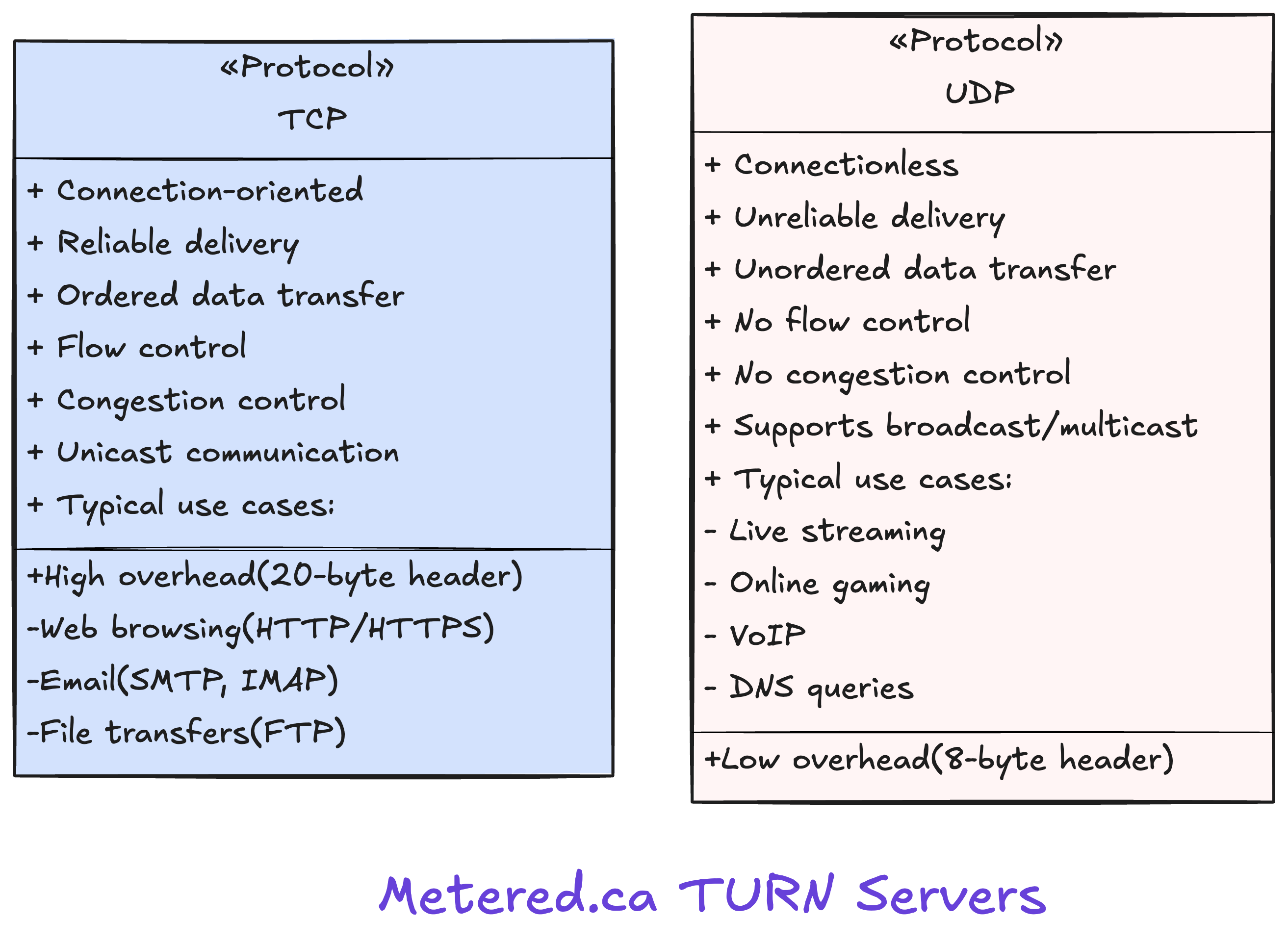
4. TCP vs. UDP: A Summary
We've covered a lot of ground comparing these two protocols. This table provides a concise summary of their key differences and ideal use cases.
Conclusion
In this lesson, you've learned that UDP is not a "broken" version of TCP but a deliberate and powerful design choice. By sacrificing the guarantees of reliability and ordering, UDP provides a lightweight, low-latency transport service that is essential for a significant portion of internet traffic.
Key Takeaways:
- UDP is a connectionless, unreliable, and unordered protocol with a very small 8-byte header.
- Its main advantages are speed and low overhead.
- It is preferred over TCP in three main scenarios:
- Quick request-response applications where TCP's handshake is too costly (e.g., DNS, DHCP).
- Applications that implement their own reliability at a higher layer (e.g., QUIC).
- Real-time applications where new data is more valuable than old data (e.g., VoIP, online gaming, live streaming).
Preview of the Next Lesson:
Now that you have a solid understanding of both TCP and UDP, you're ready to see them in action on your own machine. In the next lesson, we'll introduce the netstat command-line tool. You'll learn how to list all the active network connections on your computer, see which processes are using them, and identify whether they are running over TCP or UDP. This will be a great step in connecting this "book knowledge" to your real-life internet usage.