Hello! Welcome to your next lesson.
In our last session, we explored the "blueprints" of networks by examining common topologies like bus, star, and mesh. We concluded that the star topology, with its central connecting device, is the standard for most modern local area networks (LANs), including the one in your home.
Today, we'll zoom in on that central point. Your goal for this lesson is to explain the high-level roles of modems, switches, and routers in a home network. These are the workhorse devices that take the data from your computer and send it across the world, and vice-versa. Understanding their distinct jobs is crucial for connecting the "book knowledge" of networking to the blinking boxes you see in real life.
The Home Network Ecosystem
Before we dissect each device, let's look at the complete system. To get from your laptop to the internet, you typically need four key components.
01 - Introduction to Home Networking - Home Networking 101
This video from Crosstalk Solutions gives a great overview of the main components you'll find in a home network. It will set the stage for our detailed discussion.
Watch the clip from 06:20 to 06:53 to get an introduction to the four main components: the modem, the router/firewall, the network switch, and the wireless access point.
The four core components are:
- Modem: The gateway to your Internet Service Provider (ISP).
- Router: The director of traffic between networks.
- Switch: The connector for devices within your network.
- Wireless Access Point (WAP): A switch for wireless devices.
Now, let's break down the roles of the three most fundamental of these: the modem, router, and switch.
The Modem: Your Bridge to the Internet
The first device in the chain is the modem. Its name is a portmanteau of Modulator-Demodulator.
- Role: The modem's sole job is to translate signals. It converts the digital signals from your computer and local network into analog signals that can travel over your ISP's infrastructure (like cable, fiber optic, or phone lines). It also does the reverse, converting incoming analog signals back into digital data your network can understand.
Think of a modem as an interpreter at the border of your network. Your LAN speaks a digital language, while the ISP's WAN speaks a different signal language. The modem facilitates communication between them.
01 - Introduction to Home Networking - Home Networking 101
Let's hear the Crosstalk Solutions video explain the modem's function.
Watch the segment from 06:53 to 07:28. Notice the key phrase: "the bridge between your home network and the internet service provider."
A pure modem typically has only two connections: one to the ISP's line coming into your house and one Ethernet port to connect a single device, like a router.
The Router: The Network's Traffic Director
While the modem gives you a connection to the internet, it's the router that lets you share that connection among all your devices. It creates and manages your private local network.
- Role: A router's primary function is to connect different networks and forward data packets between them. In a home setup, it connects your private LAN to your ISP's public Wide Area Network (WAN). It acts as the single gateway to the outside world for all devices on your network.
Routers make decisions based on IP addresses. Every packet has a destination IP address, and the router checks this address to determine whether the packet is meant for a device on your local network or if it needs to be sent out to the internet.
Hub, Switch, & Router Explained - What's the difference?
This animated video from PowerCert does an excellent job explaining what makes a router unique.
Watch the section from 03:42 to 05:16. It clearly explains that routers work with IP addresses to move data between networks. Then, watch the short summary from 06:46 to 06:57, which captures the core difference we're about to discuss.
As the video states, the essential distinction is: switches create networks, while routers connect networks.
The Switch: The Local Network Coordinator
Last lesson, you learned that modern star topologies use switches as their central device. Now let's formalize their role.
- Role: A switch connects multiple devices together to form a single local area network (LAN). It allows your computer, game console, printer, and smart TV to talk to each other efficiently.
Unlike the old "hub" which broadcasted data to everyone, a switch is intelligent. It learns the unique hardware address, called a MAC address, of each device connected to it. When a data packet arrives, the switch looks at the destination MAC address and forwards the packet only to the port connected to the intended device. This prevents unnecessary traffic and collisions.
Since you're interested in the low-level details, let's look at how this works.
What is a network switch? | Switch vs. router
This article from Cloudflare provides a clear, technically-grounded explanation of how switches work, which will be useful for your CS background. It introduces the concepts of MAC addresses and CAM tables.
First, read the introductory section "What is a network switch?". Then, skip down and read the sections "What is the difference between a MAC address and an IP address?" and "How do network switches know the MAC addresses of the devices in their network?". This will explain the mechanism switches use for forwarding.
So, to summarize the switch's operation:
- It operates within a single network (LAN).
- It uses MAC addresses (Layer 2) to identify devices.
- It maintains a CAM table to map MAC addresses to physical ports.
- It intelligently forwards data only to the destination port, creating efficient, private conversations between devices.
Putting It All Together: The Data's Journey
Let's visualize how these devices work in concert.
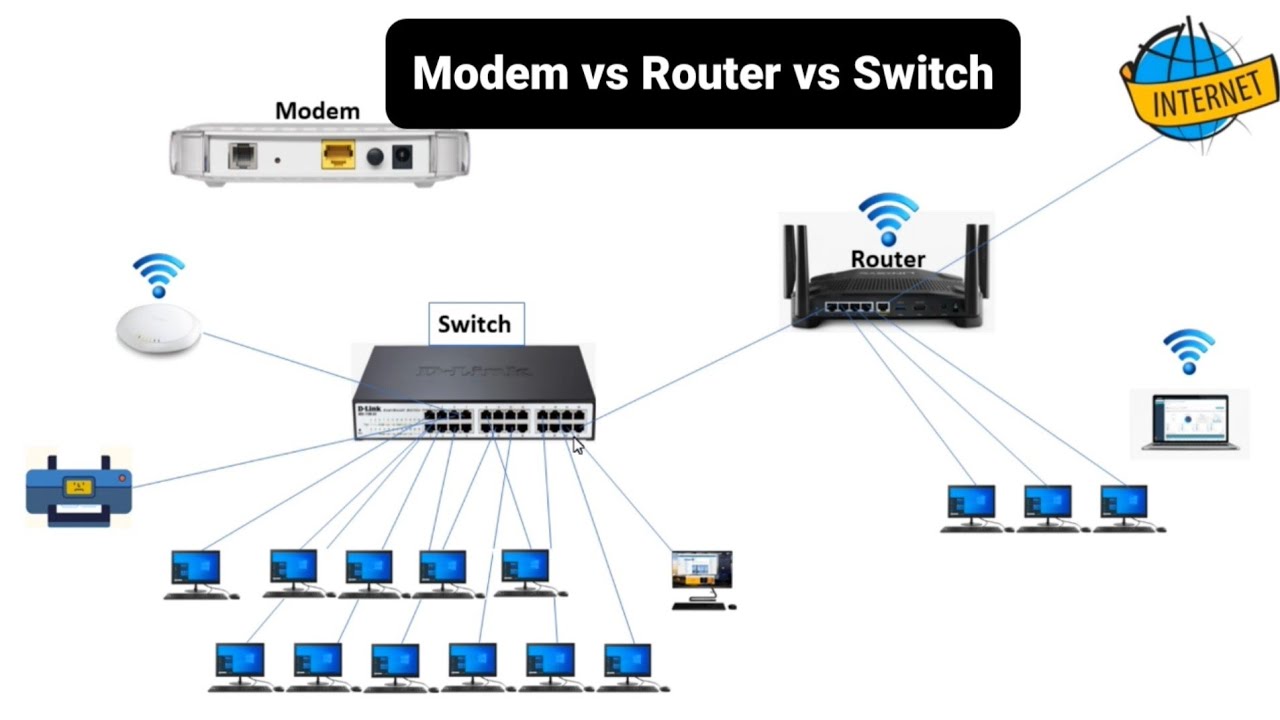
Consider two scenarios:
-
Local Traffic (Computer to Printer): You send a document to print. The data goes from your computer to the switch. The switch checks its CAM table, finds the printer's MAC address, and forwards the data directly to the port the printer is on. The router and modem are not involved.
-
Internet Traffic (Computer to Website): You open a web browser. The data goes from your computer to the switch, then to the router (which acts as the "default gateway"). The router sees the destination IP address is outside the local network. It sends the packet to the modem. The modem translates the signal and sends it across the ISP's network toward the website's server.
The Real World: Combination Devices
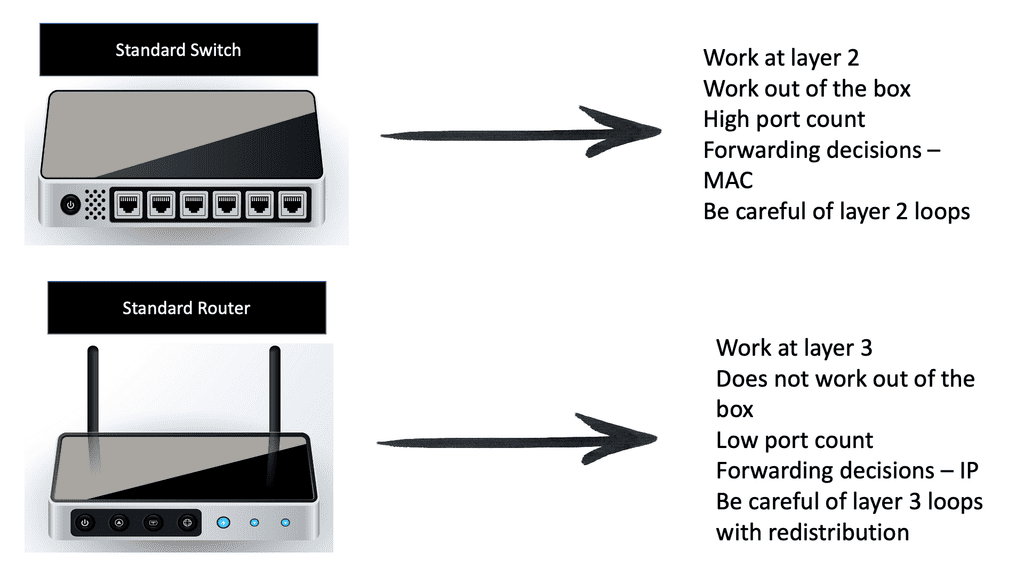
Now for the part that bridges theory and reality. You probably don't have three separate boxes. Most ISPs provide a single "gateway" or "wireless router" that combines a modem, a router, a multi-port switch, and a wireless access point into one physical device.
Home Network Diagram - All network layouts explained
This article from LazyAdmin illustrates the most common home network setup, which uses a combination device.
Look at the "Basic home network diagram" and read its description. This shows the all-in-one device. Then, read the next two sections, "Home network diagram with Modem and Router" and "Router Switch Network Diagram," which explain why you might separate these functions.
Even though they are in one box, they are still performing their distinct logical functions. Understanding them as separate components is the key to troubleshooting and designing more complex networks.
Conclusion
In this lesson, we demystified the core hardware of a home network. You can now explain the specific and distinct responsibilities of the essential devices that connect you to the internet.
Key Takeaways:
- Modem: The translator. It bridges your LAN to the ISP's WAN by modulating and demodulating signals. It handles one connection.
- Router: The traffic director. It connects different networks (e.g., your LAN and the internet's WAN) and forwards packets between them based on IP addresses.
- Switch: The local coordinator. It connects devices within a single LAN and forwards frames between them based on MAC addresses.
- In practice, these three functions (plus a wireless access point) are often combined into a single combo device or gateway provided by your ISP.
Preview of the Next Lesson:
We've established how a single home network connects to its ISP. But the internet is a "network of networks." How do all the different ISPs connect to each other? In the next lesson, we will scale up our view to examine the hierarchical structure of ISPs (Tier 1, 2, and 3) and the crucial role of Internet Exchange Points (IXPs) in weaving the global internet together.