Introduction
Hello! In our last lesson, we established the client-server model, where your browser (the client) sends requests to a server to fetch a webpage, and the server sends a response back. We learned that this conversation is the foundation of the web.
Today, we're going to learn the language of that conversation: the Hypertext Transfer Protocol (HTTP). Every time you load a webpage, submit a form, or watch a video, your browser and the server are exchanging structured HTTP messages. This lesson will break down the anatomy of those messages. You will learn to identify the key components of an HTTP request—like methods and headers—and an HTTP response—like status codes and headers. Understanding this structure is fundamental to grasping how the web truly functions, connecting your "book knowledge" directly to what's happening on your screen.
The Anatomy of an HTTP Message
At its core, HTTP communication consists of two types of messages: requests from the client and responses from the server. While their specific contents differ, they share a common structure:
- A start-line that describes the request or indicates the status of the response.
- A set of headers that provide metadata about the message.
- An empty line indicating the end of the headers.
- An optional body that contains the data being transmitted.
This diagram provides a great visual overview of a typical request and response pair.
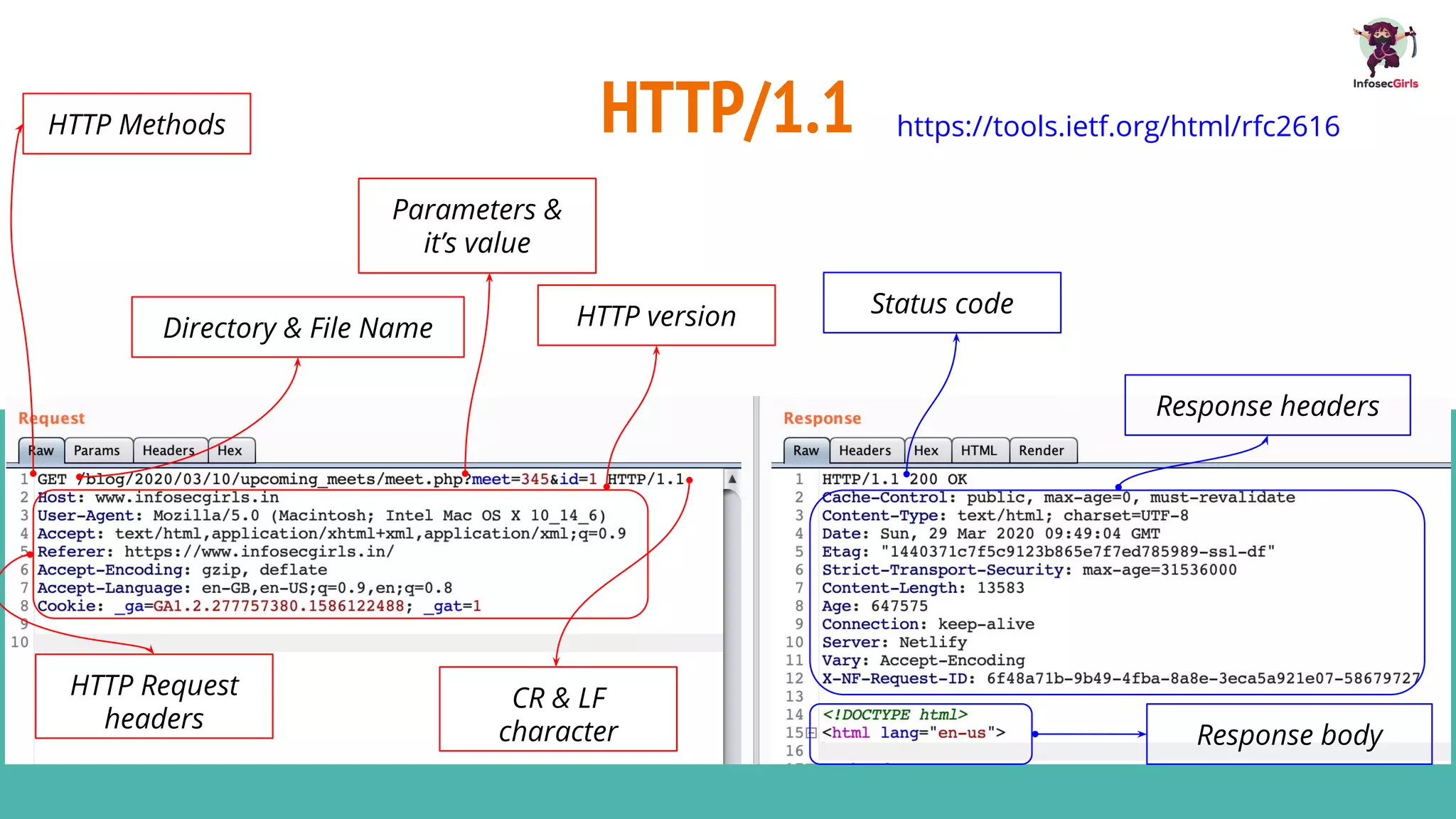
To get a formal definition of these components, let's turn to the excellent MDN Web Docs.
The article 'HTTP messages' from MDN Web Docs is a definitive guide. We'll use it to understand the precise structure of requests and responses.
Please read the introduction and the section 'Anatomy of an HTTP message'. Focus on the distinction between the 'head' (start-line and headers) and the 'body' of a message.
Now, let's break down each type of message in more detail.
Dissecting the HTTP Request
When your browser wants to fetch a resource or send data, it constructs an HTTP request. This message tells the server what the client wants to do.
A request consists of:
- Request Line: The first line, containing the HTTP Method, the Request Target, and the HTTP Version.
GET /index.html HTTP/1.1
- Request Headers: Lines of key-value pairs providing context.
Host: www.example.comUser-Agent: Mozilla/5.0 ...
- Request Body (optional): The data being sent to the server, used with methods like
POST.
HTTP Methods
The method is a verb that defines the desired action. While there are several methods, four are most common and map closely to the CRUD (Create, Read, Update, Delete) operations you may be familiar with from database work.
GET: Requests a representation of a specified resource. (Read)POST: Submits an entity to the specified resource, often causing a change in state or side effects on the server. (Create)PUT: Replaces all current representations of the target resource with the request payload. (Update)DELETE: Deletes the specified resource. (Delete)
The following video provides a clear explanation of these core methods.
HTTP Crash Course & Exploration
Let's watch a segment from 'HTTP Crash Course & Exploration' by Traversy Media. This will clarify the purpose of the main HTTP methods.
Watch from 03:33 to 05:11. Pay attention to the typical use case for each method (e.g., GET for loading a page, POST for submitting a form).
HTTP Headers
Headers provide crucial metadata. For example, the Host header tells the server which website the client wants (as one server can host many sites), and the User-Agent header tells the server which browser is making the request.
Let's use the MDN article again for a more detailed look at the request structure.
Now, let's read the section on requests in the MDN article to solidify our understanding of the request line, headers, and body.
Read the section titled 'HTTP requests'. Pay special attention to the example POST request and the breakdown of its components.
Dissecting the HTTP Response
After processing the client's request, the server sends back an HTTP response. This message indicates whether the request was successful and includes the requested resource if applicable.
A response consists of:
- Status Line: The first line, containing the HTTP Version, a Status Code, and a Reason Phrase.
HTTP/1.1 200 OK
- Response Headers: Lines of key-value pairs providing context about the response.
Content-Type: text/htmlContent-Length: 1270
- Response Body (optional): The actual content being returned (e.g., HTML document, image data, JSON object).
HTTP Status Codes
The status code is a three-digit number that provides a quick summary of the result of the request. These are grouped into five classes:
- 1xx (Informational): Request received, continuing process. (Rarely seen)
- 2xx (Successful): The action was successfully received, understood, and accepted.
- 3xx (Redirection): Further action must be taken to complete the request.
- 4xx (Client Error): The request contains bad syntax or cannot be fulfilled.
- 5xx (Server Error): The server failed to fulfill an apparently valid request.
This table gives a handy summary of the most common codes you'll encounter.
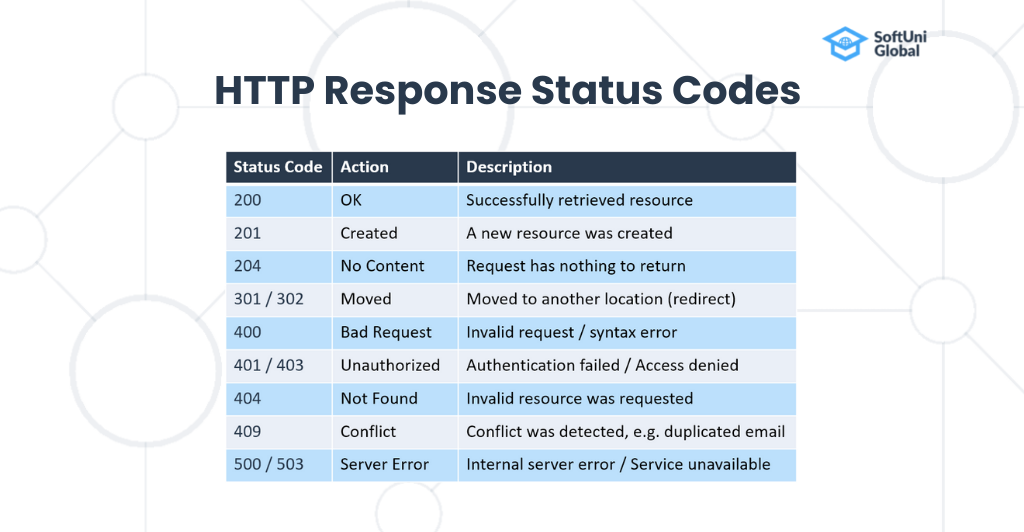
The following video segment explains these status code ranges and gives examples of the most important ones.
HTTP Crash Course & Exploration
Let's return to the Traversy Media video for a breakdown of HTTP status codes.
Watch the segment from 09:15 to 11:40. Focus on understanding the meaning of common codes like 200, 404, and 500.
Now, let's complete our reading from the MDN guide to see the full structure of a response.
Finally, let's read the section on responses in the MDN article.
Read the section titled 'HTTP responses'. This will tie together your understanding of the status line, response headers, and the response body.
Practical Application: Observing HTTP in Your Browser
Theory is great, but seeing this in action is how you'll truly connect the concepts to real-world internet use. Your web browser has powerful developer tools that let you spy on the HTTP conversation. The Network tab is your window into this world.
Let's watch a demonstration of how to use this tool, and I encourage you to follow along.
HTTP Crash Course & Exploration
This final video clip from Traversy Media demonstrates how to use the Network tab in Chrome's Developer Tools to inspect live HTTP traffic.
Watch from 12:57 to 16:09. Open your own browser's developer tools (usually by pressing F12 or Ctrl+Shift+I / Cmd+Opt+I), go to the 'Network' tab, and visit a website like google.com or any other favorite site. Try to identify the following for the main document request: The Request Method (e.g., GET). The Status Code (e.g., 200). A few Request Headers (like Host and User-Agent). A few Response Headers (like Content-Type). Look at the Response or Preview tab to see the body of the response (the HTML!).
Spending time in the Network tab is one of the best ways to learn. You can click on any resource loaded by the page (images, CSS files, etc.) and see the individual HTTP request and response for it.
Conclusion
In this lesson, we dissected the language of the web, HTTP. We saw that it's a structured, text-based protocol that enables clients and servers to communicate clearly about what action is desired and what the outcome was.
Key Takeaways:
- HTTP Requests are composed of a request line (Method, URL, Version), headers (metadata), and an optional body (data).
- HTTP Methods like
GET,POST,PUT, andDELETEdefine the action to be performed. - HTTP Responses are composed of a status line (Version, Status Code, Reason), headers, and an optional body (the content).
- Status Codes (e.g.,
200 OK,404 Not Found,500 Internal Server Error) provide a quick summary of the request's outcome. - Your browser's Developer Tools (Network tab) are an essential tool for observing and debugging these HTTP exchanges in real time.
Preview of the Next Lesson:
You've just had a brief introduction to the browser's developer tools. In our next lesson, we will focus entirely on that practical skill. We'll conduct a guided exercise where you will use the developer tools to inspect HTTP requests and responses for a specific webpage, reinforcing everything you've learned today in a hands-on, practical scenario.