Introduction
Hello! In our last lesson, we explored how load balancers are essential for creating scalable and reliable web services. We saw how they distribute traffic using various algorithms and how the distinction between Layer 4 and Layer 7 load balancing allows for different levels of routing intelligence. A key theme was the use of TCP to ensure every part of a web page arrives correctly.
But what about applications where a momentary glitch is better than a long pause? Think of a live video call or an online game. If a packet is lost, you'd rather the stream continue with a brief imperfection than have everything freeze while your device waits for a retransmission. This is where TCP's reliability becomes a liability.
Today, we will dive into this world of real-time applications. Our learning outcome is to describe how real-time applications (like video calls and streaming) use UDP and buffering. We'll investigate why UDP is the protocol of choice for speed, and we'll explore the clever techniques, like buffering, that applications use to create a smooth experience despite the internet's inherent unpredictability. This lesson will directly connect your understanding of transport protocols to the everyday experience of watching a live stream or joining a video conference.
Part 1: Why TCP's Reliability is a Problem for Real-Time Data
As we've learned, TCP is the "reliable workhorse" of the internet. It uses a three-way handshake, sequence numbers, and acknowledgements (ACKs) to guarantee that every single byte of data arrives in the correct order. If a packet is lost, TCP's sender will retransmit it.
For downloading a file or loading a webpage, this is exactly what you want. But for a real-time conversation, this retransmission process introduces a fatal flaw: latency.
Imagine you're on a video call. A packet containing 20 milliseconds of audio is lost in the network.
- With TCP, the receiver would wait, send a request for the missing packet, the sender would resend it, and only then would the audio continue. By the time the "old" audio arrives, the conversation has moved on. The result is a jarring freeze or lag that disrupts the flow of communication.
- With UDP, the receiver's application simply discards the lost packet and moves on to the next one. The result might be a tiny, almost unnoticeable audio blip, but the conversation continues in real-time.
For time-sensitive data, a late packet is as useless as a lost packet. This is why real-time applications trade TCP's perfect reliability for UDP's speed.
How TCP and UDP Work | Network Fundamentals Part 7
To see this concept explained visually, let's watch a short segment from the 'How TCP and UDP Work' video. It directly contrasts how the two protocols would handle data loss in a phone call.
Watch the segment from 09:01 to 10:13. Focus on the explanation of why retransmitting lost data for a voice call is problematic.
This trade-off is a fundamental design choice in networking.
TCP vs UDP: Impact on Application Performance and Monitoring
The article 'TCP vs UDP: Impact on Application Performance and Monitoring' provides some excellent real-world context on this trade-off. It quantifies the impact and discusses another key real-time application: online gaming.
Please read the sections titled 'Video Streaming: The UDP Sweet Spot' and 'Gaming: Where Every Millisecond Counts'. Pay attention to the comparison of how much delay TCP would introduce versus the impact of minor packet loss with UDP.
To summarize, UDP is preferred for real-time applications because:
- Low Latency: It has no connection setup (no handshake) and no retransmission delays.
- Timeliness over Correctness: For voice, video, or game state, new data is constantly being generated. It's better to receive the most current data with minor losses than to receive delayed, old data perfectly.
Part 2: Handling Network Imperfections with Buffering
So, we've established that UDP is fast but "unreliable." It doesn't retransmit lost packets, and it doesn't guarantee the order of arrival. While applications can tolerate some lost packets, receiving packets out of order or with inconsistent delays would make a video stream unwatchable.
This variation in packet arrival time is called jitter. Even if packets take the same route, network congestion can cause some to arrive faster or slower than others.
The solution is to implement a buffer on the client-side, often called a jitter buffer.
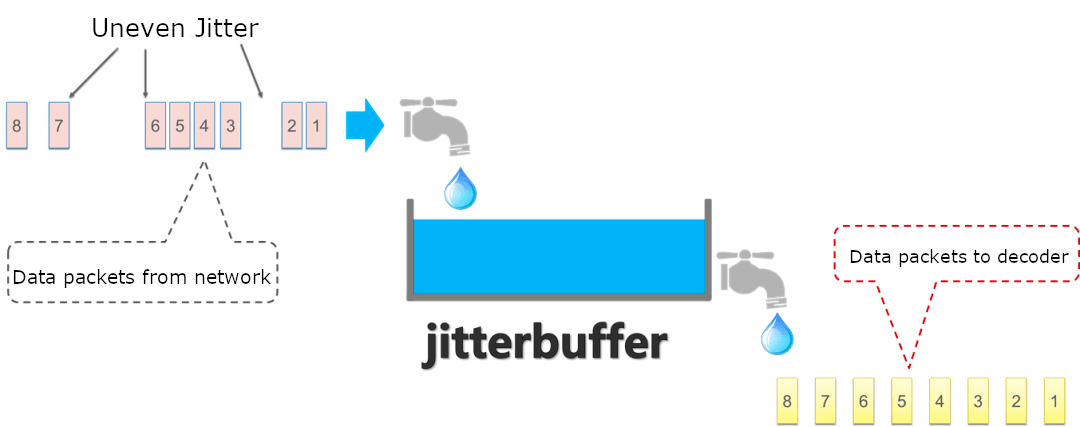
The jitter buffer works by collecting a small number of packets before starting playback. This pre-filled buffer acts as a cushion, absorbing variations in packet arrival times. If a packet is slightly delayed, the application can play data from the buffer while it waits. If a packet arrives early, it's simply held in the buffer until it's its turn to be played.
Optimising Real-Time Communications with Jitter Buffer
Let's dive a bit deeper into this concept by reading about jitter buffers.
Read the following sections from the article by Digital Samba: 'What is a jitter buffer?' 'How does jitter buffer work?' 'Role of the jitter buffer in real-time communications' 'When to use a jitter buffer?' Focus on understanding how the buffer re-orders packets and smooths out playback.
The size of this buffer represents a critical trade-off.
- Small Buffer: Results in low initial delay (the video starts quickly), but is more vulnerable to jitter. If the network delay variation is larger than the buffer can handle, the buffer will run empty, causing a freeze or stutter. This is called a buffer underrun.
- Large Buffer: Can absorb significant jitter, providing a very smooth stream. However, it increases the initial startup delay (more "buffering..." time before playback begins) and increases the overall latency for live interactions.

Modern systems use adaptive jitter buffers that can dynamically resize based on current network conditions, trying to find the optimal balance between smoothness and latency.
2.6 Video Streaming and Content Distribution Networks
The following video from Professor Jim Kurose's renowned networking course provides an excellent visualization of how client-side buffering compensates for variable network delay.
Watch the portion from 04:31 to 09:27. Pay close attention to the diagrams showing the difference between the server's transmission time and the client's playout time, and how the buffer accommodates the variable 'stair steps' of packet arrival.
Part 3: Adapting to Bandwidth Changes
Buffering solves the problem of delay variation (jitter), but what about bandwidth variation? The amount of data you can download per second can fluctuate wildly based on network congestion or if you move from Wi-Fi to a cellular network.
If the available bandwidth drops below what the video stream requires, the buffer will inevitably run out, no matter its size. The modern solution to this is adaptive bitrate streaming.
The core idea is simple:
- The video is encoded and stored on the server in multiple versions, each with a different quality (bitrate) and resolution (e.g., 480p, 720p, 1080p, 4K).
- The video is broken into small chunks, typically a few seconds long.
- The client device continuously estimates the available network bandwidth.
- Before requesting the next chunk of video, the client decides which quality version to download. If bandwidth is high, it requests a 1080p chunk. If bandwidth drops, it requests a 480p chunk.
This is why your Netflix or YouTube stream might suddenly look pixelated for a few seconds and then become sharp again—the client is adapting to a change in network conditions.
2.6 Video Streaming and Content Distribution Networks
Let's return to the Kurose video, which explains Dynamic Adaptive Streaming over HTTP (DASH), the most common standard for this technique.
Watch from 09:27 to 11:55. Focus on the roles of the server (providing chunks at different qualities) and the client (measuring bandwidth and choosing which chunk to request). Notice that the 'intelligence' is on the client side.
While DASH itself is designed for HTTP/TCP, the principle of adaptive bitrates is a core concept used across all modern streaming protocols, including those built on UDP. Complex applications like Zoom or Microsoft Teams use a hybrid approach, sending the real-time audio/video stream over UDP while using TCP for reliable transmission of chat messages or screen-sharing control information.
Conclusion
In this lesson, we've explored the sophisticated engineering behind the real-time applications we use every day. We saw that the choice of transport protocol is not arbitrary but a critical design decision based on the application's needs.
Key Takeaways:
- Real-time applications like video calls and live streaming prioritize low latency over perfect reliability, making UDP the ideal transport protocol. TCP's retransmission mechanism would introduce unacceptable delays.
- To combat network jitter (variable packet delay), clients use a jitter buffer. This small storage area smooths out the arrival of UDP packets, allowing for continuous, stable playback.
- There is a fundamental trade-off between buffer size and latency. A larger buffer provides more protection against jitter but increases the initial startup time.
- To handle changing network bandwidth, applications use adaptive bitrate streaming. The client measures the available bandwidth and dynamically requests video chunks of a suitable quality, preventing buffer underruns and ensuring the stream continues.
Preview of the Next Lesson:
We have now covered the key layers and protocols that make the internet work, from the physical layer all the way up to application-specific strategies like load balancing and adaptive streaming. In our final lesson, we will bring all this knowledge together in a capstone practical exercise. We will use Wireshark to trace a complete web page request, where you will personally capture and identify the DNS, TCP, and HTTP exchanges happening on your own machine. It will be a fantastic opportunity to see the theory we've discussed in action.