Introduction
Hello! In our previous lesson, we explored the different networking modes for virtual machines, understanding how virtualization allows us to create isolated or connected network environments. This is a fundamental building block for modern cloud computing.
Today, we'll scale up from the single machine to the global stage. Imagine you've built a popular website hosted on a server in your city. How do you ensure that users on the other side of the world have a fast, responsive experience? The physical distance data must travel creates inevitable delays, a problem known as latency.
This lesson addresses exactly that challenge. Our learning outcome is to explain how Content Delivery Networks (CDNs) reduce latency and improve performance. We'll investigate what a CDN is, how it strategically places content around the globe, and the specific techniques it uses to make the internet feel faster for everyone, everywhere.
The Problem: Distance and Latency
In a traditional web hosting model, all users connect to a single origin server where your website's files are stored.
The further a user is from this server, the longer it takes for data to travel back and forth. This delay is latency, and it's a major factor in how "fast" a website feels. Let's start by watching a short video that clearly illustrates the limitations of this traditional model.
Cloudflare CDN Walkthrough - Benefits, Configuration, Traffic Flow, and Performance
The video 'Cloudflare CDN Walkthrough' begins by explaining the issues with the standard client-server model, such as high latency for distant users and increased load on the origin server. This sets the stage for why CDNs are necessary.
Watch the segment from 00:27 to 01:35. Focus on the problems identified: varying user experience based on location, increased server load, and higher costs.
To make this tangible, let's look at a concrete example with some numbers.
The article 'CDN performance' from Cloudflare provides an excellent, easy-to-follow calculation comparing the load time of a webpage with and without a CDN. This will give you a quantitative sense of a CDN's impact.
Read the section 'What is the difference in load times with and without a CDN?'. Pay close attention to the example of a user in New York accessing a server in Singapore and how the Round Trip Time (RTT) adds up. You don't need to memorize the numbers, but understand how distance directly translates to a slower user experience.
As you can see, even with data traveling at nearly the speed of light, physical distance is a formidable barrier to performance.
The Solution: Content Delivery Networks
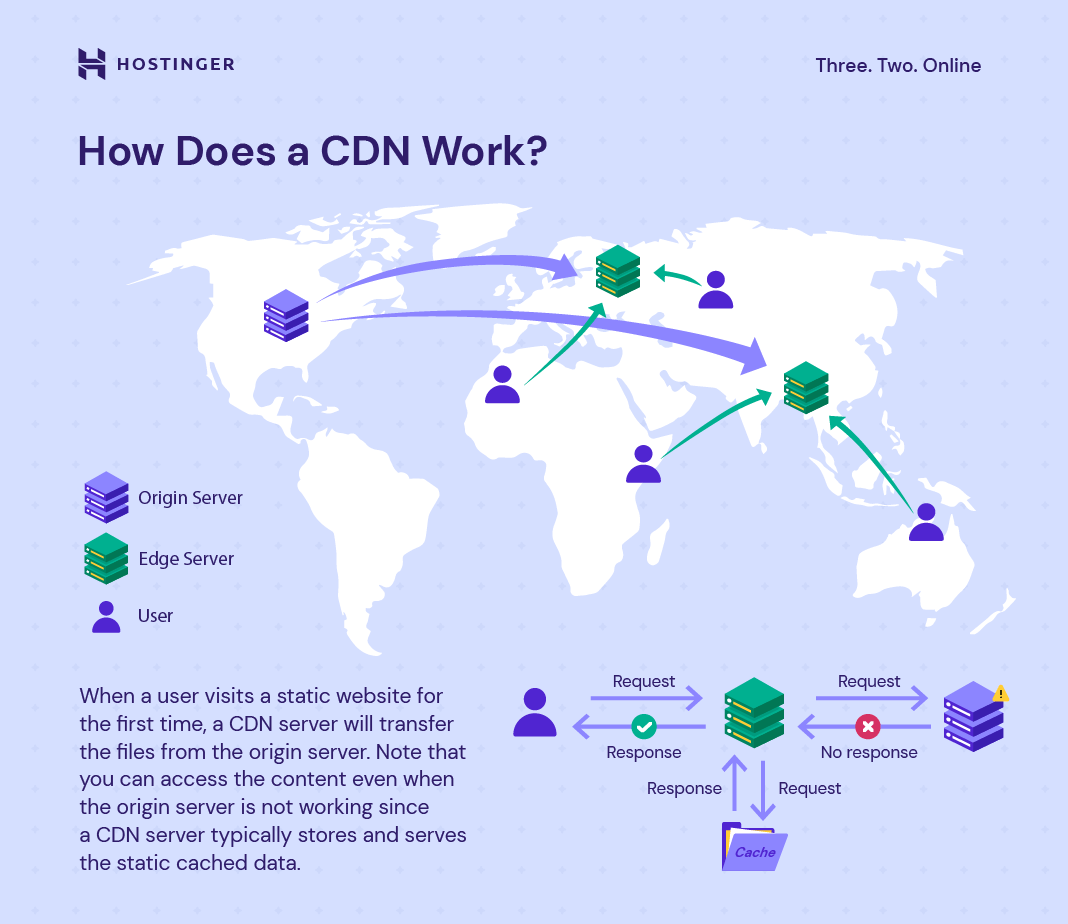
A Content Delivery Network (CDN) solves the distance problem by creating a distributed network of servers and bringing content closer to users.
These servers are placed in data centers at strategic locations around the world, often at Internet Exchange Points (IXPs) where different internet service providers connect. These locations are called Points of Presence (PoPs), and the servers within them are known as edge servers.
Let's watch a video that provides a great overview of this concept.
What Is A CDN? How Does It Work?
The video 'What Is A CDN? How Does It Work?' by ByteByteGo gives a concise and clear explanation of the fundamental purpose of a CDN and introduces the key terminology.
Watch the first part of the video (00:00 - 01:25). Focus on understanding the core idea: a CDN brings content closer to the user by using a global network of PoPs and edge servers.
The core function of these edge servers is caching. When a user requests a file (like an image, a CSS stylesheet, or a video), the CDN serves it from the nearest edge server if a copy is stored there (a cache hit). If not (a cache miss), the edge server fetches the file from the origin server, delivers it to the user, and stores a copy for future requests.

How CDNs Improve Performance
CDNs employ several mechanisms simultaneously to reduce latency and improve performance. Let's break down the most important ones.
1. Distance Reduction via Caching and Routing
As we've established, caching content on edge servers dramatically reduces the physical distance data must travel. But how does your browser know to connect to the nearest edge server? CDNs use intelligent traffic routing techniques.
How does a content delivery network (CDN) help reduce latency for global users
The article 'How does a content delivery network (CDN) help reduce latency for global users' provides a clear, step-by-step breakdown of the mechanisms CDNs use.
Please read the sections 'What is a Content Delivery Network (CDN)?' and 'How CDNs Reduce Latency for Global Users'. These sections summarize the key concepts of edge servers, caching, and minimizing network hops.
Two common routing methods are:
- DNS-based Routing: When you look up a domain name (like
www.example.com), the CDN's specialized DNS servers respond with the IP address of the edge server that is geographically or network-topologically closest to you. - Anycast Routing: Multiple edge servers around the world share the same IP address. When your request is sent to that IP, the network's routing protocol (BGP) automatically directs your traffic to the nearest server advertising that address.
2. Reduced Data Transfer
Besides bringing data closer, CDNs also make the data smaller, which means it can be transferred faster. They do this automatically through:
- Minification: Removing unnecessary characters (like whitespace, newlines, and comments) from code files (HTML, CSS, JavaScript) without changing their functionality.
- File Compression: Using algorithms like Gzip or Brotli to compress files on the fly before sending them to the user. The user's browser then automatically decompresses them. This can reduce file sizes by 70% or more.
Let's return to the 'CDN performance' article to learn more about these data reduction techniques.
Read the section 'How does a CDN reduce file sizes to increase speeds?'. Note the examples of minification and the typical savings from file compression.
3. Connection and Hardware Optimization
CDNs also optimize the connection process itself and use high-performance hardware.
- TLS Termination at the Edge: Establishing a secure HTTPS connection requires a TLS handshake, which involves several round-trips between the client and server. By terminating this handshake at a nearby edge server instead of the distant origin, a CDN significantly speeds up the initial connection time.
- Hardware: CDN providers invest heavily in their infrastructure, often using Solid-State Drives (SSDs) which are much faster than traditional Hard Disk Drives (HDDs), and placing their servers in highly-connected data centers.
4. Reducing Origin Server Load
A powerful side effect of caching is that it dramatically reduces the number of requests that hit the origin server. This has two key benefits:
- Improved Performance: The origin server is less busy, so it can respond faster to the few requests it does receive (cache misses or dynamic content).
- Higher Availability: The site is more resilient to traffic spikes. The CDN absorbs most of the load, preventing the origin server from being overwhelmed and crashing.
To further reduce origin load, advanced CDNs use Tiered Caching. Instead of every edge server fetching a cache miss from the origin, lower-tier edge servers fetch from larger, regional upper-tier data centers. Only these upper-tier servers are allowed to contact the origin.
Cloudflare CDN Walkthrough - Benefits, Configuration, Traffic Flow, and Performance
Let's revisit the 'Cloudflare CDN Walkthrough' video to see how an advanced feature like Tiered Caching works in practice. This is a great example of system design to optimize performance at scale.
Watch the segment on Tiered Caching from 03:36 to 05:18, and then the traffic flow example from 06:33 to 07:34. Focus on how a request from a second client can be served by an upper-tier cache, preventing another hit to the origin server.
Conclusion
Today we've seen that Content Delivery Networks are a cornerstone of the modern internet, solving the fundamental problem of physical distance. By distributing content across a global network of high-performance edge servers, they bring data closer to users, making websites and applications faster, more reliable, and more scalable.
Key Takeaways:
- CDNs solve the problem of latency caused by the physical distance between users and a website's origin server.
- They work by caching content (images, videos, code) on a distributed network of edge servers located in Points of Presence (PoPs) around the world.
- Performance is improved through a combination of techniques:
- Distance Reduction: Serving content from a nearby cache.
- Intelligent Routing: Using DNS or Anycast to direct users to the best server.
- Data Reduction: Minifying code and compressing files.
- Connection Optimization: Terminating TLS handshakes at the edge.
- CDNs also improve reliability and reduce costs by offloading traffic from the origin server, with advanced features like Tiered Caching further optimizing this process.
Preview of the Next Lesson:
CDNs are fantastic at distributing content, but what happens when a single application backend needs to handle millions of simultaneous user requests? In our next lesson, we will explore load balancing, a technique used to distribute incoming traffic across a group of servers to ensure no single server is overwhelmed, thereby improving responsiveness and availability.