Introduction
Hello! In our last lesson, we explored the evolution of Wi-Fi security protocols and saw a practical demonstration of how a WPA2 network could be cracked. A key step in that attack was something called a "deauthentication attack," used to force a device off the network to capture its reconnection handshake.
Today, we're going to put that technique and others under the microscope. Your learning outcome is to describe specific wireless vulnerabilities such as evil twin and deauthentication attacks. We will formally define what a deauthentication attack is, how it works at the packet level, and what its purposes are. Then, we'll examine the "Evil Twin" attack, a sophisticated man-in-the-middle strategy that often uses a deauthentication attack as a crucial first step. This will give you a clear, practical understanding of how attackers exploit the fundamental design of Wi-Fi.
The Deauthentication Attack: Forcing a Disconnect
A deauthentication attack is a type of Denial-of-Service (DoS) attack that exploits a fundamental part of the 802.11 Wi-Fi protocol: management frames. These are control messages, distinct from data packets, that manage the connection between a client (like your laptop) and an access point. In early Wi-Fi standards, these frames were not encrypted or authenticated.
Deauthentication Attacks | Baeldung on Computer Science
Let's start with a clear definition from Baeldung's article, 'Deauthentication Attacks'. This will explain the core mechanism.
Please read sections 2 ('Deauthentication Attacks: Definition and Motives') and 3 ('How Deauthentication Attacks Work?'). Focus on how the attack uses forged or spoofed frames and the diagram under the 'Mechanism' subsection, which shows the attack's flow.
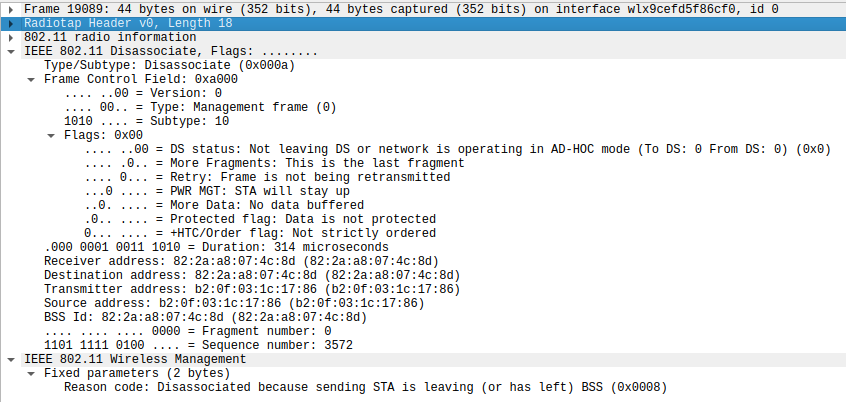
As you read, the key takeaway is that an attacker doesn't need to be connected to your network or know your password. They simply need to be within radio range. They can then craft a deauthentication frame that looks like it came from the access point (by "spoofing" the AP's MAC address) and send it to the target client. The client, believing the instruction is legitimate, immediately disconnects.
This is what that malicious frame looks like in a packet analyzer like Wireshark.
A Practical Demonstration
Seeing the attack in action makes the concept much clearer. The following video demonstrates how an attacker uses common tools to execute this.
Wi-Fi Deauth Attack EXPOSED Step by Step Guide
The video 'Wi-Fi Deauth Attack EXPOSED' provides a step-by-step guide. We'll focus on the conceptual explanation and the execution of the attack itself.
Please watch the following two segments: Conceptual Overview (00:27 - 01:58): This explains what deauthentication frames are and introduces the concept of spoofing. Launching the Attack (07:01 - 08:00): Watch how the aireplay-ng tool is used with the MAC addresses of the access point and the target to launch the attack. You don't need to memorize the command, just understand its components: specifying the attack type (--deauth), the AP's MAC (-a), and the client's MAC (-c).
Why Launch a Deauthentication Attack?
As you've now seen, the attack is simple but effective. Its motives vary:
- Denial of Service: The simplest goal is to disrupt connectivity by continuously deauthenticating users.
- Handshake Capture: As we saw in the previous lesson, this is the main purpose in a WPA2 cracking attempt. The attacker forces a disconnect so they can capture the 4-way handshake when the device automatically reconnects.
- Client Luring: This is the most sophisticated use, serving as a prerequisite for the Evil Twin attack, which we will now explore.
The Evil Twin Attack: A Deceptive Man-in-the-Middle
The Evil Twin attack is a classic Man-in-the-Middle (MitM) attack tailored for Wi-Fi. The attacker creates a fraudulent access point that impersonates a legitimate, trusted network.

This diagram perfectly illustrates the process. The deauthentication attack (Step 3) is the active measure used to force the victim's device to disconnect, making it available to be lured to the Evil Twin in Step 4.
Let's dig into the methodology with a more detailed article.
What are Evil Twin Attacks - Bitdefender InfoZone
The article 'What are Evil Twin Attacks' by Bitdefender provides an excellent, structured breakdown of how these attacks are executed.
Please read the first section, 'What is an Evil Twin Attack?', and then the 'Attack Methodology Breakdown' subsection. Pay close attention to how step 3, 'Client Disruption and Luring,' explicitly mentions using deauthentication attacks.
The Components of an Evil Twin
To make the attack from the article tangible, let's look at the software components an attacker would use. You have a background in C and operating systems, so you'll recognize that this isn't magic; it's just a clever combination of networking utilities.
Hack WPA / WPA2 WiFi Without Wordlist Using Evil Twin Attack
This video, 'Hack WPA / WPA2 WiFi... Using Evil Twin Attack', demonstrates a manual setup. We won't follow the full tutorial, but we'll use it to understand the building blocks.
Watch the following segments to understand the attack's architecture: Attack Overview (00:12 - 00:53): Explains the goal—to lure users to a fake AP to steal credentials. Victim's Perspective (01:33 - 02:42): Shows what the victim sees—a disconnect followed by a prompt to enter their password on a fake 'firmware update' page (this is a captive portal). The Fake AP (04:50 - 05:19): Introduces hostapd, a standard Linux utility used to create a software-based access point. This is the 'evil twin' itself. The Network Services (05:19 - 05:47): Mentions dnsmasq (to act as a DHCP/DNS server for the fake network) and Apache (to host the fake captive portal webpage).
By combining these tools, the attacker creates a fully functional, albeit malicious, network:
hostapdbroadcasts a Wi-Fi signal with a spoofed SSID (e.g., "Airport_Free_WiFi").dnsmasqassigns the victim an IP address and hijacks their DNS requests, redirecting any web address they try to visit to the attacker's fake page.- Apache serves the fake login page that harvests the victim's credentials.
Defending Against These Attacks
So, how do we defend against these vulnerabilities that seem to exploit the core of Wi-Fi?
- Against Deauthentication: The best defense is WPA3. As we briefly touched on in the last lesson, WPA3 mandates Protected Management Frames (PMF). This feature cryptographically signs management frames, including deauth frames. A client with PMF enabled will recognize that a spoofed deauth frame from an attacker is not validly signed by the real access point and will simply ignore it.
- Against Evil Twins: This is trickier as it involves user behavior.
- Avoid Open Wi-Fi: Be very suspicious of open (non-password-protected) networks in public places.
- Use a VPN: A Virtual Private Network creates an encrypted tunnel from your device to a trusted server. Even if you connect to an Evil Twin, the attacker cannot read your encrypted traffic.
- Pay Attention to Warnings: If your browser warns you about an invalid certificate after connecting to Wi-Fi, do not proceed. This is a major red flag for a MitM attack.
Conclusion
In this lesson, we demystified two significant wireless vulnerabilities. We saw how they work, how they are often used together, and how modern security standards are evolving to counter them.
Key Takeaways:
- Deauthentication attacks are a DoS vector that abuses un-encrypted 802.11 management frames to force devices off a network by spoofing the access point.
- Evil Twin attacks are a form of Man-in-the-Middle attack where an attacker sets up a rogue access point impersonating a legitimate one to intercept traffic and steal credentials.
- A deauthentication attack is often the first step in an Evil Twin attack, used to lure a victim to the malicious network.
- WPA3's Protected Management Frames (PMF) is the primary technical defense against deauthentication attacks. Vigilant user behavior and VPNs are key defenses against Evil Twins.
Preview of the Next Lesson:
We've spent a lot of time on the specifics of wireless networking and its security. Now, we'll shift our focus to a concept that is fundamental to modern cloud computing and development: virtualization. In the next lesson, we will explain virtual machine networking modes (bridged, NAT, host-only), giving you the foundation to understand how virtual servers, containers, and development environments connect to networks and the internet.