Hello! Welcome back to our course preparing you for the AWS Data Engineer - Associate certification.
In our last lesson, we focused on the foundational infrastructure of an MSK cluster—how to right-size brokers, select instance types, and configure storage for performance and cost-effectiveness. We built the "house," so to speak. Now, it's time to install the locks and security systems.
Today's lesson addresses a critical aspect of any production data pipeline: implementing security for MSK clusters, including encryption and IAM client authentication. A secure data platform is non-negotiable, and you can expect the certification exam to test your knowledge of how to protect data both at rest and in transit, and how to control access using familiar AWS tools like IAM.
The Three Layers of MSK Security
Securing an Amazon MSK cluster involves a defense-in-depth approach, operating at three distinct layers:
- Network Isolation: This is the outermost layer. It controls which resources on the network can even attempt to communicate with your MSK brokers. This is primarily managed using Amazon VPC, subnets, and security groups.
- Encryption: This layer protects your data from being read by unauthorized parties. MSK supports both encryption in transit (protecting data as it travels over the network between clients and brokers) and encryption at rest (protecting data stored on the brokers' EBS volumes).
- Authentication and Authorization: This is the innermost layer. Authentication verifies the identity of a client trying to connect (e.g., "Is this really Application A?"). Authorization determines what an authenticated client is allowed to do (e.g., "Application A is only allowed to read from Topic X"). In MSK, we achieve this primarily through AWS Identity and Access Management (IAM).
We will work our way from the inside out, starting with the configuration of encryption and authentication on the cluster itself.
1. Configuring Encryption and Authentication on the Cluster
When you provision an MSK cluster, you make fundamental security choices that define how clients will interact with it.
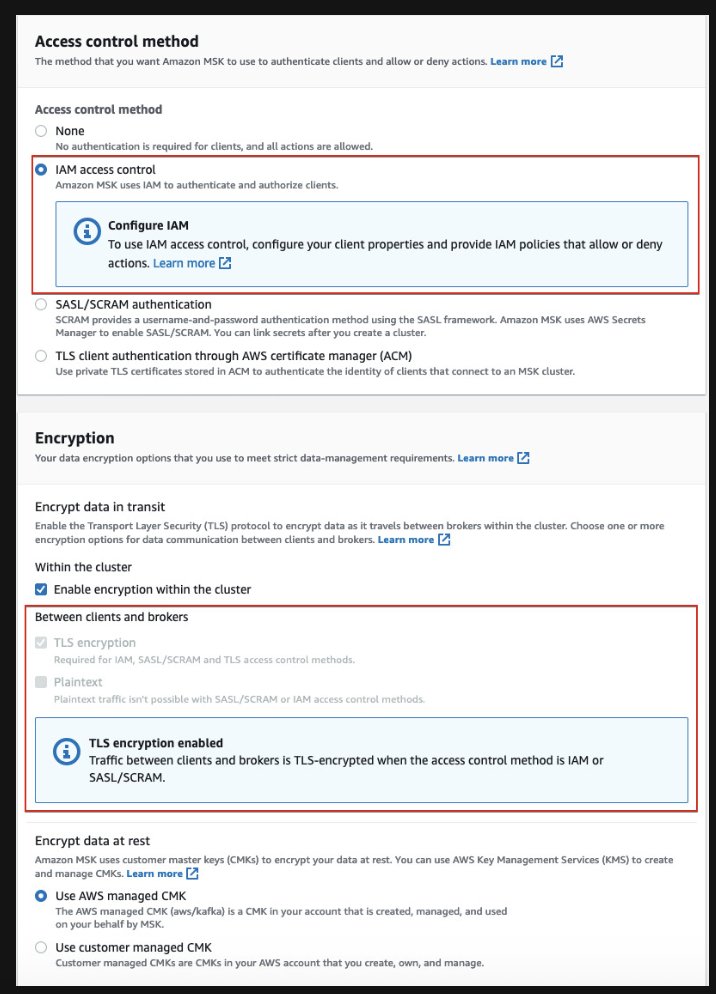
Let's break down these settings.
Encryption
- Encryption in transit: MSK enables Transport Layer Security (TLS) encryption between clients and brokers, as well as between the brokers themselves. This is a best practice and is on by default. When clients connect, they will use a specific port depending on the authentication method (e.g., port 9094 for TLS alone, 9098 for IAM which also uses TLS).
- Encryption at rest: The data stored on the EBS volumes attached to your brokers is encrypted using the AWS Key Management Service (KMS). You have the choice between an AWS-managed key (simpler to manage) and a customer-managed key (gives you full control over the key's lifecycle and policies). For the exam, remember that customer-managed keys are the solution when a scenario requires you to manage your own encryption keys or control their rotation policies.
Authentication
MSK offers several methods for client authentication, but the most integrated and common one for AWS-native workflows is IAM access control. When you select this option, you are configuring the Kafka brokers to use the AWS_MSK_IAM SASL (Simple Authentication and Security Layer) mechanism. This allows your Kafka clients to use IAM roles and policies to authenticate and get authorization.
The following article provides a good walkthrough of these settings.
Setting Up an AWS MSK Cluster with IAM Authentication ...
This article, 'Setting Up an AWS MSK Cluster with IAM Authentication', details the security settings available during cluster creation. It reinforces the concepts shown in the screenshot above.
Read from the paragraph starting 'In the next step of security...' down to 'In the Monitoring section...'. Focus on how IAM role-based authentication is enabled and the choices for encryption (TLS for in-transit, KMS for at-rest).
2. Implementing Network Security with Security Groups
Once the cluster is configured to require secure connections, you must open a path for legitimate clients at the network layer. This is where security groups come into play.
Your client (e.g., an EC2 instance, a Lambda function, or a Glue job) resides in a VPC and has one or more security groups attached. Your MSK cluster also has a security group. To allow communication, you must add an inbound rule to the MSK cluster's security group that allows traffic from the client's security group.
This is a common point of failure in data pipeline setups. Let's watch a short video that demonstrates this exact process.
AWS MSK Tutorial for Beginners | Kafka on AWS | Learn everything about AWS MSK | Hands- On Tutorial
This video segment from 'AWS MSK Tutorial for Beginners' clearly shows how to configure the network path between a client EC2 instance and an MSK cluster.
Watch from 24:00 to 25:40. The key action is when the presenter edits the inbound rules of the MSK cluster's security group, adding a rule that sources the security group of the EC2 instance. This creates the explicit network permission for the client to connect to the brokers.
3. Configuring Client IAM Authentication and Authorization
With the cluster configured and the network path open, the final step is to set up the client itself. This is a two-part process:
- Authorization: Creating an IAM Policy that defines what the client is allowed to do.
- Authentication: Configuring the Kafka client application to use its IAM identity when connecting.
3.1. Authorization with IAM Policies
To grant permissions, you create an IAM policy with kafka-cluster:* actions and attach it to the IAM role your client application assumes (e.g., the EC2 instance profile role).
These actions map directly to Apache Kafka operations. The principle of least privilege is paramount here. Instead of granting wildcard permissions like kafka-cluster:*, you should grant only what is necessary. For example, a producer application only needs WriteData permission, while a consumer needs ReadData and DescribeGroup.
This diagram illustrates a well-architected, least-privilege setup with separate roles for producers and consumers.

To build these granular policies, you need to know the specific action names and the ARN format for your resources. The official AWS documentation is the best source for this.
Semantics of IAM authorization policy actions and resources
This official documentation page is the definitive reference for all available MSK permissions and resource ARNs. It's essential for crafting least-privilege IAM policies.
First, quickly scan the 'Authorization policy actions' table. Note the common actions like kafka-cluster:ReadData, kafka-cluster:WriteData, and kafka-cluster:CreateTopic. Next, review the 'Authorization policy resources' table to see the ARN format for clusters and topics. This is what you'll use to scope your policies to specific resources.
3.2. Authentication in the Client Application
Creating the IAM policy is only half the battle. The client application must be configured to present its IAM credentials to the MSK cluster for authentication.
This involves two key steps on the client machine:
- Add the AWS MSK IAM Auth library: This is a JAR file that contains the necessary code to handle the IAM authentication handshake.
- Configure client properties: You must create a properties file that tells the Kafka client to use TLS/SSL for encryption and the special
AWS_MSK_IAMSASL mechanism for authentication.
The article we looked at earlier provides an excellent guide for this client-side setup.
Setting Up an AWS MSK Cluster with IAM Authentication ...
We'll now return to the 'Setting Up an AWS MSK Cluster with IAM Authentication' article to see how to configure the client machine.
Start reading from 'We also need to download the necessary JAR file...'. Pay close attention to the contents of the client.properties file. Understand what each line does: security.protocol = SASL_SSL: Use SASL for authentication and SSL (TLS) for encryption. sasl.mechanism = AWS_MSK_IAM: Specify the AWS-specific authentication mechanism. The sasl.jaas.config and sasl.client.callback.handler.class lines point to the Java classes in the JAR file that perform the authentication.
When your client connects, it will now use the AWS SDK and the IAM role it's running with to sign a request, which MSK validates to authenticate the client's identity. Then, MSK checks the IAM policy attached to that role to authorize the requested Kafka operation (e.g., producing a message).
Test your understanding!
You are designing a data pipeline where an application running on an EC2 instance needs to produce messages to a specific MSK topic named clickstream-events. The cluster ARN is arn:aws:kafka:us-east-1:123456789012:cluster/marketing-cluster/a1b2c3d4.... The application should have no other permissions.
Write the Statement block for an IAM policy that grants this specific permission, following the principle of least privilege.
Show answer
To solve this, you need the WriteData permission and the DescribeTopic permission (which is a required action for WriteData). The policy must be scoped to the specific clickstream-events topic ARN.
{
    "Version": "2012-10-17",
    "Statement": [
        {
            "Effect": "Allow",
            "Action": [
                "kafka-cluster:WriteData",
                "kafka-cluster:DescribeTopic"
            ],
            "Resource": "arn:aws:kafka:us-east-1:123456789012:topic/marketing-cluster/a1b2c3d4.../clickstream-events"
        },
        {
            "Effect": "Allow",
            "Action": "kafka-cluster:Connect",
            "Resource": "arn:aws:kafka:us-east-1:123456789012:cluster/marketing-cluster/a1b2c3d4..."
        }
    ]
}
Note: We also need a separate statement to grant the kafka-cluster:Connect permission at the cluster level, as this is a prerequisite for any topic-level action.
Conclusion
In this lesson, you've learned how to implement a comprehensive security strategy for Amazon MSK. We've covered the critical layers of defense, from network isolation to fine-grained access control with IAM.
Key Takeaways:
- MSK security is multi-layered, consisting of network isolation (VPC/Security Groups), encryption (TLS in-transit, KMS at-rest), and authentication/authorization (IAM).
- Enabling IAM access control on the cluster configures it to use the
AWS_MSK_IAMSASL mechanism, requiring clients to authenticate with IAM credentials. - Client configuration is a two-step process: defining permissions with an IAM policy (authorization) and setting up the client application with the correct properties and libraries to perform the authentication handshake.
- Always apply the principle of least privilege by granting specific
kafka-clusteractions on specific resource ARNs rather than using wildcards.
You are now equipped with the knowledge to design and implement secure streaming applications. In our next lesson, we will put this all together and focus on the application logic as we design producer and consumer applications to interact with an MSK cluster.