Hello! Welcome back to our course on preparing for the AWS Data Engineer - Associate certification.
In our last lesson, we established a clear decision framework for choosing between Amazon Kinesis and Amazon MSK. We concluded that MSK is the right choice when you need the power of the Kafka ecosystem, are migrating existing Kafka workloads, or require features like long-term retention with log compaction.
Today, we move from the "why" to the "how." The focus of this lesson is to configure an MSK cluster with appropriate sizing, broker specifications, and storage. Mastering this is crucial, as many exam questions will test your ability to design a cost-effective and performant streaming solution based on a given scenario. We will explore the key trade-offs you must make when provisioning an MSK cluster.
1. The First Decision: Cluster Type
When you create an MSK cluster, your first major decision is the cluster type. As we briefly touched on in the last lesson, you can choose between Provisioned and Serverless.
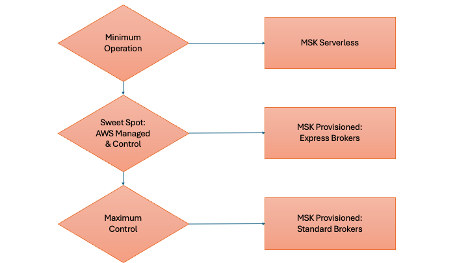
To refresh your memory on the differences, the following short video provides a concise comparison.
AWS MSK Tutorial for Beginners | Kafka on AWS | Learn everything about AWS MSK | Hands- On Tutorial
This clip from the 'AWS MSK Tutorial for Beginners' clearly explains the key differences between MSK Provisioned and MSK Serverless clusters, focusing on resource management, scalability, and billing.
Watch the segment from 07:49 to 09:51. Pay attention to the use cases described for each type. This will solidify your understanding of when to choose one over the other.
For the Data Engineer exam, a deep understanding of MSK Provisioned clusters is essential because it requires you to make specific design decisions about the underlying infrastructure. While MSK Serverless is an excellent option for variable workloads or new projects, the rest of this lesson will focus on configuring a Provisioned cluster.
2. Right-Sizing a Provisioned MSK Cluster
"Right-sizing" is the process of selecting the optimal number of brokers, broker instance types, and storage to meet your performance and availability requirements without over-provisioning and incurring unnecessary costs. This is a complex task that involves balancing multiple factors.
The most authoritative guide for this process is an AWS Big Data Blog post that breaks down the mechanics of Kafka performance. We will use it as our primary reference for this section.
Best practices for right-sizing your Apache Kafka clusters to ...
The article 'Best practices for right-sizing your Apache Kafka clusters' provides a detailed, technical framework for sizing MSK clusters. It's an essential read for understanding the underlying performance characteristics.
Read the introduction and the sections 'Sizing Apache Kafka clusters', 'Understanding Apache Kafka performance bottlenecks', and 'Right-size your cluster to optimize for performance and cost'. You don't need to memorize the formulas, but focus on understanding: The three main infrastructure bottlenecks: network throughput, storage throughput, and EBS network throughput. The key variables in the sizing formula: replication factor (r), number of brokers, and number of consumer groups. The difference between scaling up (larger brokers) and scaling out (more brokers).
Let's break down the key concepts from the article into the practical decisions you'll make when configuring your cluster.
2.1. Broker Specifications (Scaling Up)
Choosing the broker instance type (e.g., kafka.m5.large, kafka.m7g.xlarge) is your "scale-up" dimension. Larger instances provide more vCPU, memory, and network bandwidth.
- CPU: More CPU is critical for workloads with heavy processing, such as in-cluster encryption or message compression. The right-sizing blog post you just read shows that enabling in-cluster encryption can significantly impact latency, and scaling up to a larger broker type is an effective way to mitigate this.
- Memory: Brokers use memory for the page cache, which allows consumers to read recent data directly from memory without hitting the disk. If you have consumers that frequently fall behind and need to read older data, a larger memory footprint (from a larger broker type) can improve performance by keeping more data in the page cache.
- Network: Larger instances have higher baseline network throughput, which is crucial for supporting a large number of consumer groups or very high ingress/egress volumes.
2.2. Number of Brokers and Partitions (Scaling Out)
Choosing the number of brokers is your "scale-out" dimension. Adding more brokers distributes the load and increases the cluster's aggregate throughput and fault tolerance.
- High Availability: For production workloads, AWS best practices strongly recommend a cluster that spans three Availability Zones (AZs). This means your broker count should be a multiple of 3 (e.g., 3, 6, 9).
- Replication Factor: To protect against data loss, you should set the topic-level
replication-factorto at least 3. This ensures that copies of your data exist on brokers in different AZs. - Partitions: The number of partitions in your topics is directly related to the number and size of your brokers. A topic's partitions are the unit of parallelism. A high number of partitions spread across many brokers allows for higher throughput. However, there are practical limits.
The AWS documentation provides specific guidance on the recommended number of partitions per broker.
Best practices for Standard brokers
This official documentation page, 'Best practices for Standard brokers', provides a helpful table with recommended partition counts for different broker sizes. This is a critical rule of thumb for exam scenarios.
Review the table under the heading 'Right-size your cluster: Number of partitions per Standard broker'. Also, read the section 'Build highly available clusters' to reinforce the concepts of using three AZs, a replication factor of 3, and setting minimum in-sync replicas.
A key takeaway is that having too many partitions per broker can lead to increased control plane overhead and potential issues. You need to find a balance.
2.3. Storage Configuration
Each broker in your MSK cluster has an associated Amazon EBS (Elastic Block Store) volume.
- Storage Amount: The amount of storage you provision per broker depends on two main factors:
- Throughput: The rate at which you write data to the cluster (e.g., MB/second).
- Retention Period: How long you need to keep the data (e.g., 7 days, 30 days).
The required storage is roughly(Throughput * Retention Period) / Number of Brokers.
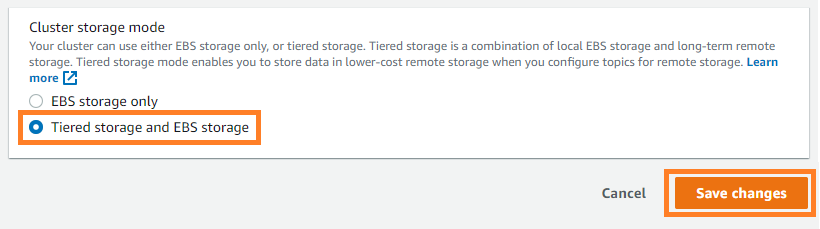
- Tiered Storage: For use cases requiring very long or "unlimited" retention, MSK offers Tiered Storage. This feature automatically moves older data from the primary EBS storage to a low-cost, virtually unlimited storage tier (built on S3) while keeping recent data on the high-performance EBS volumes. This is a highly cost-effective solution for long-term archival and replay scenarios.
3. A Practical Walkthrough
Now that we've covered the theoretical aspects of sizing, let's see how these choices translate to the AWS Management Console.
The following video from AWS provides a concise demonstration of the custom cluster creation process. As you watch, try to connect each configuration step to the sizing decisions we've just discussed.
Get Started with Amazon Managed Streaming for Apache Kafka (MSK) | Amazon Web Services
This short official video, 'Get Started with Amazon Managed Streaming for Apache Kafka (MSK)', demonstrates the key steps of provisioning a cluster using the custom creation method.
Watch from 00:58 to 03:13. Observe the sequence of configuration choices: Cluster type: 'Provisioned' is selected. Broker configuration: Selecting the broker type (instance size) and number of brokers per AZ. Storage: Specifying the EBS storage volume per broker. Networking: Choosing the VPC and subnets (ensuring they span multiple AZs for high availability). Security: Creating and attaching security groups (we will cover this in more detail in the next lesson).
4. Key Best Practices for the Exam
When analyzing an exam question about MSK configuration, keep these best practices in mind:
- Monitor CPU Usage: Maintain broker CPU utilization below 60% to leave headroom for operational events like broker replacements or rolling upgrades. If CPU is consistently high, scale up to a larger broker type.
- Monitor Disk Space: Set up CloudWatch alarms for the
KafkaDataLogsDiskUsedmetric. If it exceeds 85%, you should increase your storage, reduce the data retention period, or delete unused topics. - High Availability is Non-Negotiable: For any production scenario, assume a 3-AZ deployment with a replication factor of 3 and
min.insync.replicasset to 2.
Test your understanding!
A company is migrating its on-premises Kafka cluster to AWS MSK. Their workload consists of 200 MB/sec of incoming data, which must be retained for 14 days. The cluster serves 5 different consumer groups. The company prioritizes high availability and wants to follow AWS best practices.
What are the three most important factors you would consider when configuring their MSK Provisioned cluster?
Show answer
Here are the three most important factors:
- Broker Sizing (Scaling Up vs. Out): You need to determine the right balance between broker size and count to handle 200 MB/sec. Using the right-sizing blog's principles, you would evaluate if a smaller number of large brokers (e.g., 3 x
kafka.m7g.4xlarge) or a larger number of smaller brokers (e.g., 6 xkafka.m7g.2xlarge) is more cost-effective and performant. The 5 consumer groups will influence the required EC2 network egress, likely favoring larger broker types (scaling up). - Storage Calculation: You must provision enough storage. The total required storage is
200 MB/s * 3600 s/hr * 24 hr/day * 14 days ≈ 242 TB. This total storage needs to be distributed across the brokers. For example, on a 3-broker cluster, each broker would need at least 81 TB of EBS storage. This makes a strong case for evaluating Tiered Storage if long-term cost is a concern. - High Availability Configuration: You must deploy the cluster across 3 Availability Zones. This means the broker count must be a multiple of 3. You would also ensure all critical topics are created with a
replication-factorof 3 andmin.insync.replicasof 2 to survive an AZ failure.
Conclusion
You now have a solid understanding of how to configure a provisioned Amazon MSK cluster. We've moved beyond a simple "what is MSK" to the practical engineering decisions required to build a robust and well-sized streaming platform.
Key Takeaways:
- Configuring an MSK Provisioned cluster involves a trade-off between performance, cost, and availability.
- Scaling Up (larger brokers) is ideal for CPU/memory-intensive workloads or when you need higher network throughput for many consumers.
- Scaling Out (more brokers) is a common way to increase the overall ingest/egress capacity of the cluster.
- Storage is a function of your throughput and retention period. Tiered Storage is a key feature for cost-effective long-term retention.
- Always design for high availability by using 3 AZs and a replication factor of 3 for production workloads.
In our next lesson, we will build upon the cluster we've conceptually designed today. We'll focus on a critical next step: implementing security for MSK clusters, including encryption and IAM client authentication.