Hello! Welcome to the first lesson in our "Data Governance and Auditing" module.
In the previous module, we focused on optimizing and troubleshooting data pipelines, culminating in how to analyze slow-running queries in Athena. Now, we shift our focus from the performance of your data systems to their governance. This is a critical area for data engineers, ensuring that data is managed securely, cost-effectively, and in compliance with regulations. For the AWS Data Engineer certification, governance questions are central to many scenario-based problems.
Today's lesson addresses the learning outcome: Apply data classification and tagging to AWS resources for governance purposes. We will explore how to establish a clear data classification framework and use AWS tags as the mechanism to enforce governance policies for security, cost management, and automation.
1. The Foundation: Data Classification
Before you can govern your data, you must first understand what it is and how sensitive it is. This process is called data classification. It involves categorizing data based on its type, sensitivity, and business value to determine the appropriate level of protection and handling.
A robust classification framework is the bedrock of any data governance strategy. To understand this better, let's look at an AWS guide that outlines a practical approach.
Automation, tagging, and lifecycle strategy – Part 1
The article 'Implementing data governance on AWS: Automation, tagging, and lifecycle strategy – Part 1' provides an excellent overview of building a governance framework. We'll start with the section on data classification.
Please read the section titled 'The foundation: Data classification framework.' Pay close attention to: The reference to the NIST framework (categorizing based on impact to confidentiality, integrity, and availability). The example of how a company might classify its data (e.g., L1, L2, L3).
As the article explains, a simple but effective classification scheme might look like this:
- L3: Highly Sensitive/Restricted: Data that, if compromised, would cause severe damage. This includes Personally Identifiable Information (PII), financial records, or regulated data (PCI, HIPAA). Requires the strictest access controls and encryption.
- L2: Sensitive/Confidential: Internal data that is not for public disclosure, like business plans or internal sales figures. Requires strong access controls.
- L1: Public/Unclassified: Data that can be freely shared without risk, such as marketing materials or public documentation.
To automate the discovery of sensitive data, especially in a large S3-based data lake, AWS provides Amazon Macie. Macie uses machine learning to automatically discover, classify, and help you protect sensitive data like PII. It's a key service to know for data governance scenarios on the exam.
2. From Classification to Governance: The Tagging Strategy
Once you have a classification framework, you need a way to apply these labels to your AWS resources. This is where tagging comes in. Tags are simple key-value pairs that you attach to resources, acting as metadata that enables powerful governance mechanisms.
A well-designed tagging strategy is fundamental for:
- Cost Allocation: Tracking costs by department, project, or environment.
- Automation: Triggering automated actions, such as starting/stopping instances or applying specific backup policies.
- Access Control: Defining IAM policies that grant permissions based on tags.
- Compliance & Auditing: Identifying resources that fall under specific compliance regimes (e.g., GDPR, SOX).
Let's return to the AWS blog post to see how to structure a formal tagging strategy.
Automation, tagging, and lifecycle strategy – Part 1
This section of the same article details how to create and enforce a tagging strategy.
Now, read the section 'Your tag governance strategy.' Focus on: The example tagging strategy with 'MandatoryTags' (like DataClassification, DataOwner, Environment) and 'OptionalTags'. The mention of AWS Organizations tag policies for standardizing tags across multiple accounts.
Enforcing Your Tagging Strategy
Defining a strategy is the first step; enforcing it is what makes it effective. AWS provides several tools for this:
- AWS Organizations Tag Policies: These policies don't attach tags themselves, but they define rules for which tags can be used on resources within the accounts of your organization. For example, you can mandate that the
Environmenttag must have a value of eitherProd,Dev, orTest. This ensures consistency.
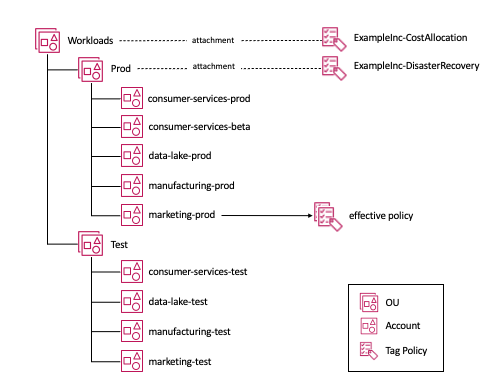
*This diagram illustrates how Tag Policies in AWS Organizations are attached to Organizational Units (OUs) and cascade down to member accounts, creating a consistent 'effective policy' for resources.*
2. AWS Config and Automated Remediation: AWS Config can be used to continuously monitor whether your resources comply with your tagging policies. If a resource is found to be non-compliant (e.g., an S3 bucket is created without a DataClassification tag), AWS Config can trigger an action, such as an AWS Lambda function, to either notify an administrator or automatically add the required tag.
3. A Practical Application: Tag-Based Access Control in AWS Lake Formation
One of the most powerful applications of tagging for a data engineer is controlling access to data within a data lake. Since you have experience with Athena, you'll appreciate how this simplifies permission management at scale.
Traditionally, you might grant an IAM user access to specific tables by name. This becomes unmanageable in an environment with thousands of tables and hundreds of users. AWS Lake Formation Tag-Based Access Control (TBAC) solves this by letting you manage permissions through tags.
The core idea is simple:
- Define policy tags (called LF-Tags) in Lake Formation (e.g., a tag key
access-levelwith valuespublic,confidential,pii). - Grant permissions to principals (users/roles) on the tags. For example, you grant the
Analytics-RoleSELECTaccess on the tagaccess-level: public. - Assign these LF-Tags to your data resources (databases, tables, or even individual columns).
The permissions are then enforced automatically. If a table is tagged with access-level: public, the Analytics-Role can query it. This decouples permission management from the resources themselves.
To understand this concept clearly, let's watch a short explanatory video.
Lake Formation: Managing Permissions Through LF-Tags
The video 'Lake Formation: Managing Permissions Through LF-Tags' from the DataEng Uncomplicated channel provides a concise and clear explanation of what LF-Tags are and why they are superior to name-based permissions.
Please watch from the beginning to 06:09. Focus on understanding: The difference between name-based and tag-based access control. How LF-Tags can be applied at the database, table, and even column level. Why this model is far more scalable and manageable in a large organization.
Now that you understand the concept, let's see how to implement it in the AWS console. The next video provides a full, practical walkthrough.
AWS Tutorials - AWS Lake Formation - Tag Based Access Control
This 'AWS Tutorials' video provides a step-by-step demonstration of setting up Tag-Based Access Control in Lake Formation. This will solidify your understanding of the end-to-end process.
Watch the video, paying close attention to the demonstration segments. The key steps to observe are: Defining Policy Tags (e.g., department with values sales_team, customer_service) (05:52). Granting Data Permissions on these tags to IAM roles/users (22:38). Associating Policy Tags with data catalog resources (tables) (25:45 - The video implies this step after granting permissions, as the tags are assigned to tables via the Glue/Lake Formation console). Verifying Access by logging in as different users to see that they can only access the tables corresponding to their tags (28:37).
This approach allows you to build a sophisticated, scalable governance model. For instance, you can tag columns containing PII with a sensitivity: pii tag and grant access only to a highly privileged HR-Compliance role, while all other roles are denied access to those specific columns, even if they can see the rest of the table.
Test your understanding!
You are a data engineer for a company with a central data lake. You have a transactions table that contains customer_id, order_amount, and credit_card_number columns. You need to grant access to two groups:
Finance-Auditors: Needs access to all columns for fraud detection.Marketing-Analysts: Should be able to analyze order amounts but must NOT see thecredit_card_number.
Using AWS Lake Formation's Tag-Based Access Control (TBAC), how would you design a solution? Describe the LF-Tags you would create and the permissions you would grant.
Show answer
Here is a possible solution using LF-TBAC:
-
Create LF-Tags:
- Create a tag key named
sensitivity. - Give it two possible values:
generalandpii.
- Create a tag key named
-
Assign Tags to Resources:
- In Lake Formation, navigate to the
transactionstable. - Assign the tag
sensitivity: generalto thecustomer_idandorder_amountcolumns. - Assign the tag
sensitivity: piito thecredit_card_numbercolumn.
- In Lake Formation, navigate to the
-
Grant Permissions on Tags:
- Grant the
Finance-AuditorsroleSELECTpermissions on both tags (sensitivity: generalANDsensitivity: pii). This gives them access to all columns. - Grant the
Marketing-AnalystsroleSELECTpermissions on only thesensitivity: generaltag.
- Grant the
Result: When a user from the Marketing-Analysts group runs SELECT * FROM transactions, Lake Formation will enforce the permissions. They will see data from the customer_id and order_amount columns, but the credit_card_number column will be hidden or inaccessible to them.
Conclusion
You have now learned the foundational principles of data governance on AWS. By starting with a clear classification framework and implementing a robust tagging strategy, you can enable powerful mechanisms for cost control, automation, and security.
Key Takeaways:
- Data Classification is the process of categorizing data based on sensitivity and business value, forming the foundation of your governance strategy.
- Tagging is the primary mechanism for applying classification labels and other metadata to AWS resources to enable governance.
- A formal Tagging Strategy, enforced using tools like AWS Organizations Tag Policies and AWS Config, ensures consistency and compliance at scale.
- Lake Formation TBAC is a critical application of tagging for data engineers, providing a scalable and granular way to manage permissions on databases, tables, and columns within the data lake.
Next Up:
In our next lesson, we will build directly on this foundation of governance. We will move from controlling access to data to controlling the quality of the data itself. You will learn how to "Configure AWS Glue Data Quality rules for automated data validation within pipelines." This will show you how to programmatically ensure that the data flowing through your ETL jobs meets predefined business and quality standards.