Hello! Welcome to your next lesson in the "Scalable ETL with AWS Glue" module.
In our previous lessons, we focused on the "first mile" of data engineering in AWS: cataloging our data. We learned how to use AWS Glue Crawlers with both built-in and custom classifiers to automatically discover and register the schema of our data in the Glue Data Catalog. Now that our data is cataloged and understood, we can move to the core of any ETL workflow: the Transform step.
Today's lesson will focus on this crucial stage. Our learning outcome is to design a Glue ETL job using the Spark environment for scalable data transformation. You will learn how to write the code that reads data from a source, applies business logic to clean, reshape, and enrich it, and then writes the result to a destination. This is a fundamental skill for the AWS Data Engineer certification exam and for building robust data pipelines.
1. The Anatomy of an AWS Glue ETL Job
At its heart, an AWS Glue ETL job is a script that runs in a fully managed Apache Spark environment. Given your background in computer science, you can think of Glue as providing "Spark-as-a-Service." You write the transformation logic in PySpark (Python for Spark), and AWS automatically provisions and manages the underlying server cluster to execute your code at scale.
This serverless approach is a key benefit, allowing you to focus on the data logic rather than infrastructure management.
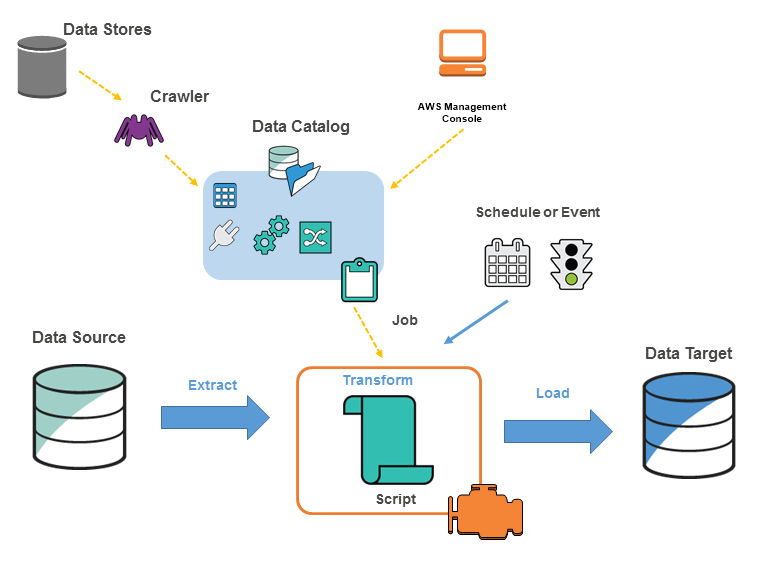
A typical Glue ETL script consists of three main parts:
- Extract: Reading data from a source (like S3) into memory.
- Transform: Applying a series of transformations to the data.
- Load (Sink): Writing the transformed data to a target (like a different S3 location).
To get a better sense of how these parts are represented in code, let's start with a short official video and some documentation.
Getting Started with AWS Glue ETL
This brief video from Amazon Web Services demonstrates the process of creating a simple Glue job. Pay attention to how the visual interface generates a PySpark script behind the scenes.
Watch the following segments: Creating a Job (01:39 - 02:57): Notice the key parameters: the job name, IAM role, source table from the Data Catalog, and the target location/format. Mapping and Schema (02:57 - 03:35): See how the script maps source columns to target columns and allows for simple transformations like dropping fields. The Generated Script (03:35 - 05:32): This is the most important part. Observe the PySpark script that Glue generates. You'll see function calls for reading, transforming, and writing data. This is the code we will be learning to write and modify ourselves.
The script generated in the video uses special libraries provided by AWS Glue. Let's look at the foundational components of a Glue script.
Tutorial: Writing an AWS Glue for Spark script
This official AWS tutorial breaks down the essential boilerplate and steps of a Glue script. Understanding these components is key to writing your own jobs.
Please read through these steps in the tutorial: Step 2: Import AWS Glue libraries: This section introduces the core objects: GlueContext, SparkContext, SparkSession, and Job. The GlueContext is particularly important as it's the main entry point for Glue-specific functions. Step 3: Extract data from a source: Focus on the create_dynamic_frame.from_catalog method. This is how a Glue job typically reads data that a crawler has already registered. Step 4: Transform data with AWS Glue: Learn about the DynamicFrame object and see an example of a built-in transform, ApplyMapping. Step 5: Load data into a target: Understand the write_dynamic_frame.from_options method, which is used to write data to a destination like S3. Step 6: Commit the Job object: This is an important final step, especially for features like job bookmarks which we'll cover later.
2. The Core Abstractions: DynamicFrame vs. Spark DataFrame
As you saw in the documentation, AWS Glue introduces a special data structure called a DynamicFrame. This is a central concept you must understand.
DynamicFrame: An AWS Glue abstraction built on top of a SparkDataFrame. Its key feature is flexibility. In aDynamicFrame, each record is self-describing. This allows it to gracefully handle messy, semi-structured data where schemas might vary from row to row (e.g., a column could be a string in one record and an integer in another). Glue represents this ambiguity with aChoiceType.- Spark
DataFrame: The standard data structure in Apache Spark. It's analogous to a table in a relational database or a pandas DataFrame. It requires a single, consistent schema for all rows in the dataset. It offers the full, rich API of Spark for complex transformations, including SQL queries, aggregations, and window functions.
The power of Glue scripting comes from knowing when to use each and how to move between them.
| Feature | DynamicFrame (AWS Glue) |
DataFrame (Apache Spark) |
|---|---|---|
| Schema | Flexible, per-record schema. Handles inconsistencies with ChoiceType. |
Rigid, one schema for the entire dataset. |
| Primary Use Case | Robust data ingestion, schema discovery, and simple ETL transforms. | Complex data analysis, aggregations, joins, and advanced transformations. |
| API | AWS Glue-specific transform library (e.g., ApplyMapping, ResolveChoice). |
Full Apache Spark API (e.g., select, groupBy, withColumn, SQL queries). |
| Conversion | my_dynamic_frame.toDF() -> DataFrame |
DynamicFrame.fromDF(my_dataframe, ...) -> DynamicFrame |
Best Practice Workflow:
- Extract: Use
glueContext.create_dynamic_frame...to read data into aDynamicFramefor robust ingestion. - Transform:
- For simple tasks (renaming, dropping columns, type casting), use
DynamicFrametransformations. - For complex logic (complex joins, aggregations), convert to a Spark
DataFrameusing.toDF(). Perform your transformations.
- For simple tasks (renaming, dropping columns, type casting), use
- Load: Convert the final Spark
DataFrameback to aDynamicFrameusingDynamicFrame.fromDF()before writing to leverage Glue's optimized writers and integration with features like job bookmarks.
Test your understanding!
You need to perform an ETL job that joins a customer dataset with an orders dataset, calculates the total spending per customer for the last 90 days, and ranks customers by their total spending. Which data structure (DynamicFrame or Spark DataFrame) would be more suitable for the core transformation logic (joining, aggregation, ranking)? Why?
Show answer
The Spark DataFrame is the more suitable choice. The task requires a join, a groupBy aggregation (to calculate total spending), a filter (for the last 90 days), and a window function (for ranking). These are all complex operations that are directly and efficiently supported by the rich Spark DataFrame API and Spark SQL, whereas they are not native to the simpler DynamicFrame API. You would read both sources into DynamicFrames, convert them to DataFrames to perform the logic, and then convert the final result back to a DynamicFrame to write it out.
3. Practical Transformations with PySpark and Glue
Now, let's walk through the code for these concepts. The following video is a comprehensive tutorial that covers reading data, performing transformations with both DynamicFrames and Spark DataFrames, and writing the results. We will break it down into manageable chunks.
To get the most out of it, you can follow along in an AWS Glue interactive session or a notebook, which provides a live environment for running this code.
PySpark For AWS Glue Tutorial [FULL COURSE in 100min]
This detailed course from Johnny Chivers will serve as our hands-on lab. It demonstrates the PySpark syntax for the entire ETL process within a Glue environment.
Watch the following segments to see how to implement an ETL job from start to finish. The video uses a Glue Interactive Session notebook, which is a best practice for developing and testing jobs. Contexts and DynamicFrames (10:45 - 15:20): Pay close attention to the explanation of SparkContext vs. GlueContext and the introduction of the DynamicFrame. This reinforces the theory from our documentation reading. Reading Data (15:20 - 18:43): See the create_dynamic_frame.from_catalog method in action. This is the 'Extract' step, pulling data based on metadata in the Glue Data Catalog. Basic DynamicFrame Transforms (20:04 - 28:55): Watch how to perform common, simple transformations directly on a DynamicFrame, such as printSchema(), count(), select_fields(), and drop_fields(). Renaming Columns with apply_mapping (28:55 - 37:34): This is a very common transformation. Observe the syntax for apply_mapping, which is Glue's primary method for renaming columns and changing data types. Converting to a Spark DataFrame (58:36 - 01:02:52): This is a critical transition. See how the .toDF() method is used and understand the rationale for when and why you would do this. Advanced DataFrame Transforms (01:02:52 - 01:19:15): Now in the Spark world, watch how to perform more powerful transformations like selecting columns (.select()), adding new columns (.withColumn()), concatenating fields (concat()), grouping and aggregating (.groupBy().count()), and filtering (.where()). This demonstrates the power you unlock by switching to a DataFrame. Joining DataFrames (01:19:15 - 01:24:28): See how to perform inner and left joins, a fundamental operation in most ETL pipelines that is best handled with DataFrames. Writing Data Back (01:24:28 - 01:35:23): Finally, observe the best practice of converting the processed Spark DataFrame back into a DynamicFrame before using Glue's optimized methods (write_dynamic_frame) to write the data to S3 and the Data Catalog. This is the 'Load' step.
4. Designing for Scale
The "scalable" part of our learning outcome is crucial. Writing a script that works on 1,000 rows is easy; ensuring it performs well on 1 billion rows requires thoughtful design. Here are some key best practices for designing scalable Glue jobs.
Best practices - AWS Prescriptive Guidance
This AWS Prescriptive Guidance document outlines several best practices for writing high-performance Glue jobs. Let's focus on a few that are most relevant to our current topic.
Please read the following sections: Use partitioning to query exactly what you need: Understand that partitioning your output data (e.g., by date) is a critical optimization. It allows downstream processes (including other Glue jobs or Athena queries) to read only the data they need, dramatically reducing scan times and costs. Use efficient data storage formats: This confirms a universal big data principle. Writing your output in a columnar format like Apache Parquet (instead of CSV or JSON) leads to significant performance gains and storage savings. Use the appropriate type of scaling: Get familiar with the difference between horizontal scaling (adding more worker nodes for parallelizable, compute-intensive tasks) and vertical scaling (using more powerful worker nodes for memory-intensive transformations).
Conclusion
Congratulations! You've just walked through the entire lifecycle of designing and implementing a scalable ETL job in AWS Glue. This process is the engine of a modern data lakehouse architecture on AWS.
Key Takeaways:
- An AWS Glue ETL job is a PySpark script that runs in a managed Spark environment.
- The core script structure is Extract, Transform, Load.
- Glue provides a special
DynamicFrameobject, which is excellent for robust data ingestion due to its schema flexibility. - For complex transformations like joins, aggregations, and window functions, it's best to convert to a standard Spark
DataFrameto use the full power of the Spark API. - The best practice is to read into a
DynamicFrame, convert to aDataFramefor complex logic, convert back to aDynamicFrame, and then write to your target. - To design for scale, always partition your output data and use columnar formats like Parquet.
Next Up:
In this lesson, we saw a variety of transformations on both DynamicFrames and DataFrames. In the next lesson, we will do a deeper dive specifically into the powerful transformations available for DynamicFrames to handle the challenges of semi-structured data, building directly on what we've learned today.