Hello! Welcome back to our module on AWS Glue.
In our last lesson, we established the AWS Glue Data Catalog as the central metadata repository for a data lake. We saw how it's organized into databases and tables, and we even manually created a table to understand that it's fundamentally a collection of metadata—like schema, location, and format—that points to your data in S3.
While creating tables manually is insightful, it's not practical at scale. Today, we'll tackle the automated solution. Our learning outcome is to create and run AWS Glue Crawlers to discover and catalog data schemas. This is one of the most fundamental and frequently used features of AWS Glue, and mastering it is essential for the Data Engineer certification and for building efficient data pipelines.
1. What is an AWS Glue Crawler?
In the simplest terms, a Glue Crawler is an automated program that connects to your data stores (like Amazon S3 or a relational database), scans your data, and automatically determines its schema. It then creates or updates tables in your Glue Data Catalog with this discovered metadata.
Think of it as a librarian who can read every book in a new shipment, figure out its genre, title, and author, and create a perfectly organized card catalog entry for it, all without you having to provide any instructions beyond pointing them to the shipment.
The workflow is as follows:
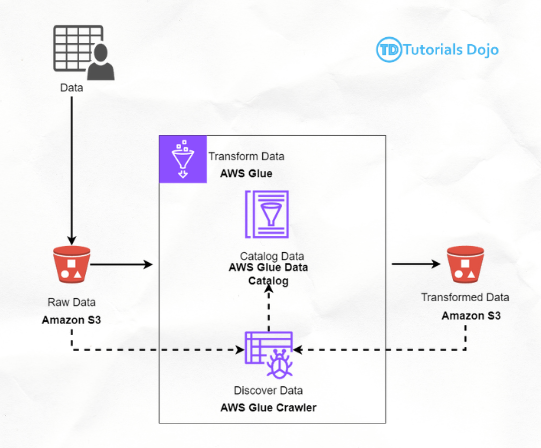
A crawler's core process involves a few key steps:
- Connecting to the data source you specify.
- Classifying the data to determine its format (e.g., CSV, JSON, Parquet) and inferring its schema (column names and data types).
- Grouping similar data into tables.
- Writing the metadata to the Glue Data Catalog.
For a concise definition of a crawler and its place in the AWS data ecosystem, let's revisit the 'Data Cataloguing in AWS' article we looked at in the last lesson.
Read the subsections 'AWS Glue Crawler' and 'AWS Glue Data Catalog'. This will reinforce how the crawler scans S3 files and uses the inferred schema to populate the catalog, making the data queryable by services like Athena.
2. How a Crawler Works: Classifiers and Configuration
The "magic" of a crawler lies in its use of classifiers. When a crawler scans your data, it uses an ordered list of classifiers to try and understand the data's format and schema.

There are two types of classifiers:
- Built-in Classifiers: AWS Glue provides these for common file types like CSV, JSON, Parquet, Avro, and various log formats. The crawler will try these in a specific order.
- Custom Classifiers: You can create your own classifiers to handle non-standard or proprietary data formats that the built-in classifiers can't recognize. We'll cover this in our next lesson.
A classifier returns a "certainty" score. If it's 100% certain it recognized the format (certainty = 1.0), the crawler uses that classification. If not, it moves to the next classifier in the list.
3. Creating and Configuring a Glue Crawler
Let's get practical. Creating a crawler involves guiding it through a wizard in the AWS Management Console. We'll walk through the main steps.
The official AWS documentation provides a tutorial with a public S3 bucket, which is perfect for a hands-on exercise.
Tutorial: Adding an AWS Glue crawler
Let's follow the official AWS tutorial to create your first crawler. This text-based guide is precise and easy to follow in your own AWS account.
Follow 'Step 1: Add a crawler' in the documentation. This will guide you through all the necessary configurations in the AWS console, including specifying the crawler name, the public S3 data source, creating an IAM role, and setting the output database.
To complement the text guide, watching a video demonstration can clarify each configuration step.
AWS Glue Crawler Tutorial with Hands On Lab | AWS Glue Tutorials | AWS Glue Hand-On Tutorial
This video provides a clear, hands-on demonstration of the crawler creation process, explaining the importance of each setting.
Watch the segment from 00:10:39 to 00:16:46. As the presenter goes through the wizard, pay special attention to these crucial, exam-relevant configurations: Data store: Pointing to the correct S3 path. IAM Role: Granting permissions for the crawler to access S3 and write to Glue. Output configuration: This is where you control how the crawler behaves regarding schema evolution and grouping.
Let's summarize the key configuration choices you just saw:
- Crawler source type: Usually
Data storesfor sources like S3. - Data store: The S3 path, JDBC connection, or DynamoDB table to scan.
- IAM Role: This is a critical security component. The crawler needs permissions to
s3:GetObjectands3:ListBucketfor the data source, andglue:*permissions to create and update the Data Catalog. The console can conveniently create a role with the necessary policies for you. - Schedule: You can run it
On demandor on a recurring schedule (hourly, daily, or using a cron expression). - Output Database: The Glue database where the discovered table(s) will be created.
- Grouping behavior for S3 data: If you have multiple files in a folder with slightly different schemas, this option tells the crawler whether to create one table (by merging schemas) or multiple tables.
Create a single schema for each S3 pathis the most common setting to avoid an explosion of tables. - Crawler update/delete behavior: You define how the crawler handles changes:
- Schema Changes: Should it update the table definition, add new columns only, or ignore changes?
- Deleted Objects: Should it delete the table, mark it as deprecated, or do nothing if the source data disappears?
Test your understanding!
You are a data engineer responsible for a data lake. A new data source provides daily files to an S3 bucket. The provider has warned you that they may occasionally add new, non-critical columns to the files in the future, but they will never remove existing ones.
How should you configure your Glue Crawler to handle this situation automatically and ensure your downstream jobs don't break?
Show answer
You should configure the crawler's schema update behavior to "Add new columns only". This ensures that when the crawler detects new columns, it will add them to the table definition in the Data Catalog. Existing columns will remain unchanged.
This is preferable to "Update the table definition," which could potentially alter or remove columns if the schema inference changes, and it's better than "Ignore the change," which would leave your metadata stale and unaware of the new data.
4. Running the Crawler and Managing Schema Evolution
Once your crawler is created, you run it. The crawler will then perform its scan and, upon completion, report how many tables were created or updated.
Tutorial: Adding an AWS Glue crawler
Let's continue with the AWS tutorial to run the crawler and verify its results.
Now, follow 'Step 2: Run the crawler' and 'Step 3: View AWS Glue Data Catalog objects'. This will show you how to start the on-demand crawler and then inspect the table and schema that it automatically created in your Data Catalog. You'll see the column names and data types that Glue inferred from the sample CSV files.
The real power of crawlers becomes apparent when managing a dynamic data lake where data and schemas change. This is known as schema drift or schema evolution.
AWS Glue Crawler Tutorial with Hands On Lab | AWS Glue Tutorials | AWS Glue Hand-On Tutorial
What happens when the underlying data files change? This video provides an excellent demonstration of how a crawler handles schema evolution.
Watch from 00:16:46 to 00:22:04. The presenter first runs the crawler and verifies the initial table. Then, he uploads a new file with an extra column and re-runs the crawler. Notice three key things: The crawler status shows '1 table updated'. The table schema in the Data Catalog now includes the new column. The 'Compare versions' feature is enabled, allowing you to see exactly what changed between crawler runs. This is invaluable for auditing and troubleshooting.
This ability to automatically adapt to schema changes makes crawlers an indispensable tool for maintaining an accurate and up-to-date Data Catalog with minimal manual intervention.
Conclusion
Today you've learned how to automate one of the most critical tasks in managing a data lake: cataloging your data. By using AWS Glue Crawlers, you can move away from manual, error-prone schema definition and embrace an automated, scalable approach.
Key Takeaways:
- Glue Crawlers automate the discovery of schemas in your data stores and populate the Glue Data Catalog.
- They use classifiers (built-in or custom) to recognize data formats like CSV, JSON, and Parquet.
- Key configurations include the data source, IAM role, schedule, and output behavior.
- Properly configuring how a crawler handles schema evolution and deleted objects is crucial for maintaining a robust data pipeline.
- Running a crawler results in one or more tables being created or updated in the Data Catalog, making your raw data instantly queryable by services like Amazon Athena.
Next Up:
We've seen how well crawlers work with standard formats. But what happens when you have a custom application log or a proprietary file format that Glue doesn't recognize out of the box? In our next lesson, we will learn how to implement custom classifiers for specialized data formats, effectively teaching the crawler to understand your unique data.