Hello! Welcome back.
In our last lesson, we dove into transforming data in-flight using AWS Lambda with Kinesis Data Firehose. We saw how to return a ProcessingFailed status for records that our function couldn't process. That naturally leads to the question: what happens to those failed records? A robust data pipeline must not lose data, even when things go wrong.
Today, we'll answer that question directly. The learning outcome for this lesson is to configure error handling for Firehose delivery streams using an S3 backup location. This is a critical feature for building resilient, auditable, and debuggable data pipelines, and it's a key topic for the certification exam.
1. The "Safety Net": S3 Backup in Firehose
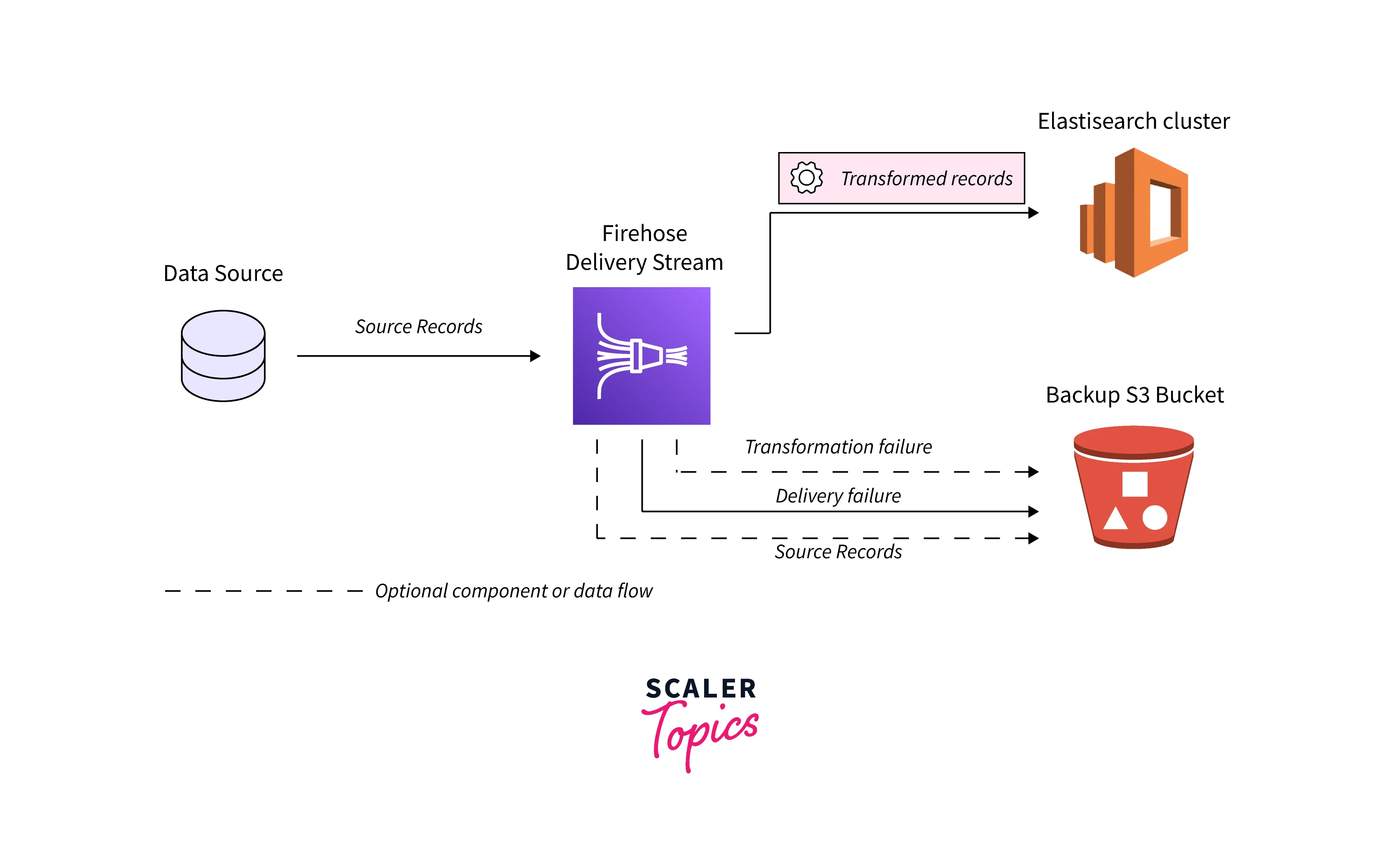
In any data pipeline, failures are inevitable. A Lambda function might encounter malformed data, a destination like an OpenSearch cluster could be temporarily unavailable, or network issues could disrupt communication. Kinesis Data Firehose provides a built-in "safety net" to handle these situations: backing up data to an Amazon S3 bucket.
This mechanism addresses two primary types of failures:
- Data Transformation Failures: Occurs when your integrated AWS Lambda function fails to process a record. This could be due to the function timing out or explicitly returning a
ProcessingFailedresult. - Data Delivery Failures: Happens when Firehose successfully transforms the data (if configured) but cannot deliver it to the final destination. This is common for destinations like Amazon OpenSearch Service, Redshift, Splunk, or other HTTP endpoints.
By configuring an S3 backup, you ensure data is not lost and can be analyzed or reprocessed later. Given your experience with S3, you'll recognize this as a standard pattern for durability.
2. Configuring the Backup Destination
Setting up error handling is a core part of creating a Firehose delivery stream. The following AWS documentation outlines the specific settings available.
Configure backup settings - Amazon Data Firehose
The official documentation, 'Configure backup settings', details the options for S3 backup. It's important to understand these for both practical implementation and the exam.
Read the introduction and the sections detailing the backup settings and options for buffering, compression, and encryption. Focus on: The difference between backing up 'all' source data versus 'failed only' data. The purpose of the 'S3 backup bucket prefix' and 'S3 backup bucket error output prefix'. The available compression and encryption options for the backup data.
As you've read, the key configuration choices are:
-
Source Record Backup: You decide what to back up.
- Failed data only: This is the most common choice for error handling. Firehose sends only the records that failed transformation or delivery to your S3 bucket.
- All records: This option backs up every original record sent to the stream, regardless of success or failure. This can be useful for auditing, compliance, or having a complete raw data archive for future reprocessing, but it incurs higher S3 storage costs.
-
S3 Backup Location: You specify the exact location in S3.
- S3 backup bucket: The bucket where backup files will be stored.
- S3 backup prefix: An optional folder path within the bucket (e.g.,
firehose-backups/my-stream/). This is essential for organizing backups from different streams. Firehose will automatically add a time-based prefix (e.g.,YYYY/MM/DD/HH/) to this, making it easy to locate failures from a specific time window. - S3 backup error output prefix: This is where Firehose writes files containing details about the failure, such as the error message and the time of the attempt. The documentation notes that failed data is backed up here, providing a specific location for debugging.
Like the primary S3 destination, you can also configure buffering, compression (GZIP, Snappy, etc.), and server-side encryption (SSE-KMS) for your backup data. This allows you to optimize storage costs and secure your failed-record data.
3. Destination-Specific Failure Handling
While the S3 backup mechanism is the ultimate safety net, Firehose's behavior before it gives up and writes to S3 can vary depending on the destination. It's crucial to understand these nuances.
Handle data delivery failures - Amazon Data Firehose
The 'Handle data delivery failures' documentation explains the specific retry logic for different destinations. This is a common area for exam questions that test your detailed knowledge.
Read the introduction and the sections for Amazon S3, Amazon Redshift, OpenSearch Service, Splunk, and Snowflake. As you read, create a mental model for each one: Does it retry? For how long? What exactly gets backed up to S3? Is it the data itself or a manifest file?
Let's summarize the key patterns from the documentation:
-
Amazon S3 Destination: Error handling is straightforward. Since S3 is highly available, "delivery failures" are rare. Backup is primarily triggered by Lambda transformation failures or data format conversion failures (e.g., converting to Parquet). In other cases, Firehose will retry delivery to S3 until the data retention period expires (24 hours).
-
OpenSearch, Splunk, HTTP Endpoints, Snowflake: For these destinations, Firehose follows a retry-then-backup model.
- Firehose attempts to deliver a batch of data.
- If the delivery fails (e.g., connection timeout, destination error), it retries for a configurable retry duration (e.g., 0-7200 seconds).
- If all retries within this duration fail, Firehose gives up and writes the batch of data to your S3 backup bucket under the configured prefix. The backup record includes error details, helping you diagnose the root cause.
-
Amazon Redshift Destination: This is a special case. The delivery process is a two-step
S3 -> Redshiftcopy.- Transformation Failures: If a Lambda transformation fails, the original record is sent to the S3 backup bucket, just like with other destinations.
- Loading (
COPY) Failures: If Firehose successfully delivers data to its staging S3 bucket but theCOPYcommand into Redshift fails for some objects, it does not back up the raw data again. Instead, it writes a manifest file to theerrors/folder of the staging S3 bucket. This manifest file lists the S3 objects that failed to load, allowing you to manually trigger theCOPYcommand for investigation.
Test your understanding!
You have a Kinesis Data Firehose stream configured to deliver data to an Amazon OpenSearch Service cluster. The stream is configured with a 5-minute (300 seconds) retry duration and an S3 bucket for backing up failed data.
Due to a misconfiguration, the OpenSearch cluster is unreachable. What is the sequence of events for a batch of data sent through Firehose, and where would you ultimately find this data to recover it?
Show answer
- Firehose receives the batch of data and attempts to deliver it to the OpenSearch cluster.
- The delivery attempt fails because the cluster is unreachable.
- Firehose begins retrying the delivery. It will continue to retry for the configured duration of 5 minutes.
- After 5 minutes of unsuccessful retries, Firehose will stop trying to deliver to OpenSearch.
- It will then write the entire batch of data as an object (or objects) to the configured S3 backup bucket, under the specified prefix and a time-based folder structure. You would recover the data from this S3 location for reprocessing.
Conclusion
You have now learned how to build resilient Kinesis Data Firehose streams by implementing a critical error handling pattern. By configuring an S3 backup location, you ensure that no data is lost during transformation or delivery failures, allowing for robust debugging and reprocessing.
Key Takeaways:
- Central Role of S3: S3 serves as the durable backup location for records that fail transformation or delivery.
- Configuration is Key: You must enable backup, choose between
Failed data onlyorAll records, and specify a bucket and prefix. - Destination-Specific Behavior: The retry logic varies by destination. S3 destinations primarily back up on transformation failure, while others (like OpenSearch) follow a retry-then-backup model. Redshift uses a manifest file for
COPYfailures. - Debugging and Recovery: The backup data is organized by time and includes error metadata, which is invaluable for troubleshooting your pipeline.
In the last few lessons, we've focused on configuring Firehose for delivery, transformation, and error handling. In our next lesson, we will shift our focus to operational excellence and troubleshooting. We will learn how to diagnose and resolve common streaming data issues, such as Kinesis hot shards.