Hello! Welcome back to our module on Amazon EMR.
In the previous lesson, we focused on configuring the compute layer of an EMR cluster, covering instance types, purchasing options, and auto-scaling. We established how to build a cluster that is both cost-effective and performant. Now that we know how to provision the cluster's resources, our next critical task is to secure them.
This lesson directly addresses the learning outcome: Configure EMR network security using security groups and VPC settings. We will explore how to isolate your EMR clusters within your own virtual network and use firewall rules to control exactly what traffic can get in and out. This is a fundamental skill for building secure and compliant data platforms on AWS.
1. Networking Foundations: VPCs and Subnets
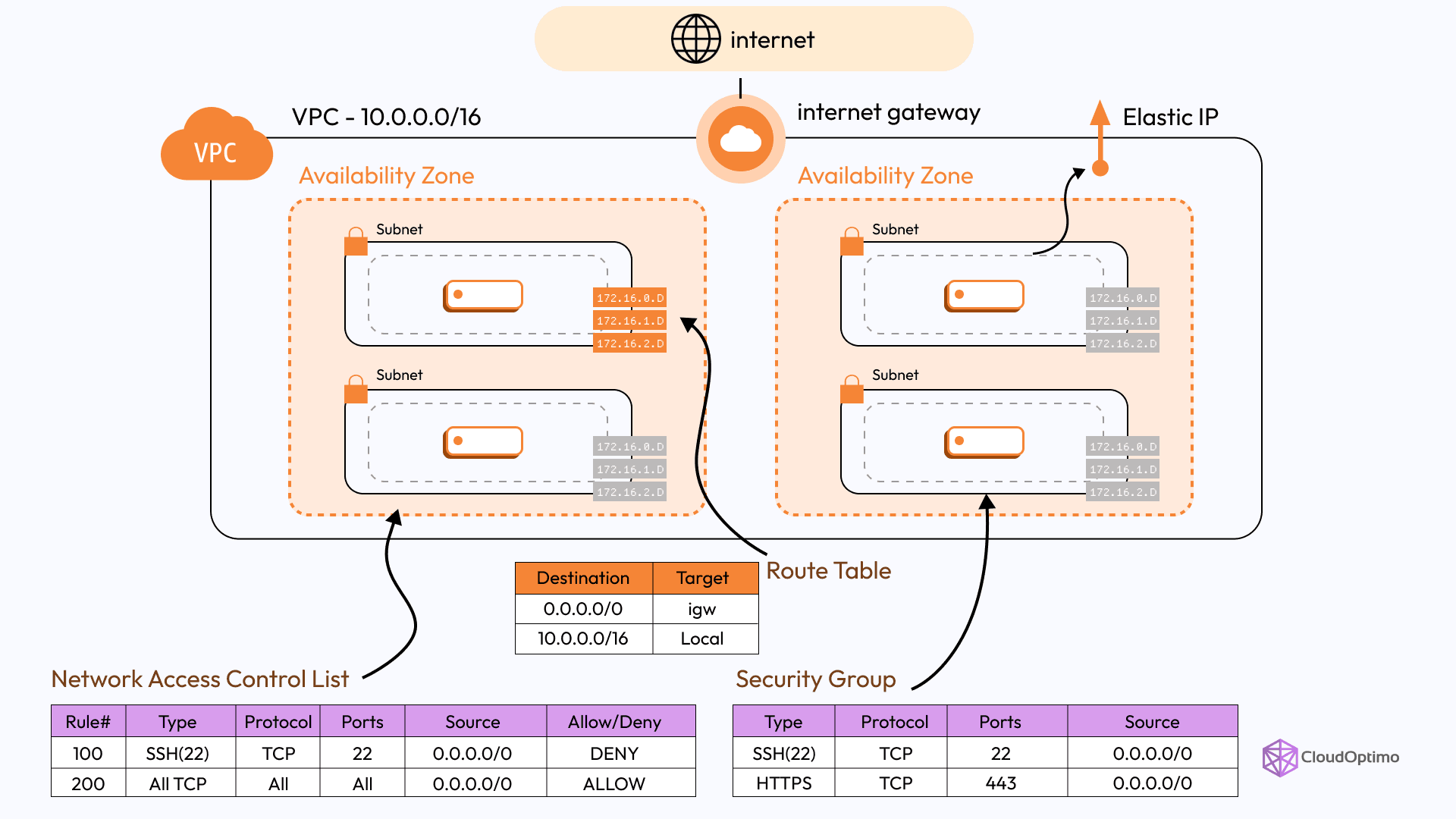
Before we can secure an EMR cluster, we must understand its networking environment. Every EMR cluster is launched within an Amazon Virtual Private Cloud (VPC). A VPC is your own logically isolated section of the AWS Cloud where you can launch AWS resources in a virtual network that you define.
Given your background, you're likely familiar with general networking principles. Let's quickly refresh the core AWS components that are essential for EMR security.
To get a clear and concise overview of these concepts, please watch the following video.
AWS VPC & Subnets For Beginners
The video 'AWS VPC & Subnets For Beginners' by Sam Meech-Ward provides an excellent refresher on the foundational components of AWS networking.
Watch from the beginning to 02:44. Focus on understanding the definitions and roles of: VPC: The overall private network boundary. Subnets: The segments within a VPC, tied to a specific Availability Zone. Public vs. Private Subnets: The crucial distinction based on internet accessibility. Internet Gateway (IGW): The component that enables communication between your VPC and the internet.
To summarize the key components:
- VPC: A virtual network dedicated to your AWS account.
- Subnet: A range of IP addresses within your VPC.
- Public Subnet: A subnet whose traffic is routed to an Internet Gateway (IGW), allowing resources within it to be directly accessible from the internet.
- Private Subnet: A subnet that does not have a direct route to the internet. Resources here cannot be reached from the internet, and they typically access the internet (for software updates, etc.) via a NAT (Network Address Translation) Gateway located in a public subnet.
2. EMR Cluster Placement: Public vs. Private Subnets
When you launch an EMR cluster, you must choose a subnet. This choice has major security implications.
Amazon VPC options when you launch a cluster
The official AWS documentation, 'Amazon VPC options when you launch a cluster', clearly outlines the two primary deployment patterns for EMR. This will help you understand the 'why' behind each choice.
Please read the sections titled 'Public subnets' and 'Private subnets'. As you read, compare the two approaches, focusing on: How each subnet type connects to other AWS services (like S3) and the internet. The security groups used by default in each scenario. The strong recommendation to use VPC endpoints for Amazon S3 when deploying in a private subnet to avoid NAT Gateway data transfer costs.
Let's break down the key differences:
Public Subnet Deployment
- How it works: The EMR nodes are placed in a public subnet and assigned public IP addresses. They communicate with the internet and other AWS services via an Internet Gateway.
- Pros: Simpler to configure initially, especially for direct SSH access from your local machine.
- Cons: Less secure. The nodes are exposed to the public internet, making the security group configuration absolutely critical to prevent unauthorized access.
Private Subnet Deployment
- How it works: The EMR nodes are placed in a private subnet and only have private IP addresses. They are not directly accessible from the internet.
- Accessing AWS Services:
- To access S3, the best practice is to use a VPC Gateway Endpoint for S3. This keeps all traffic between your EMR cluster and S3 on the private AWS network, improving security and avoiding data transfer costs through a NAT Gateway.
- To access other AWS services or to download software updates, the cluster uses a NAT Gateway that resides in a public subnet.
- Pros: Significantly more secure. This is the recommended best practice for all production environments.
- Cons: More complex to set up. Requires configuring a NAT Gateway and potentially a "bastion host" (or "jump box") in a public subnet to allow you to SSH into the cluster for administrative purposes.

3. Securing Nodes with Security Groups
While subnets define the network-level isolation, Security Groups provide the instance-level firewall. A security group acts as a stateful firewall for its associated EMR nodes (which are EC2 instances), controlling both inbound and outbound traffic.
When you create an EMR cluster, AWS can automatically create and configure a set of EMR-managed security groups. The names and rules of these groups depend on whether you deployed into a public or private subnet.
Working with Amazon EMR-managed security groups
The AWS documentation 'Working with Amazon EMR-managed security groups' is the definitive guide to the rules EMR applies by default. Understanding these defaults is key to knowing how the cluster communicates and how to modify access securely.
Skim through this document to familiarize yourself with the different managed security groups. You don't need to memorize every rule, but focus on the following: The different group names for public vs. private subnets (e.g., ElasticMapReduce-primary vs. ElasticMapReduce-Primary-Private). The purpose of the ElasticMapReduce-ServiceAccess group in private subnets (it allows the EMR service itself to manage your cluster). The default inbound rules that allow communication between the primary and core/task nodes. This is essential for the cluster to function.
Key EMR-Managed Security Groups:
- For Public Subnets:
ElasticMapReduce-primary: For the primary node.ElasticMapReduce-core: For core and task nodes.
- For Private Subnets:
ElasticMapReduce-Primary-Private: For the primary node.ElasticMapReduce-Core-Private: For core and task nodes.ElasticMapReduce-ServiceAccess: Allows the EMR service in AWS's account to communicate with your nodes in the private subnet.
These groups are created with rules that allow all necessary internal communication for services like HDFS and YARN to work correctly. Your main job is to manage external access.
Configuring SSH Access: A Practical Example
A common task is to securely connect to the primary node using SSH for troubleshooting or submitting jobs. The worst practice is to open port 22 to the world (0.0.0.0/0). The best practice is to restrict it to a specific, trusted IP address or security group.
The following video walks through the entire process of setting up a network and then securing SSH access to an EMR cluster.
AWS EMR Tutorial [FULL COURSE in 60mins]
Let's watch a practical demonstration from the 'AWS EMR Tutorial' by Johnny Chivers. This will tie together the VPC, subnet, and security group concepts we've just discussed.
Watch the following three segments: VPC and Subnet Creation (01:18 - 02:50): See how a VPC and public subnet are created using the VPC wizard. Cluster Launch (10:27 - 12:09): Observe the selection of the custom VPC and subnet during EMR cluster creation. Security Group Modification (12:09 - 15:08): This is the most critical part. Pay close attention to how the primary node's security group is found and its inbound rules are edited to allow SSH (port 22) from a specific source (the public IP of the Cloud9 instance acting as a jump box).
This walkthrough demonstrates the fundamental security workflow: launch into a dedicated network, then lock down access using security group rules to enforce the principle of least privilege.
Test your understanding!
You are deploying a new EMR cluster in a private subnet for a production ETL job. A data scientist on your team needs to run queries from a Jupyter notebook hosted on an EC2 instance in a separate public subnet within the same VPC. This EC2 instance has the security group sg-datascience.
What specific change would you make to the EMR cluster's security groups to grant the required access, while following security best practices?
Show answer
You would modify the inbound rules of the EMR primary node's security group (ElasticMapReduce-Primary-Private).
You would add a new rule that allows traffic on the required port for the web interface you're using (e.g., TCP port 8443 for Hue or a specific port for JupyterHub).
The crucial part is the Source. Instead of specifying an IP address, you would set the source to be the security group ID of the data scientist's EC2 instance: sg-datascience.
This is more secure and maintainable than using an IP address because:
- It doesn't expose the port to any other resource.
- If the EC2 instance's IP address changes, the rule will still work.
- You can grant the same access to other data science instances simply by adding them to the
sg-datasciencesecurity group, without needing to change the EMR security group rule.
Conclusion
In this lesson, we secured our EMR cluster at the network level. By understanding and correctly configuring VPCs, subnets, and security groups, you can ensure your data processing environment is isolated and protected from unauthorized access.
Key Takeaways:
- EMR clusters must be deployed into a VPC.
- Deploying EMR in a private subnet is the security best practice for production workloads, isolating your cluster from the public internet.
- Security Groups act as stateful, instance-level firewalls. You must configure their inbound rules to allow legitimate traffic (like SSH from a trusted source) while denying everything else.
- EMR automatically creates managed security groups with the necessary rules for internal cluster communication.
- For private subnet deployments, use VPC endpoints for services like S3 to enhance security and reduce costs.
Next Up:
We have provisioned our cluster and secured its network. In the next lesson, we will dive into how the cluster interacts with its primary data source: S3. We will learn how to "Configure EMR to read from and write to S3 using EMRFS, including encryption settings."