Introduction
In our last lesson, you mastered the use of struct, enum, and typedef to create clean, readable custom data types. This is the foundation for building any complex C program, especially in game development. You now have the tools to define a Player, an Enemy, or, most importantly for today, an Item.
This lesson is where theory becomes practice. We will take those building blocks and construct a core component of many games: an inventory management system. Your goal is to design and implement a system that can store a collection of items using an array of structs. This is a direct and practical step toward your capstone project—a text-based adventure or roguelike—where managing the player's inventory is a central mechanic.
By the end of this lesson, you will have a functional inventory system with the ability to add, remove, and display items, and you'll also gain insight into the performance considerations of how that data is arranged in memory.
From a Single Item to a Collection: The Array of Structs
In the last module, you learned to define a single Item like this:
typedef struct {
    char name[50];
    int value;
    float weight;
} Item;

Item sword; // A single item
But a player's inventory needs to hold many items. The simplest way to manage a collection of identical data structures in C is with an array. Combining these two concepts gives us an array of structs.
Think of it as a filing cabinet. The entire cabinet is the array. Each drawer holds a file folder, which is our struct. Each folder contains specific, related pieces of information (name, value, weight), which are the struct members.
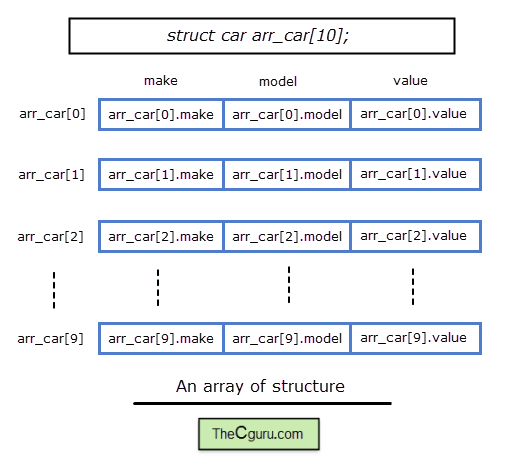
To ground this concept, let's turn to a clear, practical guide.
Array of Structures in C Programming (With Examples)
This article from WSCubeTech provides an excellent overview of defining, initializing, and accessing arrays of structs.
Please read the following sections to solidify your understanding: Introduction and "What is Array of Structure in C?": Read from the start of the article to understand the core purpose. Syntax and Initialization: Review the sections on syntax and initialization. Pay attention to the two methods of initialization: static (at declaration) and dynamic (at runtime). Accessing and Modifying Members: Read the section on accessing members, as this syntax (array[index].member) is what we will be using throughout our implementation.
Designing Our Inventory System
With the concept clear, let's design the data structures for our game's inventory. We need two main components:
- An
Itemstruct to define what an item is. - An
Inventorystruct to hold the collection of items.
First, let's define the Item. A good design includes not just data but also a way to categorize items. We can use an enum for this.
// Define symbolic constants for game parameters. This makes code easier to read and modify.


#define MAX_NAME_LENGTH 50
#define INVENTORY_CAPACITY 10

// An enum to categorize our items
typedef enum {
    ITEM_WEAPON,
    ITEM_ARMOR,
    ITEM_POTION,
    ITEM_SPELLSCROLL,
    ITEM_MISC
} ItemType;

// The struct representing a single item in the game
typedef struct {
    char name[MAX_NAME_LENGTH];
    ItemType type;
    int value; // e.g., gold coin value
    float weight;
} Item;
Next, we'll define the Inventory itself. It needs to hold the array of Items and, crucially, a counter to track how many slots are currently filled.
// The struct representing the player's inventory
typedef struct {
    Item items[INVENTORY_CAPACITY]; // An array of Item structs
    int count;                      // How many items are currently in the inventory
} Inventory;
This structure is self-contained. A single Inventory variable will now hold everything we need to manage our collection.
Implementing the Core Inventory Functions
A data structure is only useful with functions to manipulate it. We'll need functions to initialize the inventory, display its contents, and add/remove items.
Let's watch a quick video that demonstrates iterating through an array of structs, which is the fundamental operation in all these functions.
struct Basics | C Programming Tutorial
This video from Portfolio Courses shows a practical example of creating an array of structs and looping through it to initialize and print values.
Focus on the segment covering arrays of structs. Notice how a for loop is used with an index i to access each struct in the array (points[i]) and then its members (points[i].x).
Now, let's write the functions for our system.
1. Initializing the Inventory
When the game starts, the inventory should be empty. We can create a function to set its count to zero.
#include <stdio.h>
#include <string.h>

// (Include the struct/enum definitions from above)

// Initializes an inventory to an empty state.
void initialize_inventory(Inventory *inv) {
    inv->count = 0;
    // We don't need to clear the item data, as 'count' is the authority
    // on what is valid.
}
We pass a pointer (Inventory *inv) so the function can modify the original Inventory variable.
2. Displaying the Inventory
This function will loop through the valid items and print their details.
// Displays all items currently in the inventory.
void display_inventory(const Inventory *inv) {
    printf("Inventory (%d/%d):\n", inv->count, INVENTORY_CAPACITY);
    if (inv->count == 0) {
        printf("  - Empty\n");
        return;
    }
    for (int i = 0; i < inv->count; i++) {
        printf("  - %s (Value: %d, Weight: %.2f)\n",
               inv->items[i].name,
               inv->items[i].value,
               inv->items[i].weight);
    }
}
Note the use of const. This tells the compiler that the function will not (and should not) modify the inventory, making the code safer and clearer.
3. Adding an Item
To add an item, we must first check if there is space. If so, we copy the new item's data into the next available slot and increment the count.
// Adds an item to the inventory. Returns 1 on success, 0 if inventory is full.
int add_item(Inventory *inv, Item newItem) {
    if (inv->count >= INVENTORY_CAPACITY) {
        printf("Inventory is full. Cannot add %s.\n", newItem.name);
        return 0; // Failure
    }

    // Copy the new item into the next available slot
    inv->items[inv->count] = newItem;
    inv->count++;

    printf("%s added to inventory.\n", newItem.name);
    return 1; // Success
}
Here, inv->items[inv->count] = newItem; works because C allows struct assignment. It performs a member-wise copy of all data from newItem into the struct at the target array index.
4. Removing an Item
Removing an item from an array is more complex. We need to find the item, and then shift all subsequent items one position to the left to fill the gap.
// Removes an item from the inventory by name. Returns 1 on success, 0 if not found.
int remove_item(Inventory *inv, const char *name) {
    int found_index = -1;
    for (int i = 0; i < inv->count; i++) {
        if (strcmp(inv->items[i].name, name) == 0) {
            found_index = i;
            break;
        }
    }

    if (found_index == -1) {
        printf("Item '%s' not found in inventory.\n", name);
        return 0; // Not found
    }

    // Shift all subsequent items to the left
    for (int i = found_index; i < inv->count - 1; i++) {
        inv->items[i] = inv->items[i + 1];
    }

    // Decrement the total count of items
    inv->count--;
    printf("'%s' removed from inventory.\n", name);
    return 1; // Success
}
With these four functions, we have a complete, if simple, inventory management system!
A Deeper Look: Performance and Memory Layout
For your goal of mastering low-level programming, it's not enough to know how to build something. You should also understand why it's built that way and what the performance implications are.
The "Array of Structs" (AoS) layout we've used is intuitive, but it's not the only way. The following article is an classic read in game development circles that explores an alternative.
Programming Vexations Part 12: SOA vs. AOS
This article by Shamus Young is a fantastic, game-centric explanation of data layout and its impact on CPU cache performance.
Please read the article to understand these key ideas: Array of Structs (AoS): Read the initial SpaceMarine example. This is the data layout we are using. Notice how all the data for a single marine is grouped together. The Performance Problem: Read the section explaining cache misses. When you only need one piece of data (like position) from many objects, AoS forces the CPU to load all the other, unneeded data into the cache, wasting space and time. Struct of Arrays (SoA): Now look at the alternative memory layout, where all positions are grouped, all names are grouped, etc. This is the "Struct of Arrays" pattern. Definitions and Trade-offs: Finally, read the sections that formally define AoS and SoA and discuss the trade-offs. The key question is: "Which is the most common operation?"
For our inventory system, where common operations are display_inventory (accessing all fields of each item) or add_item (copying an entire struct), the Array of Structs (AoS) layout is perfectly suitable and is the standard choice. However, being aware of Struct of Arrays (SoA) is crucial for performance-critical systems you might build later, such as a particle system where you only need to update the position and velocity of thousands of particles every frame.
Conclusion
Today you've taken a significant step from abstract concepts to a tangible, practical game system. You designed the data structures for an inventory and implemented the logic to manage it, using an array of structs as the backbone. This pattern of storing collections of game entities is one you will use repeatedly.
Key Takeaways:
- An array of structs is the standard C approach for managing a collection of complex, multi-field objects.
- The system requires both the data structure (e.g.,
Inventorystruct) and a set of functions (initialize,add,remove,display) to be useful. - Removing an element from a static array involves finding it and shifting subsequent elements to close the gap.
- Array of Structs (AoS) is an intuitive data layout that is efficient when you need to access multiple fields of a single object at once.
- Struct of Arrays (SoA) is a performance-oriented alternative that excels in batch operations on a single field across many objects, by being more CPU cache-friendly.
Our current inventory system is robust but has one major limitation: its size is fixed at compile time. What happens when the player needs to hold 11 items? In a future lesson in Module 7, we will solve this by replacing our static array with one allocated dynamically, allowing it to grow as needed.
In the next lesson, we will continue our practical application focus by designing and implementing a combat loop, another fundamental component of your future game.