Welcome to the first lesson of our second module. In the previous module, we solidified your understanding of C's fundamentals by building a couple of small game-related programs. You saw how variables, loops, and functions come together to create interactive logic. A variable like player_hp stored a value, but we never asked where the computer actually stored it.
This lesson marks a significant step forward. We will begin to explore pointers, arguably the most defining and powerful feature of the C language. Our goal today is to answer two fundamental questions: What is a memory address, and what is the purpose of a pointer? Understanding this is the first and most critical step toward mastering C and gaining the low-level control over hardware that you're aiming for.
From Variables to Memory Locations
Every variable you declare in a program—from a simple integer to a complex structure—must be stored somewhere in your computer's memory. You can think of your computer's memory (RAM) as a gigantic, linear sequence of billions of tiny storage boxes, each with its own unique, numbered label. This label is its memory address.
When you write a line of code like int score = 100;, you're giving the compiler a friendly name (score) for a piece of data (100). The compiler, in turn, finds an available box (or a few contiguous boxes, depending on the data type's size), places the value 100 inside, and keeps an internal record that the name score corresponds to that specific memory address.
The following image provides a clear visual of this relationship. On the right, you see the variables as a programmer thinks of them: with a name, type, and value. On the left, you see how the computer "sees" them: as content stored at specific numerical addresses.
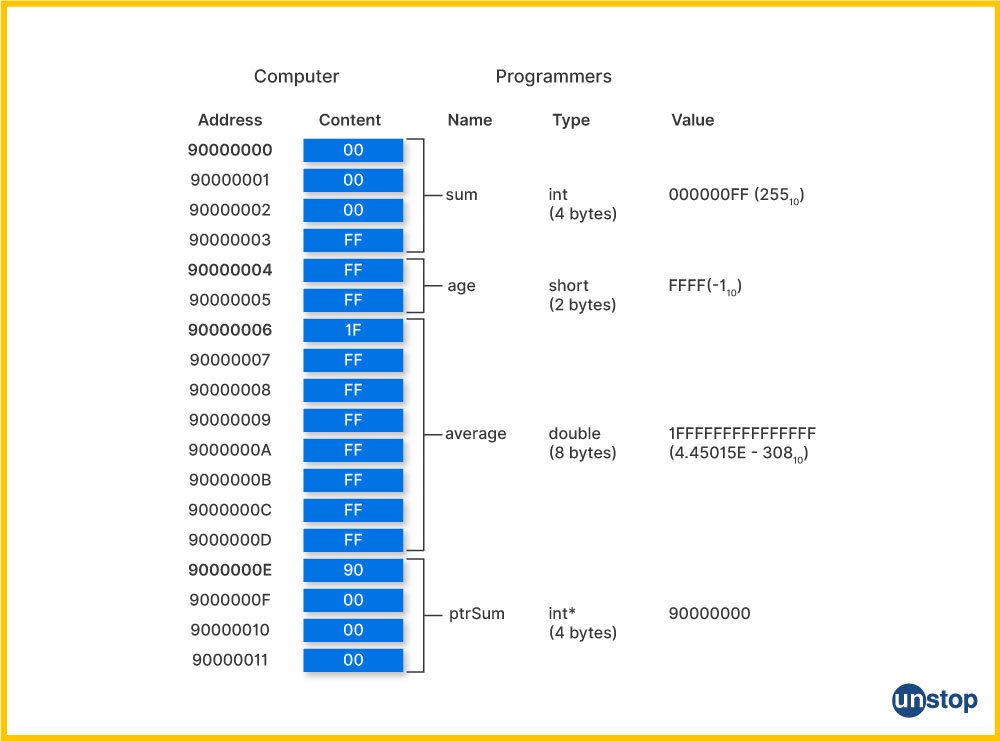
To get a more dynamic feel for this concept, the following video uses a helpful "street address" analogy.
Pointers, visually explained | Code Words
The video "Pointers, visually explained" from the Code Words channel provides an excellent mental model for memory.
Please watch the segment from data in memory. It visually demonstrates how a variable like age is assigned a location in memory, just like a house on a street.
What is a Pointer?
Now that we've established that every piece of data lives at an address, we can define a pointer with one simple sentence: A pointer is a variable whose value is a memory address.
That's it. It's not a magical or strange entity. Just as an int variable stores an integer and a char variable stores a character, a pointer variable stores a number that happens to be the address of another variable. Because it "holds the address of" another variable, we say that it "points to" that variable.
Let's watch a short clip that makes this point exceptionally clear.
you will never ask about pointers again after watching this video
The video from the Low Level channel demystifies the core concept of a pointer.
Focus on the segment from memory and pointers. Pay close attention to the moment the narrator reveals the "secret": a pointer is just a value that happens to be an address.
To solidify this, let's explore a detailed textual explanation. This article provides excellent diagrams and reinforces the fundamental definition.
Understanding Functions, Memory, and Pointers in C
This article by Jyoti Prakash provides a very clear, ground-up explanation of pointers.
Please read the section titled "Part 3: Pointers Demystified". Focus on the initial part that defines what a pointer is and contrasts it with a regular variable. The ASCII art diagrams are particularly effective at illustrating how a pointer variable ptr contains the address of another variable x.
The Purpose of Pointers
So, why go to all this trouble? If we can access variables by their names, why do we need another type of variable just to hold their addresses? The need for pointers boils down to two primary reasons: efficiency and necessity.
1. Simulating "Pass-by-Reference"
In C, when you pass an argument to a function, a copy of that argument's value is made. The function works on this private copy, and any changes it makes are lost when the function returns. This is known as pass-by-value.
What if you want a function to modify the original variable? For example, a function that swaps the values of two variables, or one that updates the player's health. Instead of passing the value, you can pass its address (using a pointer). The function then receives the location of the original data and can directly modify it. This technique allows us to simulate pass-by-reference.
2. Dynamic Memory Management
Often, you don't know at compile time how much memory your program will need. Think of a game inventory: you can't know in advance if the player will pick up 5 items or 50. The memory for local variables that we've used so far is allocated on a region called the stack, which has a fixed and limited size.
Pointers are the key to using a much larger, more flexible memory region called the heap. You can ask the operating system at runtime for a block of memory from the heap (e.g., "give me space for 50 items"). The OS will reserve that space and give you back a pointer—the starting address of that block. Your program then uses this pointer to access and manage that dynamically allocated memory.
The following video segments provide a great overview of these two use cases.
Pointers, visually explained | Code Words
Let's return to the "Pointers, visually explained" video to see these concepts in action.
Watch these two parts: First, watch the introduction on pass-by-value vs. pass-by-reference. Notice how passing a reference (a pointer) avoids copying large amounts of data and allows the original to be modified. Then, watch the segments explaining the stack and heap and how a pointer is used to manage heap memory. This directly addresses the dynamic memory use case.
A Mental Model: Program Memory Layout
To bring this all together, it helps to have a high-level map of where these addresses are located. When your program runs, the operating system organizes its memory into several distinct segments.
Understanding Functions, Memory, and Pointers in C
The same article we viewed earlier contains a section that gives a great overview of a program's memory map.
Refer back to the article and read "Part 4: Program Memory Layout". Focus on the diagram in section 4.1 and the brief descriptions of each segment (Stack, Heap, BSS, Data, Text) that follow in section 4.3. This provides the architectural context for the addresses we've been discussing.
This model is crucial for understanding how C programs work at a low level. Local variables live on the stack, which is fast and managed automatically. Dynamically allocated data lives on the heap, which is flexible but requires manual management via pointers.
Conclusion
In this lesson, we've laid the conceptual groundwork for pointers. You've moved from seeing variables as simple named containers to understanding them as data residing at specific, numbered locations in memory. This perspective is fundamental to low-level programming.
Key Takeaways:
- Computer memory is a sequence of bytes, each with a unique memory address.
- A pointer is a special type of variable that doesn't store data directly, but instead stores the memory address of other data.
- Pointers serve critical purposes: they allow functions to modify their callers' data (simulating pass-by-reference) and they are the mechanism for managing dynamically allocated memory on the heap.
- A program's memory is organized into segments (Text, Data, BSS, Heap, Stack), each with a specific role.
We've focused entirely on the "what" and "why." In our next lesson, we will dive into the "how" by learning the C syntax for working with pointers: how to declare them, how to get the address of a variable, and how to access the data a pointer points to.