In our last lesson, we explored the "what" and "why" of pointers, establishing that they are variables that store memory addresses and are essential for tasks like modifying data in functions and managing memory dynamically. We now have the conceptual framework in place.
Today, we'll transition from theory to practice and learn the C syntax for working with pointers—the "how." This lesson will equip you with the fundamental skills to declare pointers, assign addresses to them, and access the data they point to. Mastering these core operations is the single most important step in harnessing the power of C for low-level programming.
The Essential Syntax: Declaration, Address-Of, and Dereferencing
Working with pointers in C revolves around two special operators: the ampersand (&) and the asterisk (*). Understanding their roles is key. A potential point of confusion is that the asterisk (*) is used in two different contexts, for both declaration and dereferencing. We'll clarify this distinction carefully.
Let's start with a simple visual guide.
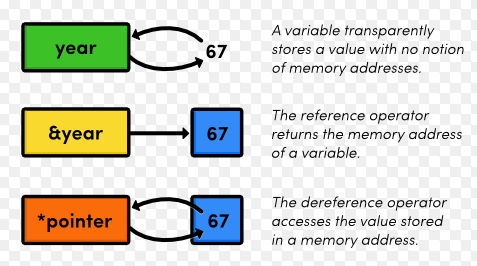
-
The Address-Of Operator (
&)
To make a pointer useful, you first need an address to store in it. The&operator, when placed before a variable's name, evaluates to the memory address of that variable.int player_score = 950; // The expression &player_score gives us the memory address where 950 is stored. -
Pointer Declaration and Assignment
You declare a pointer by specifying the type of data it will point to, followed by an asterisk (*) and the pointer's name.int *score_ptr; // Declares a pointer named 'score_ptr' that can point to an integer.It's crucial to understand that
score_ptrdoes not hold anint; it holds the address of anint. The typeint *is read as "pointer to an integer."To make the pointer point to our variable, we assign the address to it:
score_ptr = &player_score; // Now, score_ptr holds the memory address of player_score. -
The Dereference Operator (
*)
Once a pointer holds an address, you need a way to access the value at that address. This is called dereferencing, and it's done using the*operator. When used on an already-declared pointer,*means "the value at the address stored in."int current_score = *score_ptr; // Reads the value at the address and assigns it to current_score (950). *score_ptr = 1000; // Writes the value 1000 to the address. This changes player_score to 1000.Notice the dual role of the asterisk: in
int *score_ptr;, it's part of the type declaration. In*score_ptr = 1000;, it's an active operator that accesses memory.
A Visual Mental Model: Box-and-Pointer Diagrams
Tracing pointer logic in your head can be difficult. A highly effective technique, especially when debugging, is to draw "box-and-pointer" diagrams. This method gives you a concrete way to visualize what's happening in memory.
The following document provides an excellent guide to this technique. It will walk you through creating these diagrams and reinforce the syntax we've just discussed.
Box-and-Pointer Diagrams – How to make and use them in ...
This document from Rose-Hulman Institute of Technology explains how to visualize variables and pointers.
Read through the document from the beginning to understand the core concepts. Pay close attention to these parts: The initial explanation of variables as boxes in memory. The introduction of the address-of operator. The section explaining pointer declaration and assignment, which shows how an arrow is used to represent a pointer in the diagram. The description of dereferencing, where the statement *px = 42; is used to modify the original variable's value through the pointer. Finally, the section on pointer assignment, px = p2;, illustrates how you can make one pointer point to the same location as another.
Seeing it All in Action
Now that you have the individual pieces and a way to visualize them, let's watch a video that ties the syntax together with clear narration. The way the presenter verbalizes the code is a great habit to adopt.
you will never ask about pointers again after watching this video
The video "you will never ask about pointers again" provides a very clear, step-by-step breakdown of the syntax.
We will watch two key segments: First, watch the part on declaration and assignment. The presenter breaks down the line int *px = &x; piece by piece. Listen for how they translate the ampersand & to "the address of". Next, watch the explanation of dereferencing. Here, the line int y = *px; is analyzed. Note how the asterisk * is verbalized as "the thing pointed to by".
A Practical Example
Let's solidify this with a complete, runnable C program. Since your interest lies in game development, we'll use a simple example of managing a player's health.
#include <stdio.h>

int main() {
    int player_health = 100;

    // 1. Declare a pointer that will point to an integer.
    int *health_ptr;

    // 2. Assign the memory address of 'player_health' to the pointer.
    health_ptr = &player_health;

    printf("--- Initial State ---\n");
    printf("Value of player_health: %d\n", player_health);
    printf("Address of player_health: %p\n", (void *)&player_health);
    printf("Address stored in health_ptr: %p\n", (void *)health_ptr);
    printf("Value at address in health_ptr: %d\n\n", *health_ptr);

    // 3. Use the pointer to modify the original data (dereferencing).
    printf("--- Player takes damage via pointer ---\n");
    *health_ptr = *health_ptr - 30; // "Set the value at health_ptr's address to..."

    printf("Value of player_health: %d\n", player_health);
    printf("Value via pointer: %d\n", *health_ptr);

    return 0;
}
Code Breakdown:
- We declare an integer
player_healthand a pointerhealth_ptr. - We use the
&operator to get the address ofplayer_healthand store it inhealth_ptr. - The
printfstatements show thatplayer_healthhas a value, andhealth_ptrstores its address. - The line
*health_ptr = *health_ptr - 30;is the most important one. It reads the value by dereferencing (*health_ptron the right), subtracts 30, and then writes the new value back to the same memory location (by dereferencing*health_ptron the left). - Notice that changing
*health_ptralso changesplayer_health, because they both refer to the same memory location. - A note on
printf: The%pformat specifier is used to print memory addresses. It's standard practice to cast the pointer to(void *)when printing, as this is the generic pointer type that%pexpects.
Conclusion
In this lesson, you've learned the essential mechanics of working with pointers in C. While the concepts are straightforward, the syntax, especially the dual use of the asterisk, requires practice to become second nature.
Key Takeaways:
- Declaration:
type *pointer_name;declares a pointer that holds the address of a variable oftype. - Address-Of (
&): The expression&variable_nameretrieves the memory address of a variable. - Assignment:
pointer_name = &variable_name;stores an address in a pointer. - Dereferencing (
*): The expression*pointer_nameaccesses the value at the address stored in the pointer. It can be used for both reading and writing data.
In our next lesson, we will immediately apply this knowledge to solve a classic C programming challenge: making a function that can modify the variables of its caller. This will be your first look at implementing "pass-by-reference," one of the primary use cases for pointers.