Introduction
In our last lesson, you mastered the art of creating scalable Makefiles. You learned how to take a project with multiple .c and .h files, compile them into individual object files (.o), and then link those object files into a single, final executable. This process is fundamental to managing any C project beyond a few files.
However, this raises a crucial question: how does this actually work? When your main.o object file calls a function like move_player(), which exists in a completely separate player.o object file, how does the machine code in one file know how to correctly invoke the code in the other? They are compiled independently, as binary blobs of instructions. The "magic" that connects them is the Application Binary Interface (ABI).
This lesson will demystify the ABI. We will explore it as the essential, low-level "contract" that compilers, linkers, and the operating system all agree to follow. Understanding the ABI explains how your multi-file C programs can function correctly and why software compiled for one system (like Windows on an Intel chip) won't run on another (like Linux on an ARM chip).
The "Invisible Contract": API vs. ABI
You are likely familiar with the term API (Application Programming Interface). In C, this is the contract you, the programmer, interact with. It's defined in header files (.h) and consists of function declarations, struct definitions, and enums. It tells you what functions are available and what their signatures are. The compiler enforces this API at the source-code level.
The ABI (Application Binary Interface), on the other hand, is the contract at the machine-code level. It's the set of rules the compiler follows to translate your C code into binary. The ABI defines how to perform a function call, how data is laid out in memory, and how to interact with the operating system. It's an interface for compiled programs.
A simple way to remember the difference is:
- API: What to call (source code level)
- ABI: How to call it (binary/machine code level)

To start, let's watch a short video that clearly separates these two concepts.
What Is an ABI, and Why Should You Care? - Shung-Hsi Yu, SUSE
The video "What Is an ABI, and Why Should You Care?" from The Linux Foundation provides an excellent introduction.
Please watch the segment from API vs. ABI. The speaker effectively explains that while an API is a contract concerning source code, the ABI is its counterpart for machine code, which is exactly what the linker works with.
The Rules of the Contract
So, what exactly does this ABI "contract" specify? It covers several low-level details that must be consistent across all compiled code that is meant to work together. The most important rules include:
- Calling Convention: This is a set of rules for how functions are called. It's arguably the most critical part of the ABI for a programmer to understand. It specifies:
- How function arguments are passed to the function (e.g., in which specific CPU registers, or on the stack).
- How the return value is passed back to the caller (e.g., in a specific register).
- Which registers the caller must save before the function call, and which the callee must save.
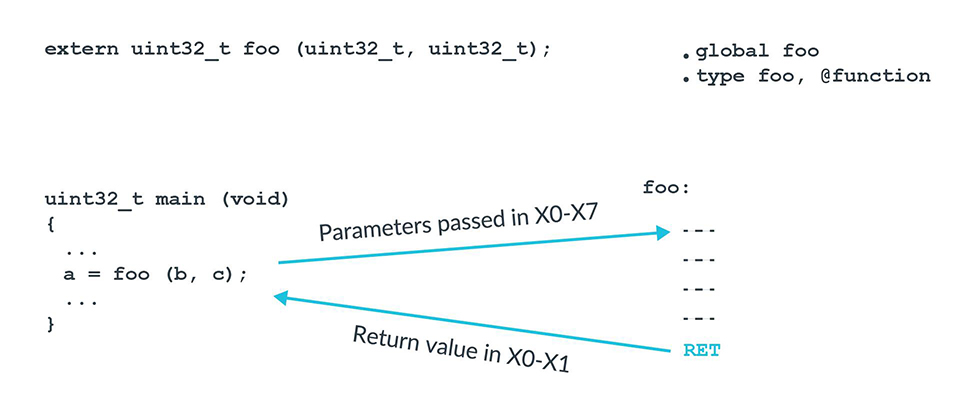
- Data Layout: This defines the size, alignment, and layout of basic data types. For
structs, it determines the order of members in memory, including any "padding" bytes added between them for alignment purposes. - Executable File Format: This specifies the structure of the binary file itself (e.g.,
.oobject files and the final executable). On Linux, this is typically the ELF (Executable and Linkable Format); on Windows, it's the PE (Portable Executable) format. The OS needs to understand this format to load and run the program. - Name Mangling: This defines how symbol names in the source code (like function and global variable names) are represented in the object file. C has a very simple scheme: a function named
footypically becomes a symbol namedfoo. C++ has a more complex system to support function overloading, which encodes parameter types into the symbol name.
The following article provides a superb, hands-on example of the ABI in action, demonstrating how a simple change in a C function's parameter type creates a different ABI contract.
To Save C, We Must Save ABI | The Pasture - ThePhD
This article from thephd.dev gives a developer's perspective on the C ABI, calling it an "invisible contract".
Please read the first two sections of the article: Start at the beginning and read through The Monster - Application Binary Interface for a clear definition. Then, carefully study the section The C ABI. It uses a code example to show how changing a function's parameter type from long long to a 128-bit integer alters the underlying assembly code and register usage. This is a perfect demonstration of the ABI "contract" being forged by the compiler.
Breaking the Contract: Why ABI Stability is Critical
Now we can understand the importance of the ABI in linking. When make links main.o and player.o, the linker assumes both files were compiled following the same ABI. If main.o calls a function in player.o, it prepares the arguments and expects the return value according to the ABI's calling convention. The compiled code in player.o must be looking for those arguments and placing its return value in the exact same places.
What happens if this contract is broken? This is called an ABI break, and it's a major problem in software development. The consequences can range from obvious to dangerously subtle.
The next video segment demonstrates this with a practical example involving a shared library—a pre-compiled library that an application links against at runtime. This scenario makes ABI breaks particularly clear.
What Is an ABI, and Why Should You Care? - Shung-Hsi Yu, SUSE
Let's see the consequences of breaking the ABI contract. This next segment of the same video from The Linux Foundation demonstrates this perfectly.
Watch from Demonstrating ABI Breakage. Pay close attention to the three scenarios presented: Renaming a function: The linker can't find the symbol it's looking for. This is an explicit, easy-to-spot error. Changing function parameters: The caller and callee now have different expectations about where parameters are. This often leads to a runtime crash (like a segmentation fault). Changing a data structure's layout: This is the most insidious type of break. The program might run without crashing but will read the wrong data, leading to silent corruption and incorrect results. Imagine a financial application suddenly calculating with the wrong numbers—the consequences could be catastrophic.
This last point is why ABI stability is a sacred principle for operating system vendors and library maintainers. If a new version of a core system library (like libc) broke its ABI, thousands of applications on your system could suddenly crash or misbehave, forcing a recompile of every single one. Because C does not encode function parameter types into the symbol name, the linker cannot detect these mismatches for you. It blindly links foo to foo, and you only discover the problem at runtime.
The Bigger Picture: Architecture and OS Specificity
Finally, it's crucial to realize that ABIs are not universal. They are specific to a combination of CPU architecture and operating system.
For example, the rules for passing arguments on an Intel x86-64 processor running Windows are different from the rules on the same processor running Linux. Both are different again from the rules on an ARM processor running Linux (like on a Raspberry Pi or many Android phones).
This is the fundamental reason why you cannot simply copy an executable file from a Windows machine and run it on a Linux machine, even if they have the same type of CPU. Their ABIs are incompatible. The executable is structured differently, and it makes system calls (requests to the OS) in a way the other OS doesn't understand.
Mastering APIs, ABIs, and ISAs in Software and Hardware with real-world examples
This video, "Mastering APIs, ABIs, and ISAs," provides a concise explanation of this architecture-specificity.
Watch the short segment from Architecture-Specific ABIs. The speaker explains why you need to consider different ABIs when writing software that needs to run on both an Intel (x86) PC and an ARM-based smartphone. This highlights that the "contract" changes depending on the hardware and OS.
Conclusion
You've now peered behind the curtain to see the "invisible contract" that makes modern software work. The Application Binary Interface is the critical set of rules that allows independently compiled pieces of code to be linked together and run correctly. Without a stable and well-defined ABI, our multi-file projects, shared libraries, and entire operating systems would be impossible to maintain.
Key Takeaways:
- An API is a source-level contract ("what to call"), while an ABI is a binary-level contract ("how to call it").
- The ABI specifies low-level rules, most importantly the calling convention (how parameters are passed and values returned) and data layout (how structs are organized in memory).
- Your compiler generates code that adheres to a specific ABI. The linker assumes all object files it combines follow that same ABI.
- Breaking ABI compatibility by changing function signatures or struct layouts in a library without recompiling dependent applications can lead to linker errors, runtime crashes, or silent, dangerous data corruption.
- ABIs are specific to a CPU Architecture and Operating System pair, which is why executables are not portable across different systems like Windows and Linux.
In our next lesson, we will put theory back into practice. Armed with your knowledge of Makefiles and a newfound appreciation for the ABI that links everything together, you will restructure your inventory game project into a clean, modular, multi-file application.