Introduction
In our last lesson, we focused on constructing dynamic game messages safely using snprintf, building on our prior work of deconstructing input with strtok_r. A recurring theme was the critical importance of preventing buffer overflows. Today, we turn our attention to the very first point of contact with the user: capturing their input. This is where your program is most vulnerable, and where robust practices are non-negotiable for a stable and secure game.
This lesson will teach you the professional standard for handling user input in C. We will explore the many pitfalls of the simple scanf function and then master the superior two-step pattern: safely reading a full line of text with fgets() and then parsing the data from that string with sscanf(). By the end of this lesson, you will have a reliable and secure method for building the command parser for your text-based adventure game.
The Perils of scanf
When first learning C, many programmers are introduced to scanf as the primary tool for getting user input. While simple for well-defined, trusted scenarios, it is notoriously fragile and unsafe when dealing with unpredictable user input. Let's examine its main weaknesses.
1. Buffer Overflows
The most severe issue is its potential for buffer overflows. When you use the %s format specifier without a width limit, scanf will read characters and write them to your buffer until it encounters whitespace, with no regard for the buffer's size.
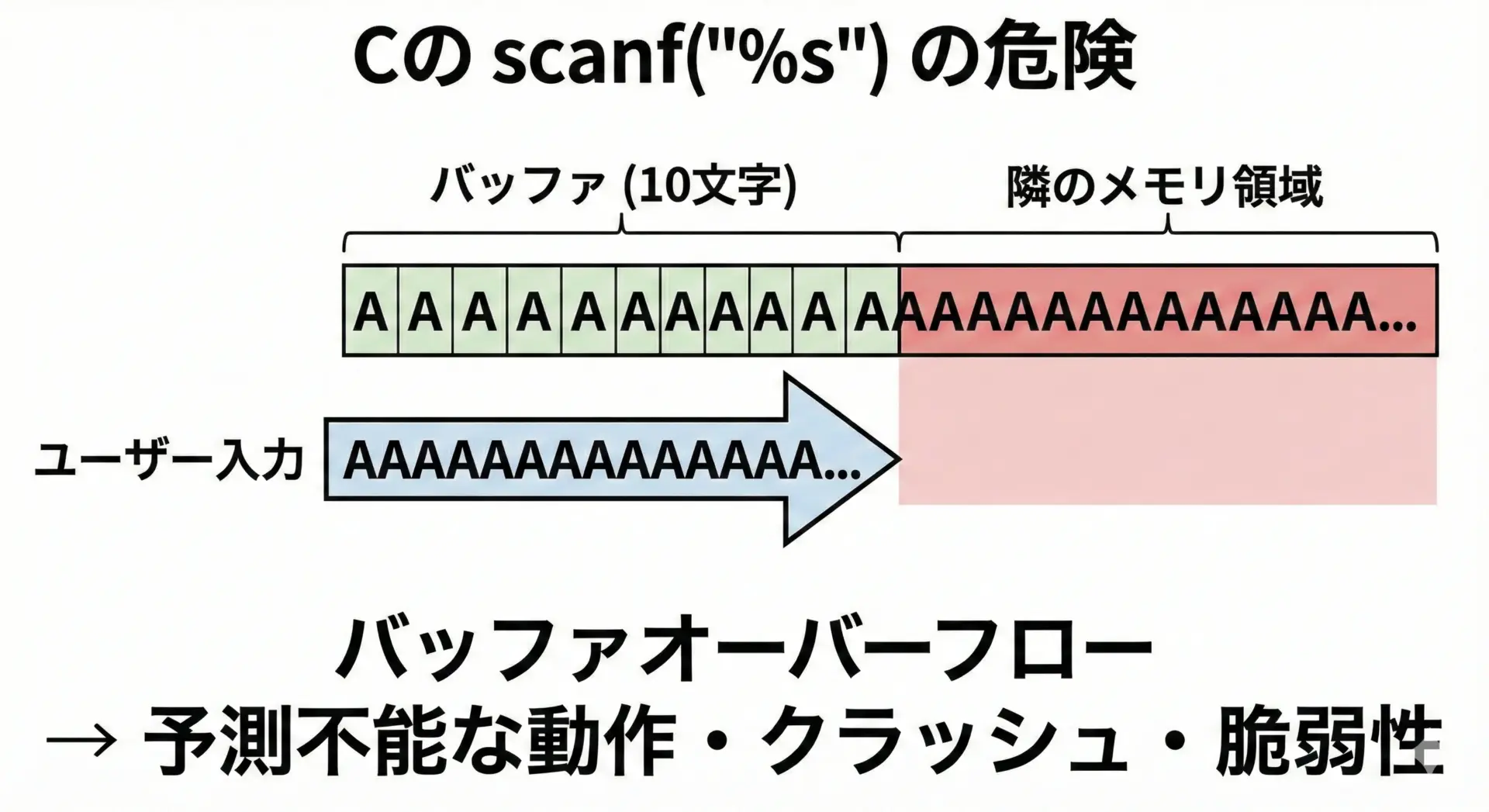
While you can mitigate this with width specifiers (e.g., scanf("%49s", name) for a 50-char buffer), this brings us to the next problem.
2. Poor Whitespace Handling
scanf with %s stops reading at the first whitespace character (like a space, tab, or newline). This makes it fundamentally unsuitable for a game command parser, where you expect inputs like "go north" or "take brass key". scanf would only read "go" or "take", leaving the rest of the command unprocessed in the input stream, causing chaos on the next input cycle.
Let's watch a quick demonstration of these two problems.
The video "How to use scanf with fgets" by CodeVault clearly illustrates the typical failures of scanf.
First, watch from the beginning until this section. The presenter shows how scanf("%s", ...) only reads the first word, leaving the rest of the input to be incorrectly processed by subsequent scanf calls. Next, watch the segment from this clip. This explains a more subtle but critical problem: scanf used for numbers (e.g., scanf("%d", ...) ) reads the digits but leaves the newline character (\n) in the input buffer. A subsequent call to read a string will see this leftover newline and immediately stop, appearing to "skip" the user's input.
These behaviors make scanf a poor choice for robust interactive programs. We need a way to consume an entire line of input at once, regardless of its content, and do so safely.
The fgets() Solution for Safe Reading
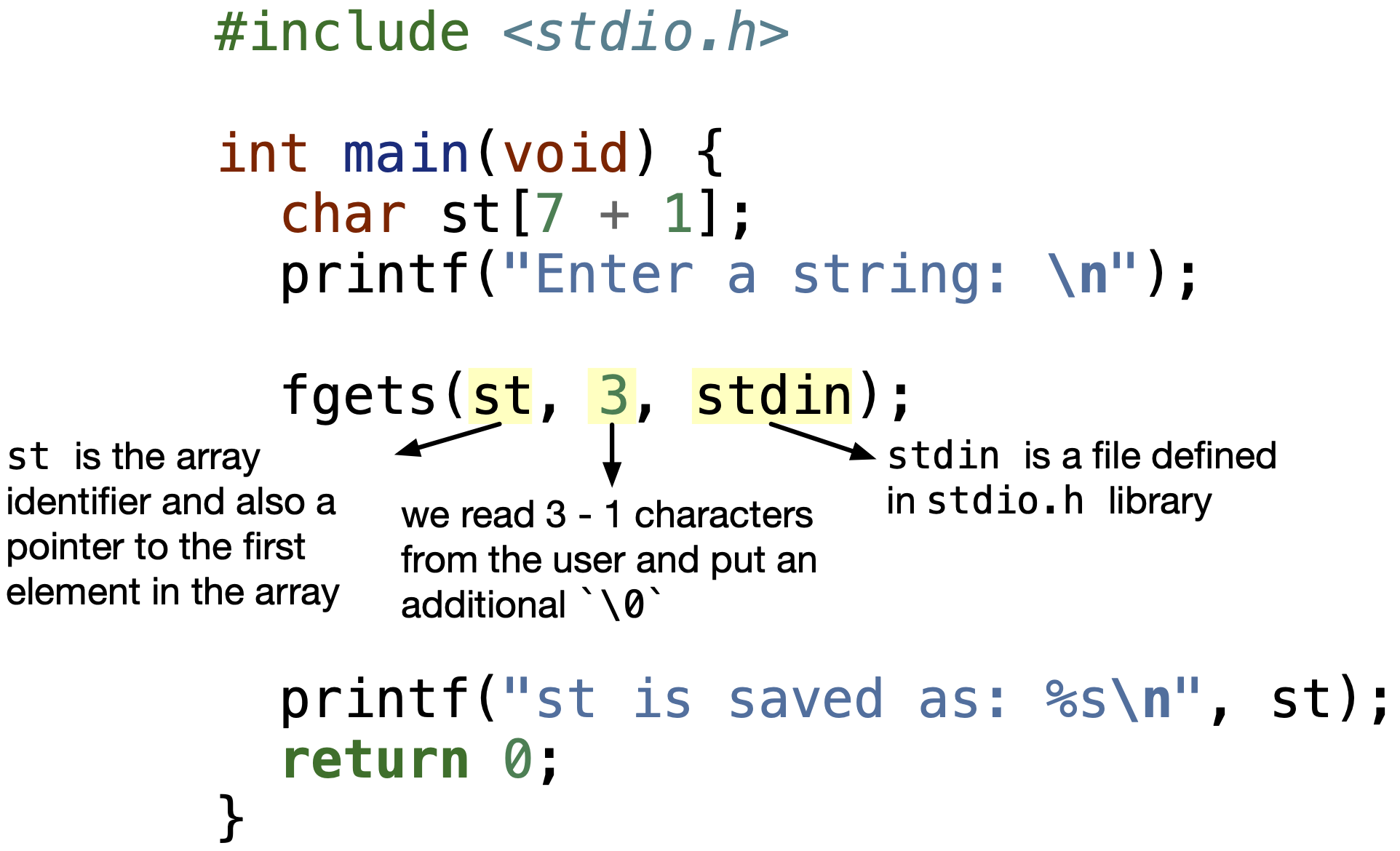
The standard library provides fgets() for this exact purpose. It is designed to read a line of text from an input stream (like the keyboard) into a buffer of a specified size.
Its function signature is: char *fgets(char *str, int n, FILE *stream);
str: A pointer to the character array (your buffer) where the input will be stored.n: The maximum number of characters to be read (including the final null character). This is the crucial safety feature.fgetswill read at mostn-1characters from the stream, ensuring it never writes past the end of your buffer.stream: The input stream to read from. For keyboard input, you will always usestdin.
Handling the Trailing Newline
fgets has one minor quirk: it reads and stores the newline character (\n) if there's room in the buffer. For a command parser, you almost never want this. A common and robust way to remove it is using the strcspn function from <string.h>, which finds the first occurrence of any character from a given set.
#include <stdio.h>
#include <string.h>

char input[100];
printf("Enter a command: ");

// Safely read the entire line
if (fgets(input, sizeof(input), stdin)) {
    // Find the first newline and replace it with a null terminator
    input[strcspn(input, "\n")] = '\0';

    printf("You entered: '%s'\n", input);
}
This input[strcspn(input, "\n")] = '\0'; idiom is a concise and effective way to clean the input string.
The Two-Step Pattern: fgets() + sscanf()
Now that we have a safe way to get a full line of user input into a string, we can proceed to the second step: parsing the data from that string. This is where sscanf, the function we previewed in the last lesson, comes into play.
This two-step process provides a powerful separation of concerns:
- I/O:
fgetsdeals with the messy, unpredictable outside world, safely capturing a line of text into a buffer. - Parsing:
sscanfworks on that clean, predictable buffer in memory, extracting the data you need.
A crucial part of using sscanf is to always check its return value. It returns the number of items it successfully assigned. If you expect to parse one integer (sscanf(buffer, "%d", &num)) and the return value is not 1, you know the user entered something other than a valid integer.
Let's study a complete, practical example that implements a robust input loop for getting a number from a user, handling all sorts of invalid input.
C Programming FAQ #1 Using fgets and sscanf to restrict input
The video "C Programming FAQ #1 Using fgets and sscanf to restrict input" by Bluefever Software provides an excellent walkthrough of building a robust input validation loop.
Watch the video from this main segment. As you watch, pay attention to the layers of validation the programmer adds: The Goal: The program needs to get a number between 1 and 99, rejecting all other input. fgets: First, the input is read into a generous buffer using fgets. This handles the I/O safely. Length Check: The code checks the length of the input string. If it's too short or too long for a valid number (e.g., "1" is length 2 with newline, "99" is length 3), it's rejected immediately. sscanf Parsing: Only if the length is plausible does it attempt to parse the number using sscanf. sscanf Return Value Check: It critically checks if sscanf returned 1. If not (e.g., the user typed "abc"), the input is rejected. Range Check: Finally, if the number was parsed successfully, it checks if it falls within the valid range (1-99). This multi-layered approach is exactly what's needed for a resilient game command parser that doesn't crash when the player types something unexpected.
For reinforcement, here is a concise textual resource that summarizes this recommended pattern.
C scanf Tutorial: Master Input Handling ...
The website ZetCode offers a tutorial on input handling that culminates in this best-practice pattern.
Please read the sections Handling Input Errors and Best Practices. Notice how the code example combines fgets and sscanf inside a loop to repeatedly prompt the user until valid input is entered. The best practices list explicitly recommends this as an alternative for complex input.
Conclusion
You have now learned the professional and secure way to handle user input in C. By abandoning the fragile scanf for direct keyboard input and adopting the robust fgets() + sscanf() pattern, you are insulating your game's logic from unpredictable user behavior. This not only prevents crashes and security holes like buffer overflows but also gives you the fine-grained control needed to provide helpful feedback to the player, such as "Invalid command" or "Please enter a number."
Key Takeaways:
scanfis unsafe for general user input because it can cause buffer overflows and has problematic handling of whitespace and newline characters.- The recommended, safe pattern is a two-step process:
- Read an entire line of input into a sized buffer using
fgets(). - Parse the required data from that buffer using
sscanf().
- Read an entire line of input into a sized buffer using
- Always check the return value of
sscanf()to verify that the parsing was successful. - Remember to remove the trailing newline character that
fgets()often leaves in the buffer.
In our next lesson, we'll continue our exploration of string manipulation by tackling a classic algorithmic problem. We'll implement a two-pointer algorithm to determine if a string is a palindrome, a technique that sharpens your ability to work with pointers and arrays in tandem.