Introduction
In our previous lesson, we learned how to clean and transform text using string methods. We ended by seeing how the .split() method can take a single string, like a headline, and break it into a list of individual words. This was our first encounter with one of Python's most fundamental data structures.
This lesson directly addresses the learning outcome: to create and manage sequential data using Python lists. While strings are great for holding a single piece of text, lists are containers designed to hold an ordered sequence of multiple items. For any data journalism project, you'll use lists to store everything from a collection of scraped headlines to daily stock prices or survey responses. We will explore how to create lists, add items to them, and access the specific data you need.
What is a List?
At its core, a list is an ordered, changeable collection of items. Think of it as a shopping list or a to-do list in your code. Instead of storing all your items in one long, unmanageable sentence (like a single string), a list keeps each item separate and in a specific order.
The following video from NetworkChuck offers a great, high-energy introduction to why lists are so much more useful than a single, large string for storing multiple pieces of information.
Watch these introductory segments to build an intuition for what a list is and its core characteristics.
First, watch the section from what a list is to understand the basic concept and syntax using []. Next, watch the segment on mixed data types to see that lists are flexible and can hold strings, numbers, and other data types all at once.
As you saw, a list is defined by square brackets [], with individual items separated by commas. A single list can hold a mix of data types, making it a very versatile tool.
Creating and Populating Lists
There are two primary ways you'll create lists in your projects.
1. Creating a list with initial items:
You can define a list with its contents right from the start. This is useful when you have a predefined set of data.
# A list of keywords for a story on finance
keywords = ["stock market", "inflation", "interest rates", "earnings"]
print(keywords)
# >> ['stock market', 'inflation', 'interest rates', 'earnings']
2. Creating an empty list and adding items:
More often, you'll start with an empty list and populate it dynamically, for example, by adding data scraped from a website. This is done using the .append() method, which adds a new item to the end of the list.
This is a fundamental pattern in programming, especially for tasks like data collection.
Lists - Learn Python - Free Interactive Python Tutorial
This tutorial from learnpython.org provides a clear, interactive example of creating an empty list and adding items with .append().
Please read the first section of the page, from the beginning down to the line Accessing an index. Pay close attention to the code block demonstrating how mylist.append() is used to build up the list one item at a time.
Accessing Items by Index
Since lists are ordered, every item has a specific position. You can retrieve any item by referring to its position number, or index. A crucial point in Python (and many other programming languages) is that indexing starts at 0, not 1.
- The first item is at index
0. - The second item is at index
1. - ...and so on.
You use square brackets with the index number to get the item at that position. The video from NetworkChuck explains this concept of ordered, indexed access very clearly.
This segment demonstrates how to use numerical indices to retrieve specific items from a list.
Watch the portion of the video from explaining list order. Focus on how the index, starting from 0, is used to pull out a single piece of data from the list.
As the video shows, my_list[0] gives you the first element. This is how you can work with individual pieces of data you've collected.
Python also allows for a handy trick called negative indexing, where [-1] refers to the last item, [-2] to the second-to-last, and so on. This is extremely useful when you want to get the most recently added item to a list without needing to know the list's total length.
A Practical Example in Data Journalism
Let's see how these concepts are applied in a real-world scenario. Imagine you are writing a script to scrape links to PDF reports from a government website. A common workflow would be:
- Create an empty list to store the links.
- Find each link on the page.
- Use
.append()to add each link to your list.
The following guide for journalists demonstrates exactly this.
A simple Python web scraping guide for journalists – JRN 305 – Winter 2021
This article shows how a list is used as a container in a simple web scraping task.
Read the section titled "Getting the PDF links". It starts with creating an empty list called links. The guide then uses a for loop (which we'll cover soon) to iterate over items and add each one to the list using .append(). This is a classic, practical application of list creation and management.
This example bridges the gap between theory and practice, showing how an empty list acts as a collector for data you gather programmatically.
Managing Your List's Contents
Once you have data in a list, you'll often need to manage it. Here are a few essential operations:
- Finding the length: The
len()function tells you how many items are in a list.len(my_list) - Removing items:
.remove(value): Removes the first occurrence of a specific value..pop(index): Removes the item at a specific index and returns it. If you don't provide an index, it removes and returns the last item.
- Checking for membership: The
inkeyword checks if an item exists in a list, returningTrueorFalse.
Let's see these in action.
# From our previous lesson's example
words = ['update', 'the', 'stock', 'markets', 'wild', 'ride', 'a', 'deep', 'dive']

# How many words are in our list?
print(f"Number of words: {len(words)}")
# >> Number of words: 9

# Let's remove a common "stop word"
words.remove('a')
print(words)
# >> ['update', 'the', 'stock', 'markets', 'wild', 'ride', 'deep', 'dive']

# Is the word 'wild' in our list?
print(f"'wild' in list: {'wild' in words}")
# >> 'wild' in list: True

# Is the word 'crash' in our list?
print(f"'crash' in list: {'crash' in words}")
# >> 'crash' in list: False
These basic management tools allow you to query and modify your lists as needed.
Finally, lists can also contain other lists. This is called a nested list and is a common way to represent tabular data, like a spreadsheet.

This code shows a nested list called step_data. Each inner list contains two items: a day of the week (a string) and a step count (an integer). This structure is excellent for storing paired or row-based data.
To access elements in a nested list, you use two sets of brackets. For example, to get the step count for Tuesday:
step_data[1]would get the second inner list:['Tue', 4500]
step_data[1][1]would then get the second item from that list:4500
Conclusion
In this lesson, we've unpacked Python lists, the primary tool for managing ordered collections of data. You've learned how to create them, add to them, and retrieve the specific information you need.
Here are the key takeaways:
- Lists are ordered and changeable collections of items, created with square brackets
[]. - You can create a list with initial data or start with an empty list and add items using the
.append()method. - Items are accessed by their zero-based index (e.g.,
my_list[0]for the first item). Negative indexing (my_list[-1]) is a useful shortcut for accessing items from the end. - Essential management functions include
len()to find the size,.remove()or.pop()to delete items, and theinkeyword to check for existence.
The mind map below gives a great overview of the many operations available for lists. We've covered the most fundamental ones today.
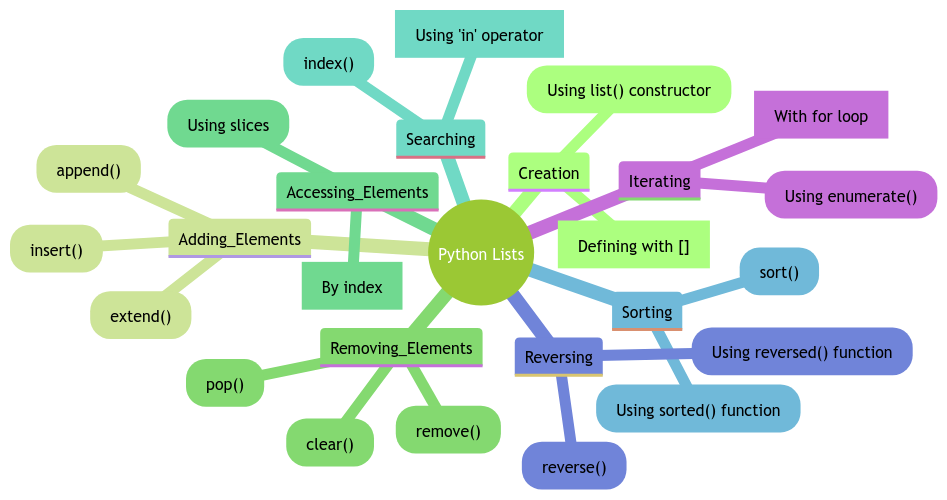
A visual summary of the various ways you can create, access, modify, and work with Python lists.
In our next lesson, we'll explore another crucial data structure: dictionaries. While lists are organized by numerical order (index), dictionaries allow us to store and retrieve data using custom names or "keys," opening up even more powerful ways to structure your information.