Introduction
Welcome to our next lesson! In our previous session, we explored Python dictionaries and saw a preview of how they could be used to build a word counter. A key part of that example involved checking if a word was already in our dictionary before we updated its count. This act of checking and deciding is a fundamental concept in programming, and today we're going to master it.
This lesson focuses on the learning outcome: to control program flow by writing conditional if/else statements. These statements are the basic building blocks of decision-making in your code. For any aspiring data journalist or technical writer, this is how you'll program a script to filter news articles for certain keywords, categorize data based on specific criteria, or even check if a headline meets a required length. By the end of this lesson, you'll be able to make your Python scripts react intelligently to the data they process.
The Core of Decision-Making: if, elif, and else
At its heart, programming involves telling a computer not just what to do, but when to do it. Conditional statements allow your program to execute different blocks of code based on whether a certain condition is true or false.
The structure for this decision-making in Python revolves around three keywords:
if: This starts the check. If the condition is true, the code inside this block runs.elif(short for "else if"): If the firstifcondition was false, Python checks theelifcondition. You can have as manyelifblocks as you need.else: If all the precedingifandelifconditions were false, the code in theelseblock runs. This is the catch-all, default action.
The following short and clear video from the Bro Code channel provides an excellent walkthrough of this entire structure. Pay close attention to the syntax, especially the colons (:) and the indentation, which are crucial in Python.
If statements in Python are easy (if, elif, else) 🤔
This video explains the if, elif, and else statements using a practical age-checking example. It clearly demonstrates the syntax and logic.
Watch from the beginning to understand the basic if statement. Continue watching to see how the else statement provides an alternative path. Finally, see how elif statements allow you to check for multiple, specific conditions in order.
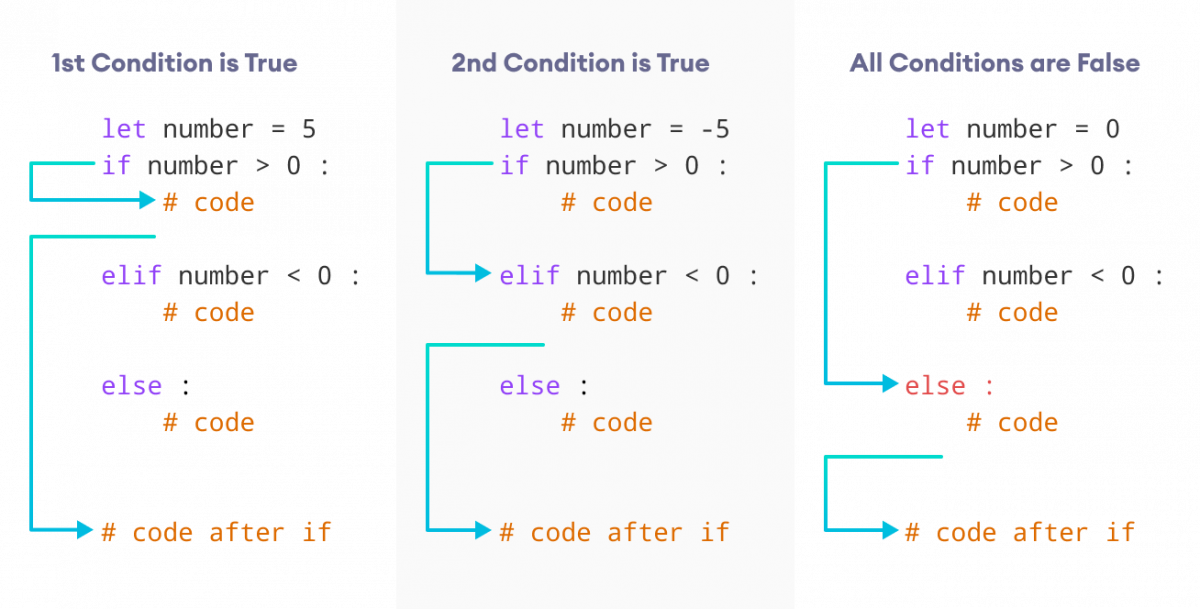
As the video explained, the order of your if and elif statements matters. Python checks them one by one from top to bottom and executes the first block where the condition is true, then skips the rest.
The image below visualizes this flow of logic. The program asks a question at each step (if, then elif) and follows the path corresponding to the first "true" answer it finds. If no conditions are met, it follows the else path.
Conditions and Comparison
The "condition" in an if statement is any expression that Python can evaluate as either True or False. Most often, this involves using comparison operators to compare two values. Here are the most common ones:
| Operator | Meaning | Example |
|---|---|---|
== |
Equal to | age == 18 |
!= |
Not equal to | country != "India" |
> |
Greater than | price > 100.0 |
< |
Less than | word_count < 500 |
>= |
Greater than or equal to | score >= 90 |
<= |
Less than or equal to | temperature <= 0 |
Notice the double equals sign (==) for checking equality. A single equals sign (=) is used for assigning a value to a variable, a very different operation.
A Practical Example: Simple Sentiment Analysis
Let's combine what we've learned with your interest in writing and analysis. Imagine you're analyzing comments on an article to get a rough idea of reader sentiment. You can use an if/elif/else structure to classify a comment as "positive," "negative," or "neutral" based on the presence of certain keywords.
This uses the in operator, which is a very powerful and readable way to check if a substring exists within a larger string.
comment = "This was a really boring article, I am not happy."


# Convert to lowercase to make the check case-insensitive
comment = comment.lower()

if "amazing" in comment or "great" in comment or "love" in comment:
    sentiment = "positive"
elif "boring" in comment or "bad" in comment or "not happy" in comment:
    sentiment = "negative"
else:
    sentiment = "neutral"

print(f"The detected sentiment is: {sentiment}")
Try it yourself:
- Copy the code above into a Python environment (like an online compiler or a local file).
- Run it. The output should be
The detected sentiment is: negative. - Now, change the
commentstring to something positive, like"I love this great perspective!", and run it again. - Finally, change it to something neutral, like
"This is an article.", and see theelseblock in action.
This simple example demonstrates the core of automated text analysis. By expanding your lists of keywords and using more sophisticated logic (which we'll learn later), you can build powerful tools for tasks in data journalism, like gauging public reaction to a story from social media feeds.
Putting It All Together
To solidify your understanding, let's look at one more practical resource that presents these ideas with clear, bite-sized problems.
10 if-else Practice Problems in Python
This article offers a concise review and practical exercises. We will focus on the explanation of a multi-condition problem.
First, read the brief introduction under "The Python if-else Statement" for a quick syntax recap. Then, skip to "Exercise 2: More Options" and read both the exercise prompt and the accompanying explanation. This demonstrates a classic if-elif-else pattern for handling specific user inputs.
The example in the reading of checking y or n is a common pattern for creating interactive scripts—another useful skill for building tools that ask for user confirmation before performing an action, like deleting a file or publishing an article.
Conclusion
In this lesson, you've learned how to give your programs the ability to make decisions. This is a crucial step up from simply executing a linear sequence of commands.
Here are the key takeaways:
ifstatements execute a block of code only if a specific condition isTrue.elifstatements allow you to check additional conditions if the precedingiforelifs wereFalse.elsestatements provide a default block of code to run if none of theiforelifconditions are met.- Conditions are expressions that evaluate to
TrueorFalse, often using comparison operators (==,>,<) or theinoperator.
In our next lesson, we will explore for loops. Now that you know how to make a decision about a single piece of data, loops will empower you to apply that logic automatically to every item in a list or every word in a text, dramatically scaling up the power of your scripts.