Introduction
Welcome back! In our last lesson, you successfully configured and launched a rogue base station, luring a test UE to connect to it by broadcasting a powerful signal. You even caught a glimpse of the UE's IMSI flashing by in the srsenb logs.
Today, we will turn that observation into a deliberate, targeted attack. This lesson is dedicated to achieving the learning outcome: Perform an IMSI catch by capturing and analyzing the UE's initial attach signaling. We'll delve into why this privacy leak occurs in 4G LTE and then use our lab setup to systematically capture the revealing messages and dissect them in Wireshark.
This moves us from simply trapping the device to actively extracting its most fundamental identifier.
1. The Vulnerability in the Attach Procedure
To connect to a network, a UE must identify itself. For privacy, it's designed to use a temporary, randomly assigned identifier called a TMSI (Temporary Mobile Subscriber Identity) or its modern equivalent, the GUTI (Globally Unique Temporary Identifier). However, what happens if the network doesn't recognize the TMSI?
This is the crux of the IMSI-catching vulnerability. If an MME (the core network's "brain") receives an attach request with a TMSI it doesn't know, its only recourse is to ask the UE, "Who are you, really?". It does this by sending an Identity Request message, asking for the permanent IMSI. Crucially, this exchange happens before the signaling link is encrypted.
The diagram below shows a simplified attach flow. Note the initial Attach Request containing the IMSI, which happens before security is fully established.

The following reading explains this process and why it constitutes a vulnerability.
[PDF] Assessing the threat of Stingrays in 4G cellular networks
Please read the following section from the paper 'Assessing the threat of Stingrays in 4G cellular networks'. It provides a concise explanation of the authentication process and highlights the exact moment the IMSI is exposed.
In the PDF, please read Section 2.1, titled 'Authentication'. Focus on the sentence: 'The problem in this approach is when the IMSI is sent out in cleartext; this allows an attacker to collect and track the data'.
2. Forcing the IMSI Reveal
Our goal is to create the exact scenario described above: we want our rogue network to be an "unknown MME" so it's forced to ask for the IMSI.
With srsRAN, this is straightforward. The core network (srsepc) uses a simple text file, user_db.csv, as its subscriber database (the HSS). To perform an IMSI catch, we simply ensure our target UE's SIM credentials are not in this database.
When the UE connects:
- It sends an
Attach Requestwith its current TMSI/GUTI. - Our rogue
srsepcdoesn't recognize the TMSI and sends back anIdentity Request (Type: IMSI). - The UE complies and sends an
Identity Responsecontaining its cleartext IMSI. - Our rogue
srsepcreceives the IMSI, logs it, but then fails the authentication because the IMSI is not in itsuser_db.csv.
The attack is successful the moment we receive the Identity Response. The subsequent authentication failure is irrelevant. The paper you just read confirms this is the exact logic for a simulated Stingray.
3. Capturing and Analyzing the Attach
While watching the console logs is useful, a professional analysis requires capturing the traffic for inspection. Since you are proficient with Wireshark, we will configure srsRAN to generate PCAP files that we can analyze.
Step 1: Configure srsRAN for Packet Capture
First, we need to tell srsenb and srsepc to dump their traffic.
Analysing the srsRAN LTE MAC layer with Wireshark
The following blog post by Daniel Estévez provides an excellent guide on analyzing srsRAN traffic. We'll use his instructions to enable PCAP generation.
Please read the section 'Running srsRAN'. Focus on the paragraph that begins 'I’m enabling all the dumps to PCAP...'. Based on this, modify your rogue enb.conf and epc.conf files to enable the MAC, S1AP, and NAS PCAP dumps. The post shows exactly which lines to add or uncomment.
In short, you will add/uncomment lines like these in your configuration files (enb.conf and epc.conf), which will save the traffic to /tmp/:
- In
epc.confunder[mme]:pcap_enable = true - In
enb.confunder[pcap]:enable = trueandmac_net_enable = true
Step 2: Execute the IMSI Catch
Now, run the same procedure as in the last lesson, but with your modified configuration files.
- Ensure
user_db.csvis clean: Make sure theuser_db.csvfile referenced by yourepc_rogue.confeither does not exist or does not contain the IMSI/key of your test SIM. - Start the EPC: In a terminal, run
sudo srsepc --epc.conf ~/.config/srsran/epc_rogue.conf. - Start the eNB: In a second terminal, run
sudo srsenb --enb.conf ~/.config/srsran/enb_rogue.conf. - Induce Connection: Bring your test UE close to the SDR antenna. The UE will attempt to attach.
- Stop the Capture: Once you see the connection attempt and subsequent failure in the logs, you can stop
srsenbandsrsepc(Ctrl+C). The PCAP files (e.g.,/tmp/enb_mac.pcap,/tmp/epc.pcap) will have been created.
Step 3: Wireshark Analysis
Now, let's find the IMSI in the captured traffic. Open /tmp/enb_mac.pcap or /tmp/epc.pcap in Wireshark. You will need to apply a display filter to isolate the relevant messages.
A good filter to start with is s1ap || nas-eps. You are looking for a specific sequence:
Attach Request: Sent from the UE. Inside this NAS message, you'll find theEPS mobile identity, which will likely be aGUTI.Identity Request: Sent from the MME (your EPC) to the UE. This is the smoking gun. Wireshark will dissect this message and show that it is explicitly requesting theIMSI.
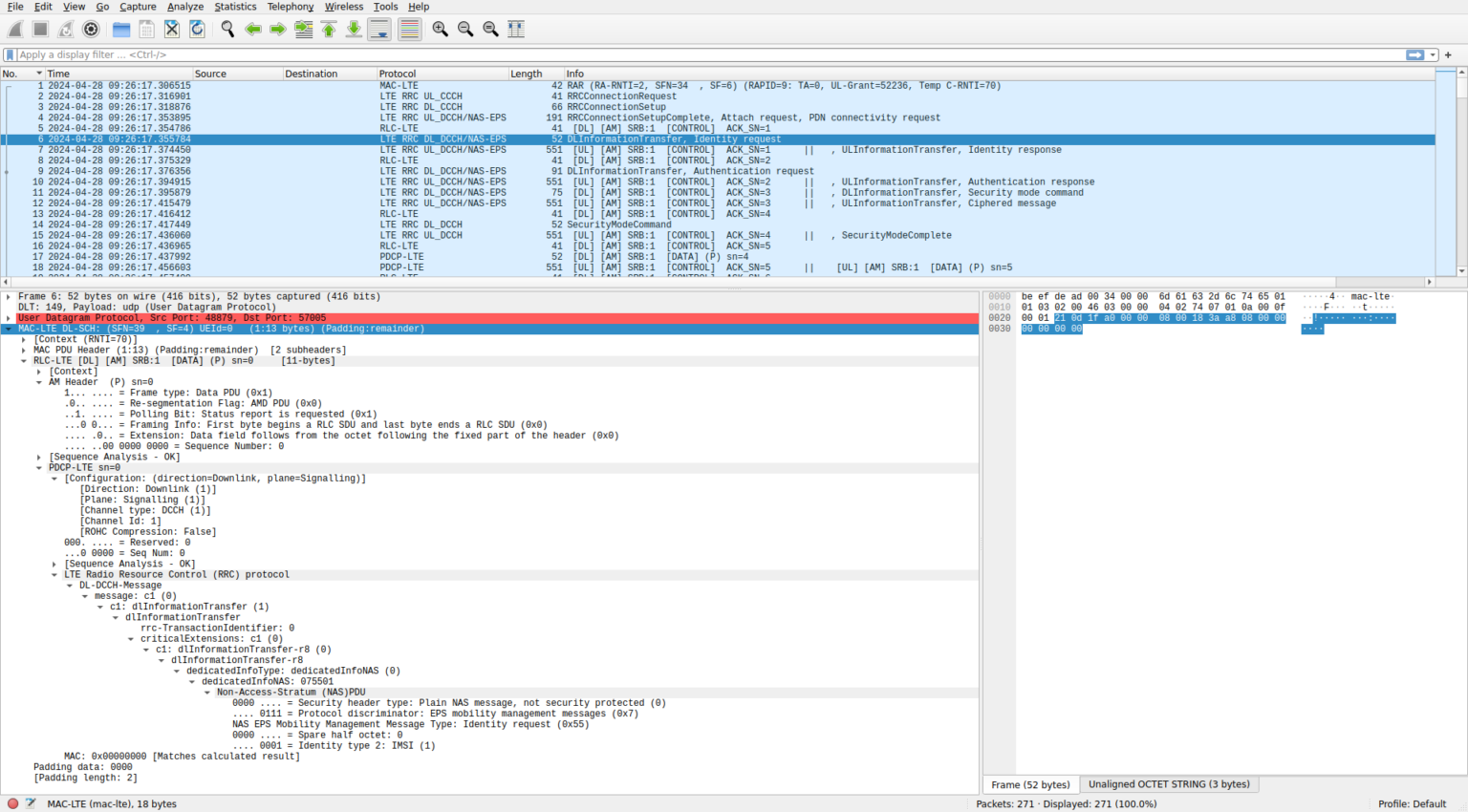
Identity Response: Sent from the UE back to the MME. This message contains the payload we want. Wireshark will dissect it and display the UE'sIMSI.
The detailed flow of these messages, along with the other RRC and NAS signaling, is complex but very well documented.
Analysing the srsRAN LTE MAC layer with Wireshark
We will now return to Daniel Estévez's blog post to analyze our capture. The section below meticulously breaks down the entire attach process as seen in Wireshark, including the unencrypted IMSI exchange.
Read the subsection 'Network connection' (under 'eNB MAC layer'). Follow the step-by-step analysis from the 'RRC connection request' onwards. Pay special attention to the descriptions of the packets containing the 'identity request' and 'identity response'. Compare the description with what you see in your own PCAP file.
This analysis confirms the attack. You have captured the signaling and extracted the IMSI, a permanent subscriber identifier that is supposed to be protected.
To see this flow explained in a video format, you can watch this segment, which analyzes a legitimate attach procedure in Wireshark. The key messages are the same.
LTE Call Flow - Wireshark (Pcap) analysis of LTE UE Attach
This video from Telco Bytes analyzes a Wireshark capture of a full LTE attach. It will help reinforce your understanding of the key messages involved.
Watch the sections from 02:49 to 06:45 and from 09:14 to 11:40. The first part covers the 'Initial UE message' (Attach Request). The second part covers the authentication phase, which is where the Identity Request/Response would occur if the TMSI were unknown.
Conclusion
In this lesson, we transitioned from simply creating a rogue cell to executing a classic cellular intelligence attack. You've learned the theoretical weakness in the LTE attach procedure and successfully exploited it in a lab environment.
Key Takeaways:
- The IMSI is exposed in 4G LTE when a UE connects to a network that does not recognize its temporary identifier (TMSI/GUTI).
- The network sends an unencrypted
Identity Requestfor the IMSI before establishing a secure signaling channel. - An attacker can force this exchange by running a rogue base station with an empty subscriber database.
- By enabling PCAP dumps in srsRAN and analyzing the traffic in Wireshark, we can capture the
Identity Responsemessage and extract the target's IMSI.
Preview of the Next Lesson:
Catching an IMSI is a powerful tool for tracking, but it's only an identifier. The next logical step is to intercept the user's actual data. In the next lesson, "Capture user-plane traffic from a UE connected to the rogue base station," we will modify our attack. Instead of rejecting the UE after getting its IMSI, we will complete the authentication and establish a data bearer, turning our IMSI catcher into a full man-in-the-middle platform.