Hello! Welcome back to the course.
In our last lesson, we put on our "red team" hats and successfully compromised the Open5GS core network by exploiting a vulnerability in its web API. That exercise demonstrated how your web security background is directly applicable to the 5G world.
Today, we're switching sides to the "blue team." Instead of launching attacks, we'll learn how to detect them. We will focus on one of the most classic threats in cellular security: the fake base station, also known as an IMSI catcher or Stingray. By the end of this lesson, you will be able to use tools like Crocodile Hunter or SnoopSnitch to detect potential fake base stations.
The Threat: Fake Base Stations and Pre-Authentication Vulnerabilities
Before we can detect a threat, we need to understand how it works. Fake base stations exploit the fact that your phone needs to exchange some information with a cell tower before any secure, authenticated connection is established. We touched on this in earlier modules, but it's crucial for understanding detection.
To get an expert's overview of this "glass jaw" in 4G/LTE security, let's watch a segment from a Black Hat talk by Cooper Quintin, the creator of one of the tools we'll be studying.
Detecting Fake 4G Base Stations in Real Time
This video explains what IMSI catchers are and, more importantly, the pre-authentication vulnerabilities in LTE that they exploit to perform downgrade attacks or capture subscriber identities.
Watch the section from 05:27 to 13:35. Pay close attention to the diagram of the LTE attach procedure and the speaker's explanation of what happens between steps 1 and 6, before authentication begins. This is the critical window of opportunity for an attacker.
As the video explains, even with 4G's mutual authentication, an attacker can broadcast as a seemingly legitimate tower. Your phone will exchange several messages to identify the network (decoding the MIB and SIB, which you'll remember from Module 2) and initiate a connection request. It's during this initial, unencrypted handshake that a fake base station can capture your IMSI or trick your phone into downgrading to a less secure 2G network.
Two Philosophies of Detection
So, how do we spot these malicious towers? There are two main approaches, each with its own strengths and weaknesses. Cooper Quintin outlines these in the next part of his talk.
Detecting Fake 4G Base Stations in Real Time
Let's continue with the same presentation to understand the two main categories of detection tools: app-based and SDR-based.
Watch from 17:09 to 21:20. Focus on the pros and cons listed for each approach. This will frame our discussion of the specific tools.
To summarize the video:
- App-Based Detection: Uses the phone's own hardware.
- Pros: Cheap (just an app), easy to use.
- Cons: Limited data (only sees what the phone connects to), prone to false positives, can't always distinguish malicious activity from normal network quirks.
- SDR-Based Detection: Uses external Software-Defined Radio hardware.
- Pros: Comprehensive data (sees all towers in an area, not just the one you're connected to), can access low-level radio information.
- Cons: More expensive, harder to set up, requires dedicated hardware.
Let's look at a prominent example from each category.
App-Based Detection: SnoopSnitch
SnoopSnitch is a well-known Android application designed to collect and analyze mobile radio data directly from the phone to detect signs of IMSI catchers, user tracking, and other threats.
The F-Droid page for SnoopSnitch provides a concise overview of its purpose and, critically, its requirements.
Read the main description and the 'Requirements' section. Note the specific hardware and software conditions needed for the app to function.
The key takeaway is that SnoopSnitch is not a simple app you can install on any phone. It needs deep access to the phone's baseband processor, which is responsible for all cellular communication. This is why it has strict requirements:
- Qualcomm Chipset: The app is designed to interpret diagnostic data from Qualcomm modems.
- Stock Android ROM: Custom ROMs often alter or lack the necessary drivers to access the baseband.
- Root Privileges: The app needs elevated permissions to access these low-level diagnostic interfaces.
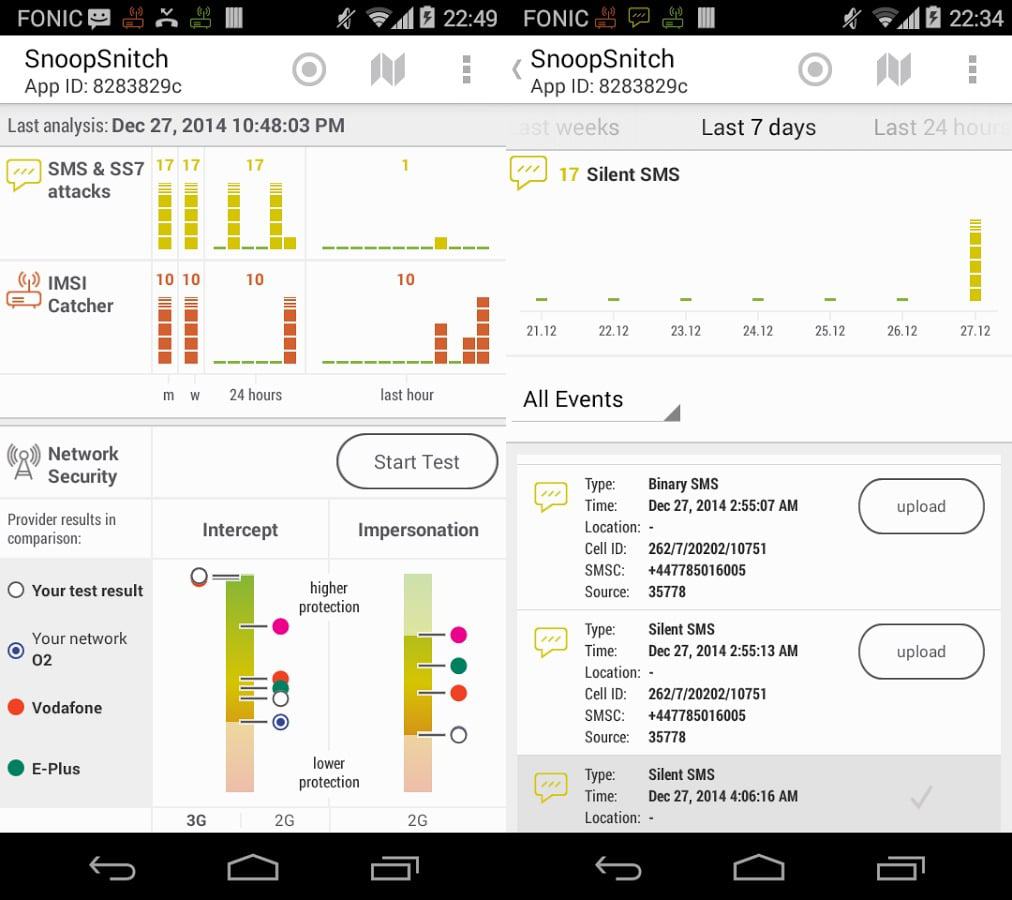
SnoopSnitch works by looking for suspicious events reported by the baseband, such as:
- Silent/Binary SMS: SMS messages that don't appear in your inbox but can be used to pinpoint your location or probe your device.
- Downgrade Attacks: Being suddenly forced from a 4G/LTE connection to a 2G one.
- Unexpected Network Rejections: Certain types of rejection messages can be indicative of an attacker trying to deny you service.
- Unencrypted Connections: Alerts if the network requests a null-encryption cipher (A5/0).
SDR-Based Detection: Crocodile Hunter
While SnoopSnitch is useful, it's like looking at the world through a keyhole—it only sees the network from the perspective of a single phone. SDR-based tools act like a watchtower, surveying the entire radio landscape. Crocodile Hunter, developed by the EFF, was a pioneering project in this space specifically for 4G.
Although the project is now archived, its principles are fundamental to SDR-based detection.
Detecting Fake 4G Base Stations in Real Time
In this final clip, the creator of Crocodile Hunter explains how the tool works, its hardware, and its workflow for finding anomalies.
Watch from 21:20 to 31:41. Focus on the hardware stack (SDR, GPS, etc.) and the detection workflow: scanning, decoding MIB/SIB, mapping, and looking for anomalies. The explanation of trilateration is particularly insightful.
The workflow of Crocodile Hunter is a masterclass in radio signal intelligence:
- Scan: Systematically scan known LTE frequency bands in the area.
- Decode: For each signal found, decode the MIB and SIB to extract parameters like the Mobile Country Code (MCC), Mobile Network Code (MNC), Cell ID, and Tracking Area Code (TAC).
- Record: Log all this information along with the signal strength and the precise GPS location where the signal was received.
- Map: Use trilateration to estimate the physical location of the transmitting cell based on multiple measurements of its signal strength from different locations.
- Analyze: Look for anomalies. This is the core of detection.
An anomaly could be:
- A cell that appears to be moving.
- A cell broadcasting parameters for a foreign country (like the Bermuda MCC found in Washington D.C. in the video).
- A cell that suddenly appears during a specific event and disappears afterward.
- A cell with missing or malformed broadcast parameters.
The Crocodile Hunter GitHub repository (LINK) details the complex setup involving srsLTE, a database, and custom Python scripts. While powerful, this complexity and the need for expensive SDR hardware (like a BladeRF or USRP) made it a tool for dedicated researchers.
Modern Detection: Ray Hunter
Recognizing the accessibility issues of Crocodile Hunter, the EFF developed a successor project: Ray Hunter. This tool embodies the same principles but is designed to run on cheap, widely available hardware.
$30 Stingray Detector | Catching Fake Cell Towers with EFF's Rayhunter
This video from ChiefGyk3D gives an excellent, practical introduction to Ray Hunter, showing how it makes IMSI catcher detection accessible.
Watch the first nine minutes (00:00 - 09:55) to understand what Ray Hunter is, the type of hardware it runs on (like the Orbic hotspot), and see a demonstration of the simple installation process on Linux.
Ray Hunter is a game-changer for a few reasons:
- Cost: It runs on specific, inexpensive mobile hotspots (~$30) instead of expensive SDRs.
- Simplicity: The installation process, as shown in the video, is a straightforward script. This aligns well with your Linux command-line skills.
- Functionality: It flashes a modified firmware onto the hotspot, turning it into a dedicated cellular monitoring device. It logs all cellular signaling to a PCAP file, which you can then analyze with your familiar tool, Wireshark.
A red bar appearing on the device's screen is the immediate alert that something is suspicious, such as being forced to a 2G network. You can then pull the PCAP log and dig into the packets to see exactly what happened.
Summary and Comparison
Here is a table to help you compare these three detection tools:
| Feature | SnoopSnitch | Crocodile Hunter (Archived) | Ray Hunter (Active) |
|---|---|---|---|
| Approach | App-Based (on-device) | SDR-Based (external hardware) | App-Based (on modified dedicated hardware) |
| Hardware | Specific rooted Qualcomm Android phones | Laptop, GPS, expensive SDR (e.g., BladeRF) | Cheap, specific mobile hotspots (e.g., Orbic RC400L) |
| Cost | Low (if you have a compatible phone) | High ($500+) | Very Low (~$30) |
| Setup Complexity | Medium (rooting, finding compatible ROM) | High (compiling srsLTE, configuring database) | Low (running a script) |
| Detection Scope | Monitors the phone's own connection | Monitors all 4G cells in the vicinity | Monitors the hotspot's connection attempts |
| Primary Output | On-screen alerts, internal log | Web UI with map, database of cell parameters | On-screen alert, PCAP file for Wireshark analysis |
| Best For | Personal, real-time device protection | In-depth, wide-area academic/journalistic research | Accessible, practical detection for enthusiasts/activists |
Conclusion
You have now seen how defenders can turn the tables on attackers by monitoring the radio environment for signs of malicious activity. We've explored the two primary detection methods and looked at three specific tools that embody these approaches.
Key Takeaways:
- Fake base stations are detected by identifying anomalies in their broadcast signals and behavior.
- App-based tools like SnoopSnitch provide a convenient but limited view from a single device's perspective.
- SDR-based tools like Crocodile Hunter offer a comprehensive, wide-area view but are complex and expensive.
- Modern tools like Ray Hunter provide a practical, low-cost compromise, turning cheap hardware into a dedicated monitoring device that is accessible to a much wider audience. Your experience with Linux and Wireshark makes Ray Hunter a particularly suitable tool for you to explore.
Preview of the Next Lesson:
Detecting rogue base stations is one part of the defensive picture. In our next and final lesson, we will broaden our scope to discuss operator-side countermeasures against these attacks, explore the key security improvements in 5G that mitigate legacy threats, and cover the crucial legal and ethical framework that governs cellular security research.