Hello! Welcome back to the final phase of our journey through the ARIES recovery algorithm.
In the last two lessons, we completed the Analysis and Redo phases.
- Analysis gave us a snapshot of the system at the time of the crash by identifying the "winner" (committed) and "loser" (uncommitted) transactions in the Active Transaction Table (ATT).
- Redo then replayed history, ensuring that every logged operation (even from losers) was reflected in the database state, bringing it to the exact state it was in at the moment of the crash.
Now, the database is durable, but it's not yet consistent. It contains changes from transactions that never officially completed. Our task today is to clean this up. Your learning goal is to perform the Undo phase of ARIES to roll back any transactions that were active at the time of the crash. This final step ensures atomicity by erasing the effects of all "loser" transactions.
The ARIES Recovery Roadmap: The Final Phase
Let's look at our roadmap one last time. We've analyzed the situation and repeated history. Now it's time to reverse the changes that don't belong.
- Phase 1: Analysis - Done!
- Phase 2: Redo - Done!
- Phase 3: Undo (Our focus today)
- Goal: Reverse all actions of "loser" transactions to restore atomicity.
The Undo Phase: Reversing Uncommitted Changes
The Undo phase is a backward pass through the log to revert all changes made by transactions that were still active (status 'U') at the time of the crash.
The key principles are:
- Work Backwards: The undo process starts from the end of the log and moves backward.
- Identify Losers: It uses the ATT from the Analysis phase to identify which transactions to undo.
- Log the Undo: Crucially, for every change that is undone, ARIES writes a new log record called a Compensation Log Record (CLR). This adheres to the "log changes during undo" principle.
Compensation Log Records (CLRs)
A CLR is a special log record that describes the action taken to undo a previous update. It contains the "before" value from the original update record, which is now applied to the page to reverse the change.
A key feature of a CLR is the undoNextLSN pointer. This pointer stores the prevLSN of the log record it is compensating for. This creates a backward-linked list, allowing the Undo phase to efficiently jump from one update to the next for a specific transaction, skipping over log records from other transactions.
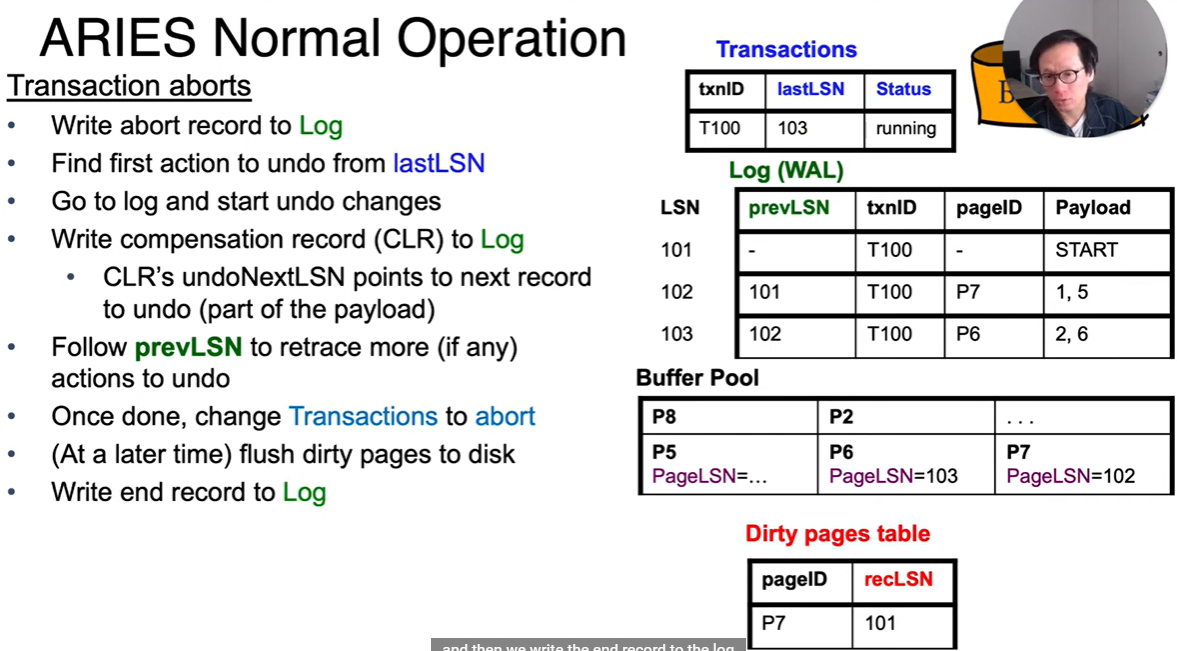
The most important rule of ARIES regarding CLRs is: CLRs are never undone. If the system crashes while the Undo phase is running, the subsequent recovery's Redo phase will simply re-apply the CLRs, ensuring the undo action is completed without needing to be undone itself. This makes the entire recovery process robust.
Once all updates for a loser transaction have been compensated for (i.e., the undoNextLSN chain leads to the transaction's BEGIN record), the system writes a final TXN-END record for that transaction, officially closing the book on it.
The Undo Algorithm in Action
To see how all these pieces fit together, let's watch a detailed walkthrough. The following video from CMU's Database Systems course explains the entire recovery sequence, with a specific focus on the Undo phase and how it handles crashes during recovery.
20 - Database Recovery with ARIES (CMU Intro to Database Systems / Fall 2022)
Professor Andy Pavlo walks through a complete ARIES recovery example. Pay close attention to how the Undo phase operates after the Analysis and Redo phases are complete.
Watch the segment from 1:08:58 to 1:19:28. Focus on these points: How the Undo phase identifies which transactions to roll back (T2 and T3 in the example). The process of scanning backward and creating CLRs. How the undoNext pointer is used to find the next change to reverse for a given transaction. The demonstration of what happens when a crash occurs during the Undo phase, and how ARIES correctly recovers from that.
A Static Worked Example
The video provides a dynamic view of the process. Now, let's walk through a static example to solidify your understanding. We'll use the same scenario from the Aries Example document we reviewed in the last lesson.
State Before Undo:
- The Redo phase is complete.
- The ATT contains one loser transaction:
T2, withstatus='U'andlastLSN=3. - The log contains LSNs 1 through 5, and a
TXN-ENDfor T1 has just been added at LSN 6.
Let's examine the Undo phase for the scenario in this document. You've already seen the setup and the Redo phase; now focus on how T2 is rolled back.
Read section '4 Undo Phase' and the beginning of section '5 Second Crash'. Observe how the system generates CLRs for T2's updates in reverse order and how the undoNextLSN pointers are set.
Let's trace the steps described in the document:
-
Identify Target: The Undo phase identifies
T2as the only transaction to roll back. ItslastLSNis 3, so that's where the undo process forT2begins. -
Undo LSN 3:
- The system examines the log record at
LSN 3, which is<T2, Update P2...>. ItsprevLSNis 2. - It generates
LSN 7: <T2, CLR, ...>, which undoes the change made byLSN 3. - The
undoNextLSNfor this CLR is set to 2 (theprevLSNof the record being undone).
- The system examines the log record at
-
Undo LSN 2:
- The system follows the
undoNextLSNpointer toLSN 2. The record is<T2, Update P1...>. ItsprevLSNisnil(since it's the first record for T2 afterBEGIN). - It generates
LSN 8: <T2, CLR, ...>, which undoes the change made byLSN 2. - The
undoNextLSNfor this CLR is set tonil.
- The system follows the
-
Complete the Rollback:
- Since the
undoNextLSNis nownil, the system knows all of T2's actions have been reversed. - It writes
LSN 9: <T2, END, ...>, marking the transaction as fully resolved.
- Since the
At this point, the database is in a fully consistent state. All committed transactions' changes are durable, and all uncommitted transactions have been atomically rolled back.
Test your understanding!
Imagine the system crashes after writing LSN 7 to the log but before writing LSN 8. When recovery restarts, what happens during the new Undo phase regarding transaction T2?
Show answer
When recovery restarts:
- Analysis: The new analysis will find T2 is still a loser transaction.
- Redo: The Redo phase will scan forward and re-apply the change from the
CLRatLSN 7. This means the undo of LSN 3 is re-established. - Undo: When the new Undo phase begins, it will find the
CLRatLSN 7. It will see that this CLR has anundoNextLSNpointing toLSN 2. The system knows it doesn't need to undoLSN 3again. It will simply pick up where it left off and proceed to undoLSN 2by creating a newCLRfor it.
This demonstrates the power of logging undo actions—it makes the recovery process itself recoverable.
Conclusion
Congratulations! You have now navigated all three phases of the ARIES recovery algorithm. By combining Analysis, Redo, and Undo, a database system can robustly guarantee the atomicity and durability properties of ACID, even in the face of unexpected system crashes.
Key Takeaways:
- The Undo phase is a backward pass through the log that reverses changes from uncommitted ("loser") transactions.
- For every undone action, a Compensation Log Record (CLR) is written to the log.
- CLRs use an
undoNextLSNpointer to efficiently trace a single transaction's history backward. - The "log-the-undo" principle makes recovery resilient to crashes that happen during the recovery process itself.
Preview of the Next Lesson
We have fully covered the ARIES recovery logic. However, you may have noticed that the Analysis and Redo phases potentially have to scan a very large portion of the log. The final piece of the ARIES puzzle is optimizing this. In our next lesson, we will explore the last learning outcome in this module: Explain how checkpointing reduces recovery time by limiting the portion of the log that needs to be processed. We will see how fuzzy checkpoints allow the system to establish a "point of no return," drastically reducing the amount of work required during a restart.