Hello! In our last lesson, we implemented Strict Two-Phase Locking (S2PL), a powerful protocol that guarantees serializability and prevents cascading aborts. However, as we hinted, S2PL's strictness can lead to a new problem: deadlocks.
A deadlock occurs when two or more transactions are stuck in a circular waiting pattern, where each is waiting for a lock held by the next transaction in the chain. Neither can proceed, and the system grinds to a halt without intervention.
Today, we'll tackle this problem head-on. Our goal is to implement deadlock detection using a waits-for graph. We will explore how to model transaction dependencies, how to algorithmically find deadlocks, and how to resolve them by aborting a transaction. This is a critical component for any robust, lock-based concurrency control system.
Understanding Deadlocks and the Waits-For Graph
Before we can build a detector, we need a formal way to represent "who is waiting for whom." This is done using a waits-for graph. The concept is simple:
- Nodes: Each active transaction is a node in the graph.
- Edges: A directed edge from transaction to transaction (i.e., ) means that is waiting for to release a lock.
- Deadlock: A cycle in the waits-for graph indicates a deadlock.
For example, if and , we have a deadlock. Neither transaction can make progress because each is waiting for the other.
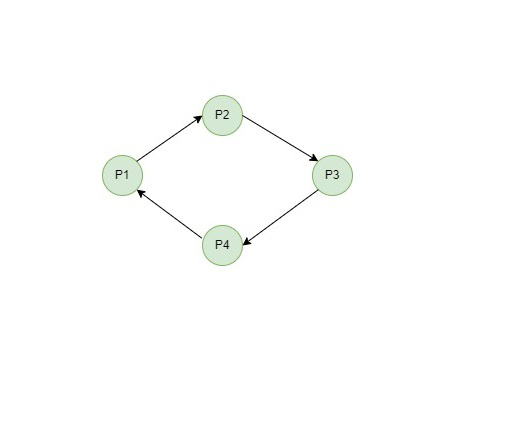
To see how this graph is constructed from a sequence of lock requests, the following video provides a clear, step-by-step example.
Lecture 19 Part 7 Deadlock Detection and Resolution
This video from UC Berkeley's database course demonstrates how to construct a waits-for graph as transactions request and wait for locks. It's a great visual walkthrough of the core concept.
Watch from the beginning to 01:41. Pay close attention to how each denied lock request adds a new edge to the waits-for graph, eventually revealing a cycle.
Implementing a Deadlock Detector
Now that we understand the model, let's design the implementation. In most database systems, deadlock detection is not performed on every lock request because that would be too slow. Instead, a dedicated background thread wakes up periodically, checks for deadlocks, and resolves them.
Your implementation will follow this model, which consists of three main steps:
- Build the waits-for graph based on the current state of the lock manager.
- Detect cycles in the graph.
- Break any detected cycles by aborting a "victim" transaction.
The project specification for CMU's database course provides an excellent, practical guide for this task. It outlines a clear API and provides crucial implementation hints that we will follow.
Project #3 - Concurrency Control
This resource provides the specifications for implementing a deadlock detector. It's an ideal blueprint for our work, as it details the API, algorithm choices, and common pitfalls from an engineering perspective.
Read 'Task #3 - Deadlock Detection' and the associated 'REQUIREMENTS AND HINTS' and 'COMMON PITFALLS' sections. You don't need to read about Wound-Wait. Focus on understanding the following points: The detector runs in a background thread and builds the graph 'on the fly' each time it runs. The API you would implement (AddEdge, HasCycle, etc.). The cycle detection algorithm is Depth First Search (DFS). The method for breaking a cycle: aborting the youngest transaction.
Let's break down the implementation details based on that reading.
Step 1: Building the Waits-For Graph
Your background thread will start by constructing the graph from scratch. The necessary information resides within the LockManager, which you built in a previous lesson. The LockManager contains lock request queues for each data item.
The algorithm to build the graph is as follows:
- Create an empty graph data structure. You can use an adjacency list, like
std::unordered_map<txn_id_t, std::vector<txn_id_t>>. - Iterate through the
LockManager's internal state (e.g., its map of locked items). - For each data item, identify the set of transactions waiting for a lock on it (
T_waiters) and the set of transactions currently holding a lock on it (T_holders). - For every transaction and every transaction , add a directed edge from to . This is because cannot acquire its lock until all incompatible holders in release theirs.
- Important: Remember that multiple transactions can hold a shared lock. If a transaction is waiting to acquire an exclusive lock, it is waiting on all current shared lock holders.
As the project spec notes, you should not include already aborted transactions in your graph.
Step 2: Detecting Cycles with Depth-First Search (DFS)
With the graph built, you need to find cycles. Since you have a background in algorithms, you know that DFS is the standard way to detect cycles in a directed graph.
The algorithm works by maintaining the status of each node:
UNVISITED: Not yet explored.VISITING: Currently in the recursion stack for the current DFS traversal.VISITED: Fully explored (all its descendants have been visited).
When performing DFS from a node u:
- Move
ufromUNVISITEDtoVISITING. - For each neighbor
vofu:- If
vis in theVISITINGstate, you have found a back edge, which means a cycle exists. - If
visUNVISITED, recursively call DFS onv.
- If
- Once all neighbors of
uare explored, moveufromVISITINGtoVISITED.
To ensure your implementation is deterministic (as required by the CMU project), you should always start your DFS traversals from the active transaction with the lowest ID. When exploring neighbors, also process them in sorted order of their transaction IDs.
Step 3: Breaking the Cycle (Victim Selection)
When your DFS finds a cycle, you must break it by aborting one of the transactions. This is called victim selection. There are many possible heuristics, such as aborting the transaction that has done the least work or holds the fewest locks.
However, a simple and common strategy is to abort the youngest transaction in the cycle (the one with the highest transaction ID). This approach helps prevent starvation, where the same transaction is repeatedly chosen as the victim and never gets to finish.
Once the victim is chosen:
- The transaction's state is set to
ABORTED. - The
TransactionManagermust be notified to roll back its changes and release all locks it holds. - Your detection thread should not stop after finding one cycle. It should continue checking until all cycles in the graph are broken before going back to sleep.
Test your understanding!
Imagine your detector finds a cycle: . The transaction IDs are their subscripts (e.g., txn_id of is 1). Following the rule to abort the youngest transaction, which transaction would you abort and why?
Show answer
You would abort transaction . Since the transaction ID represents its age (lower ID = older), is the youngest transaction in the cycle with the highest ID. Aborting it breaks the cycle, allowing to proceed (as it was waiting on ).
Deadlock Detection in Practice
Seeing how real database systems handle deadlocks can provide valuable context. The following video demonstrates deadlock scenarios in MySQL and PostgreSQL, showing how the systems automatically detect the cycle and abort one of the transactions.
16 - Two-Phase Locking in Databases (CMU Intro to Database Systems / Fall 2022)
Professor Andy Pavlo triggers deadlocks in MySQL and PostgreSQL. This practical demo shows how different systems report and resolve deadlocks, connecting our implementation logic to real-world behavior.
Watch the demo from 51:08 to 01:06:27. Observe: How MySQL almost instantly detects the deadlock and reports which transaction was chosen as the victim. How PostgreSQL uses a deadlock_timeout and provides a very detailed error message explaining who was waiting for whom. The crucial role of the client application in handling the abort and retrying the transaction.
A key takeaway from the demo is the trade-off in detection frequency. This is controlled by a configuration parameter (like deadlock_timeout in Postgres or the sleep interval of your background thread).
- Frequent checking: Detects deadlocks quickly, reducing transaction latency. However, it consumes more CPU resources.
- Infrequent checking: Lower overhead, but transactions may be stuck waiting for a long time before a deadlock is resolved, hurting system throughput.
Conclusion
In this lesson, we designed a complete system for handling the deadlocks that can arise from lock-based concurrency control. You now have a practical, implementation-focused understanding of this critical database component.
Key Takeaways:
- A deadlock is a circular wait among transactions, which can be modeled with a waits-for graph. A cycle in this graph signifies a deadlock.
- The common implementation strategy is a background thread that periodically builds the graph from the lock manager's state, detects cycles using DFS, and breaks them by aborting a victim transaction.
- A robust heuristic for victim selection is to abort the youngest transaction in the cycle to prevent starvation.
- Real-world systems provide knobs to control deadlock detection behavior, reflecting the trade-off between detection overhead and resolution latency.
Preview of the Next Lesson
While Strict 2PL with deadlock detection is a robust and widely used approach, it's not the only one. For workloads with many read operations, the cost of acquiring locks and the potential for blocking can be a bottleneck. In our next lesson, we will explore a fundamentally different approach: Multi-Version Concurrency Control (MVCC). We'll see how MVCC allows readers to proceed without acquiring locks, dramatically improving concurrency in many common scenarios.