Hello! Welcome back to our module on Columnar Storage and Execution.
In the last lesson, we analyzed why columnar databases are so much faster for analytical queries, highlighting three key advantages: reduced I/O, CPU/cache efficiency, and superior compression.
Today, we will dive deep into that third advantage by focusing on one of the most powerful and widely used compression techniques. Your learning outcome is to implement dictionary encoding to compress a column and store its values. This is a fundamental technique that not only reduces data size but also enables many of the performance optimizations that make columnar systems so effective.
By the end of this lesson, you will understand:
- The core concept of dictionary encoding.
- The key data structures required: the dictionary and the attribute vector.
- The design trade-offs for implementing the dictionary itself.
- A step-by-step process for encoding a column of data.
Recap: Why Compression Matters in Column Stores
As we saw, because data in a column is of the same type and often has repeating values, it's highly compressible. This leads to:
- Reduced I/O: Less data to read from disk.
- Faster Queries: In some cases, we can operate directly on the compressed data without decompressing it.
Dictionary encoding is a perfect example of a scheme that enables both of these benefits.
The Core Idea: Replacing Values with Codes
At its heart, dictionary encoding is a simple but powerful idea. Instead of storing the same value (like the string "United States") millions of times in a column, you store it just once in a separate data structure called a dictionary. Then, in the column itself, you replace every occurrence of "United States" with a small, fixed-length integer code (e.g., 5).
This process transforms one large column of potentially variable-length data into two new structures:
- The Dictionary: Contains the set of unique values from the column.
- The Attribute Vector: A new column of the same length as the original, containing the integer codes that map to the dictionary.
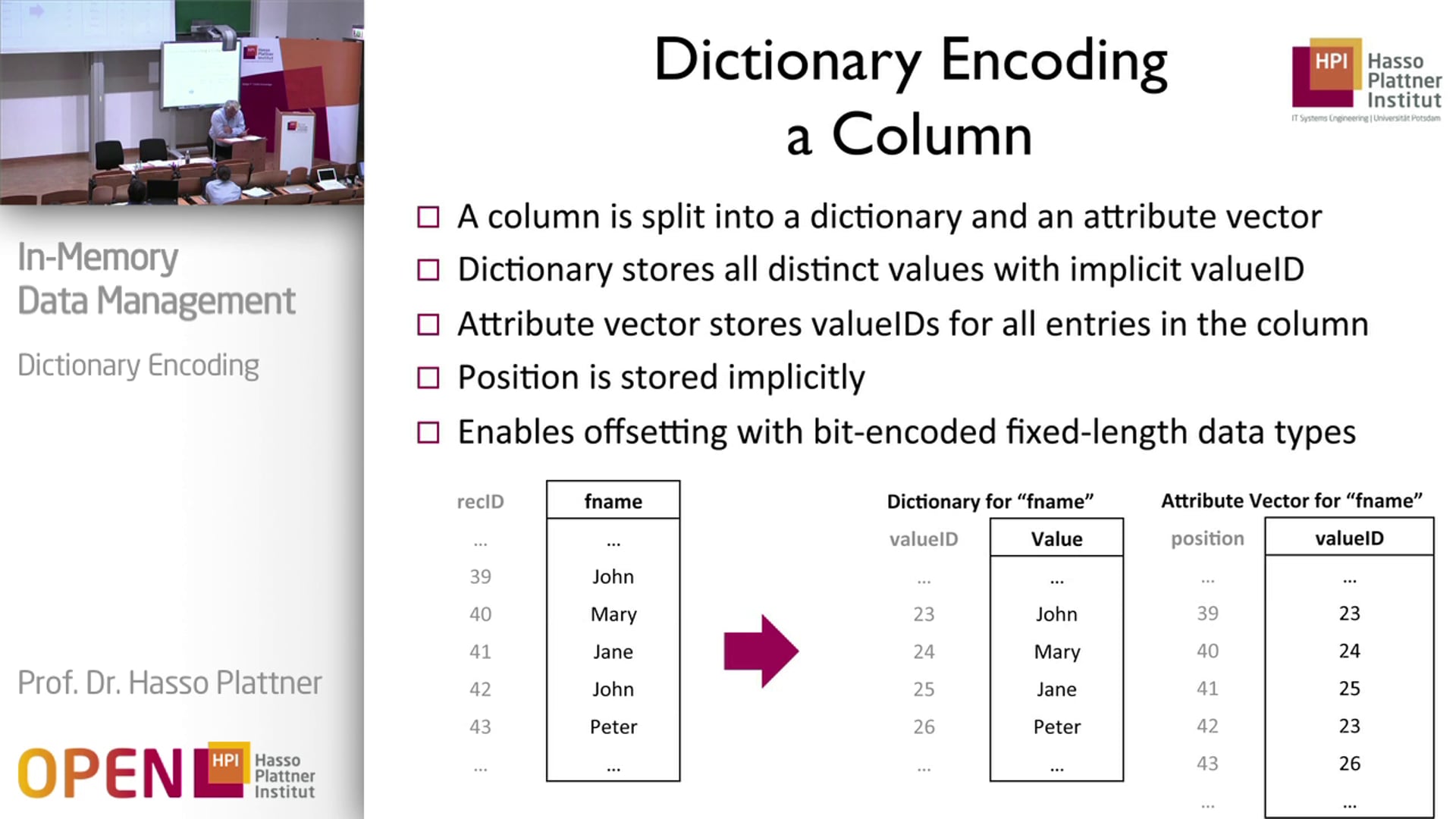
The primary goals here are to reduce storage size (compression) and, crucially for columnar databases, to convert variable-length data like strings into fixed-length integer codes. These codes are much more efficient for the CPU to process.
Let's watch a short video segment that introduces this concept.
F2023 #05 - Storage Models & Database Compression (CMU Intro to Database Systems)
This video from CMU's Intro to Database Systems course explains the fundamental idea behind dictionary compression and its importance.
Watch from 01:12:09 to 01:15:30. Pay close attention to how variable-length strings are converted to fixed-length integers and the role of the dictionary as a mapping table.
Implementing Dictionary Encoding: Design Choices
To implement this, you need to answer a few key questions. We'll focus on the most common scenario for analytical databases: creating the dictionary for an immutable block of data all at once. The most critical question for you as an implementer is: What data structure should I use for the dictionary?
There are three main choices, each with different trade-offs:
-
Sorted Array: Store the unique values in a sorted array. The integer code for a value is simply its index in this array.
- Pros: Very memory-efficient and simple. Preserves the natural ordering of the data, which is a huge advantage for range queries (e.g.,
WHERE name > 'M'). Decoding is a fast array lookup. - Cons: Inefficient to update (requires rebuilding the array). Encoding can be slow as it requires searching for each value in the sorted array (though a binary search helps).
- Pros: Very memory-efficient and simple. Preserves the natural ordering of the data, which is a huge advantage for range queries (e.g.,
-
Hash Table: Map each unique value to an integer code using a hash table.
- Pros: Very fast encoding (constant-time average lookup). Easy to update with new values.
- Cons: Does not preserve data order, making range queries on the compressed data impossible. Higher memory overhead than a simple array.
-
B+ Tree: A more complex tree structure that keeps values sorted while also allowing efficient updates.
- Pros: Combines the benefits of both: preserves order and allows efficient updates.
- Cons: Significantly more complex to implement and has higher CPU and memory overhead than the other two options.
For analytical workloads where data is often written in large, immutable batches (column chunks), the Sorted Array is a very common and effective choice. We will focus on this approach for our implementation.
The following video provides a more detailed breakdown of these design choices.
05 - Database Compression (CMU Advanced Databases / Spring 2023)
Now let's get into the implementation details. This more advanced lecture covers the key design decisions you need to make when implementing dictionary encoding.
Watch from 23:27 to 36:50. This is a dense but crucial segment. Focus on: The four key design questions (when, scope, data structure, encoding). The different data structures for the dictionary (Array, Hash Table, B+ Tree) and their trade-offs. The array-based approach is a very common and efficient method for immutable data, so pay close attention to that explanation.
A Step-by-Step Implementation Plan
Based on the sorted array approach, here is a concrete plan for how you would implement dictionary encoding for a column chunk:
Input: A column of values (e.g., an array of strings).
Output: A dictionary and an attribute vector of integer codes.
-
Build the Dictionary:
a. Iterate through the input column and collect all unique values into a temporary data structure (a hash set is efficient for this).
b. Convert the set of unique values into an array or list.
c. Sort this array of unique values (e.g., lexicographically for strings). This is your dictionary. -
Build the Attribute Vector:
a. Create a new integer array of the same size as the original input column. This will be your attribute vector.
b. Iterate through the original input column again. For each value:
c. Perform a binary search on your sorted dictionary to find the index of the current value.
d. Store this index in the corresponding position in your attribute vector.
After these steps, you have successfully compressed the column. You would then store both the dictionary and the new attribute vector to disk.
Test your understanding!
You are given the following column of country names: ['USA', 'CAN', 'USA', 'MEX', 'USA', 'CAN']
- What would the dictionary look like if it's stored as a sorted array of unique values?
- What would the corresponding attribute vector (the array of codes) be?
- Why is it beneficial that the dictionary is sorted?
Show answer
- Dictionary:
['CAN', 'MEX', 'USA'](unique values, sorted alphabetically). - Attribute Vector: We map the original values to the index in our sorted dictionary:
- 'USA' maps to index
2. - 'CAN' maps to index
0. - 'MEX' maps to index
1.
The resulting vector is:[2, 0, 2, 1, 2, 0].
- 'USA' maps to index
- Benefit of Sorting: A sorted dictionary is order-preserving. This means a comparison on the original values (e.g.,
'CAN' < 'MEX') is equivalent to a comparison on their codes (0 < 1). This is extremely powerful for executing range queries (e.g.,WHERE country BETWEEN 'A' AND 'D') directly on the compressed integer codes, which we'll explore in the next lesson.
Dictionary Encoding in Practice: Apache Parquet
These concepts are at the core of real-world file formats like Apache Parquet, which is a standard for columnar storage in the big data ecosystem.
Parquet applies dictionary encoding on a per-column-chunk basis. However, it includes a practical optimization: if the dictionary for a chunk grows too large (e.g., for a column with many unique values), it "falls back" to storing the raw data without a dictionary. This avoids situations where the dictionary itself becomes a memory bottleneck.
Faster C++ Apache Parquet performance on dictionary ...
To see how these concepts are applied in a widely-used, real-world system, let's look at how Apache Parquet handles dictionary encoding. This blog post from the Apache Arrow project is a great resource.
Read the first section, 'Background: how Parquet files do dictionary encoding'. Pay attention to the example, how it mentions combining with RLE/bit-packing (which we'll see more of later), and the concept of 'falling back' to plain encoding when the dictionary grows too large.
The structure described in the blog post is visualized below.

For a much deeper dive into a state-of-the-art implementation, the design of the string dictionary in the DuckDB database is an excellent, if advanced, read. It uses a highly optimized hash table instead of a sorted array to achieve extremely fast performance.
Unified String Dictionary in DuckDB
For those interested in a deeper, more modern implementation, this excerpt from a Master's thesis on DuckDB's Unified String Dictionary provides a fantastic look at the data structures involved.
This is an advanced but rewarding read. Skim sections 4.1.1 ('Main components') and 4.1.2 ('Insertion') to see how a real high-performance database handles dictionary construction. Notice the use of a linear probing hash table for fast lookups and the careful memory layout for performance. This contrasts with the simpler sorted-array approach and shows a design optimized for fast insertions.
Conclusion
In this lesson, we've deconstructed dictionary encoding, a foundational compression technique in columnar databases. You now have a practical blueprint for how to implement it.
Key Takeaways:
- Dictionary encoding compresses data by replacing values with integer codes, transforming variable-length data into a fixed-length format.
- The implementation consists of two main components: the dictionary (storing unique values) and the attribute vector (storing the integer codes).
- For immutable data blocks common in OLAP systems, a sorted array is a simple and effective data structure for the dictionary, with the added benefit of being order-preserving.
- Real-world systems like Apache Parquet use this technique extensively, adding practical trade-offs like fallback mechanisms for high-cardinality data.
Preview of the Next Lesson
Now that we know how to create and store a dictionary-encoded column, the next natural question is: how do we use it? In our next lesson, we will learn how to execute an aggregate query (e.g., SUM, COUNT) on a dictionary-encoded column without full decompression, leveraging the compact, CPU-friendly nature of our newly encoded data.