Hello! Welcome to a new module in our course: Columnar Storage and Execution.
So far in this course, whenever we've discussed storing data—from heap files and slotted pages to B+ trees and recovery logs—we have implicitly assumed a traditional row-oriented storage model. This is the model you likely learned in your undergraduate database course, where all the attributes of a single record (a row or tuple) are stored together contiguously.
In this lesson, we will challenge that fundamental assumption. Your learning outcome is to explain the architectural differences between row-oriented and column-oriented storage layouts. This is a critical architectural decision in modern data systems, and understanding the trade-offs between these two models is essential for building and analyzing high-performance databases. We'll see how this choice has profound implications for query performance, especially in the context of different application workloads.
Workload Matters: OLTP vs. OLAP
Before we can compare storage layouts, we first need to understand the two major categories of database workloads, as the "best" layout is entirely dependent on how the data will be used. These categories are:
- Online Transaction Processing (OLTP): Characterized by a large number of short, fast transactions that read or write small amounts of data. Think about booking a flight, transferring money, or posting on social media. These queries are typically simple (
INSERT,UPDATE,DELETE, or pointSELECTs on a primary key). - Online Analytical Processing (OLAP): Characterized by complex, read-only queries that scan and aggregate large volumes of data. Think about a data analyst calculating quarterly sales trends or identifying the most popular products by region. These queries often involve
GROUP BYand aggregate functions (SUM,AVG,COUNT) across millions or billions of rows.
#05 - Row vs. Column Storage + Compression ✸ StarTree Database Talk (CMU Intro to Database Systems)
To start, let's get a clear definition of these workload types. This segment from Professor Andy Pavlo's lecture at CMU provides an excellent overview of OLTP, OLAP, and a hybrid approach, HTAP.
Watch from 03:42 to 11:07. Focus on the core characteristics of OLTP and OLAP workloads, especially concerning: The type of queries (simple vs. complex). The access patterns (write-heavy vs. read-heavy). The amount of data touched per query (small vs. large).
This distinction is the key motivation for designing different storage architectures. A system optimized for fast, small writes (OLTP) will look very different from one optimized for massive, read-only scans (OLAP).
The Traditional Approach: Row-Oriented Storage
The N-ary Storage Model (NSM), commonly known as a row store, is the classic database architecture. As the name implies, it stores all the data for a single tuple together.

This layout is a natural fit for your experience with C/C++ structs or Java objects, where all fields of an object are laid out together in memory. In a row store, you can conceptually think of a table as an array of structs.
#05 - Row vs. Column Storage + Compression ✸ StarTree Database Talk (CMU Intro to Database Systems)
Now let's examine the row-store architecture in detail. The same lecture will walk us through how tuples are stored on pages and why this is efficient for OLTP but highly inefficient for analytical queries.
Continue watching from 11:07 to 21:57. Pay attention to how an analytical query that only needs two columns is forced to read pages full of data from other, unnecessary columns. This wasted I/O is the central drawback of row stores for OLAP.
As the video explains, the row-oriented model has clear advantages and disadvantages:
-
Advantages:
- Fast Inserts/Updates/Deletes: Adding or modifying a full record is efficient. You typically only need to access and write to a single page (or a small number of pages). This makes it ideal for OLTP workloads.
- Efficient Full-Tuple Retrieval: Queries like
SELECT * FROM users WHERE user_id = 123are very fast because all the data needed is located together. A single disk read can fetch the entire record.
-
Disadvantages:
- Inefficient for Analytical Scans: This is the critical weakness. Consider the query
SELECT AVG(salary) FROM employees WHERE department = 'Sales'. A row store must read the entire page for every employee tuple, even though it only needs thesalaryanddepartmentcolumns. All other columns (name, address, hire_date, etc.) are read from disk into memory, only to be thrown away. This is a massive waste of I/O and memory bandwidth.
- Inefficient for Analytical Scans: This is the critical weakness. Consider the query
For a concise summary of these points, you can refer to the "N-Ary Storage Model (NSM)" section in the CMU lecture notes.
Lecture Notes - 5 Storage Models & Compression
These lecture notes provide a clear, text-based summary of the row-oriented storage model.
Quickly read the section titled 'N-Ary Storage Model (NSM)'. It's a great reinforcement of what you just watched.
The Analytical Approach: Column-Oriented Storage
To solve the gross inefficiency of row stores for OLAP workloads, a different architecture was popularized: the Decomposition Storage Model (DSM), or column store.
The idea is simple but powerful: instead of storing rows together, store columns together. All values for the user_id column are stored contiguously, all values for the last_name column are stored contiguously, and so on.
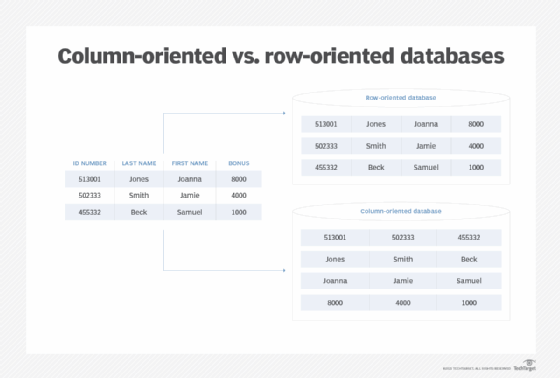
Let's see how this works in practice.
#05 - Row vs. Column Storage + Compression ✸ StarTree Database Talk (CMU Intro to Database Systems)
Let's explore the column-store architecture. This part of the lecture explains how columns are stored separately and then 'stitched' back together at query time.
Watch from 21:57 to 29:26. Focus on how the same analytical query from before (AVG(salary)) now becomes much more efficient. Also, note the challenge of tuple reconstruction—how does the system know which salary belongs to which employee?
The video explains that the system can reconstruct tuples because it knows that the Nth entry in the salary column corresponds to the Nth entry in the department column. This is typically done using fixed-length offsets, effectively treating each column as a giant array.
The trade-offs are the inverse of the row-store model:
-
Advantages:
- Massive I/O Reduction for Scans: The query
SELECT AVG(salary) FROM employeesnow only needs to read one column (salary) from disk. It completely ignores all other columns, eliminating wasted I/O. This is the primary reason column stores dominate OLAP and data warehousing. - High Compression Potential: Since all the data within a column is of the same type and often has lower entropy (e.g., a
countrycolumn has few unique values), it can be compressed much more effectively than rows containing mixed data types. We will explore this in a future lesson.
- Massive I/O Reduction for Scans: The query
-
Disadvantages:
- Slow Point Operations: Inserting a single new record is now an expensive operation, as you have to append a value to the end of every single column file. Similarly,
SELECT *becomes a nightmare of "stitching" together values from every column file. This makes pure column stores a poor fit for OLTP workloads.
- Slow Point Operations: Inserting a single new record is now an expensive operation, as you have to append a value to the end of every single column file. Similarly,
Test your understanding!
You have a table with 50 columns and 1 billion rows. Your application runs a query that calculates the SUM() of one column based on a filter on a second column (e.g., SELECT SUM(col_A) FROM table WHERE col_B > 100).
Which storage model would be architecturally superior for this query, and why, in terms of I/O?
Show answer
The column-oriented model is vastly superior. It would only need to read data from col_A and col_B. In contrast, a row-oriented model would have to read all 50 columns for every row that it scans, resulting in roughly 25 times more data being read from disk, only for most of it to be discarded.
A Hybrid Solution: Partition Attributes Across (PAX)
As you might have guessed, production systems often want a middle ground. The Partition Attributes Across (PAX) model is a hybrid approach that organizes data into large blocks (e.g., 128MB), and within each block, data is stored in a columnar format.
This retains the massive I/O benefits for analytical scans (since you can still read columns selectively within a block) while keeping all the data for a group of tuples physically close to each other, which can help with certain access patterns. Modern analytical file formats like Apache Parquet and ORC, which are ubiquitous in big data systems, are based on this hybrid PAX model.
Conclusion
Today we've explored the fundamental architectural differences between row-oriented and column-oriented storage. This is not just an implementation detail; it's a core design decision that determines what workloads a database system will excel at.
Key Takeaways:
- Row-Oriented Storage (NSM): Stores all attributes for a tuple contiguously. It is optimized for OLTP workloads, which involve frequent writes and point queries on entire records.
- Column-Oriented Storage (DSM): Stores all values for an attribute contiguously. It is optimized for OLAP workloads, which involve analytical scans over a subset of columns, as it drastically reduces I/O.
- The Trade-off: The choice of storage layout is a direct trade-off between write/point-query performance (row store) and scan/aggregation performance (column store).
- Hybrid Models (PAX): Modern systems often use hybrid layouts to combine the benefits of both approaches.
Preview of the Next Lesson
We've established the architectural difference. In our next lesson, we will go one level deeper and analyze the performance advantages of column stores for analytical (OLAP) workloads. Beyond the obvious I/O savings, we will look at other crucial benefits like improved CPU cache performance and the immense potential for data compression that column-oriented layouts unlock.