Hello and welcome back.
In our last lesson, we built the fetch_options_chain function, a crucial tool for getting a comprehensive snapshot of all available option contracts for an underlying asset. This gives us the "menu" of options to choose from. However, a static menu isn't enough for active trading; we need to see prices as they change.
This brings us to today's learning outcome: Implement logic to subscribe to real-time market data for specific option contracts in a portfolio. We will shift our focus from one-time data requests to establishing a continuous, live stream of market data for the contracts our strategies are interested in. This is the heartbeat of our trading system, providing the real-time information needed to make entry, exit, and adjustment decisions.
From Snapshots to Live Streams
In the previous lesson, we used ib.reqTickers() to fetch market data. This function is excellent for getting a snapshot—a single point-in-time picture of the market. It's like taking a photograph.
For live trading, we need a video feed, not a photograph. We need to subscribe to a data stream that continuously pushes updates to our application as they happen. In the Interactive Brokers API, this is achieved using a different request: reqMktData.
While reqTickers returns a static list of Ticker objects, reqMktData establishes a persistent connection for a contract. ib_insync then manages this connection in the background, updating a Ticker object in real-time and firing an event each time new data arrives.
Practical Considerations: Market Data Subscriptions
Before we dive into the code, it's important to understand a practical aspect of receiving real-time data. Exchanges typically charge for real-time data feeds, especially when accessed via an API ("off-platform"). Interactive Brokers passes these costs to the user.
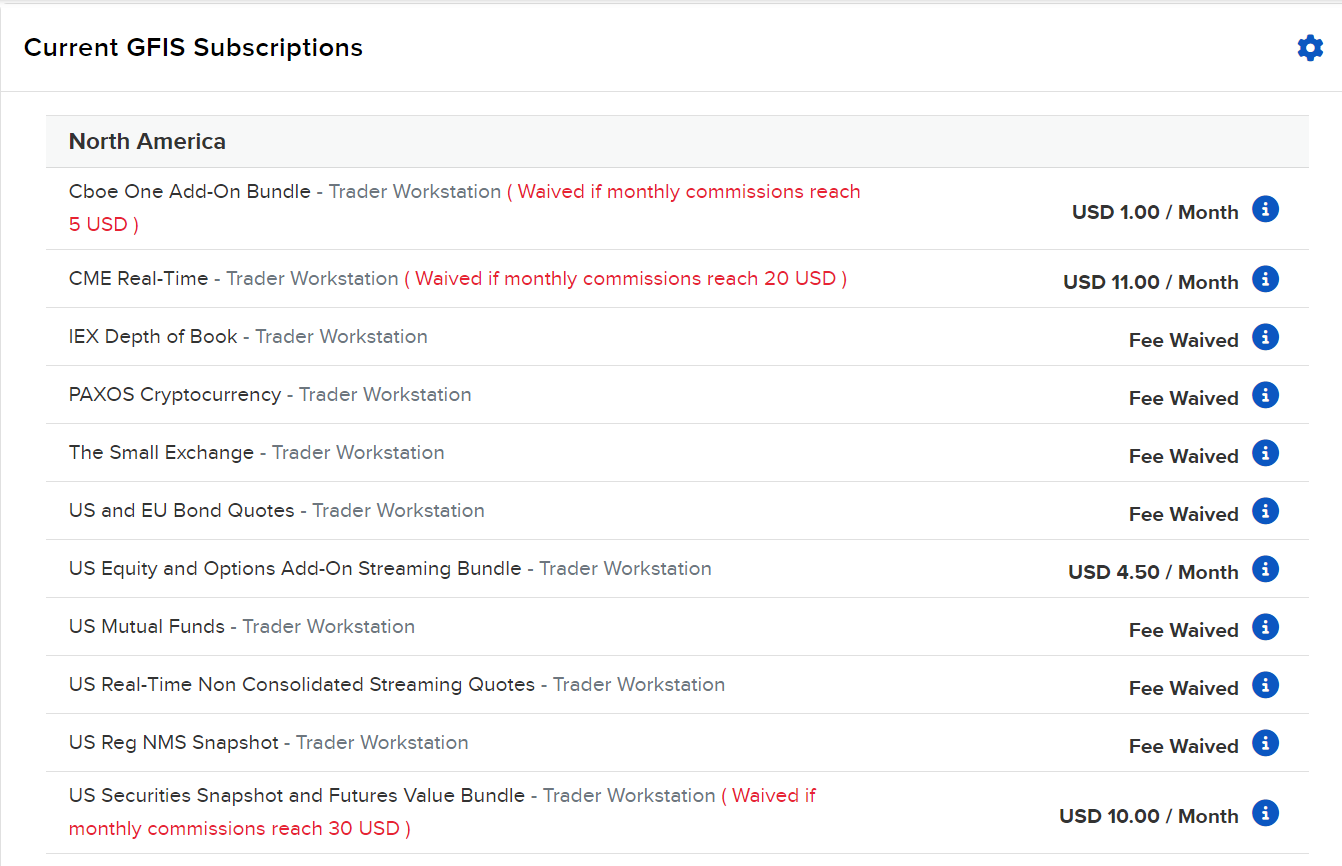
For development, you can often use delayed data, but for a live trading system, you will need to subscribe to the appropriate real-time data packages through your account portal. The official IBKR documentation provides more context on this.
Python API – Requesting Market Data | Trading Lesson
This brief section from the official Interactive Brokers documentation, titled 'Discussing Market data subscriptions', explains the requirements for receiving live market data via the API. It's a quick but important read.
Read the first section, 'Discussing Market data subscriptions', to understand the difference between on-platform and off-platform data and the need for funded accounts and data subscriptions.
Implementing a Market Data Subscriber
Our goal is to create a component that can take a list of specific option contracts (which our strategy has selected from the full chain) and subscribe to their live data feeds. We'll use an event-driven approach, which is a common and robust pattern in trading systems.
The process in ib_insync looks like this:
- For each
Optioncontract we want to monitor, we callib.reqMktData(). This returns aTickerobject. - This
Tickerobject is not static; it's a live object thatib_insyncwill update automatically whenever a new tick (e.g., a change in bid, ask, or last price) comes from the broker. - We attach our own function (a "callback" or "handler") to the
Ticker'supdateEvent. - Whenever the
Tickeris updated,ib_insyncwill automatically call our function, passing the updatedTickerobject to it.
This allows us to react instantly to market changes.
The following video demonstrates these concepts using the native ibapi library. While our implementation will use the simpler ib_insync, the underlying principles of requesting a stream and processing incoming tick data are the same.
Interactive Brokers TWS API Tutorial in Python - with Trading Bot example
This video from ATJ Traders, 'Interactive Brokers TWS API Tutorial in Python', shows how to request and handle streaming market data. Pay attention to the concepts, not the specific syntax, as we will use a more streamlined approach.
Watch the section on requesting market data (from 44:53 to 57:12). Notice how a request is made for a specific contract (reqMktData) and how the incoming data (tickPrice) is handled by a separate function in the wrapper. The video shows how different 'tick types' (bid, ask, last) are identified and stored. This is the logic we will replicate using ib_insync's event handlers.
Building the Subscriber Class with ib_insync
Now, let's translate this into a clean, reusable class using ib_insync. We will create a new file, framework/market_data.py, for our MarketDataSubscriber.
This class will manage all our data subscriptions. It will hold a reference to the main IB connection object and provide a simple interface to subscribe to contracts and handle their updates.
# In framework/market_data.py

from ib_insync import IB, Ticker, Option
from typing import List, Dict, Callable

class MarketDataSubscriber:
    """
    Manages real-time market data subscriptions using ib_insync.
    """
    def __init__(self, ib_client: IB):
        """
        Initializes the MarketDataSubscriber.

        :param ib_client: An active and connected ib_insync IB instance.
        """
        self.ib = ib_client
        # A dictionary to map contract conId to its live Ticker object
        self.tickers: Dict[int, Ticker] = {}
        # A simple callback to be triggered on data update.
        # The next lesson will replace this with a more robust event system.
        self.data_handler: Callable[[Ticker], None] = self._default_handler

    def subscribe_contracts(self, contracts: List[Option]):
        """
        Subscribes to market data for a list of option contracts.

        :param contracts: A list of ib_insync Option contracts to subscribe to.
        """
        for contract in contracts:
            if contract.conId in self.tickers:
                print(f"Already subscribed to {contract.localSymbol}.")
                continue

            print(f"Subscribing to market data for: {contract.localSymbol}")

            # 1. Request streaming data
            # The '236' generic tick type provides IV and greeks if available.
            ticker = self.ib.reqMktData(contract, genericTickList='236', snapshot=False, regulatorySnapshot=False)

            # 2. Store the ticker
            self.tickers[contract.conId] = ticker

            # 3. Attach our handler to the update event
            ticker.updateEvent += self.on_ticker_update

    def on_ticker_update(self, ticker: Ticker):
        """
        This method is called by ib_insync whenever a subscribed ticker is updated.
        """
        # In this lesson, we delegate to a simple handler.
        # In the next lesson, this will push data to a formal event queue.
        if self.data_handler:
            self.data_handler(ticker)

    def set_data_handler(self, handler: Callable[[Ticker], None]):
        """
        Sets a custom function to handle incoming ticker data.

        :param handler: A function that takes a Ticker object as an argument.
        """
        self.data_handler = handler

    @staticmethod
    def _default_handler(ticker: Ticker):
        """A simple default handler that prints the update."""
        print(
            f"Update for {ticker.contract.localSymbol}: "
            f"Bid={ticker.bid}, Ask={ticker.ask}, Last={ticker.last}"
        )

# Example usage (would be in your main application file)
# if __name__ == '__main__':
#     ib = IB()
#     ib.connect('127.0.0.1', 7497, clientId=2)
#
#     # Define two specific contracts to monitor (e.g., from your portfolio)
#     # In a real scenario, these would be retrieved from your position manager
#     # or selected by your strategy logic.
#     spy_call = Option('SPY', '20241220', 550, 'C', 'SMART')
#     spy_put = Option('SPY', '20241220', 500, 'P', 'SMART')
#     ib.qualifyContracts(spy_call, spy_put)
#
#     contracts_to_monitor = [spy_call, spy_put]
#
#     # Initialize and use the subscriber
#     subscriber = MarketDataSubscriber(ib)
#     subscriber.subscribe_contracts(contracts_to_monitor)
#
#     print("Subscriptions are live. Waiting for market data updates...")
#     ib.run() # Start the ib_insync event loop to receive data
Code Breakdown:
__init__: The class is initialized with the activeib_insync.IBinstance. It prepares a dictionaryself.tickersto store the liveTickerobjects, using the contract's uniqueconIdas the key.subscribe_contracts: This is the core method. It loops through a list ofOptioncontracts. For each one, it callsib.reqMktData().snapshot=Falseis critical; it tellsib_insyncwe want a continuous stream, not a one-time value.- The returned
Tickerobject is stored. - Most importantly, we connect our
on_ticker_updatemethod to theticker.updateEvent. The+=syntax is howib_insyncregisters an event handler.
on_ticker_update: This is the callback function.ib_insync's event loop will automatically call this method whenever one of the subscribed tickers receives new information from the broker. For now, its job is simple: pass the updated ticker to a handler. In this lesson, it's just a print function, but this is the hook we will use in the next lesson to build our formalDataHandler.
This design gives us a clean separation of concerns. The MarketDataSubscriber is responsible only for managing the subscriptions. The actual processing of the data is delegated to a handler, making the system modular and easy to extend.
Test your understanding!
Imagine you only want to print an update if the bid price has actually changed. How would you modify the _default_handler to achieve this? You'll need to store the previous bid price somewhere. Where would be a good place to store it to track the state for each ticker?
Show answer
A good place to store the last known bid price would be on the Ticker object itself, since it's unique to each subscription. ib_insync allows you to add custom attributes to its objects.
Here's how you could modify the MarketDataSubscriber class and its handler:
class MarketDataSubscriber:
    # ... (other methods are the same) ...

    def subscribe_contracts(self, contracts: List[Option]):
        for contract in contracts:
            # ... (subscription logic) ...
            ticker = self.ib.reqMktData(contract, ...)

            # Initialize a custom attribute to store the last bid
            ticker.last_known_bid = -1.0

            self.tickers[contract.conId] = ticker
            ticker.updateEvent += self.on_ticker_update

    def on_ticker_update(self, ticker: Ticker):
        # Check if the bid has changed and is valid
        if ticker.bid != -1 and ticker.bid != ticker.last_known_bid:
            print(
                f"BID CHANGE for {ticker.contract.localSymbol}: "
                f"New Bid={ticker.bid}"
            )
            # Update the stored value
            ticker.last_known_bid = ticker.bid

        # You could add similar logic for ask, last, etc.
This pattern of storing state directly on the Ticker object is a clean way to manage per-contract information without needing complex external dictionaries.
Conclusion
In this lesson, we transitioned from fetching static data to subscribing to live, streaming market data—a fundamental requirement for any automated trading system. We've implemented a MarketDataSubscriber class that cleanly encapsulates the logic for creating and managing these subscriptions using ib_insync's event-driven model.
Key Takeaways:
- Live data streaming is achieved with
reqMktDatain the IB API, which differs from the snapshot-basedreqTickers. ib_insyncsimplifies streaming by providing liveTickerobjects and anupdateEventfor attaching callback functions.- Encapsulating subscription logic in a dedicated class (
MarketDataSubscriber) promotes modularity and separation of concerns. - Real-world API data access often requires paid subscriptions, a practical detail to remember for live deployment.
Preview of the Next Lesson:
Our subscriber currently just prints data to the console. This is great for verification, but not useful for our strategy logic. In the next lesson, "Create a data handler to parse incoming streaming tick data," we will build upon today's foundation. We will replace our simple print handler with a robust DataHandler class that parses the incoming Ticker objects and publishes structured market data events that the rest of our framework can consume.