Hello and welcome back to the course.
In our previous lessons, we laid important groundwork by defining our core data models (OptionContract, OptionsChain) and building a TimeManager utility to handle market hours and Days to Expiration (DTE). With these foundational pieces in place, we are now ready to fetch live data from the broker.
Today's lesson addresses the learning outcome: Implement a function to fetch and parse the complete options chain for a given underlying symbol. This is a cornerstone of our trading system. Before we can analyze or trade any options, we must first retrieve the universe of available contracts for our target underlying. We will use the ib_insync library to connect to Interactive Brokers and build a robust function to accomplish this.
What is an Options Chain?
An options chain is a list of all available option contracts for a given underlying security. It includes all listed strike prices, expiration dates, and specifies whether the option is a call or a put. For a trader, the options chain is the menu from which they select their instruments.
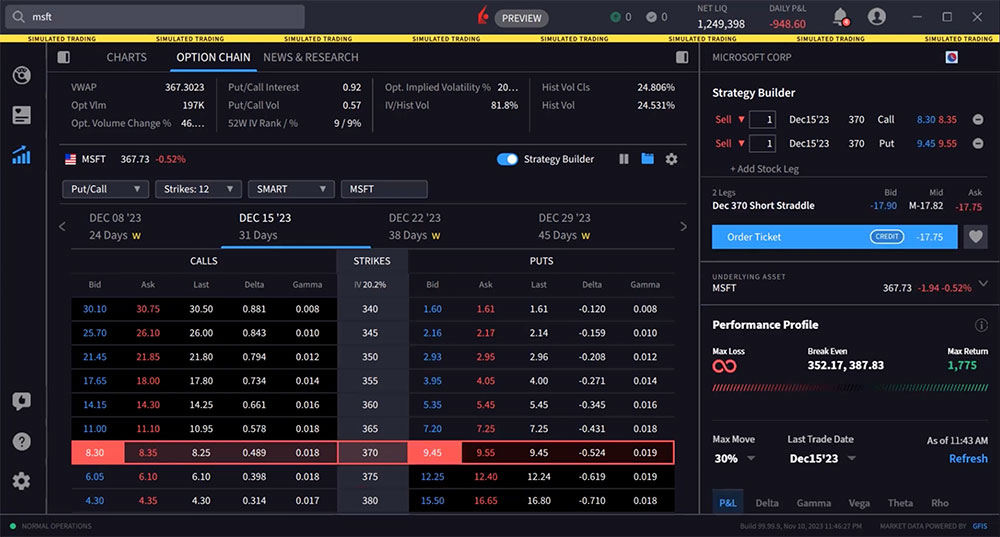
Our goal is to programmatically fetch this entire "menu" of data, so our system can then filter it to find the specific contracts that meet our strategy's criteria.
The Process for Fetching an Options Chain
Fetching an options chain with ib_insync is not a single command but a sequence of logical steps:
- Define the Underlying: First, we must create a contract object for the underlying asset (e.g., a stock like
SPYorAAPL). We need its unique identifier (conId) to ask the broker for its associated options. - Request Option Parameters: We use a specific function,
ib.reqSecDefOptParams(), to ask for the "Security Definition Option Parameters." This request doesn't return market data. Instead, it returns the structure of the chain: the available exchanges, expirations, and strike prices. - Filter Parameters and Build Contracts: From the full list of parameters, we select the expirations and strikes that are relevant to us. For example, we might only be interested in options expiring in 30-60 days with strikes close to the current stock price. We then use these filtered parameters to construct a list of specific
ib_insync.Optioncontract objects. - Request Market Data: Finally, with a list of fully defined
Optionobjects, we make a request (e.g.,ib.reqTickers()) to get the actual market data (bid, ask, last price, volume, etc.) for each of them. - Parse and Structure the Data: The returned data is a list of
Tickerobjects. We'll parse this raw data and organize it into a more usable format, like a Pandas DataFrame, which aligns with your experience.
Implementing the Fetch Function
The following resource provides an excellent, practical walkthrough of this entire process. It will form the basis of our implementation.
Download options chains data with the IBKR API
This article from PyQuant News, 'Download options chains data with the IBKR API', demonstrates exactly the steps we need. It covers connecting to the API, fetching chain parameters, filtering them, and requesting market data.
Please read through the article, focusing on these key sections: Retrieve the current market price: Understand how to get the price of the underlying, which is useful for filtering strikes. Request option chain data: Pay close attention to the use of ib.reqSecDefOptParams() and how the results (strikes and expirations) are filtered. Request market data for Nvidia options: See how the filtered parameters are used to create a list of Option contracts and how ib.reqTickers() is called to fetch their data. Note how the final data is structured for analysis.
The approach shown in the article is the standard method, also confirmed in a related Stack Overflow discussion (Resource ID LINK), which identifies reqSecDefOptParams as the key function.
Now, let's turn the logic from the article into a reusable function. We'll create a new file, framework/data_fetcher.py, to house this logic. Our function will be more generic, accepting parameters for filtering, and will return a clean Pandas DataFrame.
Here is the complete function. We'll break down what each part does below.
# In framework/data_fetcher.py

import pandas as pd
from datetime import date, timedelta
from ib_insync import IB, Stock, util

# Assume the TimeManager from our previous lesson is available
# from framework.time_utils import TimeManager

def fetch_options_chain(
    ib: IB,
    symbol: str,
    min_dte: int = 0,
    max_dte: int = 120,
    strike_range: int = 20
) -> pd.DataFrame:
    """
    Fetches the complete options chain for a given symbol and filters it.

    :param ib: An active and connected ib_insync IB instance.
    :param symbol: The underlying stock symbol (e.g., 'AAPL').
    :param min_dte: The minimum days to expiration for the options.
    :param max_dte: The maximum days to expiration for the options.
    :param strike_range: The number of strikes to fetch above and below the current price.
    :return: A pandas DataFrame containing the filtered options chain data.
    """
    # 1. Define and qualify the underlying contract
    underlying = Stock(symbol, 'SMART', 'USD')
    ib.qualifyContracts(underlying)

    # 2. Get the current market price of the underlying
    [ticker] = ib.reqTickers(underlying)
    underlying_price = ticker.marketPrice()
    if pd.isna(underlying_price):
        # Fallback if market price is not available
        underlying_price = ticker.close

    # 3. Request option parameters
    chains = ib.reqSecDefOptParams(underlying.symbol, '', underlying.secType, underlying.conId)

    # Filter for the primary exchange (usually SMART)
    chain = next(c for c in chains if c.exchange == 'SMART')

    # 4. Filter expirations by DTE
    today = date.today()
    expirations = sorted([
        exp for exp in chain.expirations
        if min_dte <= (pd.to_datetime(exp).date() - today).days <= max_dte
    ])

    # 5. Filter strikes by range around the current price
    strikes = [
        s for s in chain.strikes
        if underlying_price - strike_range <= s <= underlying_price + strike_range
    ]
    rights = ['P', 'C'] # Puts and Calls

    # 6. Build the list of option contracts
    contracts = [
        Option(symbol, expiration, strike, right, 'SMART', tradingClass=chain.tradingClass)
        for right in rights
        for expiration in expirations
        for strike in strikes
    ]

    # 7. Qualify contracts and fetch market data
    qualified_contracts = ib.qualifyContracts(*contracts)
    tickers = ib.reqTickers(*qualified_contracts)

    # 8. Parse the data into a structured format
    chain_data = []
    for t in tickers:
        if t.contract and t.bid != -1 and t.ask != -1: # Filter out contracts with no data
            dte = (pd.to_datetime(t.contract.lastTradeDateOrContractMonth).date() - today).days
            chain_data.append({
                'conId': t.contract.conId,
                'symbol': t.contract.symbol,
                'expiration': t.contract.lastTradeDateOrContractMonth,
                'strike': t.contract.strike,
                'right': t.contract.right,
                'dte': dte,
                'bid': t.bid,
                'ask': t.ask,
                'last': t.last,
                'volume': t.volume,
            })

    if not chain_data:
        return pd.DataFrame() # Return empty DataFrame if no data found

    return pd.DataFrame(chain_data)

# Example Usage (assuming you have a connected `ib` object)
# if __name__ == '__main__':
#     ib = IB()
#     ib.connect('127.0.0.1', 7497, clientId=1) # Connect to IB Gateway or TWS
#
#     spy_chain_df = fetch_options_chain(ib, 'SPY', min_dte=30, max_dte=60, strike_range=50)
#     print(spy_chain_df)
#
#     ib.disconnect()
Code Breakdown:
- Steps 1-3: We define the underlying stock, fetch its price, and use
reqSecDefOptParamsto get the chain structure. This directly follows the logic from the resource. - Step 4 (Filtering Expirations): Instead of taking the first few expirations, we are using the
min_dteandmax_dteparameters to select a specific DTE window. This is crucial for strategies like credit spreads, which are often sold at a target DTE (e.g., 45 days). - Step 5 (Filtering Strikes): We use the
strike_rangeparameter to fetch strikes within a certain range of the current underlying price, preventing us from requesting data for thousands of deep in-the-money or far out-of-the-money options that are irrelevant. - Steps 6-7: We use list comprehensions to efficiently build all the contract combinations and then fetch their ticker data.
qualifyContractsis important to ensure IB recognizes every contract we've constructed. - Step 8 (Parsing): This is where we create a clean, structured output. We loop through the returned
Tickerobjects, extract the necessary attributes (strike,right,bid,ask, etc.), and store them in a list of dictionaries. Finally, we convert this list into a Pandas DataFrame, which is ideal for further analysis and filtering. We also perform a basic validation check to filter out tickers with invalid bid/ask prices.
Connecting to Our Framework
This fetch_options_chain function is a powerful utility. The DataFrame it returns can now be used to populate the data classes we designed earlier.
For example, your Strategy class could use this function to get the available options. Then, it would iterate through the DataFrame rows to create instances of your OptionContract data class, and group them into an OptionsChain object for further processing.
# A conceptual example of how this would be used
from framework.models import OptionContract, OptionsChain

# ... assume spy_chain_df is the DataFrame returned by fetch_options_chain ...

option_contracts = []
for index, row in spy_chain_df.iterrows():
    contract = OptionContract(
        conId=row['conId'],
        symbol=row['symbol'],
        lastTradeDateOrContractMonth=row['expiration'],
        strike=row['strike'],
        right=row['right'],
        # ... other fields from your data class could be populated here
    )
    option_contracts.append(contract)

# Now create the final OptionsChain object
spy_options_chain = OptionsChain(
    underlying_symbol='SPY',
    contracts=option_contracts
)
This neatly bridges the gap between fetching raw broker data and organizing it within our custom application structure.
Test your understanding!
Modify the fetch_options_chain function to accept an additional parameter strike_increment: int = 5. Use this parameter to filter the strikes list so that it only includes strikes that are multiples of the given increment (e.g., if strike_increment is 5, it should only include strikes like 450, 455, 460).
Show answer
You would modify the list comprehension that generates the strikes list.
# Change this line in the fetch_options_chain function:
strikes = [
    s for s in chain.strikes
    if underlying_price - strike_range <= s <= underlying_price + strike_range
]

# To this:
strikes = [
    s for s in chain.strikes
    if (underlying_price - strike_range <= s <= underlying_price + strike_range)
    and (s % strike_increment == 0)
]
You would also need to add strike_increment: int = 5 to the function's signature. This kind of filtering is very common for simplifying the options chain and focusing on the most liquid contracts.
Conclusion
In this lesson, we successfully built a critical function to fetch and parse a complete options chain from Interactive Brokers. By wrapping the multi-step ib_insync process into a single, reusable function, we have created a clean and powerful data-fetching utility for our framework.
Key Takeaways:
- Fetching an options chain is a sequential process: define underlying -> get parameters (
reqSecDefOptParams) -> filter parameters -> build contracts -> fetch market data (reqTickers). - Encapsulating this logic in a dedicated function (
fetch_options_chain) makes our code modular and reusable. - Filtering by DTE and strike range is essential to manage the amount of data requested and focus on relevant contracts.
- Parsing the raw data from the broker into a Pandas DataFrame provides a structured, easy-to-use format that integrates well with data science workflows and our custom data models.
Preview of the Next Lesson:
Fetching the options chain gives us a static snapshot of what's available. However, markets are dynamic. To make trading decisions, we need to see prices change in real time. In our next lesson, we will dive into implementing logic to subscribe to real-time market data for specific option contracts. We will move from requesting a static list of tickers to setting up a continuous stream of data for the contracts we choose to monitor.