Hello! Welcome to the second lesson of our final module on system orchestration.
In our last lesson, we successfully implemented the asynchronous event loop that will serve as the engine for our trading system. We saw how asyncio allows us to manage concurrent data streams and operations efficiently. However, our main() function became quite crowded with initialization and task management logic.
This lesson directly addresses that issue. Our learning outcome is to create a main Framework class to initialize and connect all components based on the configuration file. By encapsulating the system's setup and control logic within a single, well-defined class, we will elevate our project from a script to a robust, maintainable application—a core principle in professional software development.
1. The Orchestrator Pattern: From Script to System
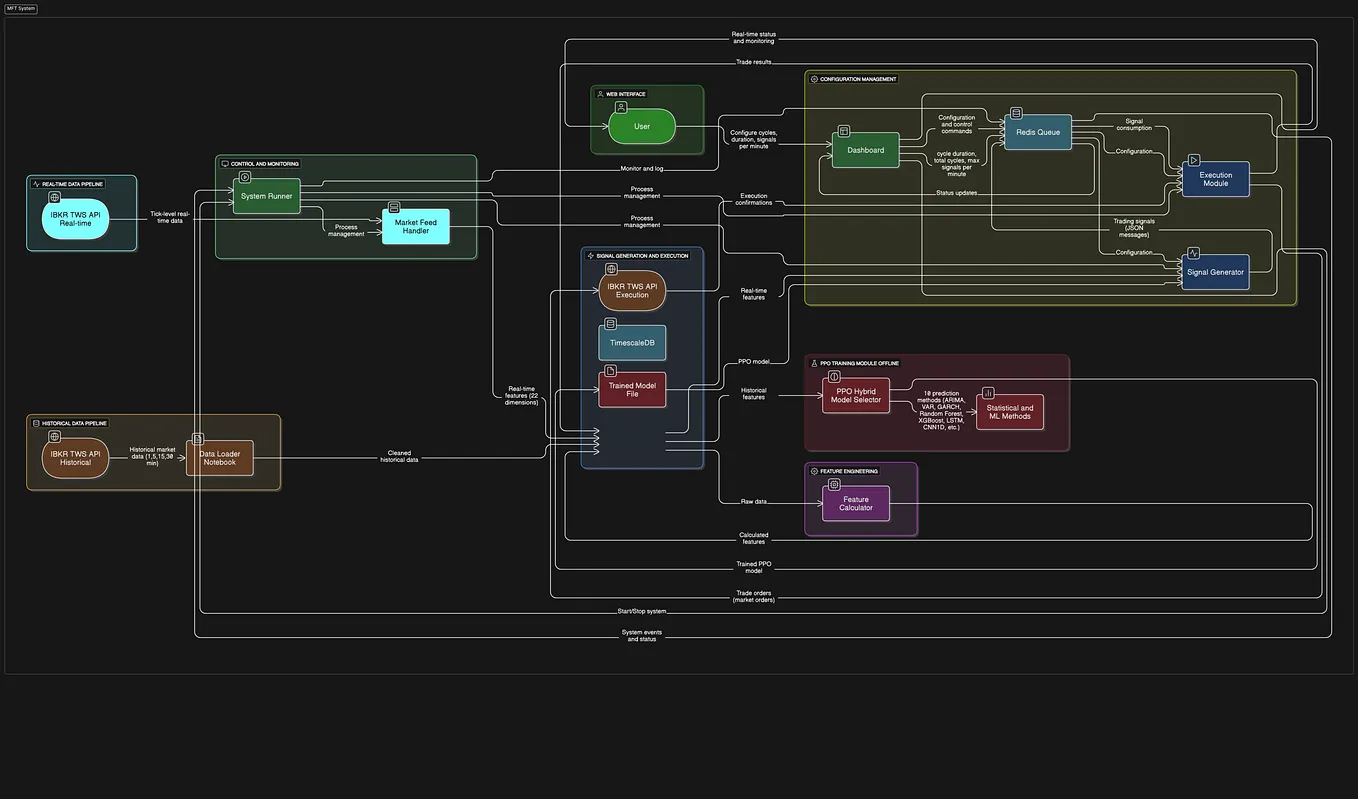
As systems grow in complexity, scattering setup logic across a main script becomes unsustainable. A much cleaner approach is to use an "Orchestrator" or "Conductor" design pattern. This central class is responsible for:
- Reading the configuration.
- Building and "wiring" all the necessary components together.
- Managing the system's lifecycle (start, run, stop).
This is not just a trading system concept; it's a fundamental pattern in large-scale software. Your experience in IT management likely involves overseeing systems where different modules are coordinated by a central service or application layer. Our Framework class will serve that exact purpose.
Take a look at this high-level architectural diagram.
2. Designing the Framework Class
Before writing code, let's define the responsibilities of our Framework class, drawing inspiration from established designs.
Developing an Advanced AI Forex System: A Python Agent ...
The article 'Developing an Advanced AI Forex System' describes a ForexTradingSystem class that serves as an excellent blueprint for our Framework class. It formalizes the concepts of initialization and configuration-driven setup.
Please read sections 'V. System Orchestration and Lifecycle' and 'VI. The Power of Configuration'. Pay close attention to how the ForexTradingSystem class uses a config object in its initialize method to instantiate and configure each component. This is precisely what we aim to achieve.
Based on that reading, our Framework class will have the following structure:
__init__(self, config): The constructor will accept a configuration object (loaded from ourconfig.yaml). It will initialize the centralasyncio.Queueand call a helper method,_initialize_components(), to do the heavy lifting._initialize_components(self): This private method will read different sections of theself.configobject and instantiate theDataHandler,Strategyobjects, andExecutionHandler. It will inject theevent_queueand other necessary dependencies into each component.run(self): This method will contain theasyncio.TaskGrouplogic we developed in the previous lesson. It will create and launch the concurrent tasks for the event loop and any background processes (like data streaming).stop(self): This method will handle the graceful shutdown of the system.
3. Implementing the Core Framework
Let's translate this design into Python code. We will create a Framework class that encapsulates all the orchestration logic.
Here is the skeleton of our class. Notice how it takes the config and immediately uses it to set up the system's building blocks.
import asyncio
import yaml

# Assume these are our component classes from previous modules
from data_handler import IBKRDataHandler
from strategy import BullPutSpreadStrategy, BearCallSpreadStrategy
from execution import IBKRExecutionHandler
from event import MarketEvent, SignalEvent, OrderEvent, FillEvent

class Framework:
    """
    The main orchestrator for the trading system.
    Initializes and connects all components based on the config file,
    and manages the main event loop.
    """
    def __init__(self, config_path: str):
        print("Initializing Trading Framework...")
        self.config = self._load_config(config_path)
        self.event_queue = asyncio.Queue()

        # This will hold all running tasks for graceful shutdown
        self.tasks = []

        self._initialize_components()
        print("Framework initialized successfully.")

    def _load_config(self, config_path: str) -> dict:
        """Loads the YAML configuration file."""
        with open(config_path, 'r') as f:
            return yaml.safe_load(f)

    def _initialize_components(self):
        """Instantiates and connects all trading components."""
        print("Initializing components...")

        # --- Data Handler ---
        # We instantiate the specific data handler required, configured from the YAML file.
        self.data_handler = IBKRDataHandler(
            event_queue=self.event_queue,
            config=self.config['data_handler']
        )

        # --- Strategies ---
        # The framework can load multiple strategies dynamically based on the config.
        self.strategies = []
        for name, params in self.config['strategies'].items():
            if name == 'bull_put_spread' and params['active']:
                self.strategies.append(
                    BullPutSpreadStrategy(
                        event_queue=self.event_queue,
                        config=params
                    )
                )
            elif name == 'bear_call_spread' and params['active']:
                self.strategies.append(
                    BearCallSpreadStrategy(
                        event_queue=self.event_queue,
                        config=params
                    )
                )
        if not self.strategies:
            raise ValueError("No active strategies found in configuration.")

        # --- Execution Handler ---
        self.execution_handler = IBKRExecutionHandler(
            event_queue=self.event_queue,
            config=self.config['execution_handler']
        )
This _initialize_components method is the heart of the learning outcome. It acts as an assembly line: it takes the raw parts from the configuration and builds a fully connected system, ready to run.
Test your understanding!
Suppose your config.yaml file looks like this:
# ... other sections
strategies:
  bull_put_spread:
    active: true
    # ... other params
  bear_call_spread:
    active: false
    # ... other params
After _initialize_components() runs, what will the self.strategies list contain and why?
Show answer
The self.strategies list will contain exactly one object: an instance of the BullPutSpreadStrategy.
The code iterates through the strategies dictionary in the config file. It found bull_put_spread and saw that its active flag was true, so it created an instance. It then found bear_call_spread, but since its active flag was false, it skipped the instantiation. This demonstrates the power of configuration-driven setup.
4. Managing the System's Lifecycle
Now, let's add the run and stop methods to bring the system to life and shut it down gracefully. The run method will look very similar to the main function from our previous lesson, but now it's neatly encapsulated as a method of our Framework.
# (Inside the Framework class)

    async def _event_loop(self):
        """The main event processing loop."""
        print("Event loop started.")
        while True:
            try:
                event = await self.event_queue.get()
            except asyncio.CancelledError:
                print("Event loop cancelled.")
                break

            # Dispatch event to the appropriate handler(s)
            if isinstance(event, MarketEvent):
                for strategy in self.strategies:
                    await strategy.on_market_data(event) # Assuming these are now async

            elif isinstance(event, SignalEvent):
                await self.execution_handler.on_signal(event)

            elif isinstance(event, FillEvent):
                # In a full system, this might go to a Portfolio Manager first
                for strategy in self.strategies:
                    await strategy.on_fill(event)

            self.event_queue.task_done()

    async def run(self):
        """Starts the trading system and all its components."""
        print("--- Starting Trading System ---")
        try:
            async with asyncio.TaskGroup() as tg:
                # Create tasks for each long-running component
                self.tasks.append(tg.create_task(self._event_loop()))
                self.tasks.append(tg.create_task(self.data_handler.run()))
                self.tasks.append(tg.create_task(self.execution_handler.run()))
                # Add other component tasks as needed
        except* Exception as e:
            print(f"An error occurred in the task group: {e.errors}")
        finally:
            await self.stop()

    async def stop(self):
        """Stops all running tasks and components gracefully."""
        print("--- Shutting Down Trading System ---")
        for task in self.tasks:
            if not task.done():
                task.cancel()

        # Allow tasks to process cancellation
        await asyncio.sleep(1)

        # Call component-specific shutdown methods
        await self.data_handler.disconnect()
        await self.execution_handler.disconnect()
        print("System shutdown complete.")
5. The New, Cleaner Entry Point
With our Framework class in place, our main application entry point (main.py) becomes incredibly simple and readable. All the complexity is hidden away.
# main.py

import asyncio
from framework import Framework

async def main():
    """
    Main entry point to initialize and run the trading system.
    """
    trading_system = Framework(config_path='config.yaml')
    try:
        await trading_system.run()
    except asyncio.CancelledError:
        print("Main task cancelled, initiating shutdown.")

if __name__ == "__main__":
    try:
        asyncio.run(main())
    except KeyboardInterrupt:
        print("\nShutdown requested by user.")
This is a significant improvement. To start the entire system, you just create one object and call one method. To change its behavior—like swapping out a data provider or tweaking strategy parameters—you only need to modify the config.yaml file, without touching the core Python code.
Conclusion
In this lesson, we took a major step towards building a professional-grade application. By creating a central Framework class, we have encapsulated the complex process of system initialization and orchestration.
Key Takeaways:
- An Orchestrator Class (our
Framework) is a design pattern used to manage the lifecycle and interaction of multiple components in a complex system. - This class should be configuration-driven, meaning it builds the system dynamically based on settings from an external file like
config.yaml. - The
Frameworkis responsible for instantiating components (DataHandler,Strategy,ExecutionHandler) and injecting dependencies like the event queue. - Encapsulating this logic dramatically simplifies the main application entry point and makes the entire system more modular, maintainable, and scalable.
Preview of the Next Lesson:
Our framework is now capable of running live. But what if we want to test a new strategy idea without risking real capital? The Framework class we've just built provides the perfect place to control the system's execution mode. In our next lesson, we will implement a "paper trading" mode that simulates order fills without sending them to the broker. We'll see how a simple switch in our config.yaml can direct our Framework to load a simulated execution handler instead of a live one.