Hello! Welcome to the final lesson of our first module.
In our previous lesson, we built a robust, centralized logging system. This gives us the ability to record what's happening inside our trading framework, which is crucial for monitoring and debugging. We can now log errors with rich, structured context.
But what should the system do when an error occurs? A "foolproof" system doesn't just log an error and crash; it handles it intelligently. This brings us to the topic of this lesson, which directly follows our work on logging: designing and implementing a custom exception hierarchy for handling API, data, and order errors.
By creating our own specific exceptions, we can move from generic error handling to a sophisticated system that can differentiate between a temporary network glitch, a malformed data packet from the broker, or a rejected order, and then take appropriate action for each case. This allows us to build specific, predictable recovery and failure logic into our framework.
Why Not Just Use Built-in Exceptions?
Python provides a rich set of built-in exceptions like ValueError, KeyError, and ConnectionError. It's a common mistake to either create custom exceptions for everything or, conversely, to only use these built-in types. A professional approach requires a balance.
The key principle is to create custom exceptions when you need to represent a domain-specific problem that requires a unique handling strategy. A ValueError tells you what happened (an argument had the right type but an inappropriate value), but it doesn't tell you the business context. Was it an invalid trade size, an unsupported ticker symbol, or something else?
To frame this, let's explore a more nuanced perspective on when and why to create custom exceptions.
Professional Guide to Python Exception Handling
The article 'Professional Guide to Python Exception Handling' by Derek Armstrong offers an excellent discussion on this topic. It makes a strong case for using built-in exceptions where appropriate and provides clear justification for when to create custom ones.
Please read the section titled 'The Case Against Custom Exceptions'. It provides a critical perspective that will help you design a clean and effective exception strategy.
As the article suggests, we should use built-in exceptions for general programming errors. However, for our trading framework, we need to handle specific failures like:
- The broker's API key is invalid.
- Market data for a specific option contract is missing a bid price.
- An order to open a credit spread is rejected due to insufficient margin.
Catching a generic Exception for all these cases would force us into messy if/elif/else blocks trying to parse error strings. A custom exception hierarchy solves this elegantly.
Designing the Exception Hierarchy
A well-designed hierarchy provides structure and allows us to catch errors at different levels of granularity. The foundation of this is a single base exception for our entire application. All other custom exceptions will inherit from this base class.
This has two main benefits:
- It clearly namespaces our application's errors, distinguishing them from Python's built-in errors or third-party library errors.
- It provides a single "catch-all" for any error originating from our framework (
except TradingSystemError:), which can be useful at the highest level of the application for graceful shutdowns.
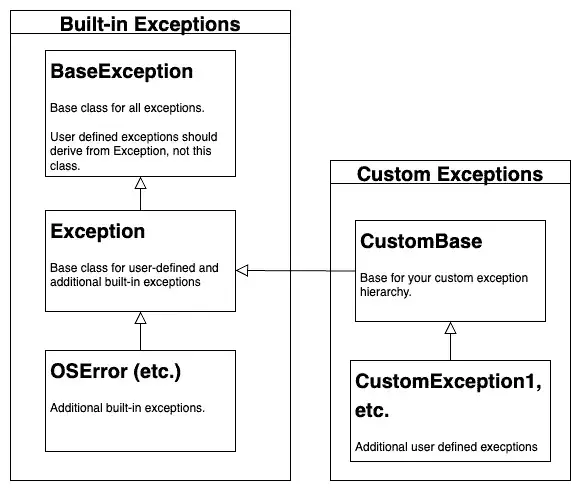
Let's start by defining our base exception and the top-level categories for our trading system, which directly correspond to the major components we'll be building.
# In a new file, e.g., 'framework/exceptions.py'

class TradingSystemError(Exception):
    """Base exception for all errors in the trading framework."""
    pass

class APIError(TradingSystemError):
    """For errors related to broker API communication."""
    pass

class DataError(TradingSystemError):
    """For errors related to market data processing."""
    pass

class OrderError(TradingSystemError):
    """For errors related to order management and execution."""
    pass
Now, we can get more specific by subclassing these categories.
# Continuing in 'framework/exceptions.py'

# --- API Errors ---
class AuthenticationError(APIError):
    """Failed to authenticate with the broker API."""
    pass

class ConnectionError(APIError):
    """Network-related error when connecting to the API."""
    pass

# --- Data Errors ---
class DataValidationError(DataError):
    """Incoming data failed a validation check."""
    pass

class MissingDataError(DataError):
    """Expected data was not found or is incomplete."""
    pass

# --- Order Errors ---
class OrderRejectedError(OrderError):
    """The broker rejected an order."""
    pass

class InsufficientFundsError(OrderError):
    """Not enough capital or margin to place an order."""
    pass
This structure allows us to handle errors with precision. For example, in our execution handler:
try:
    # code to submit an order
    pass
except InsufficientFundsError as e:
    # specific logic: log a warning, notify user, stop trying for this symbol
    logger.warning(f"Cannot place order due to insufficient funds: {e}")
except OrderRejectedError as e:
    # specific logic: log an error, investigate the broker's reason
    logger.error(f"Order was rejected by the broker: {e}")
except APIError as e:
    # general API logic: maybe the connection is down, try to reconnect
    logger.critical(f"A severe API error occurred: {e}")
Making Exceptions Useful: Adding Context
An exception class is not just a name; it's a container for valuable information about what went wrong. To make debugging effective, our exceptions should carry context.
For example, an OrderRejectedError should include the order_id and the reason provided by the broker. A DataValidationError should specify which data field was invalid.
Let's see how to add this information.
How to Create Custom Exceptions in Python
The article 'How to Create Custom Exceptions in Python' provides clear, practical examples of how to add custom attributes to your exceptions and create hierarchies.
Please review the sections 'Adding Useful Information', 'Exception Hierarchies', and the 'Business Logic Exceptions' under 'Practical Examples'. These demonstrate how to initialize exceptions with contextual data, which is exactly what we need.
Applying these patterns, we can enhance our OrderRejectedError:
class OrderRejectedError(OrderError):
    """The broker rejected an order."""
    def __init__(self, message, order_id=None, broker_message=None):
        full_message = f"{message} (Order ID: {order_id})"
        super().__init__(full_message)
        self.order_id = order_id
        self.broker_message = broker_message

    def __str__(self):
        # Overriding __str__ for a clean, readable output
        base = super().__str__()
        if self.broker_message:
            return f"{base} | Broker Response: '{self.broker_message}'"
        return base

# --- How you would raise it ---
# raise OrderRejectedError(
#     "Spread order for SPY failed validation",
#     order_id="12345",
#     broker_message="Invalid combo order leg price"
# )
Best Practices: Chaining and Logging
When you catch a low-level exception (e.g., from a networking library) and raise your own higher-level custom exception, you risk losing the original error's traceback. Exception chaining solves this. By using raise NewException from original_exception, you preserve the full context for debugging.
import requests

# ... inside your API connection module
try:
    response = requests.get("https://api.broker.com/account", timeout=5)
    response.raise_for_status() # Raises HTTPError for 4xx/5xx responses
except requests.exceptions.Timeout:
    # Handle a timeout specifically
    raise ConnectionError("API request timed out") from None # 'from None' hides the requests exception
except requests.exceptions.HTTPError as e:
    if e.response.status_code == 401:
        # Raise our custom auth error, but link the original HTTPError
        raise AuthenticationError("API authentication failed. Check API keys.") from e
    else:
        # Raise a generic API error for other HTTP issues
        raise APIError(f"API returned an error: {e.response.status_code}") from e
This practice is invaluable. When our logger (from the last lesson) captures the AuthenticationError, it will also include the full traceback from the underlying requests.exceptions.HTTPError, telling us exactly what went wrong at the network level.
Test your understanding!
You are writing a function parse_tick_data(raw_data) that takes a dictionary of raw tick data from the broker. A valid tick must contain the keys 'symbol', 'bid', and 'ask'.
- If the
raw_datadictionary is missing the 'bid' key, which of our custom exceptions should you raise? - How would you modify that exception's class definition to include the missing key's name and the raw data that caused the error?
- Show the line of code you would use to
raisethis exception inside theparse_tick_datafunction.
Show answer
-
The most appropriate exception is
MissingDataError, which inherits fromDataError. -
You would modify the class to accept these new attributes:
class MissingDataError(DataError): """Expected data was not found or is incomplete.""" def __init__(self, message, missing_key=None, raw_data=None): super().__init__(message) self.missing_key = missing_key self.raw_data = raw_data def __str__(self): return f"{self.args[0]} | Missing Key: '{self.missing_key}'" -
Inside the function, you would raise it like this, catching the built-in
KeyErrorand chaining it:def parse_tick_data(raw_data): try: # ... processing other keys ... bid_price = raw_data['bid'] return bid_price except KeyError as e: # The 'bid' key was missing. raise MissingDataError( "Required key not found in tick data", missing_key='bid', raw_data=raw_data ) from e
Conclusion
In this lesson, we have designed a clean, hierarchical exception system tailored to our trading framework. This is the final foundational piece of Module 1, working hand-in-hand with our configuration and logging systems to create a robust application backbone.
Key Takeaways:
- Create a Base Exception: Start with a single
TradingSystemErrorto namespace all application-specific errors. - Build a Hierarchy: Design categories of exceptions (
APIError,DataError,OrderError) that reflect the domains of your application, allowing for handling at different levels of specificity. - Add Context: Enhance your custom exceptions by adding relevant data (e.g.,
order_id,status_code) to make them powerful tools for debugging and programmatic handling. - Use Exception Chaining: Preserve the root cause of errors by using
raise NewException from original_exception, which is critical for effective logging and debugging. - Handle, Don't Just Catch: The purpose of this hierarchy is to enable intelligent responses to errors, rather than simply catching
Exceptionand giving up.
Preview of the Next Module:
We have now completed the foundational setup of our framework. In the next module, "Broker Connectivity and Data Model," we will put our new APIError hierarchy to immediate use. Our first task will be to implement a connection manager for the Interactive Brokers API, where we will have to gracefully handle the very authentication and connection errors we designed exceptions for today.