Hello and welcome back!
In our last lesson, we implemented the Strategy design pattern, creating a flexible structure for our BullPutSpread and BearCallSpread algorithms. This decoupled our strategy logic from the main application, but it left us with a key question: how do we tell our system which strategy to run, which symbols to trade, or what parameters to use without hardcoding them?
This lesson answers that question. We will set up a robust configuration system using a YAML file. This is a critical step in building a professional-grade application, as it allows you to separate your code from your configuration. By the end of this lesson, you will be able to create and manage a YAML file to handle all your trading system's parameters, including symbols, strategy settings, and even sensitive API keys.
Why Separate Configuration from Code?
In any complex system, many parameters can change:
- The list of underlying symbols you want to monitor (e.g.,
SPY,QQQ). - The parameters for your strategy (e.g., target delta, spread width).
- Your broker API keys.
- Settings for different modes (e.g., paper trading vs. live trading).
Hardcoding these values directly into your Python scripts is inflexible and error-prone. A configuration file provides a single, centralized place to manage these settings, making your system easier to maintain, deploy, and modify.
Choosing a Configuration Format: An Introduction to YAML
Several formats are popular for configuration, including JSON, TOML, and YAML. For our purposes, YAML (YAML Ain't Markup Language) is an excellent choice because its syntax is clean, human-readable, and exceptionally good at representing nested data structures, which is perfect for our strategy parameters.
To get a quick overview of these formats and their syntax, the following video provides a concise comparison.
This video, 'Config Files in Python', compares the three most common configuration file formats. It will help you appreciate why YAML is often preferred for its readability.
Please watch from 01:03 to 05:40. The first part introduces config files, and the second part shows side-by-side examples of JSON, YAML, and TOML.
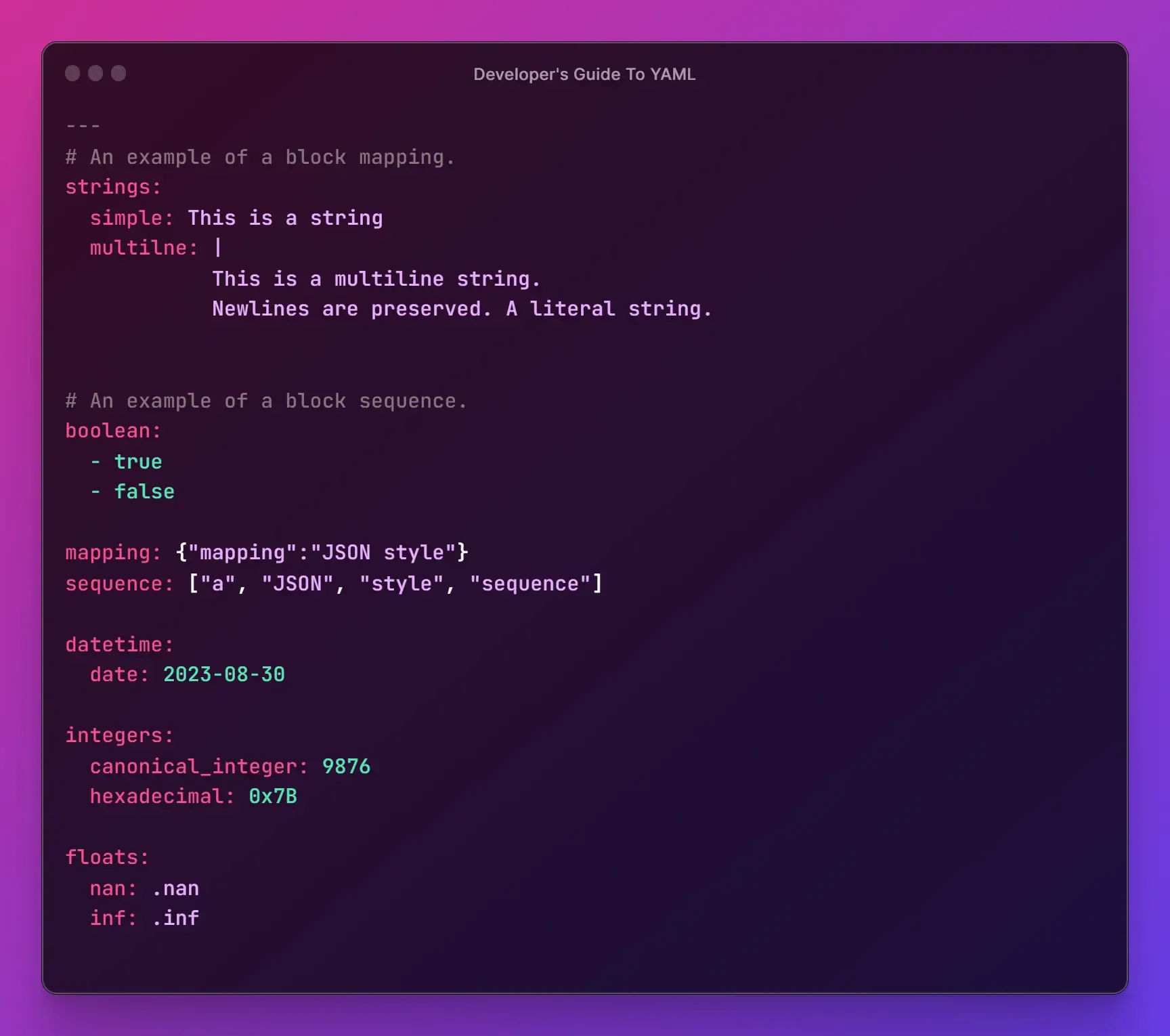
As you can see, YAML's use of indentation and minimal syntax makes it very clear. Here is a visual guide to some common YAML data types.
Reading and Writing YAML Files in Python
To work with YAML in Python, we'll use the PyYAML library, which is the de-facto standard. You can install it via pip:
pip install PyYAML
The process of interacting with a YAML file involves two main operations:
- Loading: Reading the YAML file and parsing its contents into a Python object (usually a dictionary).
- Dumping: Taking a Python dictionary and writing it back into a YAML-formatted file.
This video and article provide a clear, practical guide to performing these operations.
Working with YAML Files in Python
The video 'Working with YAML Files in Python' from NeuralNine offers a focused tutorial on using the PyYAML library.
Watch the segments from 00:00-03:41 and 11:01-12:46. This will cover the installation, basic YAML syntax, and the core yaml.safe_load() and yaml.dump() functions.
How to Work with YAML in Python – A Guide with Examples
For a text-based reference, the article 'How to Work with YAML in Python' from freeCodeCamp provides excellent code examples for reading and writing YAML.
Read the sections 'How to Read YAML Files' and 'How to Write YAML Files'. Pay close attention to the use of yaml.safe_load() and the default_flow_style=False parameter in yaml.dump().
A crucial takeaway from these resources is to always use yaml.safe_load() instead of yaml.load(). The load() function is insecure as it can execute arbitrary Python code, posing a significant security risk.
Designing Our Trading System's config.yaml
Let's design an initial config.yaml file for our trading framework. It will have three main sections:
account: For broker-related information like API keys.trading: For general trading parameters like the symbols to trade.strategies: A nested section to hold parameters specific to each strategy.
Here is what our config.yaml will look like:
# config.yaml

account:
  broker: 'interactive_brokers'
  # We will handle API keys securely in the next section
  api_key: 'YOUR_API_KEY'
  api_secret: 'YOUR_API_SECRET'
  paper_trading: True

trading:
  symbols:
    - 'SPY'
    - 'QQQ'

strategies:
  bull_put_spread:
    enabled: True
    parameters:
      target_delta: 0.20
      spread_width: 5
      dte_min: 30 # Days to expiration
      dte_max: 45

  bear_call_spread:
    enabled: False
    parameters:
      target_delta: 0.15
      spread_width: 10
      dte_min: 30
      dte_max: 45
This structure is clean, extensible, and easy to read. You can see how we could easily disable the bear_call_spread strategy or adjust the target_delta for the bull_put_spread without touching any code.
A ConfigManager Class for Robustness
To make configuration handling even cleaner within our application, it's good practice to encapsulate the logic in a dedicated class. A ConfigManager can handle loading the file, providing easy access to values, and handling potential errors.
The freeCodeCamp article you reviewed earlier presents a great template for such a class.
How to Work with YAML in Python – A Guide with Examples
Let's revisit the freeCodeCamp article to study a practical implementation of a configuration manager.
Read the section 'Build a YAML Config Manager' and study the ConfigManager class. Note how it handles file loading, error checking, and provides a get() method for convenient, safe access to nested values using dot notation (e.g., 'database.host').
We can adapt this pattern for our framework. Here is a simplified version tailored to our needs:
import yaml
import os

class ConfigManager:
    def __init__(self, config_path='config.yaml'):
        if not os.path.exists(config_path):
            raise FileNotFoundError(f"Configuration file not found at: {config_path}")

        with open(config_path, 'r') as file:
            try:
                self.config = yaml.safe_load(file)
                print("✓ Configuration loaded successfully.")
            except yaml.YAMLError as e:
                print(f"✗ Error parsing YAML file: {e}")
                raise

    def get(self, key_path, default=None):
        """
        Get a configuration value using dot notation.
        Example: get('strategies.bull_put_spread.parameters.target_delta')
        """
        keys = key_path.split('.')
        value = self.config

        for key in keys:
            if isinstance(value, dict) and key in value:
                value = value[key]
            else:
                return default
        return value

# --- Example Usage ---
if __name__ == '__main__':
    try:
        config_mgr = ConfigManager()

        # Accessing nested values
        symbols = config_mgr.get('trading.symbols')
        print(f"Trading Symbols: {symbols}")

        delta = config_mgr.get('strategies.bull_put_spread.parameters.target_delta')
        print(f"Bull Put Spread Target Delta: {delta}")

        # Accessing a non-existent key with a default
        profit_target = config_mgr.get('strategies.bull_put_spread.parameters.profit_target', 0.5)
        print(f"Default Profit Target: {profit_target}")

    except (FileNotFoundError, yaml.YAMLError) as e:
        print(e)
This ConfigManager provides a clean, centralized API for the rest of our application to access configuration values.
Advanced Topic: Securely Managing API Keys
We've arrived at a critical aspect of your goal: building a "foolproof" system. Storing sensitive information like API keys directly in a configuration file is a major security risk, especially if the code is managed with a version control system like Git.
A standard industry practice is to store secrets in environment variables and have the application load them at runtime. We can integrate this elegantly with our YAML configuration using a powerful feature of PyYAML: custom tags.
We'll define a custom tag, !Env, that instructs our YAML loader to fetch a value from an environment variable.
Our config.yaml would be modified to look like this:
# config.yaml (secure version)
account:
  broker: 'interactive_brokers'
  api_key: !Env 'IB_API_KEY'
  api_secret: !Env 'IB_API_SECRET'
  paper_trading: True
# ... rest of the config
Before running the application, you would set the environment variables in your terminal:
export IB_API_KEY='your_real_api_key'
export IB_API_SECRET='your_real_api_secret'
The following article provides a superb explanation and implementation of this technique. Given your IT background, you will likely appreciate the elegance of this solution.
A Powerful Python Trick: Custom YAML tags & PyYAML
This article, 'A Powerful Python Trick: Custom YAML tags & PyYAML', explains how to create custom constructors to handle special tags. We will focus on its excellent example for securely loading secrets from environment variables.
Please read the section 'Advanced Examples' -> 'Protecting Secrets'. This section details the problem with storing secrets in files and presents a complete solution using an !Env tag and a custom PyYAML constructor.
By integrating the code from the article, our ConfigManager can be extended to handle the !Env tag, providing a seamless and secure way to manage your API keys. This is what a professional, production-ready implementation looks like.
Test your understanding!
You want to add a new parameter to your config.yaml to define the account_id for paper trading. This ID is not sensitive, so it doesn't need to be an environment variable.
- How would you modify the
config.yamlfile to add anaccount_idofDU12345under theaccountsection? - Using the
ConfigManagerclass instanceconfig_mgr, what line of Python code would you write to retrieve thisaccount_id?
Show answer
-
You would add the key-value pair directly to the
accountsection inconfig.yaml:account: broker: 'interactive_brokers' api_key: !Env 'IB_API_KEY' api_secret: !Env 'IB_API_SECRET' paper_trading: True account_id: 'DU12345' # Add this line -
You would use the
getmethod with dot notation:account_id = config_mgr.get('account.account_id') print(f"Account ID: {account_id}")
Conclusion
In this lesson, we have built a vital component of our trading framework. By separating configuration from code and using YAML, we have made our system far more flexible, maintainable, and secure.
Key Takeaways:
- YAML is a human-readable data format ideal for managing complex application configurations.
- The
PyYAMLlibrary allows us tosafe_loadconfiguration into Python dictionaries anddumpit back to files. - A
ConfigManagerclass encapsulates configuration logic, providing a clean, robust interface for the rest of the application. - For sensitive data like API keys, the best practice is to use environment variables and load them dynamically, for which custom YAML tags like
!Envprovide an elegant solution.
Preview of the Next Lesson:
Our framework is taking shape. We have interfaces, a strategy pattern, and now a configuration system. However, when the system is running, how do we know what it's doing? Blindly running a trading system is risky. In our next lesson, we will address this by setting up a centralized logging system to track data flow, signals, orders, and errors, giving us the visibility we need to operate and debug our system effectively.