Introduction
In our previous lesson on currying, you saw the ...args syntax used to create a flexible curry function that could accept a variable number of arguments. This ... syntax is a powerful feature introduced in ES6, and it can represent one of two distinct operators depending on how it's used: the rest operator or the spread operator.
This lesson is dedicated to mastering this syntax. Your goal is to apply rest and spread operators with function arguments and array literals. Understanding the distinction between these two operators is crucial for writing clean, modern, and expressive JavaScript. As a software engineer, you'll find these operators indispensable for tasks ranging from manipulating data collections to designing flexible function interfaces.
Let's begin with a high-level visual overview of the difference.
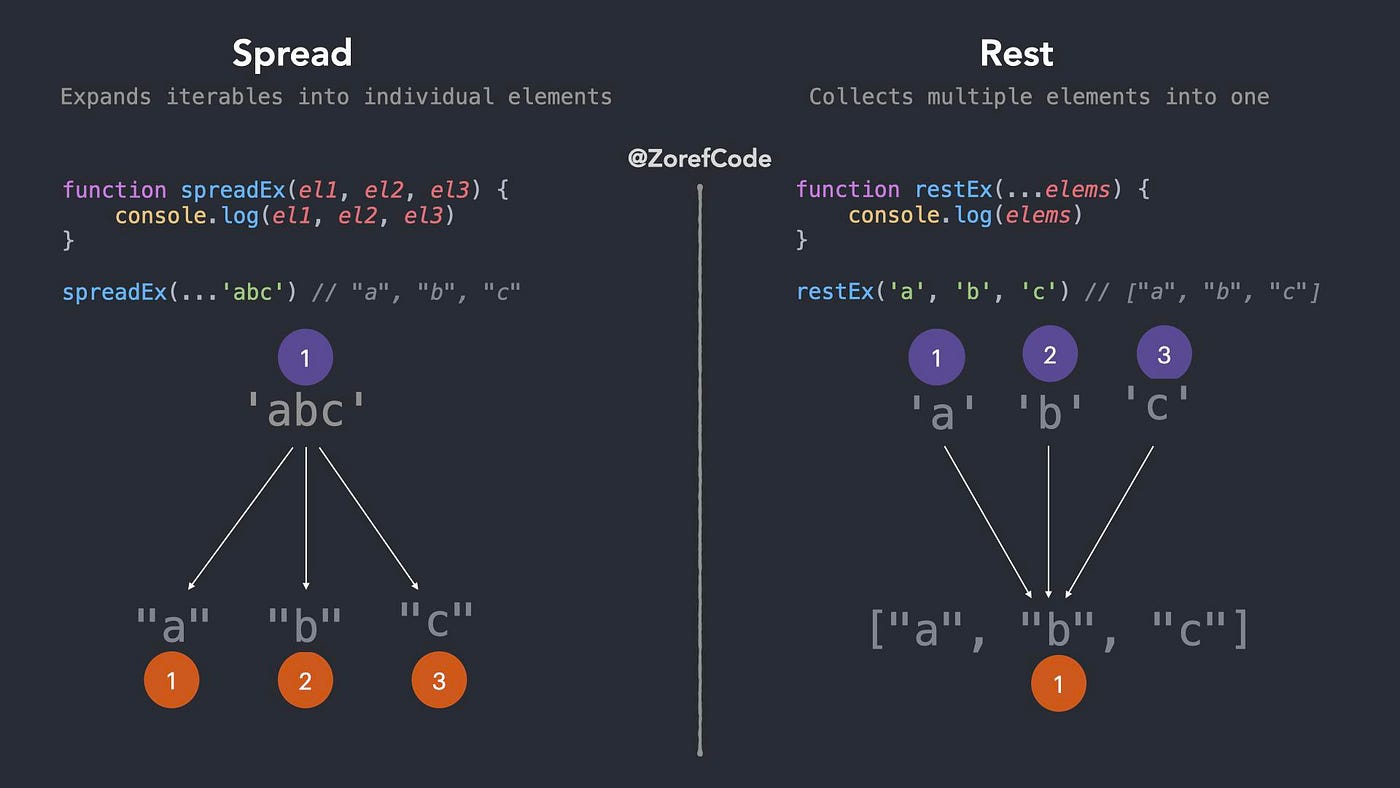
The Rest Operator: Gathering Elements
The rest operator's job is to "gather" the remaining elements or arguments into a single array. You can identify it because it appears on the "left side" of an assignment, typically in a function definition or a destructuring expression.
Rest in Function Parameters
The most common use for the rest operator is to create functions that can accept an indefinite number of arguments. This provides a modern, more powerful alternative to the older arguments object.
A function can have named parameters, and the rest operator can be used to collect all remaining arguments into an array. A key rule is that the rest parameter must be the last parameter in a function's definition.
Let's create a sum function that can take any number of arguments:
function sum(...numbers) {
  // 'numbers' is a true array
  console.log(Array.isArray(numbers)); // true
  return numbers.reduce((total, num) => total + num, 0);
}

console.log(sum(1, 2)); // 3
console.log(sum(1, 2, 3, 4, 5)); // 15
Because numbers is a real array, we can use any array method on it, like reduce(), map(), or filter(). This is a significant advantage over the old arguments object, which is only "array-like" and doesn't have these methods.
The following resource provides a detailed look at rest parameters and contrasts them with the arguments object.
Rest parameters and spread syntax
This article from The Modern JavaScript Tutorial will solidify your understanding of how rest parameters work in functions.
Please read the first two sections: Rest parameters and The "arguments" variable. Focus on the key differences between the rest parameter array and the arguments object.
Rest in Destructuring Assignments
The rest operator is also incredibly useful in destructuring assignments. It allows you to pull specific elements from an array (or properties from an object) while gathering the rest into a new variable.
const scores = [95, 88, 76, 65, 54];

const [winner, runnerUp, ...others] = scores;

console.log(winner);   // 95
console.log(runnerUp); // 88
console.log(others);   // [76, 65, 54]
This pattern is highly effective for processing data where you care about the first few items and want to handle the remainder as a group. The following video provides a practical demonstration.
Why Is Array/Object Destructuring So Useful And How To Use It
This short clip from Web Dev Simplified shows exactly how the rest operator works within an array destructuring context.
Watch the segment from this point, where the presenter introduces the rest operator to capture the remaining elements of an array.
The Spread Operator: Expanding Elements
The spread operator does the exact opposite of the rest operator: it "spreads" or "expands" the elements of an iterable (like an array or string) into individual elements. You can identify it because it typically appears on the "right side" of an assignment, in places where multiple elements are expected, such as in a function call or an array literal.
Spread in Function Calls
Suppose you have a function that expects multiple arguments, like Math.max(num1, num2, num3), but your data is already in an array. The spread operator elegantly solves this problem.
const numbers = [10, 5, 25, 15];

// Without spread, this would fail because Math.max expects numbers, not an array.
console.log(Math.max(numbers)); // NaN

// With spread, the array is expanded into individual arguments.
// This is equivalent to calling Math.max(10, 5, 25, 15).
console.log(Math.max(...numbers)); // 25
Spread in Array Literals
The spread operator is also extremely useful inside array literals for creating new arrays. Its main applications here are for copying and combining arrays.
1. Copying an Array:
You can create a shallow copy of an array with a very concise syntax.
const original = ['a', 'b', 'c'];
const copy = [...original];

console.log(copy); // ['a', 'b', 'c']
console.log(original === copy); // false (they are different arrays in memory)

copy.push('d');
console.log(original); // ['a', 'b', 'c'] (original is unaffected)
2. Combining Arrays:
It provides a more readable and flexible way to concatenate arrays compared to the older concat() method.
const arr1 = [1, 2, 3];
const arr2 = [4, 5, 6];

const combined = [...arr1, 'new-element', ...arr2];
console.log(combined); // [1, 2, 3, 'new-element', 4, 5, 6]
This video from freeCodeCamp.org demonstrates these practical use cases.
...spread operator and rest operator - Beau teaches JavaScript
This video offers quick, clear examples of the spread operator in action.
Watch the following segments: Passing array elements as arguments to a function. Copying an array to create a distinct new array. Concatenating arrays in a flexible way.
Spread with Objects
Since ES2018, the spread operator also works on objects, making it easy to create shallow copies and merge objects.
const user = { name: 'Alex', id: 123 };
const permissions = { isAdmin: false };

// Merging two objects
const userWithPermissions = { ...user, ...permissions };
console.log(userWithPermissions); // { name: 'Alex', id: 123, isAdmin: false }

// Adding/overwriting a property
const updatedUser = { ...user, id: 456, active: true };
console.log(updatedUser); // { name: 'Alex', id: 456, active: true }
A crucial point to understand, especially given your background, is that spread performs a shallow copy. If an array or object contains other objects (non-primitive values), the inner objects are copied by reference, not duplicated.
JavaScript Rest vs Spread Operator – What's the Difference?
This article from freeCodeCamp provides a detailed explanation of a critical nuance of the spread operator.
Please read the section titled What to Know About the Spread Operator. Pay close attention to Info 3, which explains how spread behaves with primitive vs. non-primitive values and the concept of shallow copying. This is a common source of bugs, and understanding it is vital.
Summary: Rest vs. Spread
The ... syntax is versatile, but distinguishing its role is straightforward if you remember the context.
- Rest Parameters:
...appears in a function definition or a destructuring assignment. Its purpose is to gather multiple items into a single array. - Spread Syntax:
...appears in a function call or an array/object literal. Its purpose is to expand an iterable into individual items.
The summary of the javascript.info article provides a perfect final recap.
Rest parameters and spread syntax
This final section clearly summarizes the rule for telling the two operators apart.
Read the Summary section to reinforce the core distinction and use patterns.
Conclusion
In this lesson, you've dissected the dual nature of the ... syntax in JavaScript. You learned how to use the rest operator to create flexible functions and destructure collections, and how to use the spread operator for expanding iterables into function arguments or for immutably creating new arrays and objects.
Key Takeaways:
- Rest operator (
...) gathers individual elements into an array. It's used in function parameter lists and destructuring assignments. - Spread operator (
...) expands an iterable's elements. It's used in function calls and array/object literals. - Rest parameters provide a modern, superior alternative to the
argumentsobject because they create a true array. - Spread syntax offers a concise and readable way to perform shallow copies and combine arrays and objects.
- The distinction is based on context: rest is for declaration/assignment (gathering), while spread is for invocation/expression (expanding).
In our next lesson, we will continue exploring ways to create cleaner function interfaces. We'll build on the concept of destructuring that you saw today and combine it with default parameters to make your functions more robust and self-documenting.