In our last session, you implemented a brute-force k-NN search. This sequential scan is the bedrock of our project, providing a perfectly accurate baseline for measuring our future optimizations. While correct, its performance is directly proportional to the size of the dataset, a scaling property we aim to overcome. Before we can build faster algorithms, however, we must first understand the fundamental constraints of the hardware they run on.
This lesson delves into the invisible forces that govern your code's real-world speed. Your learning outcome is to analyze the impact of CPU cache lines on data access patterns and performance. We will explore why two algorithms with the same theoretical complexity can have drastically different execution times, and how understanding the memory hierarchy is the first step toward writing truly high-performance code.
The Great Chasm: CPU Speed vs. Memory Speed
At the heart of modern computer architecture lies a profound performance imbalance: the CPU can process data orders of magnitude faster than it can fetch that data from main memory (RAM). A CPU might complete an instruction in a fraction of a nanosecond, while a round trip to RAM can take 50-100 nanoseconds. This is often called the "Memory Wall." For applications like ours that need to process vast amounts of data, waiting for memory is the primary performance bottleneck.
To bridge this chasm, CPUs are equipped with small, extremely fast memory buffers called caches. These caches sit between the CPU and main memory, holding recently accessed data. The entire system is a hierarchy:
- L1 Cache: Tiny (e.g., 32-64 KB), but incredibly fast (a few CPU cycles latency).
- L2 Cache: Larger (e.g., 256 KB - 1 MB) and slightly slower.
- L3 Cache: Larger still (e.g., 8-64 MB), shared by all CPU cores, and slower than L1/L2.
- Main Memory (RAM): Huge (many GBs), but dramatically slower than any cache.
The following classic talk by Scott Meyers provides a powerful, intuitive demonstration of this speed difference.
code::dive conference 2014 - Scott Meyers: Cpu Caches and Why You Care
This segment from Scott Meyers' talk "Cpu Caches and Why You Care" visualizes the latency of accessing different levels of the memory hierarchy.
Watch the section from this timestamp. Pay close attention to the animation comparing cache access times to main memory access time. It vividly illustrates why he concludes, "from a speed perspective, the total amount of memory in your system is the total amount of cache."
The Unit of Transfer: Cache Lines
When the CPU needs a piece of data that isn't in the cache (a cache miss), it doesn't just fetch the single byte or word it requested. Instead, it fetches a fixed-size block of contiguous memory called a cache line. On virtually all modern x86-64 processors, a cache line is 64 bytes. If the requested data is already in the cache (a cache hit), the access is extremely fast.

This design is based on a principle called spatial locality: if you access a memory address, you are very likely to access nearby memory addresses soon. By fetching a whole 64-byte line, the hardware makes a bet that you'll need the neighboring data. When this bet pays off, you get the subsequent data "for free," without another slow trip to main memory.
CPU Cache Lines: The Complete Guide with Interactive Simulator | Abhik Sarkar
This article by Abhik Sarkar provides an excellent technical overview of CPU caches and cache lines.
First, read the introduction to solidify the definition of a cache line and spatial locality. Then, jump to the section "Why Cache Lines Exist" and read about how they bridge the gap between the CPU and memory.
Access Patterns and Data Layout
The 64-byte granularity of memory transfers has profound implications for performance. The way you arrange your data in memory and the order in which you access it determines whether you are working with the cache or against it.
-
Sequential Access (Best Case): This is what you implemented in the last lesson with the brute-force sequential scan. You iterate through a large, contiguous array of vectors. When you access the first float of a vector, the CPU fetches the entire 64-byte cache line, which might contain the next 15 floats. Your subsequent reads are then lightning-fast cache hits. The CPU's hardware prefetcher can even detect this linear pattern and start fetching the next cache lines before you even ask for them.
-
Strided Access (Poor): Imagine iterating through a large matrix column by column when it's stored in row-major order. Each access jumps a large distance in memory (the width of a row), likely landing in a different cache line. You fetch a 64-byte line, use only 4 or 8 bytes of it, and then discard the rest, only to repeat the process for the next element.
-
Random Access (Worst Case): This completely defeats spatial locality and hardware prefetching. Almost every memory access results in a cache miss, stalling the CPU as it waits for data from main memory.
Let's see this in action with the classic row-major vs. column-major traversal example.
code::dive conference 2014 - Scott Meyers: Cpu Caches and Why You Care
Scott Meyers uses a matrix traversal benchmark to show the dramatic performance difference between cache-friendly and cache-unfriendly access patterns.
First, watch the opening of the talk from the problem setup, where he benchmarks row-major vs. column-major traversal. The results are stark. Then, watch his explanation from this timestamp, where he connects this performance difference directly back to cache lines and spatial locality.
This principle extends beyond access patterns to the very layout of your data structures. This is a core idea in Data-Oriented Design, a paradigm that is essential for high-performance programming. The two most common layouts are Array-of-Structs (AoS) and Struct-of-Arrays (SoA).
- AoS:
struct { id; name; salary; } employees[100];- Good for object-oriented work where you often need all fields of a single object.
- SoA:
int ids[100]; string names[100]; float salaries[100];- Excellent for analytical queries where you operate on a single field across all objects.
For our vector database, when we calculate distances, we only need the vector data (the floats). If we stored our vectors in an AoS layout alongside other metadata (e.g., struct { uint32_t id; float vector[128]; }), every cache line we fetch would be "polluted" with the ID, wasting precious memory bandwidth. Our current layout (a large, contiguous block of floats) is implicitly an SoA layout, which is ideal for the sequential scan.
Why You Shouldn't Forget to Optimize the Data Layout
This article from CedarDB provides a brilliant, practical comparison of AoS and SoA, with benchmarks.
Read the section comparing AoS and SoA to understand the two layouts. Then, read the "Read Performance" section carefully. Pay attention to how it explains the wasted memory bandwidth of the AoS layout for analytical queries, which is directly analogous to our distance calculation task.
The Final Hurdle: Misalignment
We now know that our sequential access pattern is cache-friendly. However, there's one more subtle trap: memory alignment. Our data must not only be contiguous but should also be placed at memory addresses that respect cache line boundaries.
What happens if a piece of data you need to read—say, a 16-byte chunk for a SIMD operation—starts 60 bytes into a 64-byte cache line? The CPU would need to:
- Fetch the first cache line to get the first 4 bytes.
- Fetch the next cache line to get the remaining 12 bytes.
This is a cache line split (or unaligned access), and it forces two memory operations where one should have sufficed, effectively halving your memory throughput in that instant.
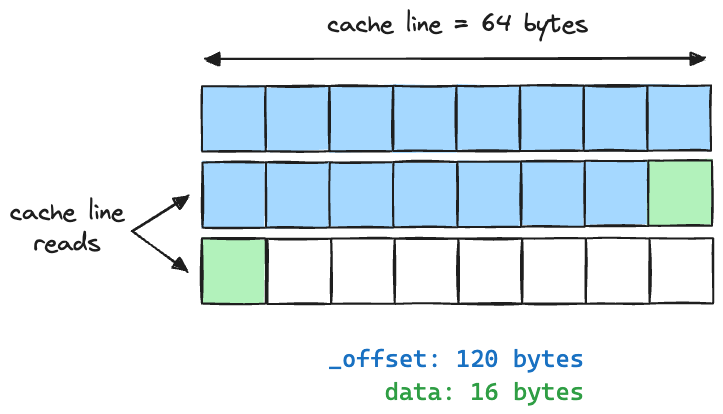
For tasks that are bound by memory bandwidth, like our brute-force search, these unaligned accesses can add up to a significant performance penalty.
Conclusion
In this lesson, we've taken a crucial step from what our code does to how the hardware executes it. Understanding the CPU cache isn't just an academic exercise; it's the key to unlocking performance in memory-intensive applications.
Here are the main takeaways:
- The vast speed difference between the CPU and RAM makes cache performance paramount.
- Memory is moved in 64-byte cache lines. Efficient code uses as much of each fetched line as possible.
- Sequential access patterns exploit spatial locality, leading to high cache hit rates and enabling hardware prefetching.
- Data layout (AoS vs. SoA) must be chosen based on the application's access patterns to avoid cache pollution.
- Data must be aligned to cache line boundaries to prevent expensive cache line splits.
We've identified that our sequential scan is fundamentally a cache-friendly algorithm, but it may be suffering from misalignment. In the next lesson, we will address this head-on. You will learn how to guarantee that your data structures respect these hardware boundaries by implementing a cache-line aligned memory allocator using posix_memalign.