Welcome to the next lesson in our journey to build a high-performance vector database. In the previous lesson, we laid the physical groundwork by learning how to create a file and, crucially, pre-allocate its entire size on disk using fallocate. This gave us a file descriptor pointing to a reserved, contiguous block of storage.
Today, we will connect that physical file to our program's memory in the most efficient way possible. Your learning outcome for this lesson is to map a pre-allocated file into the process's virtual address space using mmap for direct memory access. This system call is the cornerstone of our high-performance I/O strategy, as it effectively erases the boundary between file data and in-memory data structures. We will explore how mmap works, dissect its parameters, and understand the underlying operating system mechanisms that make it so powerful.
From File Descriptor to Memory Pointer
At the end of the last lesson, we had an integer file descriptor. While we could use read() and write() with this descriptor, doing so would involve system call overhead and memory copies for every I/O operation. mmap offers a radically different approach. It instructs the operating system's kernel to create a direct mapping between a region of the process's virtual address space and the file on disk.
Once this mapping is established, the file's contents can be accessed as if they were a simple array in memory. You get a void* pointer, and from that point on, you can read from or write to the file using simple pointer arithmetic and memory operations, bypassing the read/write system calls entirely.
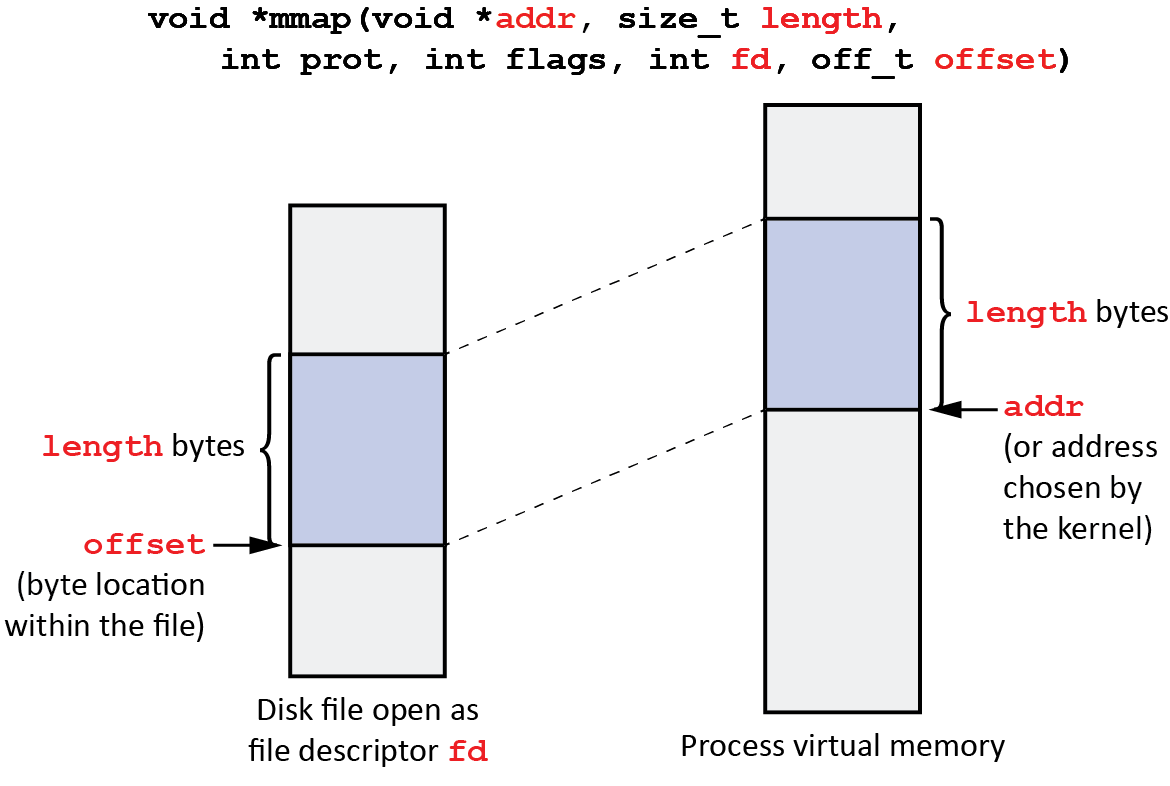
To understand how to use it, let's look at the function signature and its parameters.
#include <sys/mman.h>

void *mmap(void *addr, size_t length, int prot, int flags, int fd, off_t offset);
The following reading provides a clear and concise breakdown of what each of these arguments means.
Lab 7: Syscall and Memory-Mapped File I/O
This document from an ANU Systems, Networks, and Concurrency course lab offers a detailed explanation of the mmap system call.
Please read the section that breaks down the mmap arguments. As you read, consider how we would set these for our vector database project: addr: We'll almost always use NULL to let the kernel choose the best virtual address for the mapping. length: This will be the total size of our pre-allocated database file. prot: We need to both read and write data, so PROT_READ | PROT_WRITE is appropriate. flags: This is the most critical parameter. We'll focus on MAP_SHARED. fd: This is the file descriptor we obtained from open() in the previous lesson. offset: We want to map the entire file, so our offset will be 0.
The Magic of Demand Paging
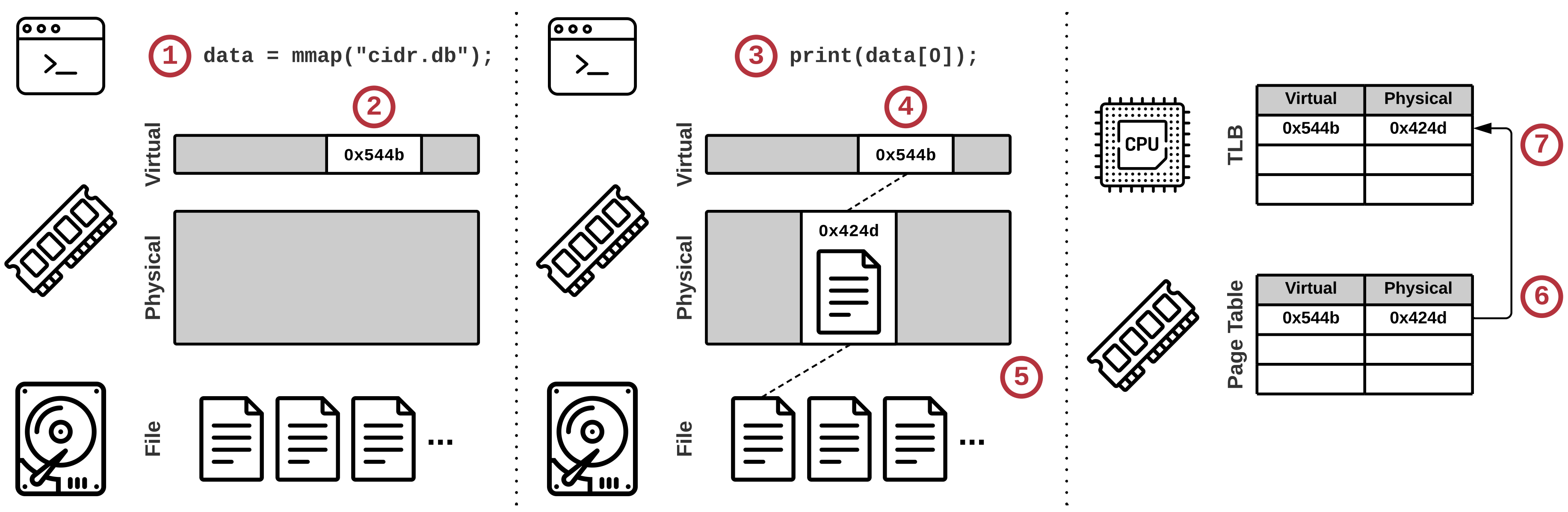
A crucial question at this point is: does mmap immediately read the entire file into RAM? The answer is no, and this is central to its efficiency. The mmap call itself is extremely fast because it doesn't move any data. Instead, it only modifies the process's page table, which is the data structure the CPU's Memory Management Unit (MMU) uses to translate virtual addresses to physical addresses.
mmap sets up the page table entries for the requested virtual address range, marking them as valid but not present in physical RAM. It associates these entries with the corresponding sections of the file on disk. The actual loading of data is deferred until the moment your program first tries to access a memory address within that mapped region.
This is what happens on first access:
- Your program attempts to read or write to an address in the mapped region.
- The MMU checks the page table and finds that while the address is valid, the corresponding page is not in physical RAM. This triggers a specific type of hardware exception called a page fault.
- This exception transfers control to the operating system's page fault handler.
- The OS handler examines the page table entry, sees that it's mapped to a file, finds the correct block on disk, and loads the required page of data into an available physical RAM frame.
- The OS updates the page table entry to point to the new location in physical RAM and marks it as present.
- Control is returned to your program, which re-executes the memory access instruction. This time, it succeeds without a fault.
This entire process is called demand paging or lazy loading. It is the same mechanism the OS uses to manage program code, data, and swap space. By using mmap, we are simply leveraging this highly optimized, fundamental OS feature for our own I/O.
For a deeper dive into the mechanics of virtual memory, page tables, and demand paging, the following video provides excellent conceptual background.
understanding mmap, the workhorse behind keeping memory access efficient in linux
This lecture from Chris Kanich's systems programming course explains the OS concepts that make mmap work.
Watch the first part of the video to understand the key ideas: Demand paging explains the "lazy loading" property. Comparing mmap with read/write highlights the primary performance benefit: eliminating the overhead of repeated system calls and extra data copies.
Persistence: MAP_SHARED vs. MAP_PRIVATE
The flags argument in mmap controls the mapping's behavior. The most important choice for us is between MAP_SHARED and MAP_PRIVATE.
MAP_PRIVATE: Creates a "copy-on-write" mapping. When you write to the memory region, the OS first creates a private copy of the modified page in RAM. Your changes are made to this private copy and are not written back to the original file on disk. This is useful for read-only access or for analyzing a file without changing it.MAP_SHARED: Creates a mapping where your modifications are written back to the underlying file. The changes are also visible to any other process that has aMAP_SHAREDmapping of the same file. For a database where we want to persistently store our vectors,MAP_SHAREDis essential.
The following video gives a clear, practical demonstration of this exact difference.
How to Map Files into Memory in C (mmap, memory mapped file io)
Jacob Sorber's video provides a great hands-on look at using mmap.
First, watch the segment showing a basic read-only mapping, which by default in his example behaves like MAP_PRIVATE. Then, pay close attention to the transition to writing, where he explains why changing the flag to MAP_SHARED is necessary to make the changes persist in the file.
Tying It All Together: Code and Cleanup
Let's see how this fits into our project. We would combine the code from the last lesson with mmap:
#include <stdio.h>
#include <stdlib.h>
#include <sys/mman.h>
#include <sys/stat.h>
#include <fcntl.h>
#include <unistd.h>

int main() {
    const char *filepath = "vectors.db";
    // Define size, e.g., for 100 vectors of 128 dimensions (floats)
    size_t filesize = 100 * 128 * sizeof(float);

    // 1. Open the file (create if it doesn't exist)
    int fd = open(filepath, O_RDWR | O_CREAT, (mode_t)0600);
    if (fd == -1) {
        perror("open");
        return EXIT_FAILURE;
    }

    // 2. Pre-allocate the file to the desired size (from previous lesson)
    // Using ftruncate for simplicity here, but fallocate is preferred
    if (ftruncate(fd, filesize) == -1) {
        perror("ftruncate");
        close(fd);
        return EXIT_FAILURE;
    }

    // 3. Map the file into memory (This lesson's focus)
    void *mapped_region = mmap(
        NULL,                   // Let the kernel choose the address
        filesize,               // Length of the mapping
        PROT_READ | PROT_WRITE, // Read and write permissions
        MAP_SHARED,             // Share changes with the file and other processes
        fd,                     // File descriptor
        0                       // Offset from the start of the file
    );

    if (mapped_region == MAP_FAILED) {
        perror("mmap");
        close(fd);
        return EXIT_FAILURE;
    }

    // The file is now mapped. We can close the file descriptor
    // without affecting the mapping.
    close(fd);

    // Now, 'mapped_region' acts like a pointer to a block of memory.
    // We can cast it and use it to write data.
    // For example, writing a float to the beginning of the file:
    float *float_array = (float *)mapped_region;
    float_array[0] = 3.14f;
    float_array[1] = 1.618f;

    printf("Wrote values to the mapped memory.\n");

    // 4. Clean up: unmap the memory region
    if (munmap(mapped_region, filesize) == -1) {
        perror("munmap");
    }

    return EXIT_SUCCESS;
}
Notice the last step: munmap(). When you are finished with the memory mapping, you must explicitly remove it. munmap() takes the pointer and the length of the region to unmap. The OS will not do this for you automatically when you close the file descriptor; the mapping persists until it's explicitly unmapped or the process terminates.
Conclusion
In this lesson, we bridged the gap between a file on disk and memory in our program. You have learned how to use the powerful mmap system call to create this link, enabling direct, high-performance access to file data.
Here are the key takeaways:
mmapcreates a mapping in a process's virtual address space that corresponds directly to a file on disk.- It operates through demand paging, meaning data is only loaded from disk into RAM on first access, triggered by a page fault. This makes
mmapfast and efficient with memory. - The returned
void*pointer allows you to treat the file's contents as a simple in-memory array, eliminatingread()/write()system call overhead for subsequent access. - The
MAP_SHAREDflag is critical for database-like applications, as it ensures that modifications made to the memory region are written back to the underlying file. - Memory mappings must be explicitly removed with
munmap()when they are no longer needed.
We now have a large, empty, memory-mapped file ready for our data. The next logical question is: how should we organize our vectors and metadata within this raw block of bytes? In the next lesson, we will tackle this by designing a file layout that ensures our data is stored contiguously for fast and efficient access.