In the previous lesson, we established the crucial performance advantages of using memory-mapped I/O (mmap) for large-scale data access. By eliminating system call overhead and an entire memory copy step, mmap provides a direct, high-performance window into file data. Now, it's time to move from theory to practice.
This lesson addresses the first step in using mmap: preparing the underlying file. Before we can map a file into memory, we must first create it and, importantly, ensure it has the necessary size for the data we intend to store. Your objective is to implement file creation and pre-allocation to a specific size using ftruncate and POSIX file descriptors. We will explore the low-level POSIX APIs that give us the necessary control for this task and analyze the precise behavior of these functions.
POSIX File Descriptors: The Primitives of I/O
In your C programming experience, you've likely used fopen, fread, and fwrite from the standard C library (<stdio.h>). These functions operate on a FILE* pointer, which is a high-level abstraction that handles details like buffering automatically.
For system-level tasks like memory mapping, we need to work at a lower level. We'll use the raw system calls provided by the OS, which operate on a file descriptor. A file descriptor is simply an integer that the kernel uses to uniquely identify an open file within a process. The open() system call gives us this handle.
The following video provides an excellent summary of the difference between the FILE* abstraction and the raw file descriptor. It also explains why we need the latter for tasks like mmap.
Reading and Writing Files in C, two ways (fopen vs. open)
This video by Jacob Sorber clearly contrasts the standard library's fopen with the POSIX open system call.
Watch the segments that explain what a file descriptor is and how open returns one. Pay attention to the distinction between a library call and a system call. Finally, the segment on control vs. convenience directly explains why file descriptors are essential for memory-mapped I/O.
The key takeaway is that open() and its associated functions (read, write, close, etc.) give us direct, unbuffered control over file operations, which is exactly what we need for building a high-performance storage layer.
Creating and Sizing a File with ftruncate
With a file descriptor in hand, we can now manipulate the file. Our goal is to create a file and set its size. For example, if we want to store 1 million 128-dimensional vectors (where each dimension is a 4-byte float), we would need 1,000,000 * 128 * 4 = 512,000,000 bytes. We must tell the filesystem to reserve this space.
The POSIX function for this is ftruncate(). It takes a file descriptor and a target size, and sets the file's size to that value.
Let's look at a concrete code example that demonstrates this process.
This article from DEV Community provides a simple, complete C program demonstrating the setup for memory mapping.
In the article, find the code block under the heading C Example for mmap. Focus on the first two steps inside the main function. Step 1: The open() call. Notice the flags O_RDWR | O_CREAT. This tells the OS to open the file for reading and writing, and to create it if it doesn't already exist. Step 2: The ftruncate() call. This is where the file size is set. It takes the file descriptor fd and grows (or shrinks) the file to FILESIZE.
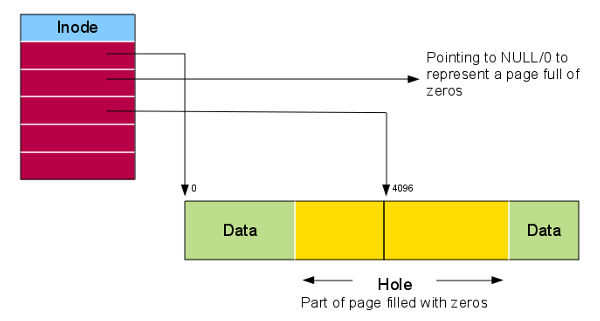
At this point, you might think the job is done. If you were to check the file's size with ls -l, it would report the correct size (e.g., 4096 bytes in the example). However, something subtle and extremely important has happened. ftruncate does not actually write any data to the disk or allocate physical blocks for the new space. It only updates the file's metadata in the inode to change its logical size.
This creates what is known as a sparse file. The file contains "holes"—regions that are logically part of the file but consume no physical disk space. When the OS needs to read from a hole, it simply returns a block of zeros without ever accessing the disk.
The Perils of Sparse Files and a Better Alternative
Using ftruncate to pre-allocate space is fast because it's just a metadata operation. However, it carries a significant risk for a database system. Since the disk blocks are not actually reserved, a write operation to a "hole" in the future might fail with an ENOSPC ("No space left on device") error if the disk has filled up in the meantime. This is unacceptable for a system that needs to guarantee data durability.
For robust pre-allocation, Linux provides a superior system call: fallocate(). Unlike ftruncate, fallocate actually allocates the physical disk blocks for the file, guaranteeing that the space is reserved. Writes into this pre-allocated space can no longer fail due to ENOSPC.
The following article provides a superb, in-depth comparison of these two approaches. This is essential knowledge for anyone doing systems programming.
fallocate and File Space Management - Linux Kernel Internals
This article from "Linux Kernel Internals" is a deep dive into file space management. We'll focus on the comparison and a practical implementation pattern.
First, please read the section ftruncate() vs fallocate(). The comparison table is the most important part of this lesson. It clearly contrasts the two functions on key aspects: block allocation, disk usage, and the risk of ENOSPC. Next, review the code example in the section Practical use cases with code. The function create_download_file demonstrates a robust, production-ready pattern. It attempts to use fallocate first. If the underlying filesystem doesn't support it (EOPNOTSUPP), it gracefully falls back to using ftruncate.
Let's break down the key differences from that table:
| Aspect | ftruncate(fd, size) |
fallocate(fd, 0, 0, size) |
|---|---|---|
| Block Allocation | No (creates a sparse file) | Yes (allocates real blocks) |
| Disk Usage | Near zero (metadata only) | Proportional to size |
ENOSPC Risk |
Yes, on subsequent writes. | No, blocks are already reserved. |
| Fragmentation Risk | Low (allocation happens later, interleaved with others) | Very low (attempts to allocate one contiguous extent) |
| Speed | Instantaneous | Slower, proportional to size (but I/O may be deferred) |
For our vector database, reliability is paramount. The guarantee that fallocate provides against ENOSPC errors makes it the clear choice. The upfront cost of allocation is a small price to pay for the assurance that our writes will succeed. The pattern of trying fallocate and falling back to ftruncate is the best practice we will adopt for our project.
Conclusion
In this lesson, you've taken the first concrete step toward building our file-based storage layer. You've learned how to move beyond standard library abstractions to use the low-level POSIX file APIs that are essential for high-performance systems programming.
Here are the key takeaways:
- High-performance I/O operations like
mmaprequire low-level control, which we get by using theopen()system call to obtain a file descriptor (int), not aFILE*. - The
ftruncate()function quickly sets a file's logical size, creating a sparse file that only consumes metadata space. While fast, this approach carries the risk of out-of-space errors on later writes. - The
fallocate()system call is the robust method for pre-allocation. It reserves actual physical disk blocks, guaranteeing that subsequent writes to that space will not fail withENOSPC. - The best practice for pre-allocation is to attempt
fallocate()first and useftruncate()as a fallback for filesystems that do not support it.
You now have a solid file prepared on disk, correctly sized and with space physically reserved. In our next lesson, we will build on this foundation by using the mmap() system call to map this file directly into our process's virtual address space, enabling the high-speed data access we're aiming for.