Welcome back! In our last lesson, we implemented the core write path for our vector database, using memcpy to write vector data directly into a memory-mapped region. We noted, however, that these changes happen in memory and aren't immediately saved to the physical disk. This leaves a window where a power failure or system crash could lead to data loss.
Today's lesson addresses this critical issue of durability. Your learning outcome is to use msync to control the synchronization of in-memory changes to the underlying physical disk. You will learn how to command the operating system to flush your in-memory changes, ensuring that once an operation is "committed," it is safely stored and can survive a crash. This is a fundamental concept in building reliable, high-performance storage systems.
The Problem of Write-Back Caching
When you write to a memory-mapped file configured with MAP_SHARED, you are not writing directly to the disk. Instead, you are modifying a region of main memory known as the page cache. The operating system's kernel manages this cache. To optimize performance, the kernel doesn't write every change to the disk immediately. Instead, it marks the modified pages in the cache as "dirty" and follows a write-back policy, flushing these pages to the disk later at a time it deems efficient.
This is generally a good thing, as it batches together many small writes into fewer, larger ones, significantly reducing I/O overhead. However, for a database, this asynchronous behavior introduces risk.
The diagram below illustrates this process. When your application performs writes (e.g., via mmap), the changes are first applied to the page cache. These dirty pages are only written to the disk subsystem later, either by a kernel background process (like pdflush) or when explicitly commanded to do so.
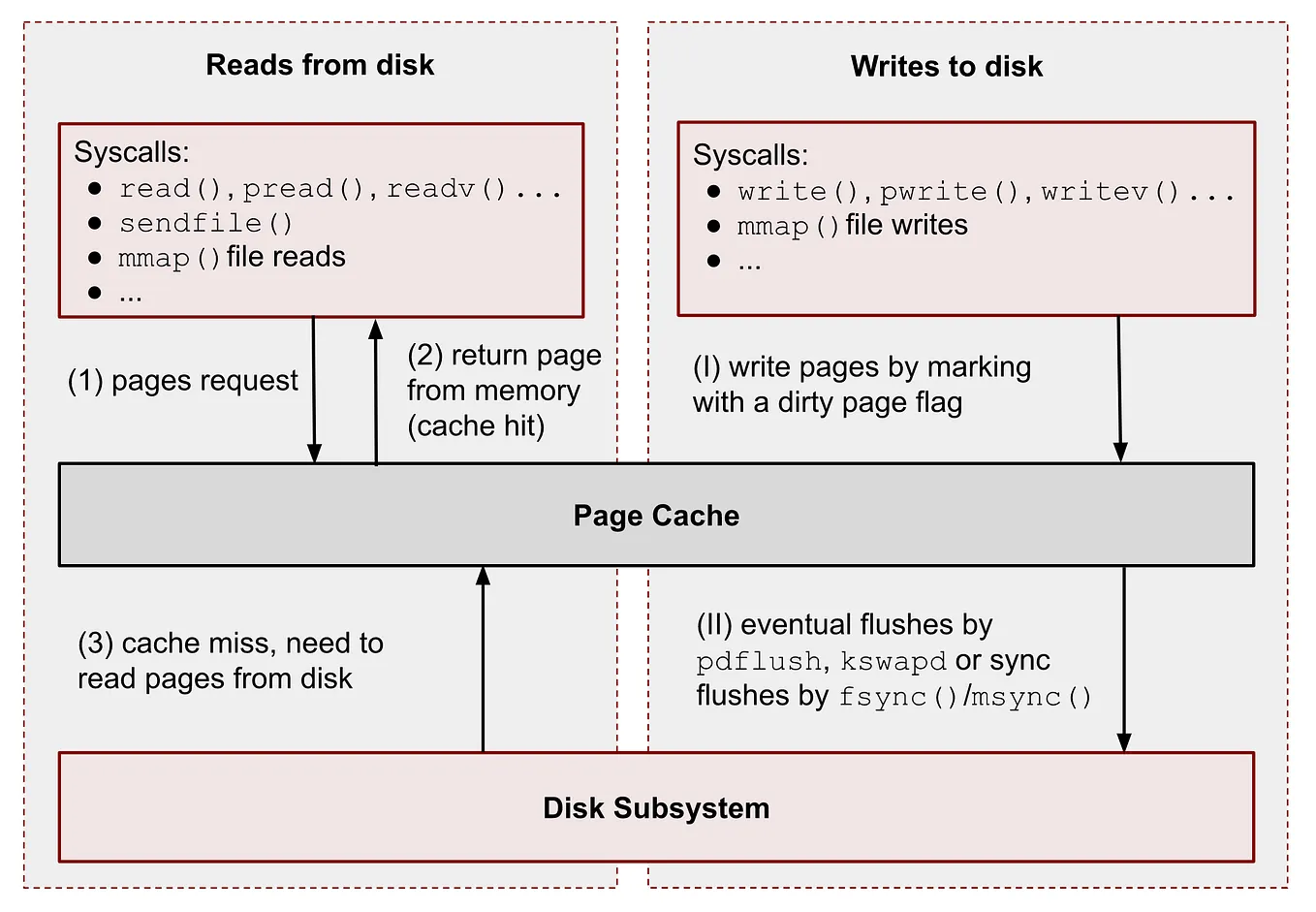
To build a durable system, we cannot rely on the kernel's timing. We need a way to force this flush operation. This is the role of the msync system call.
The msync System Call
The msync system call allows a program to "synchronize a file with its mapping." It instructs the kernel to write all dirty pages within a specified range of a memory-mapped region out to the underlying file on disk.
For a formal definition, let's turn to this lecture slide deck on memory-mapped files. It provides a concise and accurate overview of the msync interface.
[PDF] Memory-mapped files – the mmap() syscall - UAIC
This resource explains the interface and behavior of the msync system call.
Please read the section titled The msync system call to understand its purpose and function signature. Pay close attention to the flags parameter, especially the difference between MS_SYNC and MS_ASYNC. Then, continue reading the next page, msync system call (cont.). Remark #4 is critically important: munmap does not implicitly perform a sync. This reinforces why explicit msync calls are necessary to guarantee durability before a program closes a file or exits.
As you've just read, the msync function is defined as:
int msync(void *addr, size_t length, int flags);
Let's break down the parameters in the context of our project:
addr: The starting address of the memory region to synchronize. For our database, this will be the pointer to the start of our mapped region.length: The number of bytes to synchronize. We will typically sync the entire file size.flags: This parameter controls the behavior of the synchronization. The two most important flags are:MS_SYNC: This requests a synchronous flush. Themsynccall will not return until the data has been physically written to the disk. This is a blocking operation. It provides the strongest durability guarantee, as a successful return means the data is safe.MS_ASYNC: This requests an asynchronous flush. The call initiates the write operation but returns immediately, without waiting for the disk I/O to complete. The write will happen at some point in the near future. This offers better performance thanMS_SYNCbut a weaker durability guarantee.
For our purpose of ensuring data is safely stored after a batch of insertions, MS_SYNC is the correct choice.
Implementing a Flush Function
Let's add a function to our database that uses msync to commit changes to disk. This function will act as our explicit "save" command.
// In your database implementation file (e.g., vdb.c)


#include <sys/mman.h> // For msync

// ... (previous code for db_insert_vector, etc.)

// Flushes all in-memory changes to the underlying disk file.
bool db_flush(Db* db) {
    if (msync(db->mapped_region, db->file_size, MS_SYNC) == -1) {
        perror("msync failed");
        return false;
    }
    return true;
}
This implementation is straightforward. It takes our Db handle and calls msync on the entire mapped region (db->mapped_region and db->file_size), using the MS_SYNC flag to ensure the operation completes before the function returns.
The following resource provides a complete C example that ties everything together: open, ftruncate, mmap, memcpy, and finally, msync.
This article provides a complete, runnable C code example demonstrating the lifecycle of a memory-mapped file, including synchronization.
Focus on the C Example code block. Trace the steps from 1 to 7. Step 6, Flush changes to disk, is exactly what we have just implemented in our db_flush function. Seeing it in the context of the other system calls solidifies its role in the process.
The Performance vs. Durability Trade-off
You now have a tool, db_flush, to make your data durable. A crucial question for any systems designer is: when should you call it?
-
Call
db_flushafter every singledb_insert_vector?- Pro: Maximum durability. If the program crashes, you will lose at most one vector that was in the process of being inserted.
- Con: Terrible performance. You are forcing a synchronous disk write for every small insertion, nullifying many of the performance benefits of using
mmap's write-back cache.
-
Call
db_flushonly when the program is about to exit?- Pro: Excellent performance. You batch all writes and commit them in one go.
- Con: Minimal durability. A crash at any point before exit will cause all insertions since the program started to be lost.
This illustrates a fundamental trade-off in systems design. The decision depends on the application's requirements. For a system where performance is paramount and some data loss is acceptable (like a cache), you might flush infrequently. For a transactional database where data integrity is non-negotiable, you would flush very strategically, often as part of a transaction commit mechanism.
In our project, we will leave this control to the user of our library. By providing db_insert_vector and db_flush as separate functions, we empower the application developer to choose their own balance between performance and durability. They can insert 10,000 vectors and then call db_flush once, for example.
Conclusion
In this lesson, you've mastered the final piece of our high-performance I/O puzzle. You now not only know how to write data efficiently to a memory-mapped file but also how to ensure that data is safely persisted to disk.
Key takeaways from today's session:
- Writes to a
MAP_SHAREDregion are cached by the OS in the page cache and written to disk asynchronously. - This write-back caching improves performance but creates a risk of data loss in a crash.
- The
msyncsystem call provides explicit control, allowing you to force the kernel to write dirty pages to the underlying disk. - The
MS_SYNCflag enforces a synchronous, blocking write, which is essential for guaranteeing durability. - Deciding when and how often to call
msyncis a critical design decision that involves a trade-off between performance and data safety.
With the completion of this module, we have a solid foundation for file-based persistence. We can create, map, write to, and durably save our vector database file.
In our next module, we will shift our focus from I/O to the core functionality of the database: search. We will begin by implementing a brute-force sequential scan to find the k-nearest neighbors of a query vector. This will serve as an essential performance baseline and will lead us to explore how data layout directly impacts CPU cache efficiency.