Welcome to the final lesson of this module. Having successfully engineered a single-pass, SIMD-accelerated function for Cosine Similarity, you've now built a core component of any high-performance vector search engine. The journey through instruction-level parallelism, FMA intrinsics, and clever optimizations like the reciprocal square root has given you a powerful set of tools.
However, in performance engineering, claims of speed are meaningless without proof. Today, we shift from implementation to measurement. Your goal is to benchmark the performance difference between your naive and SIMD distance calculations. This isn't just about running a timer; it's about applying a rigorous methodology to produce reliable, reproducible data that quantifies the impact of your optimizations. This process is a critical skill for any systems programmer.
The Challenge of Accurate Measurement
Before we dive in, it's essential to understand why benchmarking is a non-trivial task. A naive approach, like using a simple chrono timer before and after a function call, is often misleading. Modern compilers and CPUs are incredibly sophisticated and can easily thwart simple measurement attempts.
A compiler might notice that the result of your distance calculation isn't used, and optimize the entire function call away. A CPU might use its cache and branch predictor to make subsequent runs of the same code artificially fast. A proper benchmarking framework is designed to counteract these issues. It runs the code many times to achieve statistical stability, ensures the work isn't optimized away, and provides a clean interface for analysis.
For our project, we will use Google Benchmark, a widely-respected, industry-standard C++ library for this exact purpose. The following video provides an excellent introduction to the philosophy of benchmarking and the features of this library.
How to use Google Benchmark for C++ programs
This tutorial by arisaif provides a comprehensive overview of Google Benchmark, from the fundamental challenges of measurement to the library's advanced features.
Please watch the following segments to get a solid foundation: Why benchmarking is hard: This section explains the compiler and CPU optimizations that make accurate measurement difficult. Basic setup: This covers cloning the repository and writing your first simple benchmark, including the core BENCHMARK macro and the state loop. Passing arguments and ranges: This is crucial for our task. Pay close attention to how ->Arg() and ->Range() are used to test a function with different input sizes. Preventing optimizations: This is perhaps the most important part. Understand how to use benchmark::DoNotOptimize() and benchmark::ClobberMemory() to force the compiler to actually execute your code.
Setting Up Your Benchmark Suite
Now, let's apply what you've learned to our vector distance functions. You will create a new C++ file for your benchmarks. You will need to write four distinct benchmark functions: one for each combination of metric (Euclidean, Cosine) and implementation (Naive, SIMD).
The basic structure for a benchmark function will look like this. Note how we prevent the compiler from optimizing away the work.
#include <benchmark/benchmark.h>
#include "your_vector_math_header.h" // Include your function declarations

// Assume you have a function to create random vectors for testing
// void create_random_vector(float* vec, size_t dim);

static void BM_Cosine_SIMD(benchmark::State& state) {
    const size_t dim = state.range(0);

    // Setup: this part is NOT timed
    float* a = (float*)aligned_alloc(32, dim * sizeof(float));
    float* b = (float*)aligned_alloc(32, dim * sizeof(float));
    create_random_vector(a, dim);
    create_random_vector(b, dim);

    float result;
    for (auto _ : state) {
        // This loop is timed
        result = cosine_similarity_simd(a, b, dim);
        // Prevent the calculation from being optimized away
        benchmark::ClobberMemory();
    }
    // Prevent the final result from being optimized away
    benchmark::DoNotOptimize(result);

    free(a);
    free(b);
}
You'll need to define four benchmarks and register them to run across a range of vector sizes. This allows you to see how the performance scales with the amount of data being processed.
// Register the benchmark function to run with vector sizes from 64 to 2048,
// doubling the size at each step.
BENCHMARK(BM_Cosine_SIMD)->RangeMultiplier(2)->Range(64, 2048);
BENCHMARK(BM_Cosine_Naive)->RangeMultiplier(2)->Range(64, 2048);

BENCHMARK(BM_Euclidean_SIMD)->RangeMultiplier(2)->Range(64, 2048);
BENCHMARK(BM_Euclidean_Naive)->RangeMultiplier(2)->Range(64, 2048);

// Boilerplate main function for Google Benchmark
BENCHMARK_MAIN();
Compiling and Running the Benchmarks
It is absolutely critical that you compile your benchmarks with optimizations enabled. This reflects a real-world production environment where performance matters. A typical compilation command using GCC or Clang would look like this:
g++ -o benchmark_runner benchmark.cpp -O3 -march=native -lbenchmark -lpthread
-O3: Enables a high level of optimization.-march=native: Allows the compiler to generate code specific to your CPU's architecture, including AVX2 instructions.-lbenchmark -lpthread: Links against the Google Benchmark library and its POSIX threads dependency.
Once compiled, running ./benchmark_runner will execute the suite and print a formatted table of results.
Analyzing the Results
After running the benchmark, you will get a table showing the time taken for each function at each vector size. Your goal is to analyze these numbers to understand the performance gain.
For each vector size and each metric (Cosine, Euclidean), calculate the speedup:
You should expect to see significant speedups. The Cloudflare engineering blog provides a great real-world example of this exact process.
Computing Euclidean distance on 144 dimensions
This article documents an optimization journey for vector distance calculations, starting with a naive implementation and progressing to a SIMD-accelerated one.
First, read the section on the naive algorithm and its benchmark results. Then, review the section SIMD for help. Notice that their initial AVX2 implementation yielded a ~3x speedup (from 55ms down to 17ms, although their benchmark reports 16.8ms). Your results for Euclidean distance should be in a similar ballpark.
Your results table will likely show that the speedup is not constant but changes with the vector dimension. The bar charts below show latency comparisons for several distance metrics, which is another way to visualize the kind of data you are generating. Your own plots would compare Naive vs. SIMD for the same metric.
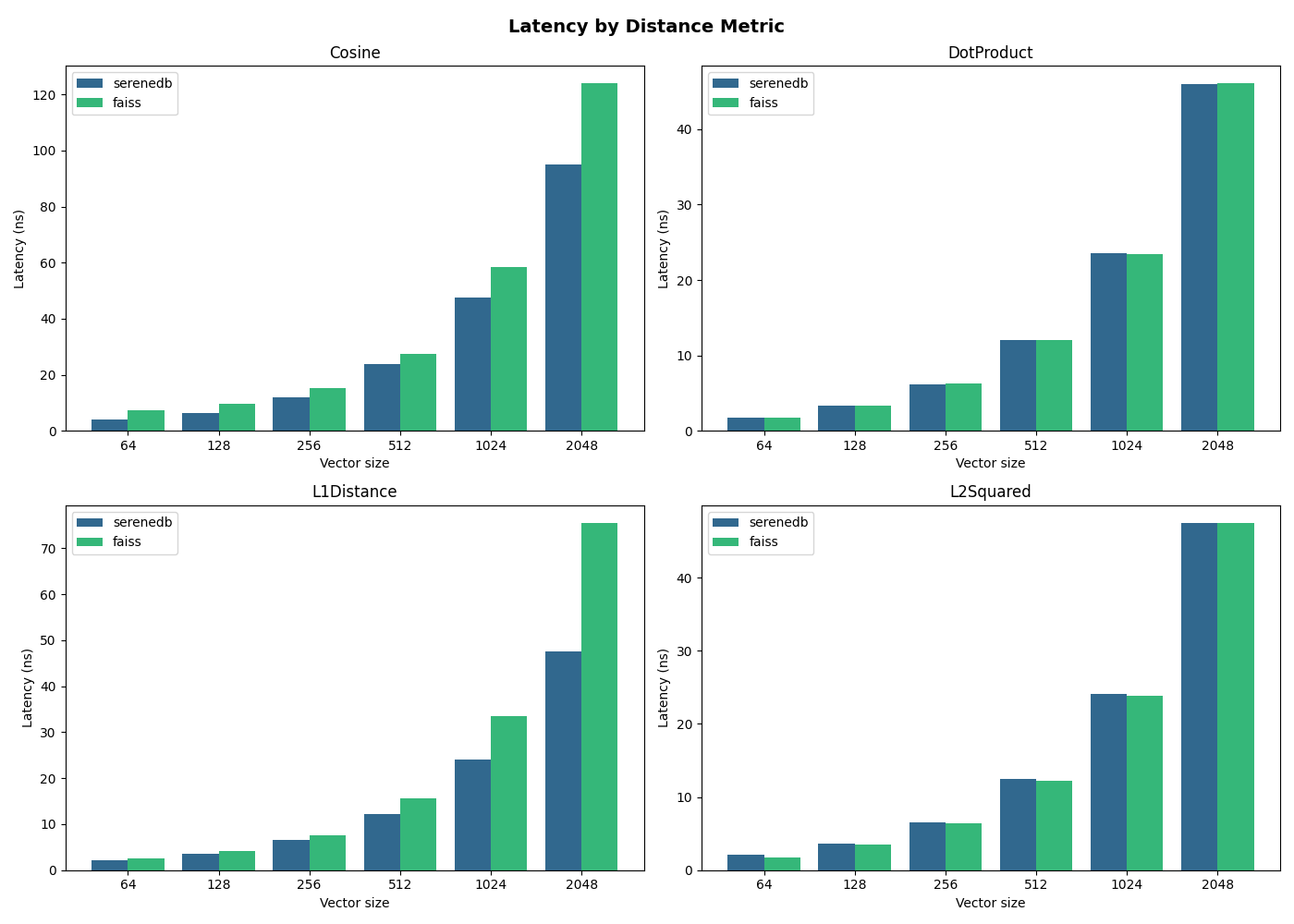
As you can see, the performance difference is substantial and grows with the vector size. For a task that is entirely limited by computation and memory access speed, SIMD provides a clear and powerful advantage by exploiting the parallel processing capabilities of modern CPUs. The author of the SimSIMD library, whose code we studied in the last lesson, showcases even more dramatic gains.
Understanding SIMD: Infinite Complexity of Trivial Problems - Modular
This final section of the blog post summarizes the cumulative effect of the hardware-specific optimizations.
Read the short section Adding up the performance gains and examine the graph. It demonstrates orders-of-magnitude improvements over naive code, highlighting the immense potential of deep hardware optimization, which is exactly the path you are on.
Conclusion
In this lesson, you have moved from being a code author to a performance analyst. You have learned not just how to write fast code, but how to prove it is fast using professional-grade tools and a sound methodology. This is a crucial feedback loop in any performance-oriented project.
Key Takeaways:
- Simple timing methods are unreliable due to compiler and CPU optimizations.
- Google Benchmark is a powerful tool for creating robust, repeatable performance tests.
- Key features like
->Range(),DoNotOptimize(), andClobberMemory()are essential for meaningful results. - Your SIMD implementations provide a significant, quantifiable performance improvement over the naive C code, demonstrating the effectiveness of instruction-level parallelism.
You have now completed the computational core of our vector search engine. The math is fast. But in a real system, data doesn't just live in memory; it lives on disk. In the next module, we will tackle the next major bottleneck: I/O. You will learn how to use memory-mapped files to load and access massive datasets with maximum efficiency, preparing the groundwork for building and searching the actual nearest-neighbor index.