Hello! In our previous lesson, we established what a function is—a rule that maps inputs to unique outputs—and how to define its domain and range. This laid the conceptual groundwork for our study of functions.
Today, we will move from concept to practice. This lesson is about using functions. You will learn how to take a specific input value, plug it into a function's rule, and calculate the resulting output. This process is called evaluating a function. We'll start with standard algebraic functions and then move on to a special, versatile type called piecewise-defined functions, which use different rules for different input values.
By the end of this lesson, you will be able to evaluate any given function for a specific input, a crucial skill for everything we will do with functions from here on.
1. Evaluating a Function: The Basics
In the last lesson, you were introduced to the notation . To "evaluate" a function means to find the value of for a particular value of . The process is straightforward: you substitute the given input value for every instance of the variable in the function's expression and then simplify using the correct order of operations, BODMAS (or PEMDAS).
Given your IT background, you can think of this as being directly analogous to calling a function in a programming language with a specific argument. If you have a function calculate_value(x), evaluating is the same as calling calculate_value(3) and getting the return value.
The following video provides a clear, step-by-step demonstration of this process.
Function Notation - GCSE Higher Maths
This video from 1st Class Maths, titled 'Function Notation', will walk you through several examples of evaluating functions. It uses the function machine analogy and demonstrates how to handle different types of expressions.
Please watch from 01:18 to 04:49. Pay attention to how the input value replaces every 'x' in the expression, especially in the final example where 'x' appears multiple times.
As you saw in the video, the key is careful substitution.
Example:
Let's evaluate the function at .
-
Substitute: Replace every with . It's good practice to use brackets (parentheses) around the substituted value to avoid sign errors.
-
Simplify: Follow BODMAS.
- Indices (Exponents):
- Multiplication:
- Addition/Subtraction:
So, we can say .
Test your understanding!
Given the function , find the value of .
Show answer
- Substitute:
- Simplify:
- Indices:
- Multiplication:
- Addition/Subtraction:
Therefore, .
2. Piecewise-Defined Functions
Now, let's look at a more interesting type of function. A piecewise-defined function (or simply a piecewise function) is a function built from different "pieces," where each piece is its own formula, and each formula applies to a different part of the function's domain.
Again, drawing an analogy to programming, this is like an if-elif-else statement. Based on the value of the input x, you decide which block of code (which formula) to execute.
To get a formal introduction, please read the first part of the following explainer.
Lesson Explainer: Piecewise Functions
This resource from Nagwa, titled 'Lesson Explainer: Piecewise Functions', clearly defines what a piecewise function is and uses the familiar absolute value function as a first example.
Read from the beginning of the article down to just before the formal definition box. This section introduces the concept of subfunctions and subdomains.
The general form of a piecewise function looks like this:
3. Evaluating Piecewise-Defined Functions
Evaluating a piecewise function involves one extra preliminary step:
- Identify the subdomain: First, take your input value and check which of the domain conditions (the inequalities) it satisfies.
- Apply the correct formula: Once you've identified the correct "piece," use only the formula associated with that subdomain to calculate the output, just as we did before.
Let's look at a clear visual example of this process.
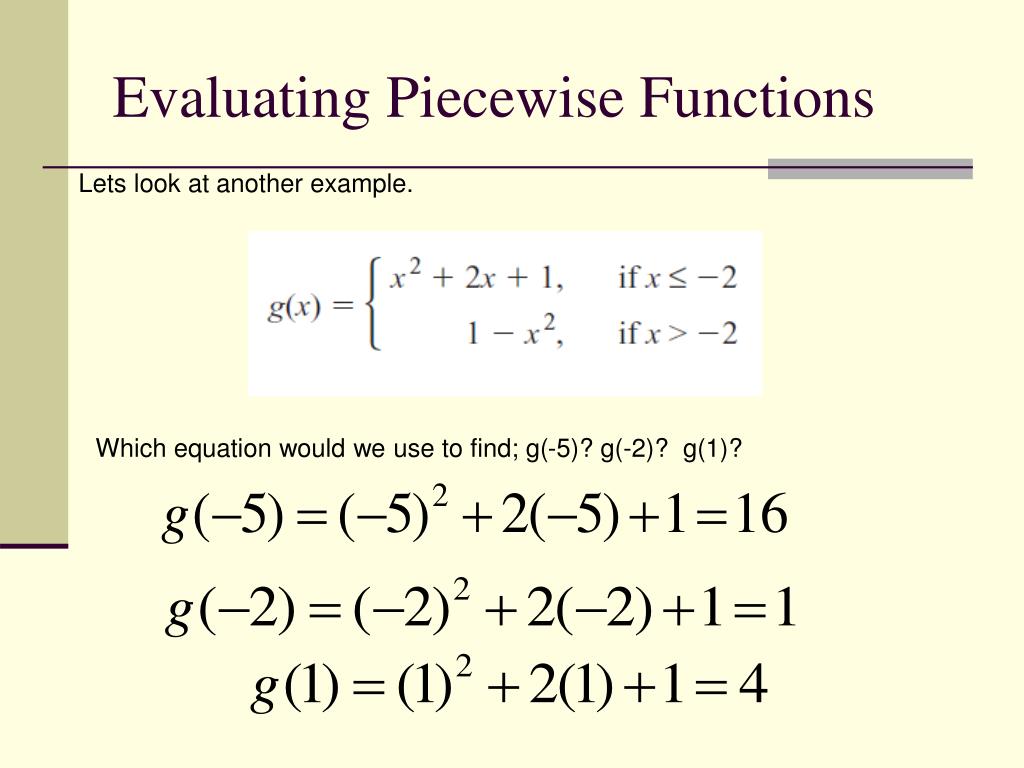
The Nagwa article you just looked at also provides a perfect, worked-out example. Please read through it to solidify your understanding.
Lesson Explainer: Piecewise Functions
Let's return to the 'Lesson Explainer: Piecewise Functions' to see a step-by-step evaluation.
Read 'Example 1: Evaluating a Piecewise Function at a Given Point'. This will guide you through the two-step process of identifying the correct subdomain and then substituting the input value.
Let's try one together. Consider the function:
Let's find , , and .
-
To find :
- Identify subdomain: Is ? Yes.
- Apply formula: We use the first formula, .
.
-
To find :
- Identify subdomain: Does fit in ? Yes. Note the sign means the endpoint is included in this piece.
- Apply formula: We use the second formula, .
.
-
To find :
- Identify subdomain: Is ? Yes.
- Apply formula: We use the third formula, .
.
Now it's your turn to practice.
Test your understanding!
Consider the piecewise function:
Find the values of , , and . Be careful with the boundary condition at .
Show answer
-
For : The input satisfies . We use the first formula.
. -
For : The input satisfies . We use the second formula.
. -
For : The input satisfies . We use the first formula.
.
Conclusion
In this lesson, we put the definition of a function into practice. You learned the essential skill of evaluating functions, which is simply a matter of substitution and simplification.
Key Takeaways:
- To evaluate a function like at a specific value, you substitute that value for every
xin the expression and calculate the result. - A piecewise-defined function uses different formulas for different intervals (subdomains) of its input values.
- To evaluate a piecewise function, you must first determine which subdomain your input value falls into and then apply the corresponding formula.
Preview of the Next Lesson:
Now that we know how to find the value of a single function for a given input, we'll explore what happens when we combine functions. In the next lesson, we will learn how to perform arithmetic operations—addition, subtraction, multiplication, and division—on functions to create new ones.