In our last session, we covered the essential first steps of data exploration using .info(), .describe(), and .value_counts(). This initial "triage" gives you a crucial high-level understanding of any new dataset. However, real-world data is often fragmented, living in separate files or database tables. This lesson will equip you with the skills to bring these disparate pieces together.
Today, we'll dive into merging, joining, and concatenating multiple DataFrames. This is a fundamental skill in data preparation, and given your SQL background, you'll find the concepts quite familiar. We will focus on three core Pandas operations: pd.merge(), df.join(), and pd.concat(), which are analogous to SQL's JOIN and UNION commands.
1. The Core Idea: Stacking vs. Joining
Before we get into the functions, it's important to distinguish between the two main ways of combining DataFrames:
- Stacking (Concatenation): This is like adding more rows or columns to a DataFrame. You are essentially "gluing" DataFrames together, either vertically (one on top of the other) or horizontally (side-by-side).
- Joining (Merging): This is for combining DataFrames based on the values in one or more common columns or indices, much like a
JOINin a database. This is used to enrich a dataset with information from another.
The video from Data School provides an excellent high-level overview and recommends focusing on pd.concat() for stacking and pd.merge() for joining, as they are the most flexible and powerful options.
How do I merge DataFrames in pandas?
This video from the Data School channel offers a great mental model for which function to use and when.
Watch the first section, from the beginning to selecting a function. The instructor gives a clear recommendation on which of the four available functions (append, concat, join, merge) you should prioritize learning.
2. Database-Style Joins with pd.merge()
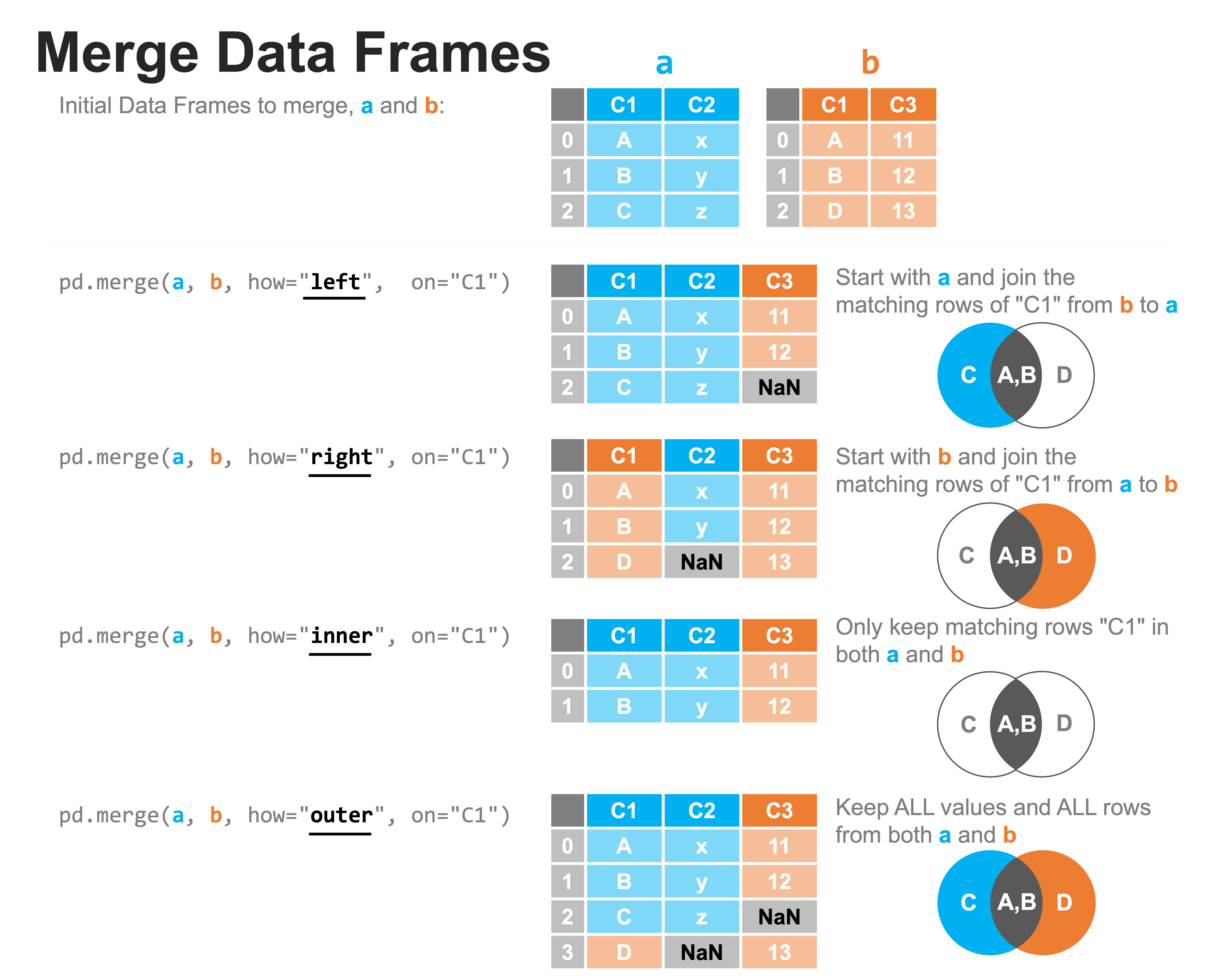
pd.merge() is the primary function for performing SQL-like joins in Pandas. It's incredibly versatile and allows you to combine DataFrames based on shared values in key columns.
The Four Types of Joins
Just like in SQL, there are four main types of joins you can perform. The logic is identical: inner, outer, left, and right. This image provides a perfect visual summary.
To solidify your intuition, let's watch a clear, simple explanation of these four types.
How do I merge DataFrames in pandas?
We'll return to the Data School video, "How do I merge DataFrames in pandas?", for its excellent explanation of join types.
Watch the final section of the video from the four join types. The simple A and B DataFrames with colors make it very easy to understand what happens in each type of join and how missing values (NaN) are introduced.
Using pd.merge() in Practice
Now let's see how to implement these joins using pd.merge(). The Alex The Analyst video provides a great practical walkthrough of the syntax and key parameters.
Merging DataFrames in Pandas | Python Pandas Tutorials
This video, "Merging DataFrames in Pandas," gives a hands-on demonstration of pd.merge().
Please watch the following segments: The merge function: Covers the basic syntax, the default inner join behavior, the on parameter to specify the key column, and how suffixes (_x, _y) are used for overlapping column names. Outer, Left, and Right Joins: Demonstrates how to use the how parameter to perform outer, left, and right joins. (Optional) Cross Joins: Briefly explains the cross join, which creates a Cartesian product of the rows from both DataFrames.
Let's recap the key parameters of pd.merge():
left,right: The two DataFrames to merge.how: The type of merge to perform. Can be'inner'(default),'outer','left', or'right'.on: The column name(s) to join on. This column must exist in both DataFrames. If not specified, Pandas will use all columns with the same name in both DataFrames. It's best practice to always specify this explicitly.left_on,right_on: Used when the key columns have different names in the left and right DataFrames.suffixes: A tuple of strings to append to overlapping column names that are not join keys (e.g.,('_left', '_right')).
Let's apply this with a quick code example.
import pandas as pd


# DataFrame of employees and their department
employees = pd.DataFrame({
    'employee_id': [101, 102, 103, 104],
    'name': ['Alice', 'Bob', 'Charlie', 'David'],
    'department_id': [1, 2, 1, 99]  # David is in a department not listed below
})


# DataFrame of departments
departments = pd.DataFrame({
    'department_id': [1, 2, 3],
    'department_name': ['Engineering', 'Marketing', 'Sales'] # Sales department has no employees listed
})

print("--- Employees DataFrame ---")
print(employees)
print("\n--- Departments DataFrame ---")
print(departments)


# Inner Join (default): Only includes employees with a matching department.
# David (dept 99) and Sales (dept 3) are excluded.
inner_join = pd.merge(employees, departments, on='department_id', how='inner')
print("\n--- Inner Join ---")
print(inner_join)


# Left Join: Includes all employees, even if their department is not in the departments table.
# David is included, but his department_name is NaN. Sales is excluded.
left_join = pd.merge(employees, departments, on='department_id', how='left')
print("\n--- Left Join ---")
print(left_join)


# Outer Join: Includes all employees AND all departments.
# David and Sales are both included, with NaN values where there's no match.
outer_join = pd.merge(employees, departments, on='department_id', how='outer')
print("\n--- Outer Join ---")
print(outer_join)
3. Stacking DataFrames with pd.concat()
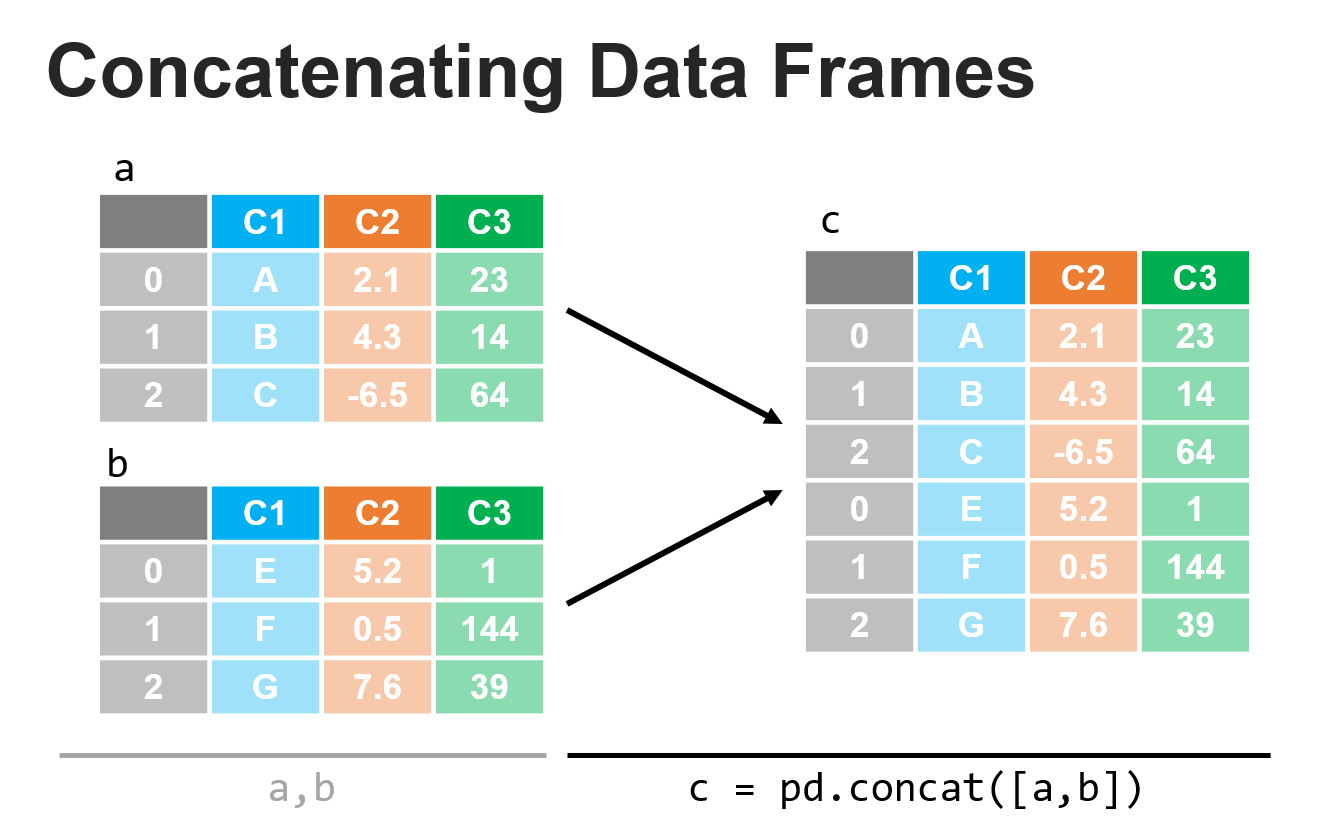
When your goal isn't to combine data based on a key, but simply to stack DataFrames on top of each other (or side-by-side), pd.concat() is the right tool. This is equivalent to a SQL UNION ALL.
This image illustrates the most common use case: stacking two DataFrames vertically.
The most important parameter for pd.concat() is axis:
axis=0(default): Stacks DataFrames vertically (appends rows). Columns are aligned by name.axis=1: Stacks DataFrames horizontally (appends columns). Rows are aligned by index.
Let's watch a demonstration.
Merging DataFrames in Pandas | Python Pandas Tutorials
We return to the "Merging DataFrames in Pandas" video for a look at concatenation.
Watch the segment from concat function. The instructor clearly shows the difference between vertical stacking (axis=0) and horizontal stacking (axis=1). He also explains the join parameter within concat, which controls how non-matching columns/indices are handled.
A very useful parameter to know is ignore_index=True, which creates a new, continuous index for the resulting DataFrame. This is helpful when the original indices are not meaningful.
4. A Note on df.join()
You will also see the df.join() method used. It's an instance method (called on a DataFrame, like df1.join(df2)) that is optimized for joining based on the index of the DataFrames. Its default behavior is to perform a left join on the index.
While you can make df.join() behave like pd.merge(), it often requires more steps, such as setting the index on the columns you want to join. For clarity and flexibility, especially when you are learning, it is generally better to stick with pd.merge() for column-based joins and pd.concat() for stacking.
Conclusion
You now have a powerful set of tools for combining data from multiple sources. Mastering these operations is crucial, as data rarely comes in a single, perfectly prepared file.
Key Takeaways:
pd.merge(): Your go-to function for database-style joins. Use it when you need to combine DataFrames based on common values in one or more key columns.pd.concat(): Use this for stacking DataFrames on top of each other (axis=0) or side-by-side (axis=1).df.join(): A convenience method for performing joins on DataFrame indices.- Join Types: The concepts of
inner,outer,left, andrightjoins are identical to their SQL counterparts and are controlled by thehowparameter inpd.merge().
In our next lesson, we will move from preparing and combining data to analyzing it. You will learn how to perform grouping and aggregation using the powerful groupby() method, allowing you to compute summary statistics for different segments of your data.