Welcome to your first lesson in the "SQL for Data Science" phase of your course. In the world of data science, SQL is the essential language for accessing, manipulating, and extracting insights from relational databases. This first module will equip you with the advanced SQL skills necessary for real-world data analysis tasks.
Today, we will focus on writing complex queries to combine data from multiple sources. You'll learn how to use JOIN operations to merge tables, how to nest queries within each other using subqueries for sophisticated filtering and transformations, and how to organize your logic cleanly with Common Table Expressions (CTEs). Mastering these will form the bedrock of your SQL proficiency.
1. Combining Data with JOINs
At the heart of any relational database are multiple tables that relate to one another. To get a complete picture, you almost always need to combine them. The JOIN clause is your primary tool for this. While you have some familiarity with JOINs, we'll quickly cover the essential types to ensure you have a solid foundation.
The video below gives an excellent overview of the different types of JOINs and how they work.
Advanced SQL Full Course | Master Joins, Window Functions, Subqueries, CTEs in SQL
This video from DataCamp provides a clear, visual explanation of the most important JOIN operations. It starts with the most common joins and moves on to more specialized cases.
Please watch the following segments: Inner Joins: This section explains how INNER JOIN works and how to join on single or multiple columns. Multiple Joins: Learn how to chain multiple JOIN clauses together in a single query to combine three or more tables. Outer Joins: This covers LEFT, RIGHT, and FULL OUTER JOIN, which are crucial when you need to retain records that don't have matches in the other table. Cross & Self Joins: Pay attention to the concepts of a CROSS JOIN (creating all possible combinations) and a SELF JOIN (joining a table to itself), which are useful for specific analytical problems.
To summarize the key ideas from the video:
| JOIN Type | Purpose |
|---|---|
INNER JOIN |
Returns only the rows where the join condition is met in both tables. |
LEFT JOIN |
Returns all rows from the left table, and the matched rows from the right table. If there's no match, the columns from the right table will be NULL. |
RIGHT JOIN |
Returns all rows from the right table, and the matched rows from the left table. If there's no match, the columns from the left table will be NULL. |
FULL OUTER JOIN |
Returns all rows when there is a match in either of the tables. It's a combination of LEFT and RIGHT JOIN. |
SELF JOIN |
A regular join but where a table is joined with itself. This is useful for querying hierarchical data or comparing rows within the same table. |
2. Deeper Analysis with Subqueries
Now that you can combine tables, the next step is to perform more complex filtering and calculations. Subqueries (also called inner or nested queries) are queries placed inside another SQL query. They are incredibly powerful because they allow you to perform analysis in multiple steps within a single statement.
The following video provides an excellent conceptual breakdown of what subqueries are, how the database processes them, and the different types you'll encounter. Given your computer science background, you'll likely find the explanation of the execution flow particularly insightful.
Subquery in SQL | Correlated Subquery + Complete SQL Subqueries Tutorial
This techTFQ video offers a detailed tutorial on subqueries, focusing on the logic behind them and how they are executed.
Focus on these parts: What is a subquery? The video starts with a simple, practical problem and shows how a subquery helps solve it dynamically. Note how the subquery is executed first. Scalar subqueries: This explains subqueries that return a single value and can be used in WHERE or FROM clauses. Multiple-row subqueries: Learn about subqueries that return multiple rows, which are often used with operators like IN. Correlated subqueries: This is a critical concept. Pay close attention to how a correlated subquery depends on the outer query and is executed for each row of the outer query. This has important performance implications.
Subqueries can appear in several parts of a main query, most commonly:
- In the
WHEREclause: To filter rows based on a value or a list of values returned by the subquery. - In the
FROMclause: To create a temporary, "derived" table that you can then join with other tables. - In the
SELECTclause: To return a single, calculated value as a new column.
For a more structured textual reference on these patterns, the following article is a great resource.
Join With Subquery SQL: Key Concepts
This article from DataForge Labs provides clear definitions and examples of different subquery patterns. It's a great supplement to the video.
Focus your reading on two main areas: Start with "An introduction to subqueries" and read through the subsections on "Scalar," "Row," and "Table" subqueries. This will reinforce the types you saw in the video. Next, read the section "Basic JOIN-subquery patterns", paying special attention to "Derived table JOINS" and "Correlated subquery JOINS". This directly addresses how to combine JOINs and subqueries.
3. Improving Readability with Common Table Expressions (CTEs)
As your queries become more complex, with multiple subqueries nested inside each other, they can become difficult to read and debug. Common Table Expressions (CTEs) are a modern SQL feature that helps solve this problem.
A CTE allows you to define a temporary, named result set that you can reference within your main SELECT, INSERT, UPDATE, or DELETE statement. They make your queries more modular and readable. You define a CTE using the WITH clause.

You can even define multiple CTEs and chain them together, where a later CTE references an earlier one.
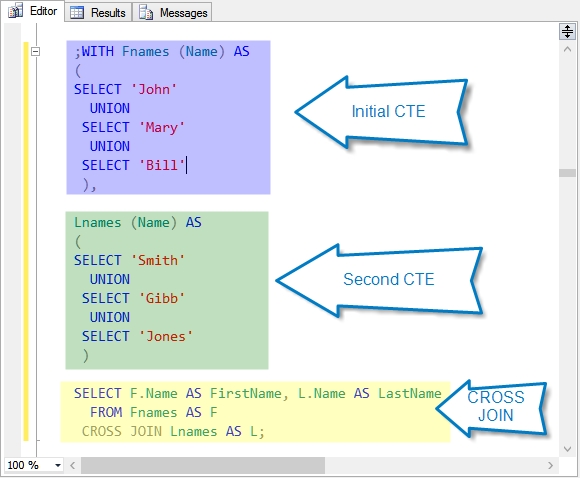
The next video segment explains how to transform a complex nested subquery into a much cleaner query using the WITH clause.
Subquery in SQL | Correlated Subquery + Complete SQL Subqueries Tutorial
Let's return to the techTFQ video to see CTEs in action.
Watch the segment from nested subqueries to CTEs. The presenter first builds a complex query with multiple nested subqueries and then refactors it using a CTE, highlighting the significant improvement in readability.
Practice: Tying It All Together
Let's apply these concepts to a common business problem.
Scenario: Find all employees who earn more than the average salary within their own department.
To solve this, you need to compare each employee's salary to a value that changes depending on their department. This is a perfect use case for a correlated subquery.
Here is one way to write the query:
SELECT
    e.name,
    e.salary,
    d.dept_name
FROM
    employees e
JOIN
    departments d ON e.dept_id = d.dept_id
WHERE
    e.salary > (
        SELECT AVG(salary)
        FROM employees
        WHERE dept_id = e.dept_id -- This correlation is key!
    );
How it works:
- The outer query iterates through each employee in the
employeestable. - For each employee, the correlated subquery in the
WHEREclause is executed. - Crucially, the subquery calculates the average salary only for the department of the current employee being processed by the outer query (
WHERE dept_id = e.dept_id). - The outer query then compares the current employee's salary to this department-specific average and includes them in the result if their salary is higher.
This pattern is powerful, but as we saw, CTEs can often make such logic even clearer, especially as more steps are added. In a future lesson on window functions, we'll see an even more efficient way to solve this same problem.
Conclusion
In this lesson, you've built a strong foundation for writing advanced SQL queries. You are now equipped to tackle complex data retrieval tasks that are common in data science.
Here are the key takeaways:
JOINs are used to combine rows from two or more tables based on a related column.- Subqueries are queries nested inside another query. They are powerful for multi-step data transformations and filtering but can become hard to read.
- Correlated Subqueries are a special type of subquery that references the outer query, making them useful for row-by-row comparisons.
- Common Table Expressions (CTEs), defined with the
WITHclause, allow you to break down complex queries into logical, readable, and reusable steps.
In our next lesson, we will explore window functions. These functions allow you to perform calculations across a set of table rows that are related to the current row, enabling you to compute running totals, moving averages, and rankings with ease.