Introduction
Welcome back. In our previous lesson, we established the formal NIST definition of cloud computing and detailed its five essential characteristics. This provided the "what" and "why" of the cloud. Now, we will build upon that foundation to understand the structure of the cloud.
Today's lesson addresses the second part of unit 1.2 in your syllabus. Our focus is on two key areas crucial for your exams:
- The Core Components of a Cloud Ecosystem: We will identify and define the fundamental building blocks that make up a cloud environment: clients, datacenters, and distributed servers.
- The SPI Service Models: We will dissect the three primary service models—SaaS, PaaS, and IaaS—often called the SPI model or the cloud computing stack. We'll focus on their definitions, differences, and the shared responsibility between the user and the provider for each.
Mastering these concepts is essential for a complete understanding of how cloud services are constructed and delivered.
1. The Core Components of a Cloud Ecosystem
Before we discuss service models, it's important to understand the physical and logical structure of the cloud. The "cloud" is not an abstract entity; it is a physical infrastructure of datacenters and servers.
To start, let's get a visual understanding of what a cloud data center looks like and how clients connect to it.
This animated video from PowerCert gives a great overview of the physical components. It explains that 'the cloud' is essentially a network of large data centers filled with servers that you access over the internet.
Watch from the beginning to timestamp 01:53. Focus on how it defines the cloud in terms of data centers, servers, and clients.
As the video illustrates, a cloud computing system is an ecosystem with three main components. Your college notes provide clear, exam-oriented definitions for these.
[PDF] UNIT -1 CLOUD COMPUTING - Vardhaman College of Engineering
Now, let's get the precise definitions from your college notes. Please read the section that describes the three components of cloud computing.
Find the heading '1.3 Cloud Components' on page 5. Read the descriptions for 'Clients', 'Data center', and 'Distributed servers'. Also, note the distinction made between 'Thin' and 'Thick' clients.
The relationship between these components can be visualized as follows:

Let's summarize these components for your notes.
-
1. Clients: These are the end-user devices that interact with the cloud to access applications and data. They are the "front end" of the cloud. As your notes point out, they can be categorized as:
- Thick Clients (or Fat Clients): Regular computers that perform some processing locally, using a web browser or a dedicated application to connect to the cloud (e.g., a desktop PC running a photo editing app that saves files to the cloud).
- Thin Clients: Computers with minimal hardware (no internal hard drives) that rely almost entirely on the server for processing. They mainly serve to display information and send user input (e.g., a virtual desktop terminal in a corporate environment).
- Mobile Clients: Smartphones and tablets.
-
2. Data Center: This is the "back end." It is a physical facility that houses a large collection of servers, storage systems, and networking equipment. This is where the actual computation happens and where data is stored.
-
3. Distributed Servers: In a cloud environment, servers are often not located in a single data center. Instead, they are geographically distributed across multiple locations but are logically connected to act as a single, coherent system. This distribution enhances reliability (if one site fails, others can take over) and performance (users can be served from a data center closer to them).
2. The SPI Model: SaaS, PaaS, and IaaS
Now that we know the physical components, let's look at how services are delivered. Cloud services are classified into three main categories, known as the SPI model or the cloud service models:
- Software as a Service (SaaS)
- Platform as a Service (PaaS)
- Infrastructure as a Service (IaaS)
These models represent different levels of abstraction and management. Think of them as layers in a stack, where IaaS is the foundation and SaaS is the top layer.
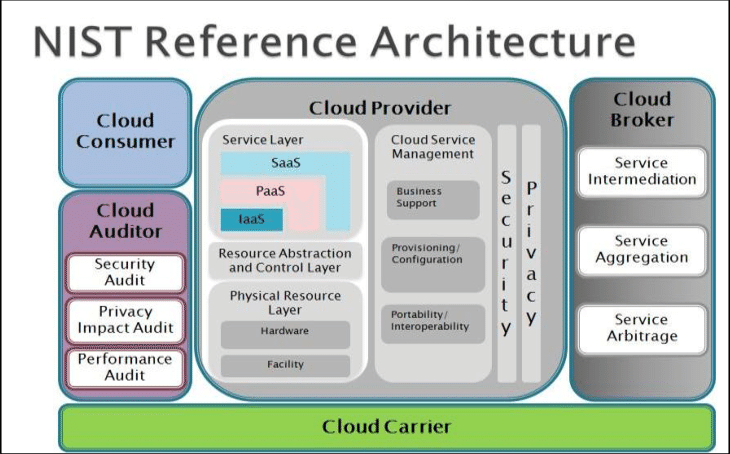
To understand the difference between these models, it's essential to first understand the different layers of a typical IT system. The following video provides an excellent, structured explanation.
AZ-900 Episode 5 | IaaS vs PaaS vs SaaS cloud service models | Microsoft Azure Fundamentals Course
This video from Adam Marczak - Azure for Everyone is one of the clearest explanations available. It first builds a complete IT stack from the ground up and then shows which parts are managed by you versus the cloud provider in each model (IaaS, PaaS, SaaS).
Watch from timestamp 00:42 to 06:40. Pay very close attention to the diagrams showing the different layers (Networking, Storage, OS, etc.) and how the responsibility for managing them shifts from On-Premises to IaaS, PaaS, and then SaaS.
Now that you have a strong visual and conceptual understanding, let's lock in the formal definitions, which are critical for your exams.
iPaaS vs IaaS vs PaaS vs SaaS: Evaluate Cloud Service Models
This article from RFPwiki provides formal, NIST-aligned definitions for each service model, along with key examples. This is excellent material for memorizing definitions.
Read the section titled 'Core Definitions and Explanations'. Focus on the formal definitions and examples provided for Infrastructure as a Service (IaaS), Platform as a Service (PaaS), and Software as a Service (SaaS).
Let's consolidate what you've learned about each model.
Infrastructure as a Service (IaaS)
- What it is: The most basic cloud service model. The provider offers fundamental computing infrastructure—virtualized servers, storage, and networking—on demand.
- Analogy: Renting an empty plot of land. You get the land (infrastructure), but you have to build the house (OS, applications) yourself.
- You Manage: The Operating System (e.g., Windows, Linux), middleware, runtime, applications, and data.
- Provider Manages: The physical data center, hardware (servers, storage), and the virtualization layer (hypervisor).
- Examples: Amazon Web Services (AWS) EC2, Microsoft Azure VMs, Google Compute Engine (GCE).
- Use Case: Migrating an existing on-premise application to the cloud without changing it (a "lift-and-shift" migration), or when you need full control over the operating system and software stack.
Platform as a Service (PaaS)
- What it is: Provides a platform allowing customers to develop, run, and manage applications without the complexity of building and maintaining the underlying infrastructure.
- Analogy: Renting a workshop with all the tools and utilities set up. You can focus on building your product (application) without worrying about the workshop's electricity or plumbing.
- You Manage: Your application code and data.
- Provider Manages: The infrastructure (servers, storage, networking), virtualization, operating system, middleware, and runtime environment.
- Examples: Heroku, Google App Engine, AWS Elastic Beanstalk, Microsoft Azure App Service.
- Use Case: Rapidly developing and deploying web or mobile applications where developers want to focus on writing code, not managing servers or patching operating systems.
Software as a Service (SaaS)
- What it is: The most comprehensive model, where the provider delivers a complete, ready-to-use software application over the internet.
- Analogy: Renting a fully furnished and serviced apartment. You just move in and use it; all maintenance, cleaning, and utilities are handled for you.
- You Manage: Your user data within the application and user-specific configurations.
- Provider Manages: Everything. The infrastructure, platform, and the application itself.
- Examples: Google Workspace (Gmail, Google Docs), Microsoft 365, Salesforce, Dropbox.
- Use Case: Using standard business applications like email, CRM, or collaboration tools where a one-size-fits-many solution is effective.
3. Comparison Summary for Exam Revision
Tabular comparisons are extremely useful for revision. The table below summarizes the key differences between the three models, based on the rfp.wiki article. This is a high-yield format for exam questions that ask you to "compare and contrast."
| Feature | Infrastructure as a Service (IaaS) | Platform as a Service (PaaS) | Software as a Service (SaaS) |
|---|---|---|---|
| What it Provides | Virtualized computing resources (servers, storage, networks). | Managed platform for app development and deployment. | Ready-to-use application software. |
| You Manage | OS, middleware, runtime, applications, data. | Application code and data. | Your data and user access. |
| Provider Manages | Physical data center, hardware, virtualization. | Infrastructure, OS, runtime, middleware. | The entire stack: infrastructure, platform, and application. |
| Key Benefit | Maximum control and flexibility. | Faster development cycles; focus on code. | No maintenance; rapid deployment and accessibility. |
| Primary Use Cases | Migrating legacy apps, custom software stacks, disaster recovery. | Web/mobile app development, agile projects, API development. | Standard business functions (CRM, HR, email, collaboration). |
| Examples | AWS EC2, Azure VMs, Google Compute Engine. | Heroku, Google App Engine, AWS Elastic Beanstalk. | Salesforce, Microsoft 365, Google Workspace, Zoom. |
This division of responsibilities is formally known as the Shared Responsibility Model, a concept that frequently appears in cloud computing exams. The key takeaway is that as you move from IaaS to PaaS to SaaS, you delegate more responsibility to the cloud provider.
Conclusion
In this lesson, we have dissected the fundamental structure of cloud computing. We identified the three core components of the cloud ecosystem and provided clear, exam-ready definitions for the three primary service models: IaaS, PaaS, and SaaS.
Key Takeaways:
- A cloud ecosystem consists of Clients (end-user devices), Data Centers (facilities with servers), and Distributed Servers (geographically separate but logically connected servers).
- The SPI model categorizes cloud services based on the level of management provided:
- IaaS offers raw infrastructure.
- PaaS offers a development and deployment platform.
- SaaS offers a complete software application.
- The Shared Responsibility Model defines what you manage versus what the cloud provider manages. This responsibility shifts significantly across IaaS, PaaS, and SaaS.
In our next lesson, we will cover the final part of unit 1.2 from your syllabus: the four Cloud Deployment Models (Public, Private, Community, and Hybrid) and the criteria for choosing the right one. This will complete our study of the fundamental ways clouds are built and offered.