Introduction
Welcome to your fifth lesson on Cloud Computing. In our last session, we established a clear, exam-ready distinction between cluster, grid, and cloud computing, focusing on their architecture, resource management, and business models. You learned that cloud computing is not just a technological evolution but a shift to a service-oriented model built on virtualization.
Today, we will explore the "why" behind this shift. This lesson directly addresses the learning outcome: to list and explain the key benefits of cloud computing, such as cost savings, scalability, and reliability, with real-world examples. Understanding these advantages is fundamental, as they form the core value proposition of the cloud and are a frequent topic in university exams. We will cover the main benefits in detail, including a numerical example for reliability, to ensure you are fully prepared to write comprehensive answers.
1. The Core Benefits of Cloud Computing
Cloud computing offers a range of significant advantages over traditional on-premise IT infrastructure. Let's start by watching a short video that uses helpful analogies to introduce these concepts.
Lec-3: Introduction to Cloud 🌧️ Computing with Real Life Examples | Key Characteristics & Benefits
This video from Gate Smashers provides a clear, high-level overview of the key characteristics and benefits of cloud computing. Pay close attention to the analogies used, such as comparing the 'pay-as-you-go' model to using Uber/Ola instead of buying a car.
Watch the following segments: Cost-Effectiveness (02:47 - 06:57): Focus on the explanation of why building your own IT infrastructure is costly and how the 'pay-as-you-go' model offers a better solution. Scalability (07:43 - 08:35): Note the e-bike example and how cloud resources can expand to meet sudden, massive increases in demand.
The video introduces two of the most important benefits: cost savings and scalability. We will now explore these and others in more detail.
a) Cost Savings: From Capital to Operational Expenditure
This is one of the most significant financial benefits of the cloud.
-
Definition: Cloud computing shifts IT spending from Capital Expenditure (CAPEX) to Operational Expenditure (OPEX).
- CAPEX: This is the money spent upfront to buy, upgrade, and maintain physical assets like servers, storage devices, and networking equipment. This involves a large initial investment.
- OPEX: This is the money spent on a day-to-day basis to run the business, such as utility bills or, in this case, a monthly cloud provider bill.
-
Explanation: Instead of purchasing expensive hardware and building a data center (high CAPEX), you rent resources from a cloud provider and pay a recurring fee based on your usage (OPEX). This pay-as-you-go model means you don't pay for idle infrastructure. Additional cost savings come from:
- Reduced Staffing Costs: You don't need a large in-house team to manage hardware maintenance, as the cloud provider handles it.
- Lower Energy Bills: You are not paying to power and cool a data center.
- Economies of Scale: Cloud providers buy hardware in enormous quantities, getting discounts that they pass on to customers.
-
Real-World Example: A startup wants to launch a new mobile application.
- Traditional Approach (High CAPEX): They would need to estimate peak user load and buy enough servers to handle it, costing hundreds of thousands of dollars. Much of this capacity would be unused initially.
- Cloud Approach (OPEX): They can start with a single virtual server for a few dollars per hour. As user numbers grow, they can add more resources instantly, paying only for what they use.
The following table visually summarizes this and other comparisons between traditional and cloud computing.

b) Scalability and Elasticity
The video you watched touched on scalability. This is a critical operational advantage.
-
Definition:
- Scalability: The ability of a system to handle a growing amount of work by adding resources. In the cloud, this can be horizontal (adding more machines) or vertical (increasing the power of an existing machine).
- Rapid Elasticity: The ability to automatically and quickly scale resources up and down in response to demand. This is a key characteristic of cloud computing.
-
Explanation: Traditional infrastructure is static. You provision for peak load, and that capacity sits idle during off-peak hours. Or, if you under-provision and experience a sudden traffic spike (e.g., a viral marketing campaign), your service will crash. Cloud elasticity solves this by matching resources to real-time demand.
-
Real-World Example: An e-commerce website during a festival sale.
- Traffic might be 10x the normal volume.
- With cloud computing, the platform can be configured to automatically add more web servers as traffic increases (scaling out) and then automatically remove them once the sale is over (scaling in). This ensures the site remains responsive during the sale without paying for the extra capacity year-round. Netflix is a prime example, using the cloud to handle massive fluctuations in viewership, especially during primetime hours.
c) Reliability and High Availability
Reliability in the cloud ensures that services are consistently available and perform as expected.
- Definition: High Availability refers to the ability of a system to operate continuously without failure for a long period. It is commonly measured as a percentage of uptime, often expressed in "nines" (e.g., 99.9% or "three nines" availability).
- Explanation: Cloud providers achieve high availability by building redundancy into every level of their infrastructure. They have multiple data centers in different geographic regions. If one data center experiences a power outage or a natural disaster, your services can automatically failover to another one. This level of disaster recovery is often prohibitively expensive for individual companies to implement.
- Service Level Agreements (SLAs): Cloud providers contractually guarantee a certain level of uptime through an SLA. If they fail to meet this guarantee, they typically provide the customer with service credits.
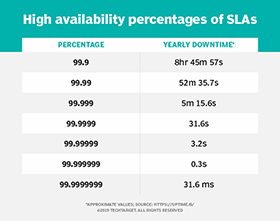
2. Numerical Focus: Calculating Reliability Metrics
To excel in your exam, you need to be comfortable with the calculations behind reliability metrics. Let's study how uptime is calculated.
To understand the quantitative side of reliability, we will look at an article from Uptime.com. This resource provides clear definitions and a practical example of calculating key reliability metrics.
Please read the following sections of the article: "How uptime is calculated": Understand the basic formula for calculating uptime and downtime percentages. "The top 3 metrics you should track": Memorize the definitions for Availability (Uptime), Mean Time Between Failures (MTBF), and Mean Time to Repair (MTTR). "Example": Carefully follow the step-by-step calculation for a website that had 3 outages in a month. This is a perfect template for an exam question.
Let's work through an example based on the article to solidify your understanding.
Exam-Style Problem:
A cloud service was monitored for a 30-day month. During this period, it experienced 2 outages, each lasting 45 minutes. Calculate the (a) Availability Percentage, (b) MTBF, and (c) MTTR.
Solution:
-
Calculate Total Time and Downtime in seconds:
- Total Monitoring Time = 30 days × 24 hours/day × 60 mins/hour × 60 secs/min = 2,592,000 seconds
- Total Downtime = 2 outages × 45 mins/outage = 90 minutes
- Total Downtime in seconds = 90 mins × 60 secs/min = 5,400 seconds
-
Calculate Availability (Uptime) Percentage:
- Downtime Percentage = (Total Downtime / Total Time) × 100
- Availability Percentage = 100% - Downtime Percentage
- Downtime Percentage = (Total Downtime / Total Time) × 100
-
Calculate Mean Time Between Failures (MTBF):
- MTBF is the average time the system runs before failing.
- Total Uptime = Total Time - Total Downtime = 2,592,000 - 5,400 = 2,586,600 seconds
- MTBF = Total Uptime / Number of Failures
- Converting to days: 1,293,300 / (24 * 3600) ≈ 14.97 days. The average time between failures is about 15 days.
-
Calculate Mean Time to Repair (MTTR):
- MTTR is the average time it takes to repair the system after a failure.
- MTTR = Total Downtime / Number of Failures
3. Other Important Benefits
For a complete exam answer, you should also be able to list and briefly explain several other advantages.
What is Cloud Computing? Types, Examples and Benefits
The TechTarget article 'What is Cloud Computing?' provides a concise list of further benefits. We'll use this to round out our knowledge.
Read the section titled "What are the benefits of cloud computing?". Focus on understanding the following points: Data and workload mobility: Accessing data from anywhere. Business continuity and disaster recovery: How the cloud helps recover from disasters. Speed and agility: How quickly you can deploy applications. Automatic updates: The provider handles maintenance.
Here is a summary of these additional benefits:
- Agility and Speed: Developers can provision resources in minutes, compared to weeks or months for procuring and setting up physical hardware. This drastically accelerates innovation and time-to-market.
- Global Reach (Broad Network Access): You can deploy your applications in data centers around the world with a few clicks, placing your services closer to your end-users to reduce latency.
- Enhanced Collaboration: Cloud-based applications (like Google Workspace or Office 365) allow teams distributed across the globe to work on the same documents and data in real-time.
- Automatic Software Updates: The cloud provider is responsible for patching and updating the software and hardware, including security updates, which saves your team time and reduces risk.
- Disaster Recovery: Storing data and applications in the cloud provides an inherent off-site backup. Cloud providers offer robust tools to facilitate business continuity and disaster recovery (BCDR) at a fraction of the cost of traditional methods.
Conclusion
In this lesson, we have thoroughly examined the key benefits that make cloud computing a dominant force in the IT industry. Mastering these points is crucial for your exams.
Key Takeaways:
- Cost Savings: The primary financial benefit, driven by the shift from CAPEX to OPEX and the pay-as-you-go model.
- Scalability & Elasticity: The ability to dynamically adjust resources to meet demand, eliminating the problems of over- or under-provisioning.
- Reliability & Availability: Achieved through massive redundancy and guaranteed by SLAs. You should be comfortable calculating uptime, MTBF, and MTTR.
- Other critical benefits include agility, global reach, enhanced collaboration, and simplified disaster recovery.
These benefits directly address the limitations of traditional, on-premise computing and explain why organizations of all sizes are migrating to the cloud.
Preview of the Next Lesson:
While the benefits are compelling, cloud computing is not without its drawbacks. To provide a balanced perspective, our next lesson will address the other side of the coin: listing and explaining the primary challenges of cloud computing, including security concerns, vendor lock-in, and the requirement for constant internet connectivity.