Introduction
Welcome to your next lesson on Cloud Computing. In our previous session, we established a strong foundation by comparing the three fundamental types of cloud storage: Object, Block, and File. We learned how each is structured, its ideal use cases, and how they differ in performance and scalability.
This lesson builds directly on that knowledge. Now that you know the what (the types of storage), we will explore the how. Specifically, this lesson addresses the learning outcome: Describe a typical cloud storage architecture, including the physical, control, and application layers.
Understanding this layered architecture is crucial for your exams. It provides a mental model for how any cloud storage service, from Amazon S3 to Azure Files, is constructed. We will break down each layer, define its purpose and functions, and illustrate how they work together to deliver a reliable and scalable storage service.
The Three-Layer Cloud Storage Architecture
To manage the complexity of providing storage to millions of users, cloud providers structure their systems in layers. Each layer has a distinct responsibility, abstracting away the details of the layer below it. While different providers may use slightly different internal names, a typical cloud storage architecture can be understood through a three-layer model:
- Physical Layer: The hardware foundation.
- Control Layer: The management "brain" of the system.
- Application Layer: The interface for users and applications.
To begin, let's look at a foundational article from IBM that introduces a generic architecture. The article uses the terms "back end," "middleware," and "front end," which map directly to the Physical, Control, and Application layers, respectively.
Anatomy of a cloud storage infrastructure
The article 'Anatomy of a cloud storage infrastructure' from IBM Developer provides a clear, high-level overview of a generic cloud storage architecture. It will give us a framework and a key diagram for our discussion.
Please read the short introductory section titled 'General architecture'. Pay close attention to Figure 1, as it visually represents the three-part structure we will be analyzing.
Now, let's examine each of these layers in detail, using the terminology from your syllabus.
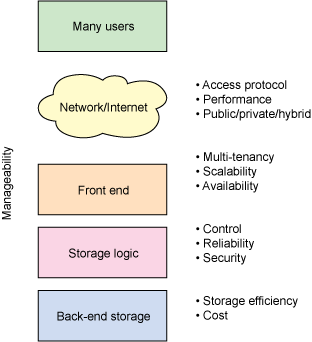
This diagram illustrates the three main layers of a cloud storage architecture. The Back End corresponds to the Physical Layer (hardware). The Middleware (Storage Logic) corresponds to the Control Layer (management and logic). The Front End corresponds to the Application Layer (API and user access).
Layer 1: The Physical Layer (The "Back End")
The Physical Layer is the foundation of the cloud. It consists of the tangible hardware resources housed in massive data centers.
- Definition: The Physical Layer comprises all the physical hardware required to store data and run the cloud environment, including servers, storage drives, networking equipment, and the necessary power and cooling infrastructure.
- Core Function: To provide the raw storage capacity and physical infrastructure upon which the entire cloud service is built.
To better understand the components of this layer, let's draw on a resource that describes the "Datacenter Layer" of a general cloud architecture, which is equivalent to our Physical Layer.
The article 'Layered Architecture of Cloud' from GeeksforGeeks gives a good breakdown of the physical components that make up a data center.
Please read the section titled 'Datacenter Layer'. This section details the physical resources that are managed at the lowest level of the cloud stack.
Key Components of the Physical Layer:
- Servers: Racks of powerful computers that provide the processing power for the control layer and other management tasks.
- Storage Media: The actual disks where data is stored. This includes:
- Hard Disk Drives (HDDs): For cost-effective storage of large amounts of data (e.g., archives, backups).
- Solid-State Drives (SSDs): For high-performance storage requiring low latency (e.g., databases, virtual machine boot volumes).
- Networking Equipment: High-speed routers and switches that connect all the servers and storage devices within the data center and connect the data center to the internet.
- Power and Cooling: Uninterruptible Power Supplies (UPS), backup generators, and extensive cooling systems to ensure the hardware operates 24/7 without overheating or power failure.
In essence, this layer is the physical reality of the "cloud"—a vast, globally distributed collection of hardware.
Layer 2: The Control Layer (The "Storage Logic" or "Middleware")
The Control Layer is the intelligent "brain" that sits between the physical hardware and the applications. It abstracts the complexity of the physical hardware and manages all the core functions of the storage system.
- Definition: The Control Layer is a distributed software layer that manages the physical storage resources, implements data management features, and presents the storage to the application layer in a virtualized, usable format. In the IBM diagram, this is referred to as "Storage Logic" or "Middleware."
- Core Function: To automate and manage the placement, protection, and retrieval of data on the physical hardware.
Key Functions of the Control Layer:
- Virtualization & Abstraction: It pools the physical storage resources and presents them as virtual storage (e.g., an object storage bucket, a block volume, or a file system). This is the layer where hypervisors (for VMs) and container runtimes would be managed.
- Data Placement: It runs sophisticated algorithms to decide on which specific servers and disks to store a piece of data, optimizing for performance, durability, or cost.
- Data Protection & Replication: This is one of its most critical roles. The control layer automatically creates and manages copies of data to protect against hardware failure. It implements schemes like:
- Replication: Storing identical copies of data on different devices.
- Erasure Coding: A more space-efficient method (like RAID) that breaks data into fragments and stores them with parity information, allowing the data to be reconstructed even if some fragments are lost.
- Multi-tenancy: It enforces security and isolation, ensuring that one customer (tenant) cannot access another's data, even if it's stored on the same physical disk.
- Scalability Management: It handles the dynamic scaling of resources. When more storage is needed, the control layer automatically incorporates new hardware into the pool without service interruption.
- Data Services: It implements features like data reduction (compression and deduplication), snapshots, and encryption.
This layer is where most of the "magic" of cloud storage happens, turning a collection of standard hardware into a resilient, scalable, and on-demand service.
Layer 3: The Application Layer (The "Front End")
The Application Layer is the top-most layer and serves as the interface for the outside world. It's how users, services, and applications actually interact with and consume the storage.
- Definition: The Application Layer exposes the underlying storage system through a set of well-defined protocols and Application Programming Interfaces (APIs). In the IBM diagram, this is called the "Front End."
- Core Function: To provide a standardized way for clients to perform storage operations (e.g., read, write, delete data) without needing to know anything about the Control or Physical layers.
Key Components of the Application Layer:
- API Endpoints: These are the public-facing access points, typically based on web protocols. The most common is the REST API over HTTP/S, used extensively by object storage services like Amazon S3.
- Protocol Gateways: The layer translates requests from various standard protocols into actions that the Control Layer can understand. This enables broad compatibility. The specific protocol exposed depends on the storage type:
- Object Storage: REST API (e.g., S3 API, Azure Blob API).
- File Storage: NFS (for Linux/Unix) and SMB/CIFS (for Windows).
- Block Storage: iSCSI or Fibre Channel over Ethernet (FCoE).
- Authentication & Authorization: This layer is responsible for authenticating the identity of the user or application making a request and authorizing whether they have the permission to perform the requested action.
For example, when you upload a file to a service like Google Drive (which uses object storage on the back end), your web browser or mobile app is communicating with this Application Layer via an API.
Summary for Exam Revision
To consolidate your understanding, here is a summary table that outlines the three layers of cloud storage architecture. This format is ideal for quick revision.
| Layer | Alternative Name | Role | Key Functions & Components | Examples of Protocols/Technologies |
|---|---|---|---|---|
| Application | Front End | Provides user and application interface | API Endpoints, Protocol Gateways, Authentication, Authorization | REST APIs (HTTP/S), NFS, SMB/CIFS, iSCSI |
| Control | Middleware, Storage Logic | Manages the storage resources and data | Virtualization, Data Placement, Replication, Erasure Coding, Multi-tenancy, Scaling, Encryption | Data distribution algorithms, replication engines, schedulers, hypervisors |
| Physical | Back End, Datacenter | The actual hardware that holds the data | Servers, Storage Disks (HDD/SSD), Networking (Routers/Switches), Power & Cooling | Physical disks, server racks, network cables |
Conclusion
In this lesson, we have deconstructed the architecture of a typical cloud storage system into three distinct layers. This model helps explain how cloud providers can offer seemingly infinite, highly reliable storage as a simple service.
Key Takeaways:
- Physical Layer: The foundation of physical hardware (servers, disks, networks) in data centers.
- Control Layer: The intelligent middleware that manages the hardware, protects data through replication/erasure coding, and handles scalability and multi-tenancy.
- Application Layer: The front-end interface that exposes the storage to users and applications via standard protocols and APIs (e.g., REST, NFS, iSCSI).
Each layer builds upon the one below it, creating a powerful abstraction that separates the application's request for storage from the physical complexity of where and how that data is actually stored.
Preview of the Next Lesson:
We briefly mentioned that the Control Layer is responsible for data protection. In our next lesson, we will dive deeper into this critical function. We will explore two key techniques: synchronous and asynchronous data replication, and understand the trade-offs they introduce in terms of data consistency, leading us to the concepts of strong consistency vs. eventual consistency.