Introduction
Welcome to the second lesson in our module on virtualization. In the previous lesson, we defined virtualization as the technology that uses a hypervisor to create multiple, isolated virtual machines (VMs) on a single physical server. We established that this abstraction of hardware is the foundational technology that makes cloud computing's key features, like resource pooling and rapid elasticity, possible.
Now, we will shift from the "what" and "how" of virtualization to the "why." This lesson directly addresses the learning outcome: Explain the business benefits of virtualization, such as improved hardware utilization, cost savings, and workload isolation. We will explore the tangible advantages that have made virtualization an indispensable technology in modern IT, focusing on concepts and definitions that are crucial for your semester exams.
1. The Problem: Inefficiencies of Traditional Server Deployment
To fully appreciate the benefits of virtualization, we must first understand the challenges of the traditional, non-virtualized approach. In a traditional data center, each server is typically dedicated to a single application or service.
To understand these problems, please read the short section below.
Chapter 9 - Virtualization and Cloud Computing
The article 'Chapter 9 - Virtualization and Cloud Computing' provides an excellent summary of the issues with traditional server deployment, which sets the stage for why virtualization is so beneficial.
In the resource, find the section titled '9.1.1.3 – Traditional Server Deployment'. Read this section to understand the key problems with this model.
As the reading highlights, the traditional model suffers from three main problems that are important to remember for exams:
- Wasted Resources: Most servers are underutilized, often running at only 5-15% of their total capacity. They sit idle for long periods, consuming power and cooling without doing productive work.
- Server Sprawl: As an organization's needs grow, more physical servers are added. This leads to an ever-expanding physical footprint, requiring more data center space, more racks, and more cabling, which is both expensive and difficult to manage.
- Single Point of Failure: If a dedicated physical server fails, the application it hosts goes down with it. There is no inherent, easy way to shift its workload to another machine.
Virtualization directly addresses these problems, delivering significant business benefits.
2. The Solution: Key Business Benefits of Virtualization
Virtualization transforms IT infrastructure by breaking the rigid one-to-one link between hardware and software. This leads to several powerful advantages.
The following video provides a clear and concise overview of these benefits.
The video 'Virtualization Explained' by PowerCert Animated Videos gives a great visual and narrated summary of the core advantages of adopting virtualization.
Watch the section from 05:46 to 07:41. As you watch, make a list of the benefits mentioned, such as cost savings, space savings, and improved disaster recovery.
Let's now detail these benefits in a structured way, perfect for exam answers.
Benefit 1: Improved Hardware Utilization and Server Consolidation
This is the most direct and impactful benefit.
- Improved Utilization: Instead of having many servers running at low capacity, virtualization allows a single physical server to host multiple VMs. This pushes the server's utilization rate much higher (often to 60-80%), ensuring that the hardware investment is fully leveraged.
- Server Consolidation: This is the process of reducing the number of physical servers in a data center by running multiple workloads as VMs on fewer, more powerful hosts. A typical consolidation ratio might be 10:1 or higher, meaning 10 physical servers are replaced by one. This directly counters the problem of server sprawl.

Benefit 2: Significant Cost Savings
Improved utilization and consolidation translate directly into financial savings, which can be categorized into two main types:
- Reduced Capital Expenditure (CapEx): Because fewer physical servers are needed, the initial cost of purchasing hardware is significantly lower.
- Reduced Operational Expenditure (OpEx):
- Power and Cooling: Fewer servers consume less electricity and generate less heat, leading to substantial savings on power and air conditioning bills.
- Physical Space: Server consolidation reduces the data center footprint, saving money on expensive real estate and rack space.
- Maintenance: Managing fewer physical machines simplifies administration and reduces maintenance costs.
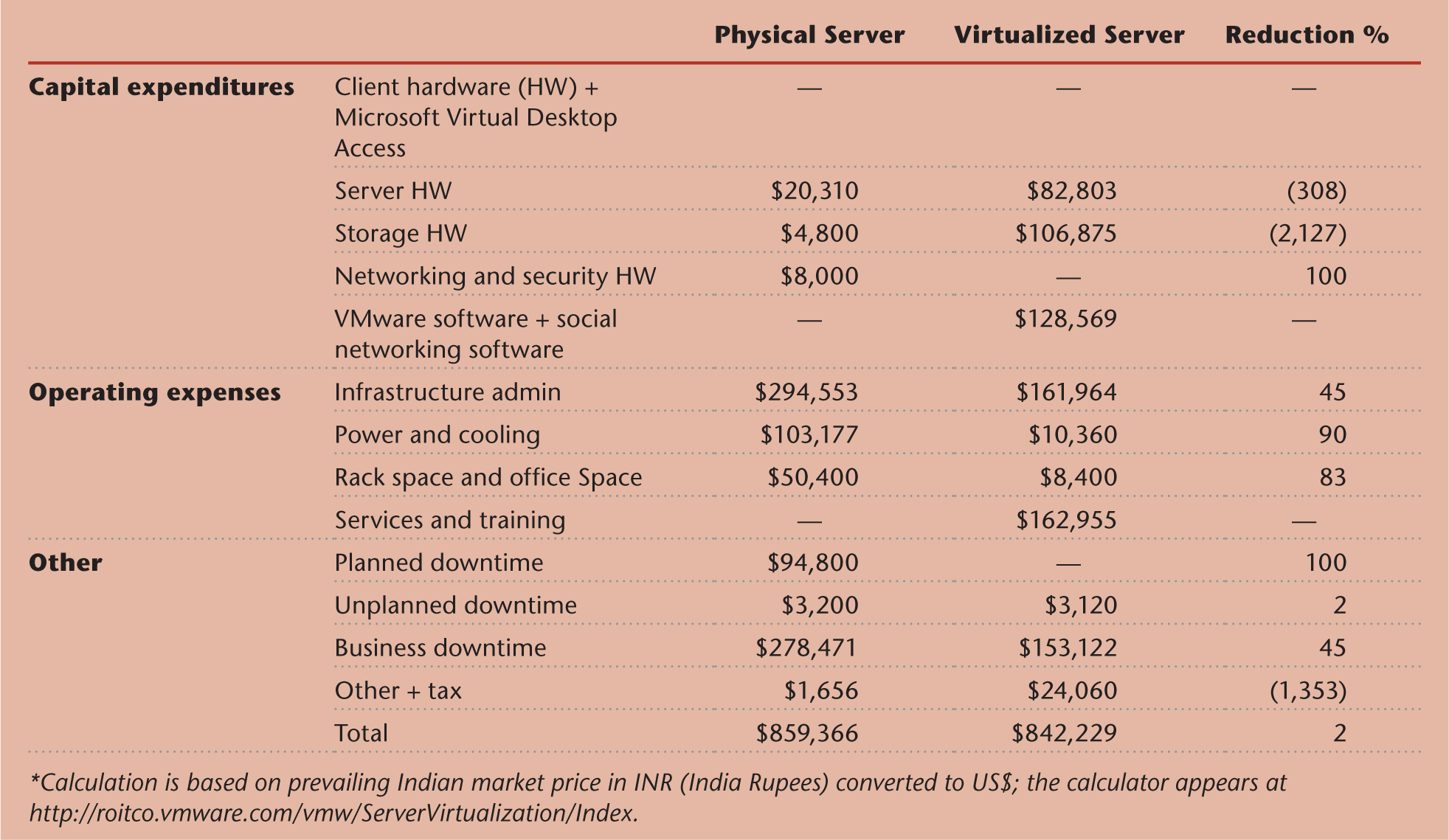
To formalize this for a more advanced analysis, businesses use metrics like Total Cost of Ownership (TCO) and Return on Investment (ROI) to evaluate the financial benefits.
- TCO includes all costs associated with the infrastructure: initial hardware/software purchase (CapEx), ongoing power, cooling, and administration (OpEx), and costs of downtime. Virtualization aims to lower the overall TCO.
- ROI measures the profitability of the investment in virtualization. It is calculated as . A high ROI indicates a very beneficial investment.
To understand these financial concepts in more detail, you can explore the following resource.
[PDF] Evaluation of Virtual Machine Performance and Virtualized ...
This research paper, 'Evaluation of Virtual Machine Performance...', provides a detailed academic look at how TCO and ROI are calculated in the context of virtualization. This level of detail is excellent for demonstrating deep understanding in an exam.
Read Section 2 ('Goal of This Study') and Section 3 ('Analysis of consolidation ratio and TCO/ROI'). Focus on how TCO and ROI are defined and what components make up the calculations (e.g., capital expenditure, operational expenditure, downtime cost). You do not need to memorize the formulas, but understand the concepts.
Benefit 3: Workload Isolation
As we learned in the last lesson, the hypervisor keeps each VM logically separate from the others running on the same host. This isolation is a major benefit:
- Security: A security breach, virus, or malware attack inside one VM is contained and does not spread to other VMs on the same physical server.
- Stability: A software crash or operating system failure in one VM will not affect the stability or performance of other VMs. Each can be rebooted independently.
Benefit 4: Faster Provisioning and Increased Agility
- Faster Provisioning: Deploying a new physical server can take days or weeks (procurement, racking, OS installation). In contrast, a new VM can be provisioned and started in minutes from a pre-configured template.
- Increased Agility: This speed allows businesses to respond much more quickly to new demands. A development team needing a new test server can get one almost instantly, accelerating project timelines.
Benefit 5: Improved Disaster Recovery and High Availability
Because a VM is essentially a set of files (containing the OS, applications, and configuration), it is fully encapsulated. This makes it highly portable and easy to manage.
- Simplified Backup and Recovery: Backing up an entire VM is as simple as copying its files. In case of a disaster, this entire VM can be restored to another physical host quickly, drastically reducing recovery time.
- High Availability: Advanced virtualization platforms support features like live migration, where a running VM can be moved from one physical host to another with zero downtime. This is used for hardware maintenance or to balance workloads, maximizing server uptime.
Benefit 6: Support for Legacy Systems
Virtualization allows organizations to run old applications that may depend on an outdated operating system (e.g., Windows Server 2003). This legacy OS can be run inside a VM on modern, reliable hardware, extending the life of critical applications without the risk of running on old, unsupported physical machines.
Summary of Benefits
For quick revision, here is a summary of the key business benefits of virtualization.
| Benefit Category | Description | Key Business Impact |
|---|---|---|
| Resource Utilization | Runs multiple VMs on a single physical host, leveraging its full capacity. | Reduces waste, maximizes return on hardware investment. |
| Cost Savings | Lowers the number of physical servers needed, reducing hardware, power, cooling, and space costs. | Decreases both Capital Expenditure (CapEx) and Operational Expenditure (OpEx). |
| Workload Isolation | Keeps VMs separate and secure from one another on the same host. | Improves security and stability; an issue in one VM does not affect others. |
| Operational Agility | Allows for the rapid provisioning of new servers (VMs) in minutes instead of days or weeks. | Enables faster response to business needs and accelerates development cycles. |
| Disaster Recovery | Simplifies backup and recovery since VMs are encapsulated as files that can be easily copied and restored. | Reduces downtime and data loss risk, improving business continuity. |
| Legacy Support | Enables old applications requiring outdated operating systems to run on modern hardware. | Extends the life of critical applications and avoids costly rewrites. |
Conclusion
In this lesson, we moved from the technical definition of virtualization to its practical, real-world value. We saw how it solves the core problems of traditional server infrastructure—wasted resources, server sprawl, and inflexibility.
Key Takeaways:
- Virtualization's primary benefit is server consolidation, which dramatically improves hardware utilization.
- This consolidation leads to significant cost savings in hardware (CapEx) and operations like power, cooling, and space (OpEx). We can measure these savings with metrics like TCO and ROI.
- Workload isolation is a critical benefit, enhancing both security and system stability by containing failures within a single VM.
- Other major advantages include faster server provisioning (increased agility), simplified disaster recovery, and the ability to support legacy applications.
Preview of the Next Lesson:
Now that we understand what virtualization is and why it's beneficial, we will zoom in on the most common type. The next lesson will cover the learning outcome: Describe server-level virtualization and illustrate its architecture with a diagram showing the relationship between hardware, hypervisor, and virtual machines. We will explore the architecture that makes all these benefits a reality.