Introduction
In our last lesson, we explored the significant business benefits of virtualization, such as improved hardware utilization, cost savings through server consolidation, and enhanced disaster recovery. We focused on why virtualization is a cornerstone of modern IT.
This lesson transitions from the "why" to the "how." We will now dissect the fundamental architecture that makes these benefits possible. We will focus specifically on server-level virtualization, which is the most common implementation and the engine behind cloud computing. This lesson directly addresses the learning outcome: Describe server-level virtualization and illustrate its architecture with a diagram showing the relationship between hardware, hypervisor, and virtual machines.
By the end of this lesson, you will be able to define server virtualization and draw and explain its architectural diagrams, a common requirement in university exams.
1. Defining Server-Level Virtualization
At its core, server virtualization is the process of partitioning a single physical server into multiple, isolated virtual servers. Each virtual server, known as a Virtual Machine (VM), runs its own operating system and applications, functioning as a complete, independent server.
This concept is the practical application of the server consolidation benefit we discussed previously.
To get a precise, exam-ready definition, please read the following brief section from the GeeksforGeeks article.
Virtualization in Cloud Computing and Types - GeeksforGeeks
The article 'Virtualization in Cloud Computing and Types' provides a clear and concise definition of server virtualization, which is an excellent starting point.
Find the heading 'Types of Virtualization' and read subsection 5, titled 'Server Virtualization'. Focus on the one-sentence concept and the example provided.
As the article explains, server virtualization allows you to run, for instance, a Linux web server, a Windows database server, and another Linux mail server all on the same physical machine, with each being completely isolated from the others.
The following diagram illustrates this high-level concept:

2. The Core Architectural Components
The architecture of server virtualization is best understood as a stack of layers. There are three fundamental components you must know for your exams:
- Physical Hardware (The Host): This is the underlying physical server, which provides the actual computing resources: CPU, memory (RAM), storage (hard disks), and network interfaces.
- Hypervisor (or Virtual Machine Monitor - VMM): This is a specialized software layer that sits between the physical hardware and the virtual machines. Its job is to create, run, and manage the VMs. The hypervisor is the core engine of virtualization; it abstracts the physical hardware and allocates resources to each VM.
- Virtual Machine (The Guest): A VM is a software-based computer. It is a self-contained package of a guest operating system (e.g., Windows, Linux) and the application(s) running on it. From the perspective of the software inside the VM, it appears to be a dedicated physical machine with its own virtual hardware.
3. Architectural Models: Type 1 vs. Type 2 Hypervisors
The specific arrangement of these components—and thus the server virtualization architecture—depends on the type of hypervisor used. There are two primary architectural models, defined by Type 1 and Type 2 hypervisors. Understanding this distinction is critical.
The following video gives an excellent animated overview of virtualization and then builds a virtualized server step-by-step, illustrating the Type 1 architecture in action.
The video 'Virtualization Explained' from PowerCert Animated Videos will help you visualize the architecture of server virtualization, especially the role of a Type 1 hypervisor.
Watch the segment from 02:10 to 05:06. Pay close attention to how the hypervisor is installed and how it is used to create and manage virtual machines. This directly illustrates the architectural layers.
Now, let's formally define and illustrate the two architectures.
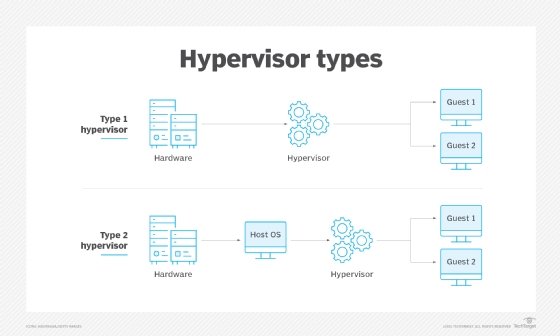
Architecture 1: Type 1 Hypervisor (Bare-Metal)
As the name "bare-metal" suggests, a Type 1 hypervisor is installed and runs directly on the host's physical hardware. There is no traditional operating system in between. This architecture is the standard for enterprise data centers and cloud providers because it offers the best performance and security.
-
Architectural Stack:
- Physical Hardware
- Hypervisor
- Virtual Machines (each with a Guest OS and Apps)
-
Key Characteristics:
- High Performance: The hypervisor has direct access to hardware, leading to minimal overhead.
- High Security & Isolation: With no underlying host OS, there is a smaller attack surface. Issues in one VM are completely isolated from others.
- Examples: VMware ESXi, Microsoft Hyper-V, KVM (Kernel-based Virtual Machine).
Architecture 2: Type 2 Hypervisor (Hosted)
A Type 2 hypervisor runs as a software application on top of a conventional host operating system (like Windows, macOS, or Linux). The hypervisor then creates and manages VMs within this application. This architecture is common for personal use, development, and testing.
-
Architectural Stack:
- Physical Hardware
- Host Operating System (e.g., Windows 10)
- Hypervisor Application
- Virtual Machines (each with a Guest OS and Apps)
-
Key Characteristics:
- Lower Performance: The hypervisor's requests for hardware resources must pass through the host OS, adding latency and overhead. The host OS also consumes resources (CPU, RAM).
- Easier to Manage: It's as simple to install and run as any other desktop application.
- Examples: Oracle VirtualBox, VMware Workstation, Parallels Desktop.
The following diagram is essential for your exams as it clearly illustrates the architectural difference between the two types.
4. Summary and Comparison
For exam preparation, being able to compare these two architectures in a tabular format is extremely valuable. The following resource from AWS provides an excellent, detailed breakdown.
What’s the Difference Between Type 1 and Type 2 Hypervisors? - AWS
The AWS article 'What’s the Difference Between Type 1 and Type 2 Hypervisors?' offers a professional, in-depth comparison. It also includes a summary table that is perfect for revision.
Read the sections 'How they work' and 'Key differences' to understand the operational mechanisms and distinctions in performance, management, and isolation. Finally, review the 'Summary of differences' table at the end. This table is a key study asset.
Based on the resource and our discussion, here is a consolidated comparison table for your notes:
| Feature | Type 1 Hypervisor (Bare-Metal) | Type 2 Hypervisor (Hosted) |
|---|---|---|
| Architecture | Runs directly on physical hardware. | Runs as an application on a host OS. |
| Performance | High, with low overhead due to direct hardware access. | Lower, as resource requests go through the host OS. |
| Isolation & Security | High, as VMs are isolated by the hypervisor. Smaller attack surface. | Lower, as vulnerabilities in the host OS can potentially affect all VMs. |
| Resource Management | Hypervisor directly controls and allocates hardware resources to VMs. | Host OS manages hardware; hypervisor requests resources from the host OS. |
| Use Case | Enterprise data centers, cloud computing environments, production servers. | Desktops, software development, testing, personal use. |
| Examples | VMware ESXi, Microsoft Hyper-V, KVM, Citrix Hypervisor. | Oracle VirtualBox, VMware Workstation, Parallels Desktop. |
Conclusion
In this lesson, we dissected the architecture of server-level virtualization, the technology that enables the benefits we previously discussed. We defined it as the partitioning of one physical server into multiple isolated virtual machines.
Key Takeaways:
- Server Virtualization creates multiple independent virtual servers (VMs) on a single physical host.
- The architecture consists of three main layers: Physical Hardware, the Hypervisor, and the Virtual Machines.
- The specific architecture is determined by the hypervisor type.
- Type 1 (Bare-Metal) Architecture: The hypervisor runs directly on the hardware, offering high performance and security. This is the standard for enterprise and cloud environments.
- Type 2 (Hosted) Architecture: The hypervisor runs as an application on a host OS, offering ease of use but with a performance penalty. This is used for desktop-level virtualization.
- Being able to draw and explain the layered diagrams for both Type 1 and Type 2 architectures is crucial for exams.
Preview of the Next Lesson:
Now that we have a solid understanding of server virtualization architecture, we will broaden our scope. The next lesson will cover the learning outcome: Explain the concepts of hardware virtualization and operating-system-level virtualization, noting key differences. We will dive deeper into different methods and levels of abstraction used in virtualization.