Introduction
Hello! In our previous lesson, we contrasted hardware-level virtualization (which creates Virtual Machines) with OS-level virtualization (which creates containers). We established that virtualization is a powerful abstraction technique that can be applied to different parts of a computer system.
So far, we have focused on virtualizing compute resources. This lesson extends that concept to two other critical components of IT infrastructure: storage and networking. We will explore how these resources can be virtualized to provide greater flexibility, efficiency, and manageability, which are foundational principles of cloud computing.
The learning outcome for this lesson is to: Define and provide use cases for storage virtualization (e.g., SAN, NAS) and network virtualization (e.g., VLAN).
Understanding these concepts is vital for your exams, as they frequently appear in questions related to cloud infrastructure and architecture. We will focus on clear definitions, architectural diagrams, and comparison tables to ensure you are well-prepared.
1. Storage Virtualization: NAS and SAN
Storage virtualization is the process of pooling physical storage from multiple storage devices into what appears to be a single, centrally managed storage device. This abstraction separates the logical representation of storage from the physical storage systems, simplifying management and improving utilization.
[PDF] Lecture Note On Cloud Computing | NMIET
For a formal, exam-oriented definition, let's turn to your college notes. This source concisely defines storage virtualization and its place within the broader topic.
In the PDF, navigate to 'UNIT-5 Virtualisation'. Find the sub-heading 'Block and File level Storage Virtualisation' and read the definition provided. It explains that storage virtualization is a series of servers managed by a virtual system, where the servers are unaware of the physical data location.
The two most common architectures for implementing networked storage are Network Attached Storage (NAS) and Storage Area Network (SAN).
1.1 Network Attached Storage (NAS)
A NAS is a self-contained storage device connected to a network that provides file-level data access to clients. Think of it as a dedicated file server. Because it connects to a standard Ethernet network, it is relatively simple to set up and manage. Users and servers on the network access the NAS as a shared network drive.
Watch this short segment for a clear introduction to NAS.
NAS vs SAN - Network Attached Storage vs Storage Area Network
The following video from PowerCert Animated Videos provides a great visual explanation of what a NAS is and how it's used.
Watch the video from the beginning until 01:29. Focus on how a NAS provides a centralized location for data, its typical components (RAID, network card), and its common use cases in homes and small-to-medium businesses.
Key Use Cases for NAS:
- File Storage and Sharing: Ideal for centralizing documents, spreadsheets, and media files for a team or a small office.
- Active Archives: Storing data that is not needed instantly but must remain easily accessible and searchable.
- Big Data Storage: Scale-out NAS systems can be used for storing large unstructured datasets like video surveillance footage.
1.2 Storage Area Network (SAN)
A SAN is a dedicated, high-speed network that interconnects and presents shared pools of storage devices to multiple servers. Unlike NAS, a SAN provides block-level access. This means that to a server's operating system, the storage on a SAN appears as a locally attached disk drive (like an internal hard drive), not a remote file share. This allows for more advanced data management and higher performance.
This next segment of the video explains the SAN architecture.
NAS vs SAN - Network Attached Storage vs Storage Area Network
Continuing with the PowerCert video, let's now look at their explanation of a SAN.
Watch from 01:29 to 04:08. Pay close attention to these key points: SAN is a network of storage devices, it uses high-speed technology like Fibre Channel, it provides block-level access, and it is not affected by regular network traffic.
Key Use Cases for SAN:
- Databases and E-commerce: High-transaction environments that require very fast I/O and low latency benefit greatly from SAN performance.
- Large-Scale Virtualization: A SAN can provide shared block storage for a cluster of virtual machine hosts, enabling features like live migration.
- High-Performance Backups: Servers can back up data directly to the SAN at high speed without congesting the primary local area network (LAN).
1.3 Architectural and Tabular Comparison: NAS vs. SAN
The fundamental difference in how NAS and SAN connect to servers and clients is crucial. The following diagram illustrates this.

For your exams, presenting these differences in a table is highly effective.
NAS vs SAN Storage Detailed Comparison | Hypertec SP
To build a comprehensive comparison table, let's consult the 'NAS vs SAN Storage' article from Hypertec SP. It contains an excellent summary table.
Scroll down to the table under the heading 'SAN vs NAS Storage'. Review the comparison points, such as data access method, protocols, and cost. This will form the basis of our summary table.
Here is a consolidated comparison table, perfect for your exam notes:
| Feature | Network Attached Storage (NAS) | Storage Area Network (SAN) |
|---|---|---|
| Data Access Level | File-level. The NAS device manages the filesystem. | Block-level. The server OS manages the filesystem. |
| How it appears to OS | As a network-mounted share (e.g., \\nas\share). |
As a local disk (e.g., D: drive). |
| Network Type | Uses the standard TCP/IP LAN (Ethernet). | Uses a dedicated, high-speed network (often Fibre Channel). |
| Protocols | NFS, SMB/CIFS, HTTP | SCSI, iSCSI, Fibre Channel Protocol (FCP) |
| Performance | Limited by LAN traffic. Higher latency. | Very high performance and low latency. Not affected by LAN traffic. |
| Cost | Generally less expensive and simpler to manage. | More expensive and complex to set up and maintain. |
| Scalability | Lower-end NAS has limited scalability. High-end can scale. | Highly scalable in both capacity and performance. |
| Typical Use Case | Home and SMB file sharing, central data repository. | Enterprise databases, large-scale virtualization, high-performance computing. |
2. Network Virtualization: VLAN
Just as we can virtualize storage, we can also virtualize the network. Network virtualization is the abstraction of network resources, traditionally delivered in hardware, to a logical, software-based entity. This allows for the creation of virtual networks that are decoupled from the underlying physical network hardware.
The most common and fundamental example of network virtualization is the Virtual LAN (VLAN).
2.1 Virtual Local Area Network (VLAN)
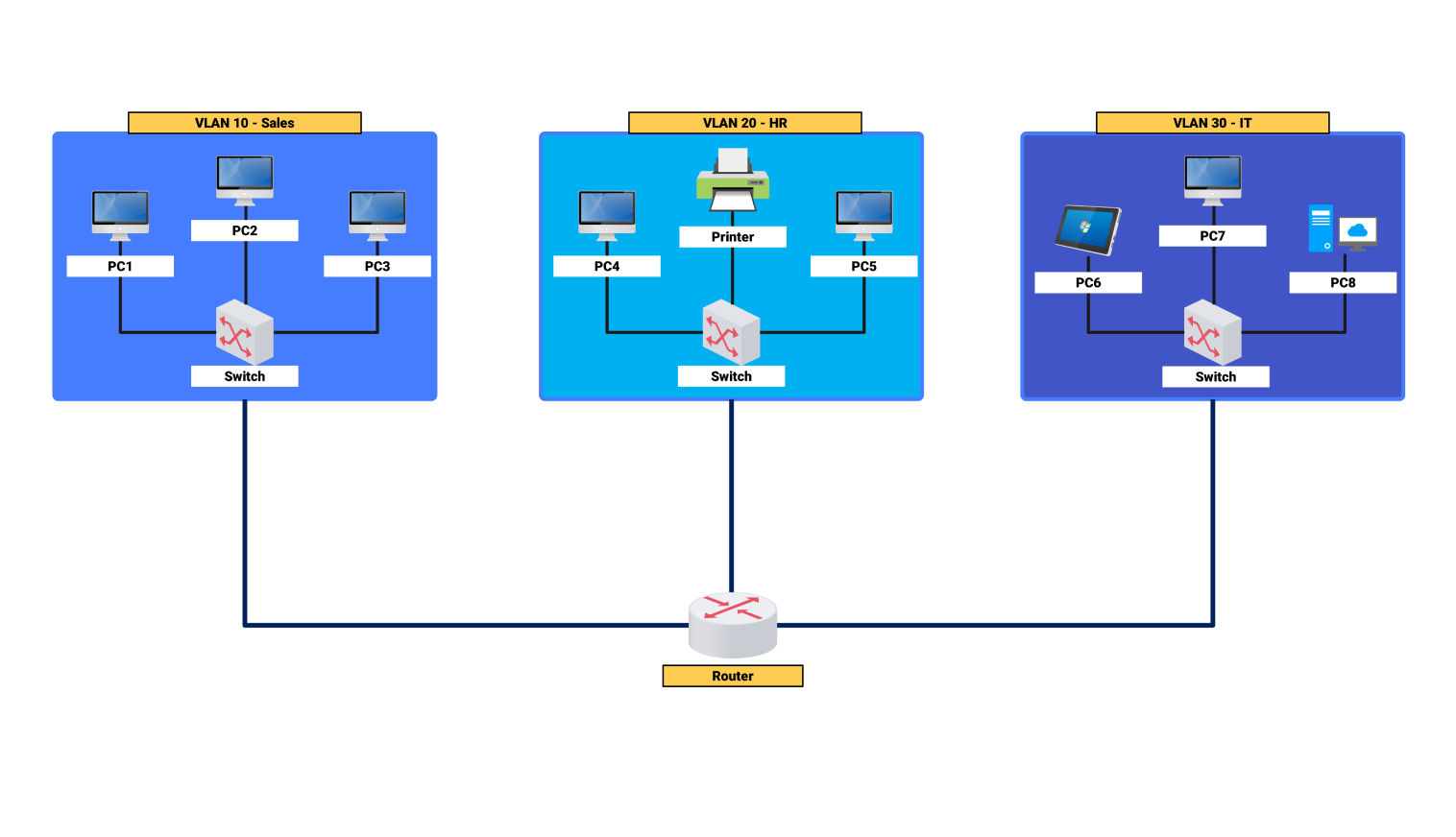
A VLAN allows a network administrator to logically segment a single physical LAN switch into multiple, isolated virtual LANs. Devices within one VLAN can communicate with each other as if they were on their own dedicated switch, but they are isolated from devices in other VLANs, even if they are connected to the same physical switch.
This video from Neso Academy provides an excellent, academic introduction to the concept.
To understand the 'what' and 'why' of VLANs, watch the introductory parts of this video.
Watch the video from the beginning to 06:35. Focus on the core idea: a VLAN is a logical partition of a switch that creates separate broadcast domains. Note the explanation that communication between different VLANs requires a router.
The diagram below shows a common use case for VLANs, where different company departments are logically isolated for security and management purposes.
2.2 How VLANs Work and Their Benefits
As explained in the video, VLANs achieve isolation by creating separate broadcast domains. A broadcast message sent by a device in one VLAN will only be received by other devices in the same VLAN. This reduces unnecessary network traffic and enhances security.
- Inter-VLAN Routing: To allow devices in different VLANs to communicate (e.g., a user in Sales accessing a server in IT), a Layer 3 device like a router is required.
- VLAN Tagging: To manage traffic across multiple switches, a process called frame tagging (standardized as IEEE 802.1Q) is used. The switch adds a "tag" to each Ethernet frame that identifies which VLAN it belongs to, allowing other switches to forward the frame to the correct destination VLAN.
Your college notes also provide a good summary of the benefits.
[PDF] Lecture Note On Cloud Computing | NMIET
Let's refer back to the NMIET notes for a list of key benefits that are useful for exams.
In 'UNIT-5 Virtualisation', find the section 'Virtual Local Area Network (VLAN)'. Read the list under 'The key benefits of implementing VLANs are:'.
Key Benefits of VLANs:
- Security: Isolates groups of users and sensitive data, even if they share the same physical network.
- Performance: Reduces broadcast traffic, which improves overall network performance.
- Cost Reduction: Allows a single switch to function as multiple virtual switches, reducing hardware needs.
- Simplified Management: Grouping users logically (e.g., by department) rather than physically makes moves, adds, and changes easier to manage.
3. Bonus: VLAN vs. VSAN
To further prepare you for potential exam questions, it's useful to know the distinction between a VLAN and a VSAN (Virtual Storage Area Network). While a VLAN logically segments an Ethernet network, a VSAN logically segments a Storage Area Network. This is a concept that appears in your provided notes.
A VSAN is a logical partition created within a physical SAN fabric. It allows you to create isolated virtual SANs on a shared physical infrastructure, much like how VLANs work for LANs.
The table below, derived from your NMIET notes, is perfect for a short-answer question comparing the two.
| Feature | VLAN (Virtual Local Area Network) | VSAN (Virtual Storage Area Network) |
|---|---|---|
| Domain | Logically separates devices on a Layer 2 Ethernet network. | Logically separates devices on a Storage Area Network. |
| Purpose | Reduces broadcast traffic and improves network performance/security. | Isolates traffic within specific portions of a SAN for security and management. |
| Scalability | Simplifies network management and adaptation to physical changes. | Makes a storage system easier to configure and scale out. |
| Primary Goal | To improve the performance and security of a general-purpose LAN. | To improve the security and manageability of a dedicated storage network. |
Conclusion
In this lesson, we expanded our understanding of virtualization beyond compute resources. We saw how abstracting storage and network hardware provides the flexibility and efficiency that are hallmarks of cloud computing.
Key Takeaways:
- Storage Virtualization pools physical storage. The two main types are:
- NAS: A simple, file-level storage device on a LAN.
- SAN: A complex, high-performance block-level storage network.
- Network Virtualization abstracts network resources. The most common example is:
- VLAN: A logical segmentation of a physical switch to create isolated broadcast domains, improving security and performance.
- The choice between NAS and SAN depends on performance, cost, and application requirements, with the key differentiator being file-level vs. block-level access.
Preview of the Next Lesson:
We have now examined the virtualization of servers, operating systems, storage, and networks. In our next lesson, we will complete our tour of virtualization types by focusing on the end-user experience. We will define and provide use cases for desktop virtualization and application virtualization, exploring how entire user environments can be delivered on-demand from a central server.