Introduction
Hello! In our recent lessons, we have explored the various domains where virtualization can be applied, from servers and storage to entire desktops and individual applications. We have focused primarily on the significant benefits this technology brings, such as improved resource utilization, flexibility, and cost savings.
However, for a complete and exam-ready understanding, it is crucial to analyze the other side of the coin: the drawbacks and challenges. This lesson directly addresses the learning outcome: List and explain the challenges of virtualization, including performance overhead and management complexity.
We will systematically break down the key disadvantages of implementing a virtualized environment. Understanding these challenges is not only essential for scoring well on questions about virtualization but also provides the context for why technologies like hypervisors and cloud management platforms are designed the way they are.
The Core Challenges of Virtualization
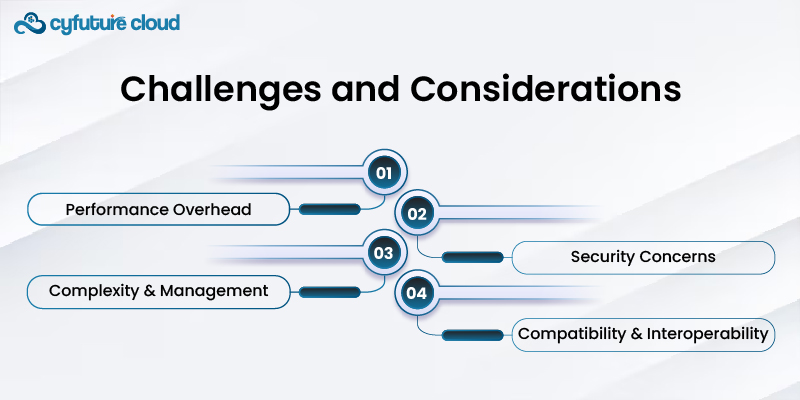
While virtualization offers powerful advantages, it introduces new layers of abstraction and complexity that organizations must manage. We can group the main challenges into four key areas, as summarized in the diagram below. We will explore each of these in detail.
1. Performance Overhead
Definition: Performance overhead is the reduction in performance of a virtualized system compared to a non-virtualized (physical) one. The hypervisor, or Virtual Machine Monitor (VMM), which creates and runs virtual machines, itself consumes CPU cycles, memory, and I/O bandwidth that would otherwise be available to the applications.
This overhead arises from several factors inherent in the virtualization process.
[PDF] Infrastructure as a service - B. M. S. College of Engineering
Your provided college notes offer specific technical reasons for this performance degradation. Let's examine a few key sections.
Please read the following three short excerpts from the PDF: Find the heading 'VIRTUAL MACHINE'. Read the 'main disadvantages' listed directly below it. In the same area, find the heading 'Full Virtualization'. Read the sentence that explains why only critical instructions are trapped and mentions 'performance overhead'. A bit further down, find the heading 'Host-Based Virtualization'. Read the 'Disadvantage' paragraph which discusses layers of mapping.\nFocus on how each point contributes to slower performance.
Based on those readings, we can summarize the key causes of performance overhead:
- Hypervisor Resource Consumption: The hypervisor itself is a piece of software that requires its own CPU and memory resources to function, taking them away from the guest VMs.
- Instruction Translation and Emulation: As mentioned in your notes under "Full Virtualization," the hypervisor must intercept and translate certain instructions from the guest OS that are intended for the hardware. This process, known as binary translation, introduces latency and is less efficient than direct hardware execution.
- I/O Virtualization: Accessing network and storage devices from within a VM requires passing requests through the hypervisor, which then communicates with the physical hardware. This indirection adds significant overhead compared to an OS running directly on the hardware.
- Resource Contention: As the notes point out, when multiple VMs run on a single host, they compete for physical resources like CPU time, memory bandwidth, and disk I/O. This can lead to "unstable performance" where the speed of one VM is negatively affected by the workload of another.
2. Management Complexity and VM Sprawl
While virtualization can simplify some aspects of management, it introduces new layers of complexity. Managing a large fleet of virtual machines, their storage, and networks can be more challenging than managing a smaller number of physical servers.
One of the most common and critical challenges is VM Sprawl.
Definition: VM sprawl is the situation where the number of virtual machines in an organization grows uncontrollably, without proper IT oversight or management. Because VMs are so easy and fast to create, departments and developers might provision new ones without a clear business purpose or a plan for decommissioning them, leading to wasted resources and increased security risks.
[PDF] Infrastructure as a service - B. M. S. College of Engineering
Your college notes directly identify this issue. Let's look at the relevant section.
Find the text 'There can be some downsides to virtualization'. Read the bullet point on 'The danger of server sprawl'. This provides a concise, exam-ready definition of the problem.
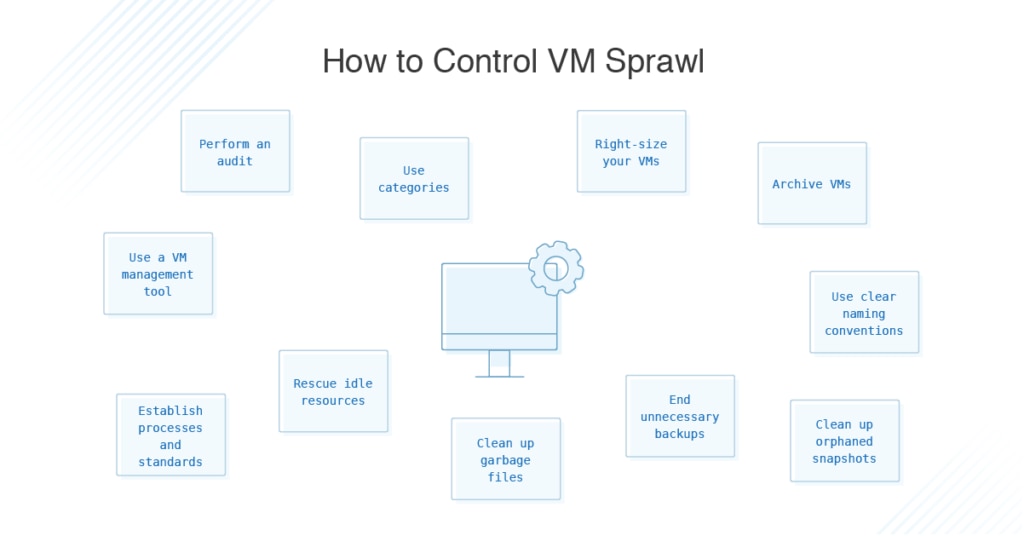
The consequence of VM sprawl is significant management overhead. To combat it, administrators must implement strict policies and use specialized tools. The following image illustrates the various strategies needed to control VM sprawl, highlighting the complexity involved.
Other factors contributing to management complexity include:
- Need for New Skills: IT staff require training and new expertise to manage virtualized infrastructure, hypervisors, and orchestration tools.
- Complex Networking: Virtual networking adds another layer of abstraction, with virtual switches, VLANs, and software-defined networking (SDN) that must be configured and secured.
3. Security Concerns
Virtualization can improve security through isolation, but it also introduces new and unique security risks. The hypervisor itself becomes a high-value target for attackers.
Pros and Cons of Virtualization in Cloud Computing - GeeksforGeeks
Let's consult two resources to build a comprehensive list of security challenges. First, a general overview, then a more detailed technical breakdown from your notes.
In this article, read the bullet points under 'Cons of Virtualization', specifically focusing on 'Security Risks' and 'Data can be at Risk'.
[PDF] Infrastructure as a service - B. M. S. College of Engineering
Now, for more technical detail, your college notes have an extensive section on cloud security that is directly applicable to virtualization.
Find the major heading 'CLOUD SECURITY AND TRUST MANAGEMENT'. From there, read the sub-section titled '2. Security Challenges in VMs' and the following section '3. Cloud Defense Methods'. Focus on the new types of attacks mentioned and the concept of the hypervisor as a 'single point of failure'.
From these resources, we can identify several critical security threats in a virtualized environment:
- Hypervisor as a Single Point of Failure: The hypervisor controls all the VMs on a host. If an attacker can compromise the hypervisor (an attack known as hyperjacking), they gain control over every single VM running on it.
- VM Escape: This is an attack where malicious code running inside a guest VM breaks out of its isolated environment and gains access to the hypervisor or other VMs on the same host. This completely undermines the security isolation that virtualization is supposed to provide.
- Inter-VM Attacks (Guest Hopping): An attacker compromises one VM and uses it as a launchpad to attack other VMs on the same physical host through the virtual network.
- VM Sprawl: As discussed earlier, unmanaged, forgotten, or unpatched VMs create security holes that attackers can exploit.
- Data Vulnerability: In a multi-tenant cloud environment, your data resides on shared physical hardware. Without proper security configurations, this could potentially expose your data to other tenants or unauthorized access.
4. Other Significant Challenges
Beyond performance, management, and security, there are other practical challenges to consider.
- High Initial Investment: While virtualization promises long-term cost savings, the initial setup can be expensive. This includes costs for powerful server hardware capable of running many VMs, virtualization software licenses (e.g., VMware vSphere), high-performance shared storage (like a SAN), and staff training.
- Application Compatibility: Not all applications are designed for virtualization. Legacy applications that require direct access to specific hardware, or applications from vendors who do not officially support virtualized environments, may not function correctly.
- Portability and Vendor Lock-in: While standards like the Open Virtualization Format (OVF) exist, moving a complex virtualized workload from one vendor's platform (e.g., VMware) to another (e.g., Microsoft Hyper-V) can still be difficult, leading to a form of vendor lock-in.
Summary for Exam Preparation
To help you consolidate this information for your exams, here is a summary table of the key challenges of virtualization.
| Challenge | Explanation | Example |
|---|---|---|
| Performance Overhead | The virtualization layer consumes system resources (CPU, memory, I/O) and adds latency to operations. | A database query inside a VM runs slower than on an identical physical server due to I/O translation by the hypervisor. |
| Management Complexity | Managing a large, dynamic environment of VMs, networks, and storage requires specialized tools and skills. | VM Sprawl: The uncontrolled proliferation of VMs leading to wasted resources and security gaps. |
| Security Risks | Introduces new attack vectors targeting the hypervisor and the interactions between VMs. | Hyperjacking: An attacker gains control of the hypervisor, compromising all VMs on the host. |
| High Initial Cost | Significant upfront capital expenditure is needed for robust hardware, software licenses, and shared storage. | Purchasing new high-density servers and a Storage Area Network (SAN) to build a private cloud. |
| Compatibility Issues | Some applications, especially legacy ones, may not function correctly or be supported in a virtual environment. | A legacy manufacturing control system that requires a direct connection to a physical serial port. |
Conclusion
In this lesson, we have moved beyond the benefits of virtualization to critically examine its challenges. We've seen that while powerful, virtualization is not a "free lunch" and comes with trade-offs in performance, management complexity, security, and cost.
Key Takeaways:
- Performance Overhead: Caused by the hypervisor's resource needs and the overhead of translating hardware requests.
- Management Complexity: Best exemplified by VM Sprawl, where the ease of creating VMs leads to a difficult-to-manage and insecure environment.
- Security Risks: New attack surfaces like hyperjacking and VM escape are introduced, making hypervisor security paramount.
- Practical Hurdles: High initial costs and potential application compatibility issues must be overcome for a successful implementation.
Preview of the Next Lesson:
Understanding these challenges, especially those related to performance and security, sets the stage perfectly for our next topic. The component at the heart of both the power and the problems of virtualization is the hypervisor. In the next lesson, we will define what a hypervisor is, explain its core function, and compare the two fundamental architectures: Type 1 (bare-metal) and Type 2 (hosted) hypervisors.