Introduction
Welcome back! In our previous lesson, we established the foundational definitions of vertical scaling (scaling up) and horizontal scaling (scaling out), and we visualized how each method works using diagrams. You learned that scaling is crucial for handling variable workloads, a core capability of cloud computing.
Today, we will build directly on those definitions to achieve the next learning outcome: Compare vertical and horizontal scaling in a tabular format, covering their respective advantages, limitations, and suitable scenarios. This lesson is specifically designed to equip you with the detailed, comparative knowledge often required in exam questions to secure maximum marks. We will consolidate information from various sources into clear, structured tables that you can use for revision.
High-Level Comparison: A Visual Overview
Before we break down the comparison point by point, let's look at a comprehensive summary in a format that's perfect for quick recall. The following image presents a detailed tabular comparison covering the most critical aspects.
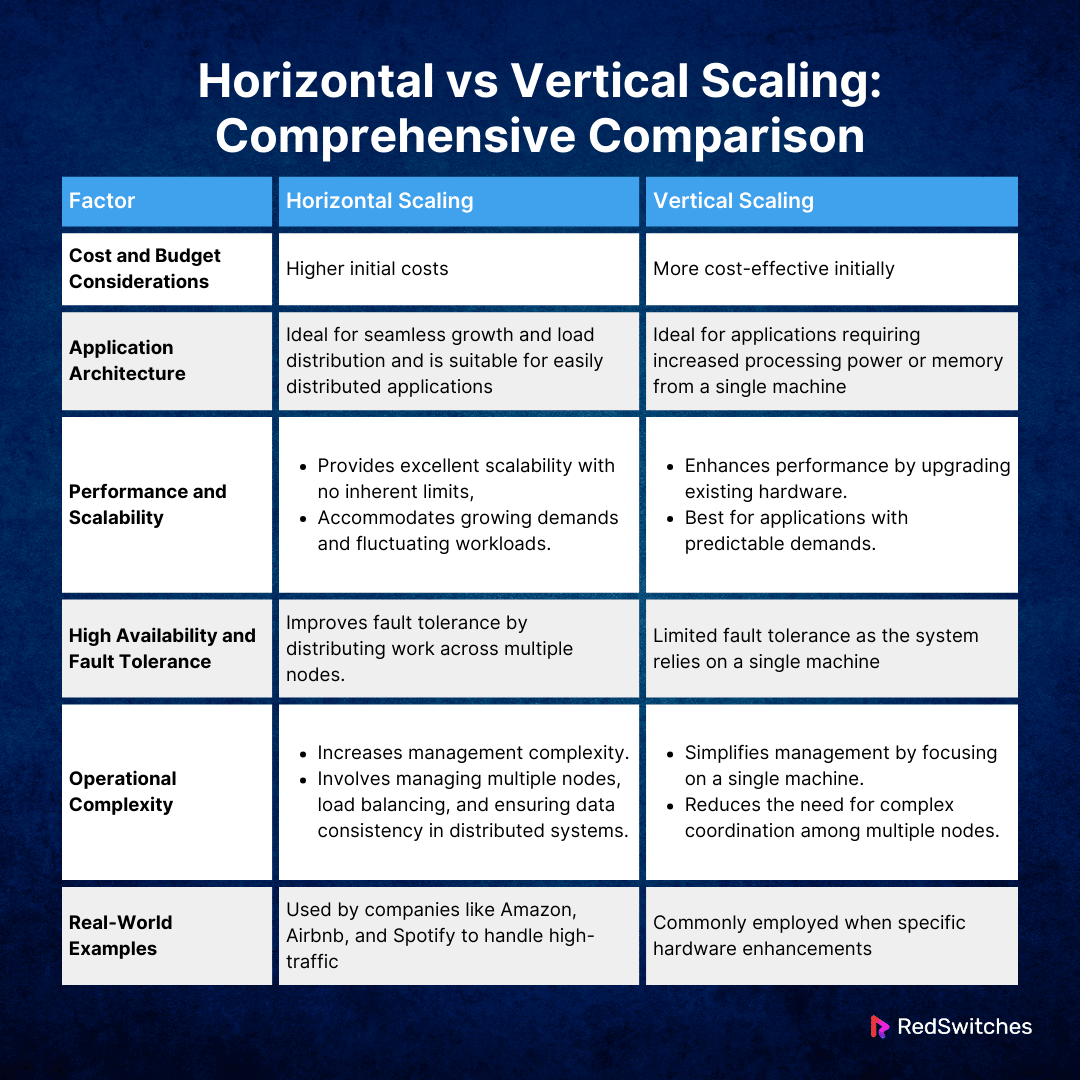
This table is an excellent starting point. Now, let's dive deeper into the most important factors from an exam perspective: performance, cost, fault tolerance, and complexity.
Deeper Dive: Key Comparison Factors
To build a robust answer, you need to be able to elaborate on each point in the comparison table. The following resources will provide the necessary depth.
First, let's get a quick video summary that reinforces the comparison.
Vertical Scaling vs Horizontal Scaling vs Diagonal Scaling | Types of Cloud Scalability
The video 'Vertical Scaling vs Horizontal Scaling vs Diagonal Scaling' by Learn with Whiteboard offers a concise summary comparing the two primary scaling methods.
Watch the segment from 04:57 to 06:27. Focus on how the video contrasts the two methods based on resource addition, cost-effectiveness, scalability limits, and complexity.
Now, let's explore the nuances of these differences through a detailed article. This resource is particularly valuable for its clear structure and real-world examples, which can elevate your exam answers.
Horizontal vs Vertical Scaling: Key Differences & Use Cases
The article 'Horizontal vs Vertical Scaling: Key Differences & Use Cases' from EdgeDelta provides an in-depth analysis, complete with multiple comparison tables and specific industry examples.
Please read the following sections: Direct Comparison – Which Approach When: Focus on the 'Comparison Table: Vertical vs. Horizontal Scaling'. Note the new comparison points like 'Implementation Speed', 'Downtime Risk', and 'Team Expertise'. Performance and Cost Analysis: Study the 'Performance and Cost Comparison Matrix' and the accompanying text. This will help you explain the financial and performance trade-offs, which are crucial for detailed answers.
Based on these resources, let's summarize the core trade-offs:
- Cost: Vertical scaling has a lower initial cost but becomes exponentially more expensive as you approach high-end hardware. Horizontal scaling may have higher upfront setup costs (e.g., for load balancers and architectural redesign) but offers a more predictable, linear cost model that is more efficient at a large scale.
- Performance: Vertical scaling provides an immediate performance boost to a single machine, ideal for latency-sensitive, monolithic applications. Horizontal scaling improves overall throughput and responsiveness by distributing the load, which is better for handling a high volume of concurrent users.
- Fault Tolerance: This is a critical distinction. A vertically scaled system has a single point of failure (SPOF); if the server fails, the entire application goes down. A horizontally scaled system is inherently fault-tolerant and offers high availability. If one server fails, traffic is simply rerouted to the other healthy servers.
- Scalability Limits: Vertical scaling has a hard physical limit—you can only add so much RAM or CPU to a single machine. Horizontal scaling is, in theory, virtually limitless, as you can keep adding more machines to the pool.
Suitable Scenarios and Real-World Use Cases
To demonstrate a full understanding, you must be able to identify which scaling strategy is appropriate for a given scenario. The choice depends on factors like application architecture, workload patterns, and business requirements.
The article you just reviewed provides excellent guidance on this.
Horizontal vs Vertical Scaling: Key Differences & Use Cases
Let's revisit the EdgeDelta article to extract specific use cases and decision criteria. This is key for answering 'scenario-based' questions.
Please read the following sections: When Scale-Up Works Best (within 'Vertical Scaling'): Note the examples like databases and legacy apps. Examples (within 'Horizontal Scaling'): See how companies like Netflix and Uber use this approach. Real-World Use Cases and Examples: Study the 'Real-World Use Case Scenarios with Recommendations' table and the examples of Shopify, Instagram, and NASDAQ.
Let's synthesize this into an easy-to-remember list for your exams.
When to Use Vertical Scaling (Scale-Up):
- Applications with predictable workloads that do not experience sudden, massive spikes in traffic.
- Stateful applications, such as many relational databases (e.g., MySQL, PostgreSQL), where maintaining state on a single, powerful machine is simpler than distributing it.
- Legacy or monolithic systems that were not designed for a distributed architecture. Scaling them up is often the only feasible option without a complete rewrite.
- Latency-sensitive workloads that benefit from inter-process communication on a single machine, avoiding network latency.
- Startups or MVPs (Minimum Viable Products) where simplicity and speed of implementation are more important than long-term scalability.
Example: NASDAQ relies on powerful, vertically scaled servers to process billions of financial transactions with sub-millisecond latency.
When to Use Horizontal Scaling (Scale-Out):
- Stateless applications, such as modern web servers and microservices, where any server in the pool can handle any incoming request.
- Applications with unpredictable or "bursty" traffic, such as e-commerce sites during a flash sale or a news website after a major event.
- Systems requiring high availability and fault tolerance. If one server fails, the others can take over, ensuring the application remains online.
- Large-scale, distributed systems designed for massive global audiences.
- When long-term cost-efficiency at scale is a priority over initial setup simplicity.
Example: Netflix uses horizontal scaling across thousands of AWS servers to stream content to millions of users globally, ensuring high availability and handling massive traffic loads.
The Ultimate Comparison Table for Your Exam
Here is a comprehensive table that combines the key insights from all the resources. You can use this as a template for a detailed exam answer.
| Aspect | Vertical Scaling (Scale-Up) | Horizontal Scaling (Scale-Out) |
|---|---|---|
| Method | Increase resources (CPU, RAM, Storage) on a single server. | Add more servers to a resource pool. |
| Scalability Limit | Limited by the maximum capacity of a single machine. | Virtually unlimited; can add as many servers as needed. |
| Performance | Immediate boost on a single node; can hit a performance ceiling. | Performance scales linearly with the number of nodes; improves throughput. |
| Fault Tolerance | Low. Creates a single point of failure (SPOF). | High. Inherently redundant and fault-tolerant. |
| Downtime | High risk. Upgrades often require server reboots or downtime. | Low risk. Can add/remove servers without service interruption. |
| Cost | Initially cheaper, but costs grow exponentially at the high end. | More predictable, linear cost at scale; can be more cost-effective long-term. |
| Complexity | Simple to implement and manage. | Complex. Requires load balancers, distributed architecture, and automation. |
| Data Consistency | Easier to manage as data resides on a single machine. | More challenging; requires strategies like replication and sharding. |
| Suitable Scenarios | Databases, monolithic/legacy apps, predictable workloads. | Web applications, microservices, big data processing, bursty traffic. |
| Real-World Examples | Relational Databases (e.g., a large MySQL server), NASDAQ. | Netflix, Google Search, Amazon, Shopify. |
Conclusion
In this lesson, we have conducted a thorough comparison of vertical and horizontal scaling. You are now equipped to answer exam questions that require not just definitions but a detailed analysis of the trade-offs between these two fundamental cloud strategies.
Key Takeaways:
- Vertical scaling is about making one server more powerful. It's simple but limited, expensive at scale, and carries the risk of a single point of failure.
- Horizontal scaling is about adding more servers to a pool. It's highly scalable, resilient, and cost-effective for large applications but introduces architectural complexity.
- The choice between them depends on the specific application's architecture, traffic patterns, budget, and availability requirements.
- For your exam, be prepared to present this comparison in a tabular format, citing specific criteria like cost, performance, fault tolerance, and suitable use cases.
Preview of the Next Lesson:
Now that you understand how cloud systems scale, you might wonder how resources are actually assigned or how traffic is distributed among multiple servers in a horizontally scaled environment. Our next lesson will address this by focusing on resource provisioning, scheduling, and the critical role of load balancers. This will connect directly to our discussion of horizontal scaling, explaining the "how" behind its implementation.