Introduction
Welcome back! In our last lesson, you successfully implemented a simple memory-mapped I/O (MMIO) device in QEMU. This gave you a practical understanding of how QEMU can trap guest accesses to a specific memory region and redirect them to your C callback functions. While this trap-and-emulate model is versatile, it incurs a significant performance penalty: every single read or write to the device can cause a costly VM exit, pausing the guest and involving the hypervisor.
This lesson introduces a far more efficient approach: paravirtualization, embodied by the virtio standard. Instead of emulating a specific piece of hardware, virtio defines a standardized, high-level protocol that both the guest (driver) and host (device) are designed to speak. This cooperative model is the foundation of high-performance I/O in modern virtualization.
Our goal is to describe the virtio transport mechanism, including virtqueues and the guest-to-host notification pathway. We'll explore how virtio uses shared memory to move data in bulk, drastically reducing the number of required VM exits.
1. Why Paravirtualization? The Need for Virtio
Full hardware emulation, like the MMIO device you built, forces the virtual environment to behave exactly like physical hardware. This creates a performance mismatch. On real hardware, register access is fast, while memory access for DMA can have latency. In a VM, register access is slow (requiring a VM exit), but guest memory is directly accessible by the hypervisor at near-native speed.
Paravirtualization leverages this fact. It creates a new, software-defined interface that is optimized for the virtual environment. Virtio is the leading open standard for such an interface.
VirtIO 1.0: A Standard Emerges [linux.conf.au 2014]
To start, let's hear the core motivation for virtio. This video segment from 'VirtIO 1.0: A Standard Emerges' explains the fundamental performance trade-offs that make paravirtualization necessary.
Watch from 01:04 to 02:44. Focus on the explanation of why register access is expensive in a VM, while memory access is cheap. This is the key insight that drove the design of virtio.
2. The Virtio Transport Mechanism
The virtio specification defines a generic transport layer for communication. Think of it as a standardized "shipping container" system for moving data between the guest and the host.
- Frontend Driver: A driver inside the guest OS (e.g.,
virtio-net.koin Linux) that knows how to speak the virtio protocol. - Backend Device: An emulated device in the hypervisor (e.g., QEMU) that implements the other side of the protocol.
- Transport: The "bus" over which the frontend and backend communicate. This is often PCI/PCIe, which allows for standard device discovery, but the actual data exchange doesn't use the simple MMIO model we saw before. Instead, it relies on shared memory.
The core idea is that the guest driver allocates a region of its own memory and shares the physical address with the host. The host can then read and write directly to this shared memory region without trapping on every access, operating on data in bulk.
Deep dive into Virtio-networking and vhost-net
This article from Red Hat, 'Deep dive into Virtio-networking and vhost-net', provides a great overview of the virtio specification. Let's read the first part to solidify our understanding of the basic architecture.
Read the section titled 'The virtio specification', starting from 'Virtio specification: devices and drivers'. Pay attention to how it describes the role of the hypervisor, the transport methods (like PCI), and how virtio devices identify themselves to the guest OS.
3. Virtqueues: The Heart of Virtio
The shared memory regions used by virtio are not just unstructured blobs of data. They are organized into a highly efficient data structure called a virtqueue. Given your background with embedded systems and device drivers, you can think of a virtqueue as being analogous to a DMA descriptor ring used by a physical network card or storage controller. It's a mechanism for passing batches of buffers between two asynchronous entities (in this case, the guest and the host).
A standard "split" virtqueue is composed of three distinct parts:
- Descriptor Table: An array of descriptors. Each descriptor points to a data buffer in guest memory and specifies its length and properties (e.g., read-only or write-only for the device). Descriptors can be chained together to handle large or fragmented data (scatter-gather I/O).
- Available Ring: This ring is written to by the driver (guest). When the driver wants the device to process a buffer, it places the index of that buffer's descriptor into the available ring. This is how the guest makes buffers "available" to the host.
- Used Ring: This ring is written to by the device (host). After the device has finished processing a buffer (e.g., after it has written received network data into it), it places the index of the descriptor into the used ring. This tells the driver that the buffer has been "used" and can be reclaimed.
This design cleanly separates read/write access: the guest only writes to the available ring, and the host only writes to the used ring, minimizing the need for complex locking.
Virtqueues and virtio ring: How the data travels
To understand the mechanics of virtqueues in detail, we'll turn to another excellent Red Hat article, 'Virtqueues and virtio ring: How the data travels'. It breaks down the structure with helpful diagrams.
Please read the following sections from the article: 'Split virtqueue: the beauty of simplicity': To get an overview of the three areas. 'Descriptor ring: Where is my data?': To understand what a descriptor contains. 'Avail ring: Supplying data to the device': To see how the guest provides buffers to the host. 'Chained descriptors: Supplying large data to the device': To understand scatter-gather lists. 'Used ring: When the device is done with the data': To see how the host returns buffers to the guest. \nFocus on the role of each component and who writes to what. The diagrams are key to visualizing the process.
4. The Notification Pathway
The virtqueue structures allow the guest and host to exchange data asynchronously, but how does one side tell the other that there's new data to process? Continuously polling the rings would be extremely inefficient. This is solved by the notification pathway.
Guest-to-Host: "Kicking" the Device
When the guest driver adds one or more buffers to the available ring, it needs to alert the host. It does this by writing to a special MMIO register on the virtio device. This is often called "kicking" the device or ringing its "doorbell."
This action does cause a VM exit, but it's a single, lightweight exit to signal a whole batch of work, rather than one exit per data access. QEMU's backend device model handles this MMIO write, which triggers it to check the available ring for new buffers.
Host-to-Guest: Injecting an Interrupt
When the host has finished with some buffers and added their descriptors to the used ring, it notifies the guest. It does this by requesting KVM to inject a virtual interrupt (typically an MSI-X interrupt) into the guest. The guest's virtio driver has an interrupt handler that wakes up, inspects the used ring to find the completed buffers, and processes them.
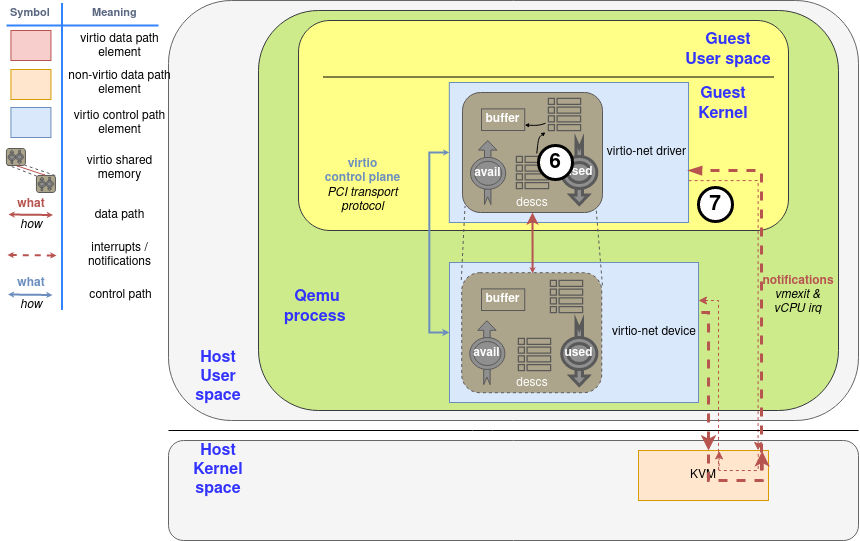
This bidirectional notification system—a "kick" from the guest and an "interrupt" from the host—forms the complete communication loop.
Deep dive into Virtio-networking and vhost-net
Let's revisit the 'Deep dive into Virtio-networking' article to see how it describes this notification mechanism.
Read the subsections 'Virtio specification: virtqueues' and 'Networking with virtio: qemu implementation'. Focus on the descriptions of 'Available Buffer Notification' and 'Used Buffer Notification'. Note how it explicitly mentions the guest writing to a memory address (MMIO kick) and the device using a vCPU interrupt.
Interview Scenario
An interviewer poses the following problem:
"We have a VM running a network-intensive application using virtio-net. Under high traffic, we observe that the guest VM is consuming a lot of CPU, and perf top shows a significant amount of time spent in the virtio interrupt handler. The throughput is lower than expected. What is the likely cause of this inefficiency, and what virtio feature is designed to mitigate it?"
Click to see a model response
This scenario describes a classic case of high interrupt overhead, sometimes called an "interrupt storm."
-
The Cause: By default, the host device might be configured to send an interrupt to the guest for every single packet (or a very small batch of packets) it processes. Under high traffic, this generates a massive number of interrupts. Each interrupt forces the guest CPU to stop what it's doing, save its context, jump to the interrupt handler, process the used ring, and then restore its context. This constant context switching is very expensive and consumes a significant amount of CPU time, detracting from the application's performance.
-
The Mitigation: The virtio specification includes features for interrupt coalescing or notification suppression. The most effective mechanism is a feature negotiated using the
VIRTIO_F_EVENT_IDXflag.- When this feature is enabled, the driver can tell the device exactly when it wants to be interrupted. Instead of interrupting immediately, the host device will only send an interrupt when its
idxcounter in the used ring reaches a specific value provided by the driver. - This allows the guest to say, "Process these 100 packets, but don't bother interrupting me until you're done with all of them." The driver can then process 100 completed packets in a single interrupt context instead of 100 separate ones. This dramatically reduces CPU overhead and improves throughput by allowing both the host and guest to work in larger, more efficient batches.
- When this feature is enabled, the driver can tell the device exactly when it wants to be interrupted. Instead of interrupting immediately, the host device will only send an interrupt when its
Conclusion
In this lesson, we explored the virtio paravirtualization standard, a dramatic improvement over the full emulation model. You've learned how virtio uses a cooperative approach to achieve high-performance I/O.
Key Takeaways:
- Paravirtualization: Virtio devices are not emulations of real hardware but are specialized interfaces optimized for a virtual environment.
- Shared Memory Transport: The core of virtio is using shared memory to transfer data in bulk, avoiding costly per-access VM exits.
- Virtqueues: Data is exchanged via a standardized set of ring buffers: the Descriptor Table (pointing to data), the Available Ring (guest-to-host), and the Used Ring (host-to-guest).
- Notification Pathway: Communication is triggered by a guest "kick" (an MMIO write causing a VM exit) and a host interrupt injection into the guest. This mechanism is designed to be efficient by operating on batches of work.
Preview of the Next Lesson:
While virtio with a QEMU backend is far more efficient than full emulation, there's still a bottleneck: every packet still has to pass through the QEMU userspace process. For ultimate performance, we can do even better. In our next lesson, we will explain how the vhost-net protocol accelerates virtio by offloading the data plane directly to the host kernel, bypassing QEMU entirely for the hot path of data transfer.